

How Price Calculation in Creation of Product Variations Works
How Bulk Variations Manager for WooCommerce plugin calculates the final price of each product variation based on differential pricing.
Select a base price for the main base product. And then simply add how much extra / less you want to charge for each individual variant under the ‘Differential price’ column.
The plugin will automatically calculate the final prices for each product variant based on the formula: [base price + sum of differential prices of attributes used in that variation]
See the example and screenshot below for the same -
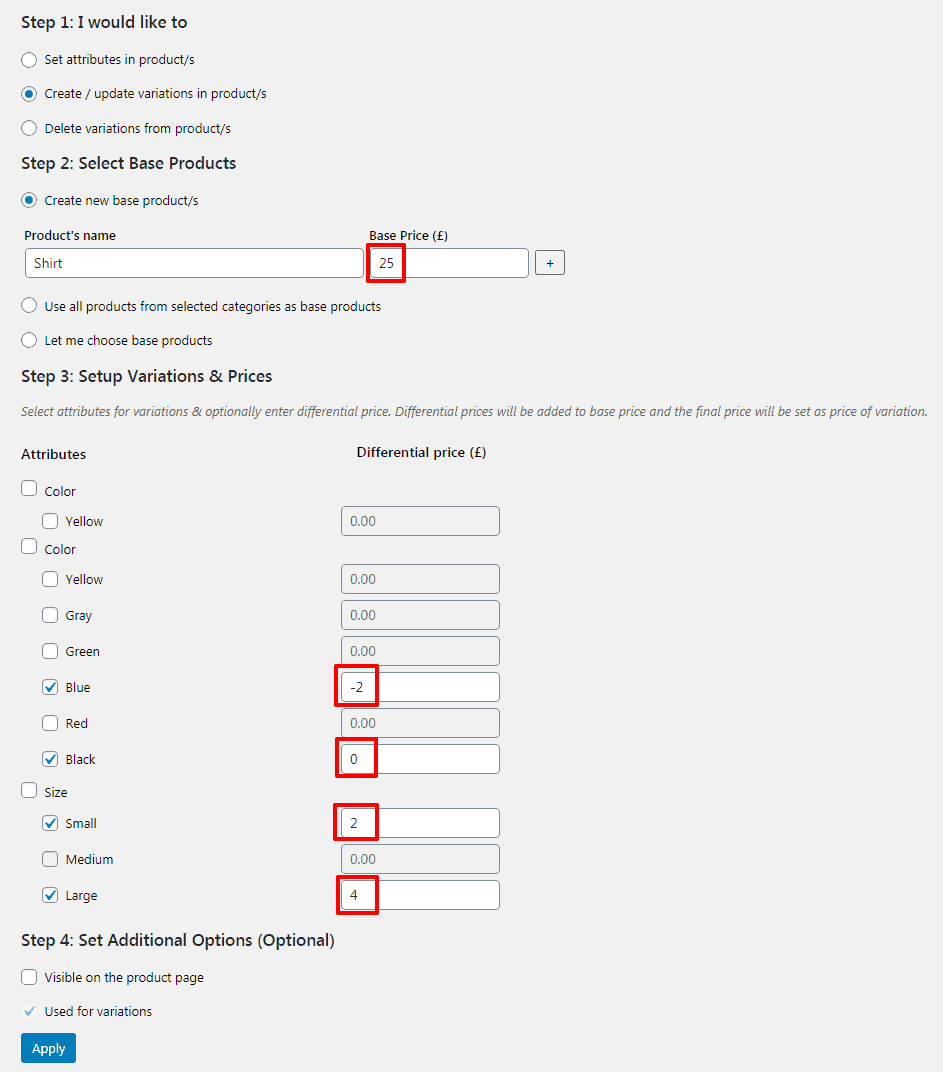
We set Shirt’s Base Price as £25.
The differential prices as follows :
- Blue: -2
- Black: 0
- Small: 2
- Large: 4
So, possible variations & its prices will be:
- Shirt (Blue, Small): 25+(-2)+(2) = £25
- Shirt (Blue, Large): 25+(-2)+(4) = £27
- Shirt (Black, Small): 25+(0)+(2) = £27
- Shirt (Black, Large): 25+(0)+(4) = £29