


WooCommerce payment gateways authorize credit cards, digital wallets, and bank transfers at checkout. They connect your store to financial networks so customers can pay. The right gateway stack directly controls your transaction fees, dispute liability, international conversions, and protection against sudden account fund freezes.
For most stores, relying on a single gateway is an operational vulnerability. A resilient store runs a balanced “Power Pair”. That means pairing one direct card processor (Stripe or WooPayments) alongside PayPal for buyer trust. Back both with express digital wallets (Apple Pay, Google Pay) and conditional routing rules.
How do WooCommerce payment gateways work?
A payment gateway transmits billing data from checkout to the processor. It verifies fund availability with card networks and deposits authorized funds into your account. The entire authorization cycle takes two to four seconds.
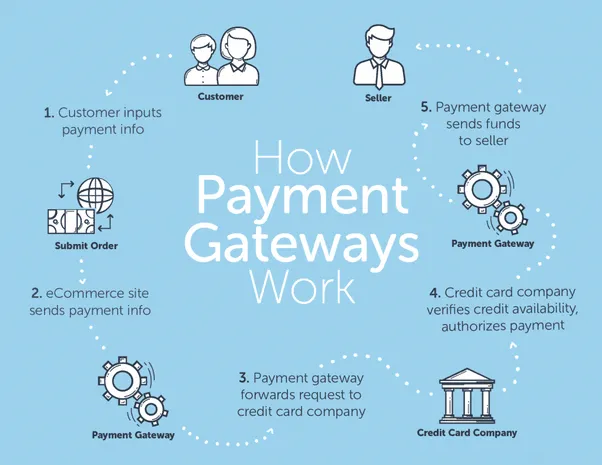
The transaction authorization follows five clear steps:
- Submission: The customer enters card details or selects a digital wallet on your checkout page and submits the order.
- Encryption: Your WooCommerce site securely encrypts the transaction payload via TLS/SSL and sends it directly to the gateway API.
- Routing: The gateway passes the authorization request through card association rails (Visa, Mastercard, Amex) to the customer’s issuing bank.
- Verification: The issuing bank checks account balance, fraud signals, and CVV/3D Secure verification before sending an approval or decline code.
- Settlement: The gateway records the approved authorization in WooCommerce, marks the order as Processing, and batches funds for deposit into your bank account.
Direct vs redirect payment gateways
Integrated direct gateways process card details on your domain through hosted token fields like Stripe Elements. Customers never leave your store. This cuts checkout friction and protects your brand experience.
Redirect payment gateways send buyers to an external portal to authenticate payment before returning to your site. Legacy PayPal Standard and regional bank redirects operate this way. While redirects offload PCI compliance from your server, off-site hops hurt conversion rates. Mobile shoppers especially abandon carts when redirection latency slows checkout.
Payment aggregators vs dedicated merchant accounts
Payment aggregators (Stripe, WooPayments, Square, PayPal) pool sellers under a shared master merchant identification number (MID). They offer instant sign-up with zero upfront underwriting. That makes them the standard starting point for growing stores.
The hidden risk is algorithmic enforcement. Aggregators rely on automated risk-scoring models. If sales spike during a promotion or your refund rate climbs above 1%, algorithms can freeze payouts immediately. You risk a rolling 20% reserve held for 90 days with no human recourse.
Dedicated merchant accounts (typically set up via Authorize.Net) take two to three business days and require thorough credit underwriting. In exchange, you get an individual MID, direct financial stability, and negotiated interchange-plus rates for high volume. Most importantly, you deal with human account managers who will not freeze cash flow arbitrarily.
How to choose a payment gateway for your WooCommerce store?
Choosing a gateway requires balancing processing costs, customer preferences, currency support, and subscription compatibility. No single provider fits every store model.
Transaction fees, payout schedules, and hidden spreads
The headline rate on pricing pages (usually 2.9% + $0.30) is rarely what you pay at month-end. True processing expenses hide across several distinct layers:
- Domestic card rate: Standard domestic credit and debit cards average 2.9% + $0.30 for online transactions.
- Cross-border fee: International credit cards add a 1% to 1.5% surcharge across Stripe, PayPal, and WooPayments.
- Currency conversion markup: When a customer pays in a foreign currency that settles in your domestic bank currency, processors apply an extra 1% to 2% FX spread above wholesale exchange rates. On PayPal, international cross-border transactions can easily reach 4.4% plus fixed fees.
- Dispute fee: Chargebacks incur a non-refundable $15 to $25 administrative fee per incident, regardless of whether you win the dispute.
- Payout timing: Standard ACH bank deposits take two business days on a rolling schedule. Certain gateways offer instant payouts to debit cards for a 1% to 1.5% convenience fee.
To plan your technical implementation and credentials step-by-step, review our companion gateway setup tutorial for WooCommerce.
Geographic availability and local payment preferences
Payment preferences vary dramatically across global markets. If you sell internationally, offering only US credit cards will suppress conversion rates:
- United States and Canada: Visa, Mastercard, Amex, Apple Pay, and BNPL (Klarna, Affirm).
- European Union: Local payment rails dominate. In the Netherlands, over 60% of online transactions run through iDEAL. Belgian buyers expect Bancontact. German shoppers heavily favor SEPA Direct Debit, Giropay, and Sofort.
- United Kingdom: Debit cards, Apple Pay, and open banking transfers.
- Latin America and Asia: Cash-on-Delivery (COD) or local voucher systems (like Boleto in Brazil or UPI in India) remain standard checkout requirements.
If your store serves multiple markets, pair your core gateway with one of the vetted tools in our guide to WooCommerce multi-currency switchers so buyers see prices and settle orders in their home currency.
Security standards, tokenization, and PCI-DSS compliance
Any merchant handling card data must comply with PCI-DSS standards. Your compliance workload depends on how your chosen gateway captures card details:
- SAQ A (Lowest liability): You use iframe fields (like Stripe Elements or PayPal hosted buttons) or hosted redirects. Payment card numbers never touch your WordPress database or web server.
- SAQ A-EP: You host custom form fields that transmit card numbers via API directly from the customer’s browser.
- SAQ D (Highest liability): Raw card numbers pass through your web server. Avoid this architecture on WordPress.
Modern gateways protect credentials through tokenization. Processors swap card numbers for an encrypted reference string stored on secure servers. Shoppers can save cards for one-click checkout or subscription billing. Meanwhile, your WordPress database never stores sensitive card details.
Gateways with 3D Secure 2.0 (3DS) trigger automated checks, like bank app prompts or SMS codes, for risky transactions. This protocol satisfies European Strong Customer Authentication (SCA) mandates. In turn, it shifts fraud dispute liability from your store to the card issuer.
Support for WooCommerce Subscriptions and recurring payments
Selling recurring membership access, physical subscription boxes, or software licenses requires tokenized auto-billing support. The payment gateway must support merchant-initiated transactions (MIT) and automated failed-payment retry routines without requiring customer re-authentication on every renewal cycle.
Before deciding, read our detailed guide on setting up recurring payments with Stripe to verify how automated retries and webhooks prevent unintended subscription cancellations.
Top 6 WooCommerce payment gateways compared
The top six WooCommerce payment gateways evaluated below reflect real-world testing across merchant fees, setup complexity, international coverage, and fraud mitigation tools.
| Gateway | Domestic Fee (US) | International / FX Markup | Recurring Billing | Best For |
|---|---|---|---|---|
| Stripe | 2.9% + $0.30 | +1.5% intl / +1% FX | Native (Woo Subscriptions) | Global reach, developer flexibility, custom checkout |
| WooPayments | 2.9% + $0.30 | +1.5% intl / +1% FX | Native (Woo Subscriptions) | Integrated in-dashboard reporting and setup |
| PayPal Payments | 2.99% + $0.49 | Up to 4.4% + fixed fee | Native (Vaulting support) | Universal consumer trust and buyer recognition |
| Mollie | €0.29 + variable | Varies by payment rail | Native (via SEPA/Credit cards) | European stores selling across EU borders |
| Square | 2.9% + $0.30 | +1% cross-border | Requires extension | Omnichannel retailers with physical POS locations |
| Authorize.Net | 2.9% + $0.30 (+$25/mo) | Standard interchange-plus | Native (CIM tokenization) | Established merchants, high-ticket, or high-volume sales |
1. Stripe: best for global coverage and developer flexibility
Stripe is the benchmark payment processor for modern ecommerce. Available in more than 45 countries, it accepts over 135 currencies and supports native express checkout flows including Apple Pay, Google Pay, and regional payment rails.
- Fully integrated direct checkout: customers enter details without off-site redirects.
- Built-in Stripe Radar uses machine learning to score fraud patterns and block stolen cards automatically.
- Native support for Apple Pay, Google Pay, Link, and recurring WooCommerce Subscriptions.
- Comprehensive developer API and webhook logs for debugging failed transactions.
Drawbacks: Stripe algorithmically monitors risk profiles. If your store encounters unexpected transaction velocity or an unusual spike in dispute rates, your account can face automated holding reserves.
Pricing: 2.9% + $0.30 per domestic US card transaction. International cards add a 1.5% fee, and currency conversion adds 1%.
To enable express wallets smoothly on Stripe, follow our walkthrough on how to set up Apple Pay for WooCommerce.
2. WooPayments: best for native WordPress dashboard management
WooPayments is Automattic’s official payment solution for WooCommerce. Built directly on Stripe Connect infrastructure, it brings account onboarding, deposit tracking, dispute management, and refund processing directly inside your WordPress admin dashboard (WooCommerce → Payments).
- Complete in-dashboard workflow: manage refunds, view deposits, and dispute chargebacks without leaving WordPress.
- Built-in multi-currency switcher functionality powered by WooCommerce core.
- Pre-integrated support for Apple Pay, Google Pay, and WooPay express checkout.
Drawbacks: Because WooPayments operates as a managed layer over Stripe Connect, support escalations for frozen funds or account verification must route through Automattic support agents rather than direct Stripe engineers. It is also available in 39 countries, fewer than Stripe’s direct footprint.
Pricing: 2.9% + $0.30 per successful domestic US transaction, with identical 1.5% international card fees and 1% currency conversion fees.
3. PayPal Payments: best for universal consumer trust
PayPal has over 400 million active consumer accounts worldwide. For customers who hesitate to enter credit card numbers on an unfamiliar store, seeing the PayPal yellow button provides immediate legitimacy that rescues abandoning buyers.
- High brand recognition: significantly boosts conversions for first-time visitors and international buyers.
- Supports Pay in 4 and PayPal Credit (BNPL) at no extra setup cost to the merchant.
- PayPal vaulting, credit cards, and digital wallet processing ship in one free extension.
Drawbacks: PayPal’s cross-border transaction fees are among the highest in the industry, reaching up to 4.4% plus fixed currency fees. Dispute resolution procedures heavily favor consumers during claim investigations.
Pricing: 2.99% + $0.49 for standard US transactions. International sales range up to 4.4% plus fixed fees.
4. Mollie: best for European Union ecommerce
Mollie is the premier payment processor for stores based in Europe or targeting European shoppers. Unlike American-centric processors that treat European payment methods as secondary add-ons, Mollie provides first-class support for iDEAL, Bancontact, SEPA Direct Debit, EPS, Przelewy24, and Klarna.
- Native integration with localized European payment methods with transparent per-transaction pricing.
- Superior checkout completion rates across EU member states compared to standard card gateways.
- Multi-currency accounts with clean, predictable payout schedules.
Drawbacks: Mollie is restricted to businesses registered in the European Economic Area (EEA), the UK, and Switzerland. It is not available for US-based corporations without a European operating entity.
Pricing: Fixed fee per method (e.g., €0.29 for iDEAL; 1.8% to 2.8% for European consumer credit cards). No monthly fees.
5. Square: best for unified online and in-person retail
If you operate a physical retail storefront, pop-up market, or warehouse counter alongside your WooCommerce website, Square eliminates inventory discrepancies. The official WooCommerce Square extension synchronizes inventory levels, product catalog updates, and sales data between your physical Square POS terminal and your online database.
- Real-time inventory synchronization across online and offline sales channels.
- Straightforward, predictable card pricing with no monthly software subscription.
- Free chargeback protection covering up to $250 in eligible dispute fees per month.
Drawbacks: Square is officially supported in a limited set of countries (US, Canada, Australia, Japan, UK, Ireland, France, Spain). Subscription billing capabilities require additional extension configurations.
Pricing: 2.9% + $0.30 for online transactions; 2.6% + $0.10 for in-person card tap/dip transactions.
6. Authorize.Net: best for high-volume and dedicated merchant accounts
Authorize.Net is one of the longest-standing payment gateways in ecommerce, owned by Visa. Unlike aggregators, Authorize.Net connects directly to your own dedicated merchant bank account, shielding established businesses from sudden algorithmic account closures.
- Dedicated merchant account stability: your funds are not co-mingled in a shared aggregator pool.
- Advanced Fraud Detection Suite (AFDS) with customizable velocity filters, IP seals, and address verification rules.
- Ideal for high-ticket items, high monthly sales volume, and B2B orders.
Drawbacks: Requires a $25 monthly gateway fee in addition to transaction percentages. The onboarding workflow requires comprehensive commercial underwriting rather than immediate automated activation.
Pricing: $25 monthly gateway fee + 2.9% + $0.30 per transaction (or $0.10 per transaction if you provide your own merchant account).
Alternative and specialized payment options
Depending on your catalog structure, standard card processors can be augmented with specialized options:
- Direct bank transfer (BACS): Essential for high-ticket B2B transactions exceeding $2,000 to eliminate credit card processing deductions entirely.
- Cash on delivery (COD): Widely required in selected regional retail markets, though vulnerable to uncollected order returns.
- Cryptocurrency gateways: For stores selling technical, privacy-focused, or cross-border digital assets, review our detailed guide on accepting cryptocurrency payments in WooCommerce.
- Partial deposits and layaway: For coaching, custom manufacturing, or event bookings, consult our walkthrough on WooCommerce partial payments to split order balances across milestones.
How to guard against silent gateway auto-enables during plugin updates?
An untested payment plugin update is an unannounced checkout outage waiting to happen. Routine updates to major gateway extensions occasionally turn on newly released localized payment methods by default without warning.
When a plugin silently enables alternative payment buttons (such as Multibanco, Blik, or Bancontact) without merchant credentials configured, shoppers clicking those buttons hit broken checkouts or send funds into unlinked clearing accounts.
Follow this five-step update audit protocol whenever updating any payment plugin:
- Stage your updates: Test plugin updates on a staging site before updating your live production store.
- Review payment method lists: Navigate to
WooCommerce → Settings → Paymentsimmediately after updating. - Verify active toggles: Confirm that only gateways you have actively vetted and verified appear in the Enabled column.
- Inspect checkout block/shortcode: Visit your live checkout in an incognito window simulating both mobile and desktop views to confirm unconfigured payment icons do not display.
- Run test transactions: Execute a live $1.00 transaction through your primary gateway and verify settlement before marking the update complete.
How to optimize payment gateways for lower costs and higher conversions?
Managing payment gateways requires ongoing optimization rather than a set-and-forget setup. Smart merchants use conditional rules and checkout shortcuts to protect margins and lift checkout speed.
Conditional payment routing based on country, cart total, and products
Enabling every payment gateway for every customer inflates your checkout page length and invites high-fee transactions. A better practice is conditional payment routing:
- Disable high-risk gateways by region: Turn off credit cards and restrict orders to BACS or verified local gateways for geographic zones with higher fraud rates.
- Enforce minimums for Cash on Delivery: Hide COD for cart values over $100 to mitigate unpaid return shipping losses.
- Steer large carts toward bank transfers: Show Direct Bank Transfer exclusively for orders over $1,000, saving hundreds of dollars in percentage interchange deductions.
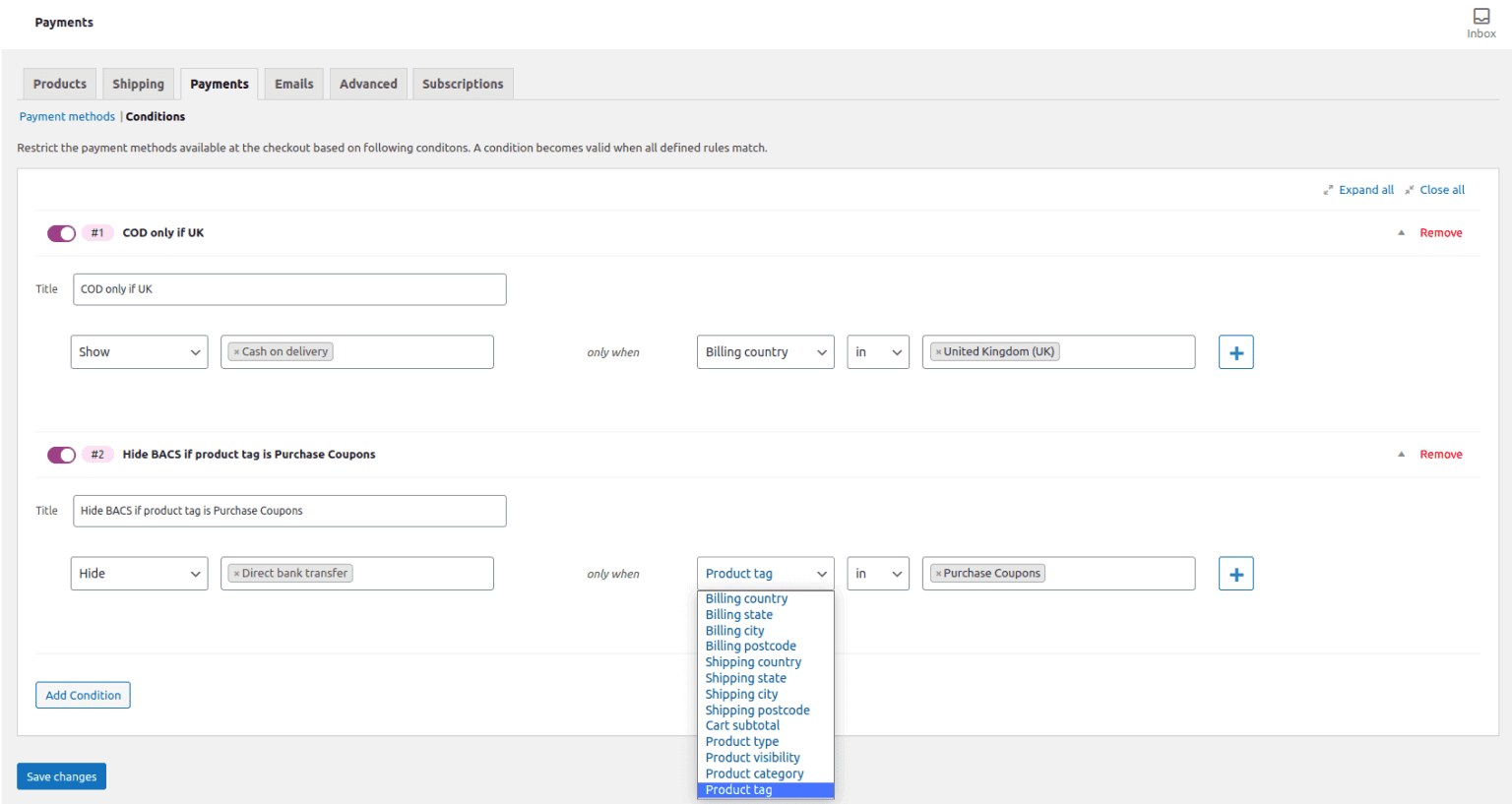
You can implement these routing rules cleanly using Conditional Payment Methods for WooCommerce, which lets you show or hide specific gateways dynamically based on billing country, shipping destination, order total, or product taxonomy.
Eliminating friction with express checkout and Buy Now flows
Every form field and checkout page redirect degrades conversion rates. Express digital wallets (Apple Pay, Google Pay) allow repeat mobile buyers to authorize shipping and payment details in under five seconds using biometric fingerprint or face authentication.
To reduce cart friction, integrate Cashier for WooCommerce. Cashier adds direct Buy Now buttons to product pages, side carts, and one-page checkouts. Because Cashier works directly with Stripe and PayPal tokens, returning customers bypass multi-step checkout forms in a single click.
Protecting margins against gateway fee cannibalization
When running aggressive promotional sales, transaction fees can erode net profit margins. For instance, pairing a 20% discount coupon with a 4.4% cross-border PayPal fee significantly shrinks margin on discounted inventory.
You can restrict promotional incentives based on payment choice using Smart Coupons for WooCommerce. To set up these guardrails, read our tutorial on restricting WooCommerce coupons by payment methods so that discount codes apply only when shoppers choose low-fee payment options.
What should you do next?
Your payment stack should protect your profit margins, not just process your transactions. To build a resilient and cost-effective payment stack on WooCommerce, take these three practical actions:
- Audit your current processing costs: Review last month’s merchant statements. Calculate your true effective processing rate by dividing total deducted fees (including international and currency spreads) by gross sales.
- Implement your Power Pair: Configure Stripe or WooPayments for frictionless direct credit card processing alongside PayPal for trusted brand alternative checkout. If your audience is primarily in Europe, replace or supplement them with Mollie.
- Consolidate analytics and track disputes: Rather than logging into three separate gateway portals to track revenue and refunds, use Putler to aggregate transactions, subscriptions, and dispute metrics from Stripe, PayPal, and WooCommerce into a unified real-time dashboard.
Frequently asked questions
Does WooCommerce charge a monthly fee for using payment gateways?
WooCommerce core is completely free and open-source, and does not charge platform subscription fees or additional per-transaction platform cuts for processing payments. You pay processing fees directly to your selected payment processors (such as Stripe’s 2.9% + $0.30 per transaction), along with any annual license fees for commercial gateway extensions.
How many payment gateways should a WooCommerce store offer?
Most WooCommerce stores should offer two to three carefully selected payment options: one direct credit card processor (Stripe or WooPayments), one recognized alternative wallet (PayPal), and biometric express wallets (Apple Pay, Google Pay). Offering more than four gateways clutters the checkout screen, triggers choice paralysis, and increases checkout abandonment.
What is the difference between WooPayments and Stripe?
WooPayments is built on Stripe Connect infrastructure, meaning transactions are cleared and underwritten through Stripe’s banking network. The primary difference is operational: WooPayments allows you to view balances, initiate refunds, and manage disputes directly within your WordPress admin dashboard, whereas standard Stripe operates primarily through the standalone Stripe.com dashboard.
How do I prevent payment processors from freezing my store funds?
To prevent automated aggregator account freezes, notify your processor’s risk department prior to major marketing campaigns or high-volume product launches that will spike transaction velocity. Avoid selling high-risk or prohibited items, maintain transparent shipping policies with automated tracking numbers, keep chargeback dispute rates below 0.8%, and establish a secondary backup gateway ready for immediate DNS or checkout activation.
Joe
That's all fairly cool, but I can't restrict the stripe Apple Pay integration over a certain transaction amount using Conditional Payment Methods for WooCommerce. ie I'd like the Apple Pay button to disappear for transaction amounts over $2000 and show only wire transfer (BACS) option. Would be great if I could do that easily.
Akshat Kothari
Hi Joe,
If you are referring to WooCommerce Stripe plugin, then Stripe plugin treats Apple Pay as an integration, and not as a separate payment method. So you would need to restrict the entire Stripe payment gateway.
To implement your use case, set up these two different conditions:
I hope this helps.
Alannah
You’ve explained it perfectly.