

Running an affiliate program is easy. Paying affiliates on time is where most WooCommerce stores struggle.
Once your affiliate network grows, payouts quickly turn into a monthly mess—different payout preferences, unpaid commissions, manual tracking, and endless back-and-forth.
With Affiliate for WooCommerce, you can handle affiliate payouts directly inside WooCommerce using PayPal, Stripe, manual payouts, coupons, store credit, or reward points. You can either pay affiliates manually after reviewing referrals or automate payouts on a schedule.
This guide explains the best affiliate payout methods in WooCommerce and shows exactly how to pay affiliate commissions without confusion.
6 options for affiliate payouts
These payout options help you handle affiliate commission payouts in WooCommerce without relying on spreadsheets or manual tracking.
PayPal automated and manual payouts: the old reliable
PayPal is still one of the most widely used payout methods for affiliate commissions. It works well for international affiliates and is familiar to most partners.
With Affiliate for WooCommerce, you’ve got two options: manual or automated PayPal payouts.
What you’ll need:
- The WooCommerce PayPal Payments plugin.
- PayPal Payouts API enabled in your PayPal Business account (personal accounts may have limitations)
- Your affiliate’s PayPal email address
- Sufficient funds in your account (don’t forget PayPal takes a cut too)
Quick steps for manual payouts:
- Go to
WordPress Admin > WooCommerce > Affiliates. - Select the affiliate you want to pay.
- Select the referrals you want to pay commission for.
- Click
Send Payouts(a pop-up will open). - Under
Payout Method, selectPayPal: Pay & Record. - Enter notes (optional) and click
Send.
For more detailed steps, check our PayPal payouts documentation
Best for: Stores paying affiliates globally using a widely supported payout method
Stripe automated and manual payouts: the sleek alternative
Stripe is a strong alternative to PayPal, especially if you prefer Stripe-based payments and want automation through Stripe Connect.
Like PayPal, Affiliate for WooCommerce supports both manual and automated Stripe payouts.
What you’ll need:
- An active Stripe account connected to your store.
- Stripe Connect enabled on your Stripe account (learn more) as it’s required for sending the payout.
- Sufficient balance in your Stripe account.
- Your affiliate’s Stripe account connected to their affiliate account on your store.
Quick steps for manual payouts:
- Go to
WordPress Admin > WooCommerce > Affiliates. - Select the affiliate you want to pay.
- Select the referrals you want to pay commission for.
- Click
Send Payouts(a pop-up will open). - Under
Payout Method, selectStripe: Pay & Record. - Enter notes (optional) and click
Send.
For more detailed steps, check our Stripe payouts documentation
Best for: Stores that want automated affiliate payouts using Stripe Connect.
Manual payouts: the flexible option
Sometimes PayPal and Stripe aren’t available or simply aren’t preferred.
For example:
- Your affiliate wants a direct bank transfer.
- You pay partners via cheque.
- Your affiliates are based in regions where PayPal/Stripe don’t work.
Affiliate for WooCommerce lets you mark commissions as paid while processing the actual payment outside the system.
Quick steps for payout:
- Go to
WordPress Admin > WooCommerce > Affiliates. - Select the affiliate you want to pay.
- Select the referrals you want to pay commission for.
- Click
Send Payouts(a pop-up will open). - Under
Payout Method, selectOthers. - Enter the payout date and notes (optional), then click
Sendto mark it as paid in the system. - Process the actual payment separately (bank transfer, cheque, etc.).
For more details, check our manual payouts documentation
Best for: Bank transfers, offline payouts, and flexible affiliate payment workflows.
Coupon commission: the short and sweet option
Coupon payouts let you pay affiliate commissions as fixed cart discount coupons instead of cash payouts.
This works well if your affiliates are also customers, or if you want to encourage repeat purchases without sending money outside your store.
For example, a $10 fixed cart coupon on a $50 order reduces the total to $40.
Quick steps for payout:
- Enable coupon payouts (Fixed cart discount) in settings.
- Pay affiliates with coupons.
- Affiliates receive coupons via email and can use them to shop on your store.
For more details, check our coupon payout documentation
Best for: Stores that want a simple payout method without direct cash transfers.
Store credits: keep it in the family
Store credit payouts are ideal when you want affiliates to spend their commissions back in your WooCommerce store.
Instead of paying cash, affiliates receive store credit they can use during checkout.
This payout option works through the Affiliate for WooCommerce and Smart Coupons integration.
To simplify setup, you can use the Affiliate Store Credit Payouts integration plugin.
Benefits:
- Store credit keeps commission value inside your business.
- Affiliates can immediately use it to buy from your store.
- Credit is linked to the affiliate’s email, reducing misuse.
Quick steps for payout
- Install the Affiliate Store Credit Payouts integration plugin.
- Enable coupon payouts (
Store Credit) in settings. - Pay affiliates using store credits.
- Affiliates receive store credit they can use on your WooCommerce store.
For more details, check our store credit payouts documentation
Best for: Product-based WooCommerce stores that want affiliates to reinvest commissions in the store.
Reward points: gamify the experience
Best for: Membership sites, subscription stores, and loyalty-driven affiliate programs.
Affiliate for WooCommerce supports tracking commissions while you assign the actual points using the WooCommerce Points and Rewards plugin.
Quick steps for payout:
- Install the Reward Points plugin.
- Go to
WordPress Admin > WooCommerce > Affiliates. - Select the affiliate you want to pay.
- Select the referrals you want to pay commission for.
- Click
Send Payouts(a pop-up will open). - Under
Payout Method, selectOthers, enter notes (optional), and clickSendto mark it as paid in the system. - Assign reward points using the
Points and Rewardsplugin.
For more details, check our reward points payouts documentation
Best for: Membership sites, subscription stores, and gamified affiliate reward systems.
Choosing the right payment method for your program
There’s no single best payout method. The right choice depends on how your affiliates operate and how much payout work you want to handle manually.
Here are the main factors to consider:
- Affiliate location: PayPal works widely, but Stripe may not be available in every region.
- Commission frequency: Frequent payouts benefit more from automation.
- Affiliate preferences: Some affiliates prefer cash, while others prefer coupons or store credit.
- Admin workload: Manual payouts work fine early, but automation matters as your affiliate program scales.
Here’s a quick reference table:
| Payment Method | Best For | Consider When |
|---|---|---|
| PayPal | Global reach, beginners | You need wide acceptance |
| Stripe | Professional setups, automation | Security and reporting are priorities |
| Manual | Flexibility, international affiliates | Standard methods aren’t available |
| Coupons | Affiliate retention | You want to make affiliates buy from you |
| Store Credits | Ecommerce, product-focused brands | More cash is required in your system |
| Reward Points | Engagement-focused programs | You want to encourage ongoing participation |
Pro tip: The easiest way to reduce affiliate payout issues is to offer at least two payout methods (example: PayPal + manual or Stripe + store credit).
What Affiliate for WooCommerce offers apart from affiliate payouts?
Affiliate payouts are only one part of running an affiliate program.
Affiliate for WooCommerce helps you manage everything from a single WooCommerce dashboard:
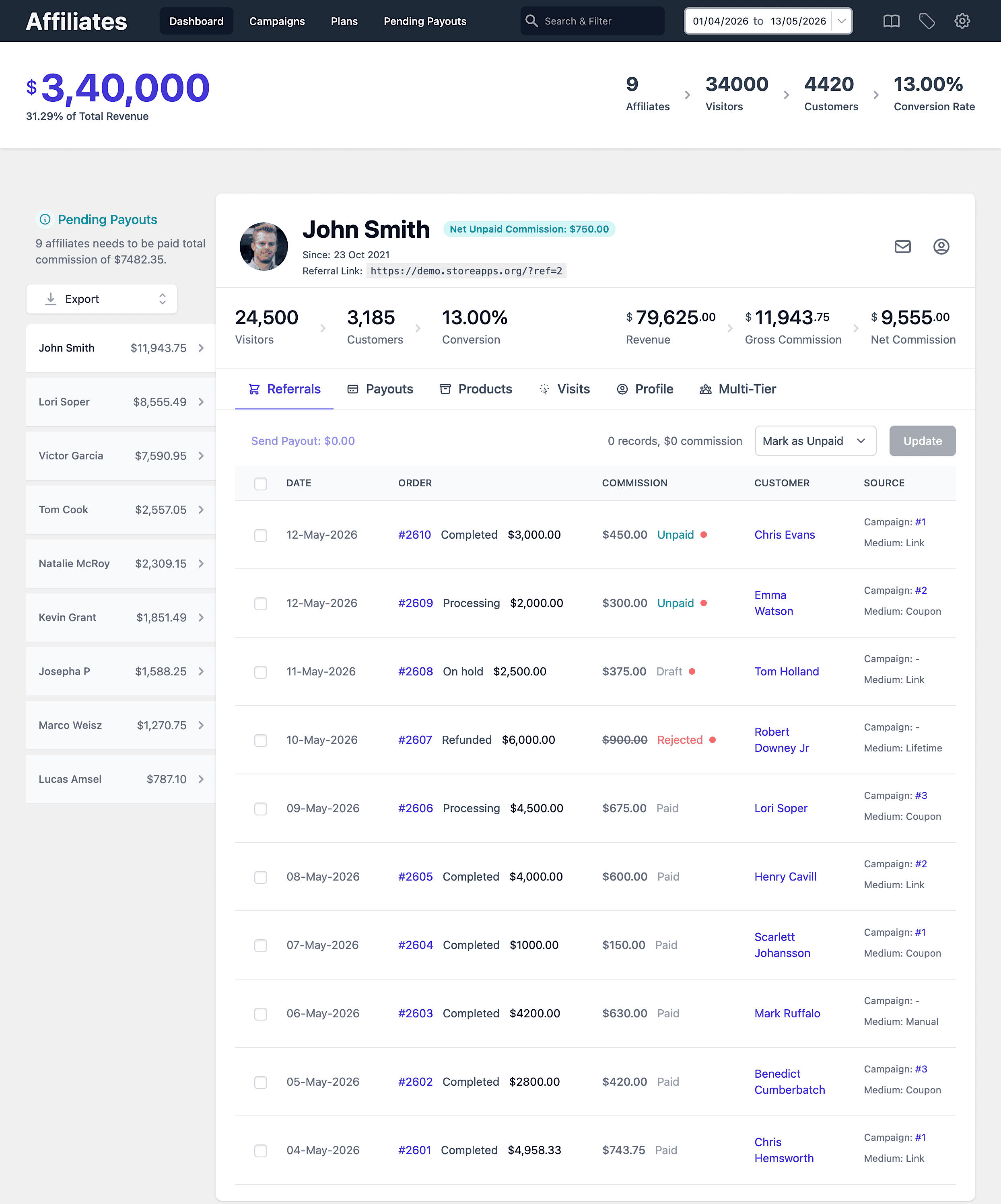
- Affiliate onboarding: Approve affiliates manually or automatically.
- Accurate tracking: Track referrals, commissions, and conversions.
- Flexible commission rules: Set commissions based on products, categories, users, roles, and more.
- Multi-tier and lifetime commissions: Reward affiliates long-term.
- Reports: Track affiliate performance, unpaid commissions, and payout history.
The bottom line
Affiliate payouts don’t need to be complicated. What matters is paying affiliates on time and giving them payout options they actually prefer.
With Affiliate for WooCommerce, you can pay affiliate commissions using PayPal, Stripe, manual payouts, coupons, store credit, or reward points—all while keeping tracking and payout records inside WooCommerce.
FAQs
How do affiliate payouts work in WooCommerce?
Affiliate payouts are commission payments you send to affiliates after they generate sales. Affiliate for WooCommerce tracks unpaid commissions and lets you pay affiliates using different payout methods.
Can I automate affiliate payouts in WooCommerce?
Yes. Affiliate for WooCommerce supports automated affiliate payouts using PayPal and Stripe. You can schedule payouts and send commissions automatically.
What does Pay & Record mean in Affiliate for WooCommerce?
Pay & Record means the payout is processed and also recorded inside WooCommerce, so you can track payout history and paid commissions.
Can I pay affiliates via bank transfer?
Yes. You can use the Others payout method to mark commissions as paid and send the actual payment via bank transfer or cheque separately.
Can I pay affiliate commissions as store credit?
Yes. You can pay commissions as store credit using the Affiliate Store Credit Payouts integration plugin, allowing affiliates to spend their commission in your store.
Can I pay affiliate commissions using reward points?
Yes. You can mark commissions as paid in Affiliate for WooCommerce and then assign reward points through the Points and Rewards plugin.