


Tapfiliate is a solid choice if you run an affiliate program across more than one store or platform and want one hosted dashboard for all of it. It suits SaaS and multi-platform sellers best. A store that sells only on WooCommerce pays for flexibility it may never use, and the monthly click and conversion caps need watching as traffic grows.
This Tapfiliate review covers what it does well, where it falls short, and what you actually pay. The screenshots come from Tapfiliate’s own dashboard. Prices and plan limits come from Tapfiliate’s pricing page, checked in October 2026.
What is Tapfiliate?
Tapfiliate is a cloud-based affiliate and referral tracking platform, sold by Tapfiliate as a monthly or annual subscription at tapfiliate.com. It runs outside your store. You connect it to WooCommerce with the Tapfiliate plugin from WordPress.org, or to other platforms with a tracking script, an integration or its REST API. From there it records clicks, attributes orders to referral links or coupon codes, and calculates commissions by the rules you set.
Quick verdict: who should buy Tapfiliate, and who should skip it
The deciding question is how many platforms your affiliate program has to cover.
Buy Tapfiliate if:
- You sell on more than one platform, for example WooCommerce plus Shopify or a SaaS billing system, and want one affiliate program across all of them.
- You want a hosted tool, so tracking data and the affiliate portal live off your WordPress server.
- You need multi-level (MLM) or product-based commissions and can budget for the Scale plan that includes them.
Skip Tapfiliate if:
- Your store runs only on WooCommerce and you would rather manage affiliates inside your WordPress admin.
- Your affiliates send a lot of low-intent traffic. Every plan caps tracked clicks and conversions, and overage is billed per thousand.
- You want automated mass payouts on a starter budget. Payouts through Trolley come with the Scale plan.
Features that matter
Affiliate sign-up and approval
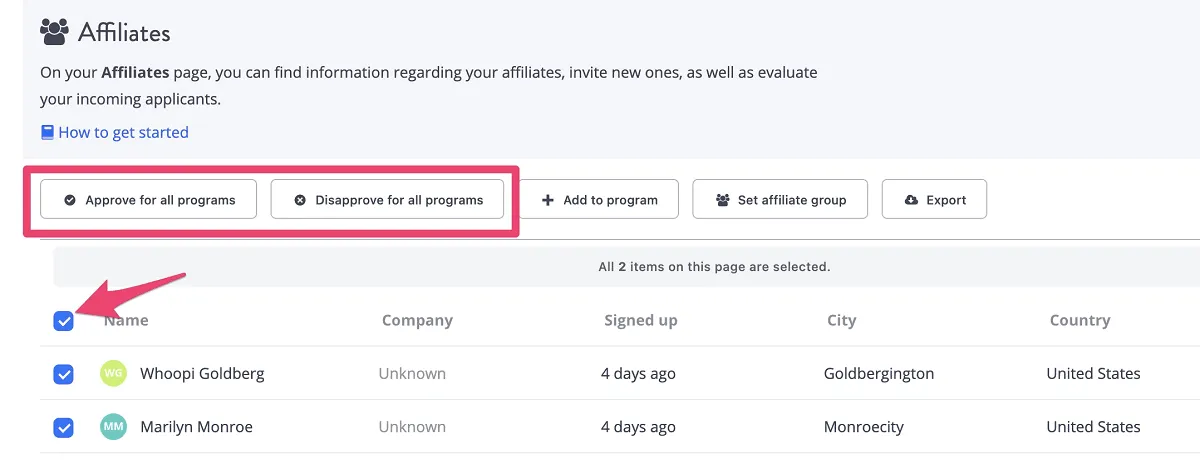
Tapfiliate gives each program a hosted sign-up page and lets you approve or reject applicants by hand, or approve them automatically. The approval queue is simple and does what it should. You can’t screen applicants with custom logic beyond the form fields you add, so a high-volume program will still need someone reviewing sign-ups.
Referral links and coupon tracking
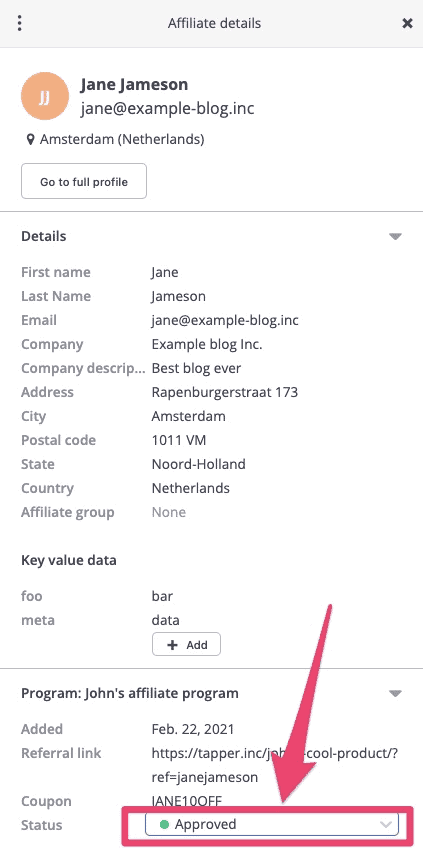
Each affiliate gets a referral link, and you can also assign them a coupon code. Coupon tracking matters for influencer and podcast partners whose audiences never click a link. Linking a code to an affiliate takes a couple of fields on the affiliate’s profile, which works well. The catch on WooCommerce is that the coupon itself must also exist in your store, so you are keeping two systems in step.
Commission types and affiliate groups
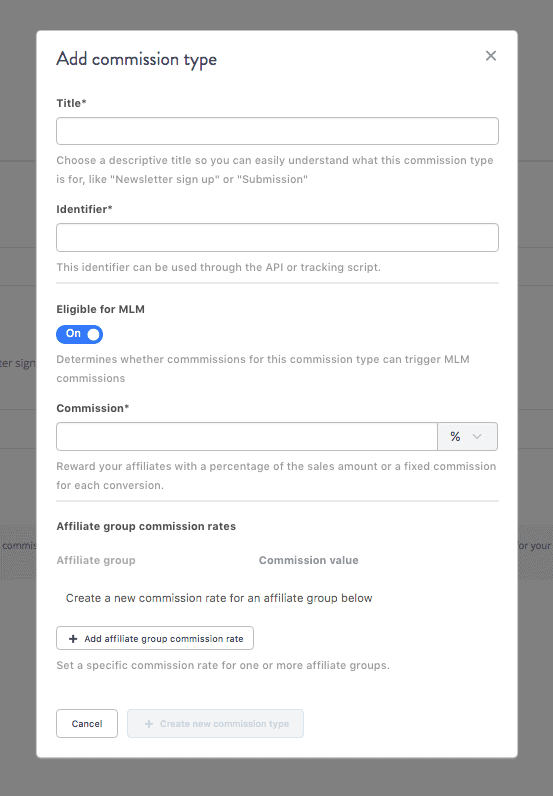
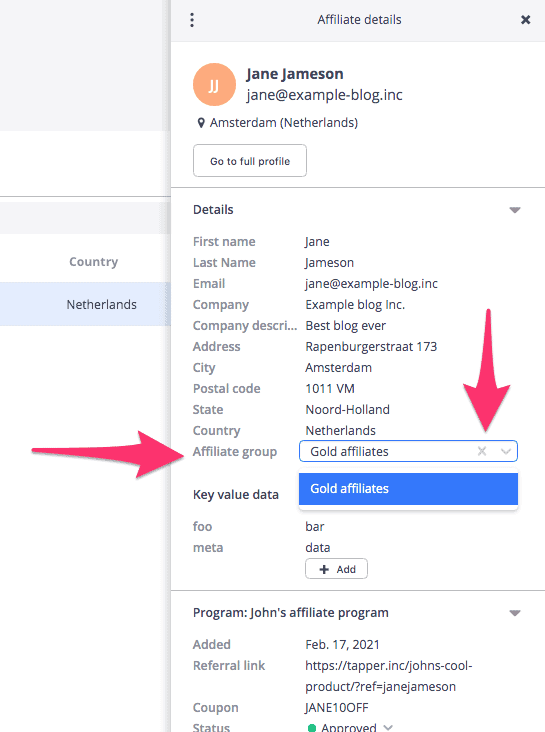
Commissions can be a percentage or a fixed amount, and recurring commissions for subscriptions come with every plan. The finer controls are kept for the Scale plan: affiliate groups, group commissions, product and category based rates, bonuses and MLM, where affiliates earn on the sales of people they recruit. Groups are the useful part. Put your top partners in a group with a higher rate and new sign-ups in a default group, and the rates follow the group. On Launch you get one flat structure, which is fine for a first program and limiting soon after.
Marketing assets
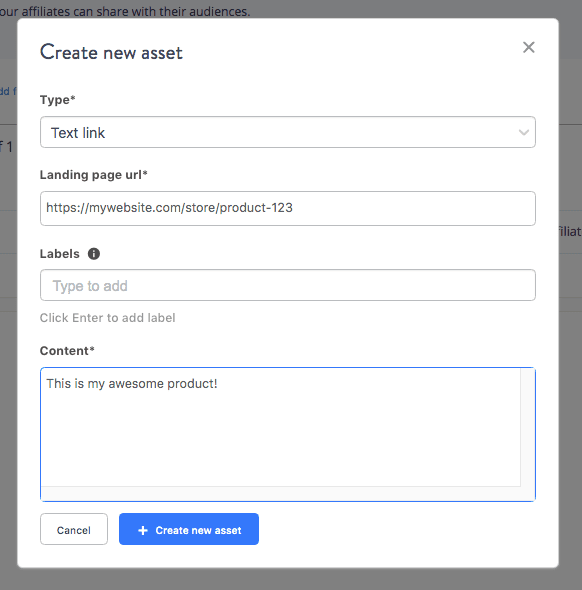
You can upload banners, text links and email copy to a shared library that affiliates see in their portal. It saves you from emailing creatives around, and it keeps everyone on current branding. There is nothing clever here, but it is tidy and it works.
Reporting
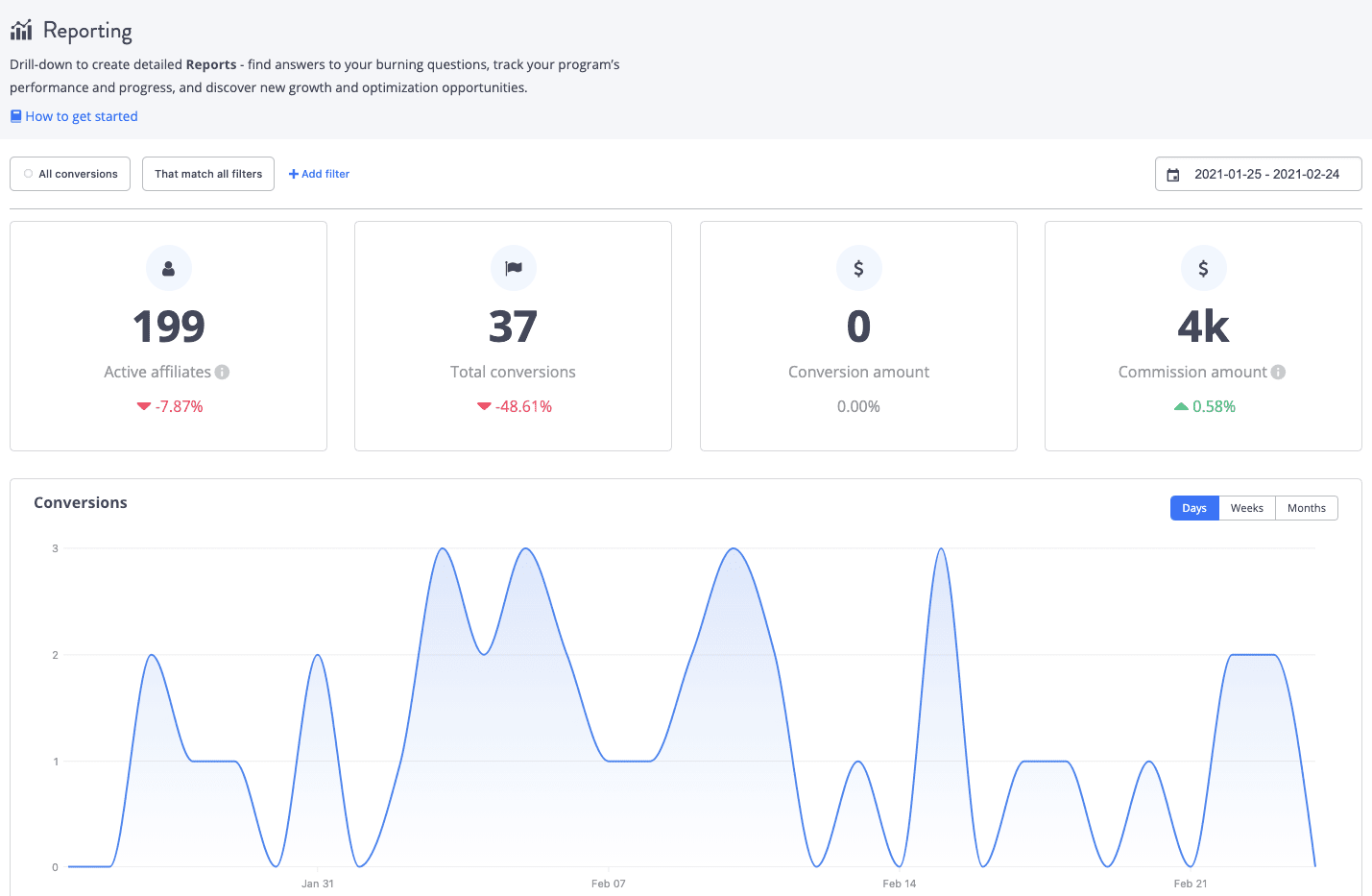
Reports show clicks, conversions, revenue and commissions per affiliate and per program, with date filters. That covers what most merchants check weekly. Because Tapfiliate sees traffic from every connected platform, its reports are strongest for sellers who need one combined view. For a single WooCommerce store, the same numbers already sit in your order data, so Tapfiliate’s reports duplicate rather than add.
Payouts
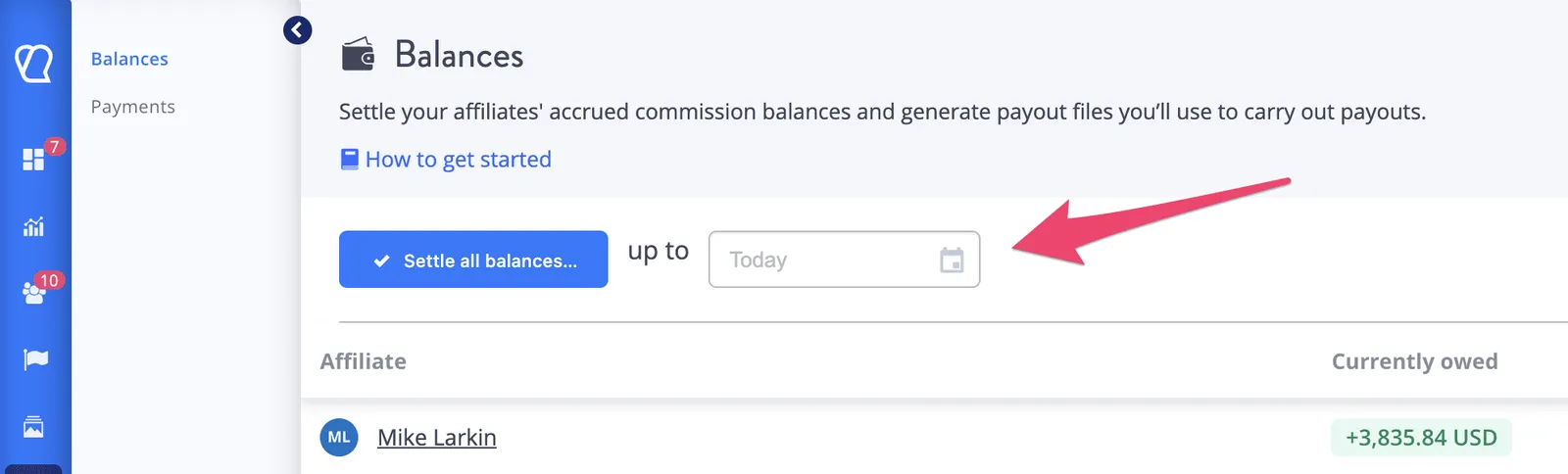
On the Launch plan you see what each affiliate is owed and pay them yourself, for example through PayPal, then mark the commission as paid. The Scale plan adds payouts through Trolley, which handles mass payments. Trolley is a separate service with its own terms, so check its fees before you count on it.
Tracking and its limits
Tapfiliate tracks clicks with a script and cookies in the visitor’s browser, then records the sale when your store reports the order. That is standard for hosted platforms, and it carries the standard risks. Browser privacy features and ad blockers can block the script, and if the order sync fails, a commission can go missing until you reconcile it by hand. Neither is unique to Tapfiliate, but both are worth testing on your own store before launch.
Tapfiliate pricing
Tapfiliate sells three plans. Prices below are from tapfiliate.com/pricing, checked in October 2026.
| Plan | Monthly billing | Annual billing | Main limits |
|---|---|---|---|
| Launch | $89/month | $74/month | 50 affiliates, 5,000 clicks and 500 conversions a month. Recurring commissions and coupon tracking included |
| Scale | $179/month | $149/month | Unlimited affiliates, 100,000 clicks and 10,000 conversions a month. Adds groups, product and category commissions, MLM and Trolley payouts |
| Enterprise | Custom | Custom | Custom click and conversion limits, white label, dedicated manager |
Launch has a 7-day free trial and Scale a 14-day one.
Going over a cap does not stop tracking. You pay overage instead:
- Clicks: $1.50 per extra 1,000 on Launch, $1 per extra 1,000 on Scale.
- Conversions: $15 per extra 1,000 on Launch, $10 per extra 1,000 on Scale.
The real total is the plan plus overage plus any payout service fees. A Launch store whose affiliates send 15,000 clicks in a busy month pays $15 in click overage on top of the plan. That is small, but clicks are counted whether or not the visitor buys. The bigger jump is the 50-affiliate cap. Your 51st affiliate moves you to Scale, which doubles the monthly bill.

Tapfiliate review: pros and cons
Tapfiliate’s strengths come from being hosted, and so do most of its costs.
Pros
- One affiliate program across WooCommerce, Shopify, SaaS billing and custom sites.
- Clean dashboard with straightforward approval, groups and marketing assets.
- Coupon-based tracking alongside referral links.
- Recurring and multi-level commissions are available.
- Hosted, so tracking data and the affiliate portal do not load your WordPress server.
Cons
- Monthly cost runs for as long as the program does, and it grows with traffic.
- Click and conversion caps on every plan, with overage billed per thousand.
- The Launch plan stops at 50 affiliates.
- Affiliate groups, product-level commissions, MLM and Trolley payouts are kept for the Scale plan.
- Script-based tracking can lose referrals to ad blockers and failed order syncs.
- On WooCommerce, coupons and settings live in two places.
Who should pick something else
If you sell only on WooCommerce, a hosted platform’s main strength, one program across several platforms, does not apply to you, and its metered plans become a cost that grows with your traffic. A plugin that runs inside WordPress keeps affiliates, commissions and payouts in the same admin as your orders, with no click caps. Affiliate for WooCommerce is the one we make for that case. For other options, see our roundup of WooCommerce affiliate plugins.
Is Tapfiliate worth it?
Tapfiliate is worth it when your affiliate program spans more than one platform, and the monthly fee buys you one place to run it. The product is well built, and the parts most merchants use every day, approvals, groups, assets and reports, work without fuss. Before you commit, estimate your monthly clicks and your affiliate count against the Launch caps. If either is close, price the Scale plan from day one.
If you are still planning the program itself, our guide to setting up a WooCommerce affiliate program covers tracking links, cookies, terms and the affiliate dashboard, and ways to pay affiliate commissions compares payout methods.
How much does Tapfiliate cost?
The Launch plan is $89 a month, or $74 a month billed annually. The Scale plan is $179 a month, or $149 a month billed annually. Enterprise pricing is custom. Overage on clicks and conversions is billed on top.
What happens if I go over my Tapfiliate click limit?
Tracking keeps running and Tapfiliate bills overage: $1.50 per extra 1,000 clicks on Launch and $1 per extra 1,000 on Scale. Extra conversions cost $15 or $10 per 1,000.
Does Tapfiliate work with WooCommerce?
Yes. Tapfiliate has a WordPress plugin that connects a WooCommerce store, and it can also track Shopify, other ecommerce platforms and custom sites through scripts, integrations and its API.
Does Tapfiliate support multi-level commissions?
Yes, on the Scale plan and above. Affiliates can earn commission on sales made by affiliates they recruit.
Can Tapfiliate pay affiliates automatically?
The Scale plan includes payouts through Trolley, a separate payments service. On the Launch plan you pay affiliates yourself and mark commissions as paid in Tapfiliate.