

The best WooCommerce subscription plugin depends on your catalog complexity and payment setup. If you run recurring billing primarily on Stripe, Smart Subscriptions handles renewals, trials, and customer accounts without database bloat. If you need complex proration across 25+ payment gateways, the official WooCommerce Subscriptions remains the industry standard.
Choosing your subscription engine is a foundational technical decision. Changing subscription plugins later requires migrating live payment tokens, active billing schedules, and renewal records between conflicting database schemas.
With the global subscription economy projected to more than triple by 2033 (Grand View Research), picking an engine that scales without breaking customer trust is essential. Our complete guide to WooCommerce subscriptions breaks down the business model, but selecting your software engine comes first.
Rather than reviewing dozens of generic add-ons, I tested the four most reliable plugins across live store scenarios.
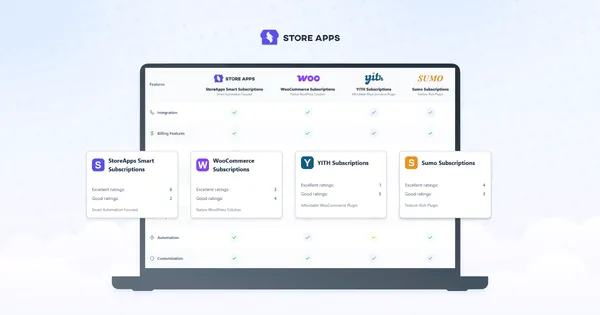
Compare the top WooCommerce subscription plugins at a glance
Evaluating a subscription plugin requires looking past surface marketing pages. You need to inspect total software costs, supported gateways, and renewal execution under real cron schedules.
| Plugin | Starting price | Gateway support | Best suited for |
|---|---|---|---|
| Smart Subscriptions | $49/year (all-in-one) | Stripe | Stores wanting simple recurring products without bloat |
| WooCommerce Subscriptions | $279/year (+ $99 for existing products) | 25+ gateways | Complex catalogs needing proration and custom workflows |
| YITH WooCommerce Subscription | $199.99/year | Stripe & PayPal (auto) | Physical subscription boxes with delivery schedules |
| SUMO Subscriptions | $49 one-time (+ support renewals) | 4+ gateways | Budget stores needing niche settings with developer help |
The key takeaway: For standard subscriptions on Stripe, an all-in-one plugin saves $300+ annually compared to modular suites that charge extra for basic catalog integration.
Smart Subscriptions for WooCommerce: best for clean, lightweight recurring revenue
Smart Subscriptions is built for merchants who want straightforward recurring revenue. It eliminates the configuration maze common in enterprise extensions, letting you launch subscriptions in minutes.
You can convert any simple product into a recurring subscription with a few clicks. The plugin supports daily, weekly, monthly, and yearly billing schedules. You can also configure free trials and collect upfront sign-up fees. At renewal time, saved Stripe payment tokens process charges automatically without merchant intervention.
Subscribers manage their plans directly inside the native WooCommerce My Account area. Customers can review renewal dates, update card details, pause active deliveries, or cancel without opening a support ticket.
Where it shines
-
Affordable pricing: Costs $49/year for the full feature set. You need no companion add-ons to sell subscriptions on existing products.
-
Reliable Stripe tokenization: Secure customer tokens process recurring charges automatically. This eliminates manual invoicing friction and failed renewals.
-
Built-in churn feedback: When a subscriber cancels, an automated feedback prompt captures their specific reason. You get actionable data on price sensitivity or product issues to fix offer leaks.
-
Fast setup: Takes under 15 minutes to configure. It creates zero orphaned post types or database bloat.
Things to consider
- Stripe-focused architecture: Smart Subscriptions runs specifically on Stripe. It does not support PayPal Commerce, Authorize.net, or regional merchant gateways.
- No dynamic box builder: If your core offer is a custom box where buyers mix different items every month, you will need a specialized bundling tool.
Who should choose Smart Subscriptions?
Pick Smart Subscriptions if you run a small or growing store selling digital products, physical replenishable goods, or access passes on Stripe. It delivers dependable recurring revenue at a fraction of enterprise software costs.
WooCommerce Subscriptions (Official): best for complex enterprise stores
WooCommerce Subscriptions is the official extension built by Automattic. It remains the most widely deployed recurring billing tool in the WordPress ecosystem.
If your store operates at high scale, this extension offers unmatched extensibility. It connects directly with ERP platforms, custom fulfillment centers, and third-party developer hooks. Automattic supports more than 25 payment gateways for automated token charging, including Stripe, PayPal Commerce, Authorize.net CIM, and Chase Paymentech.
Beyond core gateway charging, you get advanced billing controls. It handles subscription upgrades and downgrades with prorated credits. Store managers can also align renewal dates across customers and trigger manual invoice workflows for corporate clients.
Where it shines
-
Broad gateway coverage: Supports 25+ automated payment gateways. This gives international merchants complete payment flexibility.
-
Proration and tier switching: Subscribers can change tiers mid-cycle. The plugin calculates exact prorated balances automatically.
-
Ecosystem compatibility: Major third-party WooCommerce developers build integrations for this official extension first.
Things to consider
-
High total cost of ownership: The base extension costs $279/year. Crucially, converting existing store products into subscriptions requires a second extension: All Products for WooCommerce Subscriptions ($99/year). Your annual software investment quickly exceeds $378 to $500+.
-
Heavy admin interface: The settings panels and database hooks are dense. For stores selling just one or two subscriptions, the setup feels needlessly complex.
Who should choose WooCommerce Subscriptions?
Choose the official extension if you operate an established business needing non-Stripe payment gateways, complex subscription switching, or custom developer workflows.
YITH WooCommerce Subscription: best for physical recurring boxes
YITH WooCommerce Subscription is designed for merchants selling curated product boxes, recurring deliveries, and scheduled physical shipments.
Its standout strength is delivery calendar integration. If your warehouse ships product boxes on the 1st and 15th of each month, YITH synchronizes billing cycles to match those fulfillment dates. It also has a dedicated box builder where shoppers assemble personalized recurring packages.
Subscribers manage their accounts through an intuitive dashboard. Store administrators can also export shipping lists and renewal histories as CSV or PDF files for packaging teams.
Where it shines
- Fulfillment synchronization: Aligns recurring billing dates directly with your warehouse delivery schedule.
- Custom subscription boxes: Built-in tools let customers assemble customized product bundles for regular delivery.
- YITH suite compatibility: Integrates cleanly with YITH Membership and YITH Multi-Vendor extensions.
Things to consider
- High cost: The single-site license costs $199.99/year, representing a significant commitment for early-stage shops.
- Restricted free tier: The free version on WordPress.org is heavily stripped down. It lacks variation support and omits annual billing cycles, forcing users into 12-month workarounds.
- Fewer gateways: Automatic renewal processing is optimized primarily for Stripe and PayPal, offering fewer enterprise gateways than Automattic.
Who should choose YITH WooCommerce Subscription?
Pick YITH if you ship curated physical boxes, coordinate batch delivery calendars, or already power your store with the YITH plugin suite.
SUMO Subscriptions & WP Swings: evaluating budget alternatives
Marketplace and freemium plugins provide alternative entry points for cost-sensitive store owners. However, each introduces distinct operational trade-offs.
SUMO Subscriptions (Fantastic Plugins)
Sold on CodeCanyon for a one-time fee of $49 (with optional six-month support renewals), SUMO Subscriptions provides remarkable feature depth. It supports simple, variable, and grouped subscriptions, payment synchronization, deposit payments, and multiple gateways.
Configuration demands patience. The settings panel contains hundreds of granular toggles that make initial setup slow. Software updates also depend on CodeCanyon release approvals rather than continuous deployments. It suits technical store owners seeking complex settings on a strict budget.
Subscriptions for WooCommerce (WP Swings)
WP Swings provides a popular freemium option on WordPress.org. The free tier lets store owners create basic recurring products and accept test subscriptions without upfront software costs.
Operational reliability requires careful testing. User forums show frequent renewal failures under standard WP-Cron setups when traffic drops. Past changelogs also record critical security patches addressing payment verification bypasses and IDOR vulnerabilities. If you run WP Swings, configure a server-level cron job and test webhook reliability thoroughly in staging before launching.
Subscriptions vs memberships: which architecture does your store need?
Store owners frequently confuse subscription plugins with membership plugins. While both collect recurring revenue, they solve separate technical challenges.
A subscription plugin manages commerce transactions. It handles billing schedules, token charges, renewal retries, and fulfillment orders, ensuring your store collects payments on time.
A membership plugin manages access permissions. It restricts blog articles, gates video courses, protects community forums, or applies exclusive member discounts.
Consider an online fitness business charging $30/month for premium coaching. You need a subscription plugin like Smart Subscriptions ($49/year) to bill customers automatically. You then need a membership tool like WooCommerce Memberships ($199/year) to protect the video content.
Combining focused tools costs $248/year, compared to $478/year for Automattic’s default software bundle. Before buying software, review our guide on WooCommerce subscriptions vs memberships to verify your setup.
How to ensure recurring renewal reliability before launching
Subscription stores depend entirely on renewal completion rates. Before accepting live payments, verify these three operational baselines:
Payment tokenization and gateway retries
Never rely on manual invoicing for consumer subscriptions. Modern plugins rely on secure payment tokenization. The customer’s credit card details stay inside Stripe, while your store stores an encrypted customer token.
When a renewal fails because of an expired card, your software should trigger automated retry attempts over several days. Our tutorial on setting up recurring payments in WooCommerce explains token setup step by step.
Mixed cart checkout handling
Test how your checkout processes mixed orders containing both regular one-time products and recurring subscriptions.
Inferior plugins reject mixed carts, forcing buyers through separate checkouts. Modern plugins handle mixed carts in one transaction, charging one-time items immediately while registering the recurring billing token.
Transparent trial periods and sign-up fees
Offering a 7-day or 14-day trial lowers signup friction. You must decide whether to charge an upfront sign-up fee or authorize cards with an initial $0 charge.
Always display the exact renewal billing date clearly on the checkout review page. Our guide on how to add free trials to WooCommerce subscriptions details trial configuration.
Which WooCommerce subscription plugin should you choose?
Selecting your subscription software boils down to three straightforward questions:
- Selling on Stripe with standard billing schedules: Pick Smart Subscriptions for clean renewals, customer churn feedback, and zero add-on bloat at $49/year.
- Managing an enterprise catalog with 25+ gateways or proration: Choose WooCommerce Subscriptions to gain maximum developer flexibility across complex store setups.
- Shipping curated physical boxes on synchronized delivery days: Select YITH WooCommerce Subscription to align recurring billing directly with physical fulfillment cycles.
Before going live, verify your payment webhooks, server cron jobs, and customer account dashboard in a staging environment.
Frequently asked questions
Does WooCommerce support subscription billing out of the box?
No. Core WooCommerce only handles one-time transactions. Selling recurring products, subscription boxes, or software licenses requires a dedicated subscription plugin to manage recurring billing cycles, token charging, and customer account self-service.
Can I sell subscriptions without paying $279 every year?
Yes. While the official WooCommerce Subscriptions extension costs $279 annually, third-party alternatives like Smart Subscriptions offer recurring billing, trial periods, and automated Stripe renewals starting at $49/year.
What is the difference between a subscription plugin and a membership plugin?
A subscription plugin handles billing schedules, recurring payment tokenization, and recurring orders. A membership plugin restricts access to content, pages, or special discounts based on membership status. Many stores combine both, but a membership plugin alone cannot charge recurring payments.
What happens when a customer’s recurring renewal payment fails?
Reliable subscription plugins send automatic webhook retry requests to the payment processor and notify the customer via email. If the card has expired or lacks funds, customers can update their payment details directly from their My Account dashboard without losing their subscription history.
Can customers pause or cancel their own subscriptions?
Yes. Top subscription plugins add a self-service management tab to the native WooCommerce My Account area. Subscribers can change quantities, pause renewals, update billing addresses, or cancel without submitting a manual support ticket.