
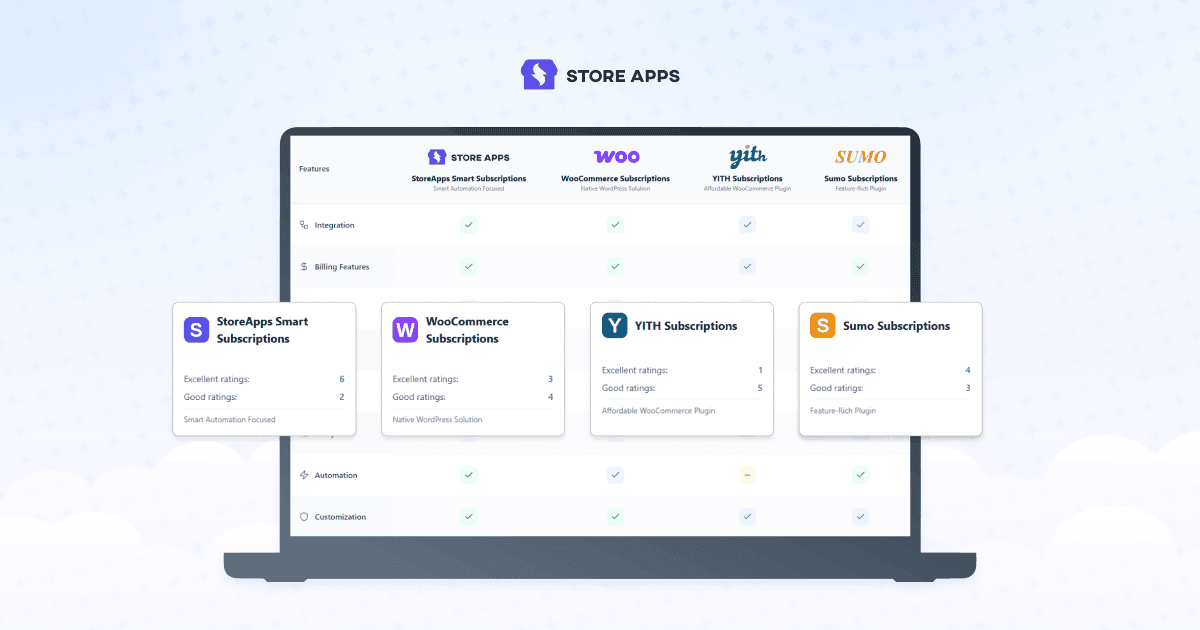
Choosing a WooCommerce subscription plugin is more than comparing features. It’s a long term decision that can shape how easily your subscription business grows.
With more than 20 subscription plugins available, finding the right one isn’t easy. Many comparison articles simply list the “best” plugins, but the reality is that there isn’t one subscription plugin that’s right for every business.
Rather than ranking dozens of similar options, we’ve shortlisted four reliable plugins, each best suited for a different type of business, from beginners and growing stores to enterprise merchants.
We’ve used the plugins, explored their capabilities and compared them on the factors that matter most, including ease of setup, billing flexibility, payment gateway support, pricing, scalability and long term value.
In this guide, you’ll discover:
- Which plugin provides the best value for growing businesses.
- What to look for before making your investment.
- The strengths, trade offs and ideal use cases of each plugin.
- Which solution can support your store as it grows.
The right choice today can save you from costly migrations and help you build a stronger recurring revenue business tomorrow. So let’s begin.
Why subscription plugin is a long-term investment?
WooCommerce core doesn’t support recurring products or subscription billing out of the box. To sell subscription boxes, software licenses, memberships or any recurring product, you’ll need a dedicated subscription plugin.
It’s an investment worth making. The subscription economy continues to grow, with the global market projected to more than triple by 2033 as businesses increasingly adopt recurring revenue models. (Source)
Think of choosing a subscription plugin like making a long term investment. You choose one that can support your business as it grows.
Today you might have a handful of subscribers. Tomorrow, you may need flexible billing plans, more payment gateways, additional integrations or thousands of active subscriptions. Migrating to a new plugin later can be difficult and disruptive.
Honestly, there is no single “best” WooCommerce subscription plugin
Search for “best WooCommerce subscription plugins”, “top WooCommerce subscription plugins” and you’ll find dozens of articles ranking plugins from #1 to #10. The truth is, there isn’t one plugin that’s right for every store.
A plugin that’s perfect for a beginner may be too limited for an enterprise business. Likewise, a feature-rich solution can be unnecessarily complex for a growing store. The right choice depends on your business goals, budget and future plans.
That’s also why we haven’t compared every plugin available. With more than 20 WooCommerce subscription plugins on the market, many offer similar functionality.
Instead, we’ve shortlisted four reliable plugins that each excel in a different area, from beginners and growing stores to enterprise businesses.
Our goal isn’t to crown one universal winner. It’s to help you choose the plugin that’s best for your business.
Each recommendation focuses on where the plugin performs best, who should use it and where it may fall short.
Comparing reliable WooCommerce subscription plugins
To make choosing easier, we’ve compared each plugin using the factors that matter most:
- Ease of setup – Helps you launch quickly and reduces the learning curve.
- Billing flexibility – Supports different subscription plans, billing cycles, free trials and signup fees.
- Payment gateway support – Ensures recurring payments work reliably with your preferred gateways.
- Long term value – Considers pricing, renewals, updates and overall return on investment.
- Scalability – Allows your subscription business to grow without changing plugins.
- Reputation and support – Reliable updates, documentation and responsive support when you need it.
Not all WooCommerce subscription plugins are built the same. Once your subscription business is running, switching plugins can be time consuming and disruptive. That’s why we evaluated each plugin using the factors that matter most for long term success.
| Criteria | Smart Subscriptions for WooCommerce | WooCommerce Subscriptions | YITH WooCommerce Subscription | Sumo Subscriptions for WooCommerce |
|---|---|---|---|---|
| Best for | Beginners & growing stores | Enterprise & complex stores | Existing YITH users | Budget-conscious stores |
| Ease of setup | Very easy | Moderate | Easy | Moderate |
| Learning curve | Low | Medium | Medium | Medium |
| Subscription flexibility | Covers most business needs | Highly flexible | Flexible | Highly flexible |
| Payment gateway support | Stripe | Extensive | Good | Good |
| Customer self-service | Included | Included | Included | Included |
| Scalability | Growing businesses | Enterprise-ready | Growing businesses | Growing businesses |
| Value for money | Excellent | Premium investment | Good | Good |
| Support & ecosystem | StoreApps | WooCommerce | YITH | Fantastic Plugins |
| Ideal if you want… | Simplicity and affordability | Maximum compatibility | Tight YITH integration | Rich features at a lower price |
Now, let’s compare the plugins in detail and see which one fits your business best.
Smart Subscriptions for WooCommerce: Best for beginners and growing stores
Where it shines
- Beginner-friendly interface that’s easy to configure.
- Quick setup with minimal learning curve.
- Covers the subscription features most stores actually need.
- Affordable pricing compared to premium alternatives.
- Clean customer subscription management experience.
- From StoreApps brand – trusted by 45,000+ paying stores.
Things to consider
- Enterprise stores with highly specialized subscription workflows may need more advanced capabilities.
- Supports the most common subscription models, but some niche use cases may require additional customization.
Choose this plugin if you…
- are launching subscriptions for the first time.
- run a small or growing WooCommerce store.
- want a balance of features, simplicity and affordability.
- primarily need recurring billing, renewals, free trials and subscriber management.
Skip this plugin if…
You may want to consider another option if you:
- manage a large enterprise store with highly customized subscription workflows.
- require advanced features that only enterprise-focused subscription platforms provide.
- already rely heavily on an ecosystem built around another subscription solution.
- looking for payment gateways other than Stripe
Key features
- Create simple subscription products.
- Flexible billing schedules (weekly, monthly, yearly and more).
- Free trials and signup fees.
- Automatic and manual renewals.
- Customer self-service subscription management.
- Stripe integration for recurring payments.
- Automated trial end reminders, renewal notifications and failed payment emails.
- Feedback box to identify churn reasons.
- Developer-friendly hooks and filters.
Pricing
$49/year
Get Smart Subscriptions plugin (Risk-Free)
WooCommerce Subscriptions: Best for enterprise and complex stores
Where it shines
- Deep integration with the WooCommerce ecosystem.
- Broad payment gateway compatibility.
- Supports complex subscription scenarios.
- Large ecosystem and extensive documentation.
- Proven choice for established businesses.
Things to consider
- Higher annual cost than most alternatives.
- Can feel overwhelming for smaller stores or beginners.
- Some advanced functionality depends on compatible payment gateways.
Choose this plugin if you…
- operate a medium or large WooCommerce business.
- use several WooCommerce extensions together.
- need maximum compatibility and flexibility.
- expect your subscription business to become increasingly complex.
Skip this plugin if you…
- are launching your first subscription product.
- have a limited budget.
- only need straightforward recurring billing features.
Key features
- Flexible recurring billing schedules.
- Free trials and signup fees.
- Subscription switching and upgrades.
- Integration with over 25 payment gateways for automatic recurring payments.
- Subscriber management dashboard.
- Allow shoppers to gift subscriptions to each other.
- Create multiple plans for a single product.
- Detailed reports to monitor recurring revenue, active subscribers count, and more.
Pricing
$279/year
Get WooCommerce Subscriptions plugin
YITH WooCommerce Subscription: Best for established stores
Where it shines
- Excellent integration with other YITH plugins.
- User-friendly administration.
- Mature and reliable subscription features.
- Suitable for both physical and digital subscriptions.
Things to consider
- Delivers the most value when used alongside other YITH products.
- Some advanced capabilities are available only in the premium version.
Choose this plugin if you…
- already use multiple YITH plugins.
- prefer a polished admin experience.
- want reliable subscription management with familiar workflows.
Skip this plugin if you…
- aren’t invested in the YITH ecosystem.
- are looking for the lowest-cost solution.
- prefer official WooCommerce extensions.
Key features
- Create recurring products with flexible billing cycles.
- Offer free trials and one-time sign-up fees.
- Support simple, variable, virtual, and downloadable subscriptions.
- Build customizable subscription boxes for recurring orders.
- Customer subscription management.
- Export subscription data for reporting and analysis.
- Customize the subscription purchase experience and plans.
Pricing
$199.99/year
Get YITH WooCommerce Subscription plugin
SUMO Subscriptions: Best for budget-conscious growing stores
Where it shines
- Strong value for money.
- Comprehensive subscription options.
- Mature product with years of development.
- Supports many subscription scenarios.
Things to consider
- The admin interface feels dated compared to newer plugins.
- Setup can take longer because of the number of available options.
Choose this plugin if you…
- want advanced functionality without enterprise pricing.
- don’t mind spending extra time during setup.
- need support for different subscription models.
Skip this plugin if you…
- prefer a cleaner, modern interface.
- want the quickest setup experience.
- are new to WooCommerce subscriptions.
Key features
- Flexible billing schedules.
- Free trials and signup fees.
- Automatic renewals.
- Manual subscription management.
- Subscriber dashboard.
- Multiple pricing options.
Pricing
$49
The right WooCommerce subscription plugin for you is…
The best WooCommerce subscription plugin isn’t necessarily the one with the longest feature list or the highest price tag. It’s the one that fits your business today while supporting your goals for tomorrow.
To help you decide:
- Choose Smart Subscriptions if you want an affordable, easy-to-use solution for a new or growing store.
- Choose WooCommerce Subscriptions if you need enterprise-grade flexibility and deep WooCommerce compatibility.
- Choose YITH WooCommerce Subscription if you’re already invested in the YITH ecosystem and want a polished subscription experience.
- Choose SUMO Subscriptions if you’re looking for a feature-rich option that offers strong value for growing businesses.
Whichever plugin you choose, think beyond your first subscription product. Consider how it will handle more subscribers, changing pricing models and new business opportunities as your store grows.
FAQ
Does WooCommerce support subscriptions by default?
No. WooCommerce doesn’t include built-in support for recurring products or subscription billing. You’ll need a subscription plugin that manages recurring payments, renewals and subscriber accounts.
Which WooCommerce subscription plugin is best for beginners?
Smart Subscriptions. It’s suitable for beginners to set up simple recurring products.
Can I sell subscriptions without buying the official WooCommerce Subscriptions plugin?
Yes. Third-party plugins also support recurring billing, subscription management and customer self-service. The right choice depends on your business requirements, preferred payment gateways and budget.
Which WooCommerce subscription plugin offers the best value for money?
It depends on what you need. If you’re looking for an affordable solution with essential subscription features, a budget-friendly plugin may offer excellent value. If you run a large store with complex workflows, paying more for deeper integrations and flexibility may be worthwhile.
Can I migrate from one subscription plugin to another later?
Yes, but migrating active subscriptions isn’t always straightforward. Existing subscribers, recurring payment schedules and renewal data may need to be transferred manually or with migration tools.
Which payment gateways work with WooCommerce subscription plugins?
Most subscription plugins support popular gateways such as Stripe and PayPal, while some also work with Authorize.net and other providers. Before choosing a plugin, make sure it supports the payment gateways your business relies on today and those you may need as you expand.
What happens if a recurring payment fails?
That depends on the plugin and payment gateway. Most subscription plugins notify the customer of the failed payment and allow them to update their payment method. Some also support automatic payment retries to help recover failed renewals and reduce subscriber churn.
Can customers upgrade, downgrade or cancel their subscriptions themselves?
Most modern WooCommerce subscription plugins let customers manage their subscriptions from their account area. Depending on the plugin, they can update payment methods, cancel subscriptions, or switch between plans without contacting store support.
Are free WooCommerce subscription plugins good enough?
Mostly not. Free plugins can be suitable mostly for testing as they lack the required features. Investing in paid plugins is a wise choice.