


CartFlows is a strong sales funnel builder for stores that sell a few products through dedicated landing pages. For a store with a large catalog, it’s a lot of setup, and the order bumps and upsells most buyers come for start on the Pro plan, not Starter. This CartFlows review covers what the funnel builder does, what each plan costs after the first year, and which stores get their money’s worth.
Everything here is based on CartFlows’ pricing page, its WordPress.org listing and its documentation, checked in October 2026. The screenshots come from the CartFlows admin. Prices change, so check the plan page before you buy.
What is CartFlows?
CartFlows is a WordPress plugin that turns a WooCommerce store’s buying path into step-by-step sales funnels. It’s built by the team behind the Astra theme and has 200,000+ active installs on WordPress.org, with a 4.8 out of 5 rating from 517 reviews.
A funnel skips the usual product page, cart and checkout. It strings together its own pages instead. A typical one has a landing page, a distraction-free checkout, an order bump on that checkout, one-click upsells or downsells after payment, and a custom thank-you page.
Quick verdict: who should buy CartFlows, and who should skip it
If you sell a handful of products through campaign pages and want each step designed in your page builder, CartFlows is worth the investment. A catalog store is a different case. When offers need to appear across hundreds of products, a funnel per product is more work than the plugin saves.
When offers need to appear across hundreds of products, a funnel per product is more work than the plugin saves.
Buy CartFlows if:
- You sell courses, digital products or 1 to 5 hero products, and send ad traffic to a dedicated landing page.
- You already design pages in Elementor, Beaver Builder, Divi or the block editor.
- You want A/B tests on checkout and offer pages without a separate testing tool, and can budget for Pro.
Skip CartFlows if:
- Your revenue is spread across a large catalog and you want offers driven by cart rules.
- Your checkout depends on plugins that hook into the default WooCommerce checkout template.
- You need to keep plugin costs flat, since every plan renews at roughly 50% above its first-year price.
Features that matter
CartFlows covers the full funnel, from the first page a visitor lands on to the thank-you screen. Most of the paid value sits in the offer steps and the reporting, and those are Pro features.
Funnel templates
The template library holds ready-made funnels for products, courses, services and events. Each pack includes matching landing, checkout and thank-you pages, so a first funnel can go live without designing from a blank page. You preview a template, name your funnel and import it.
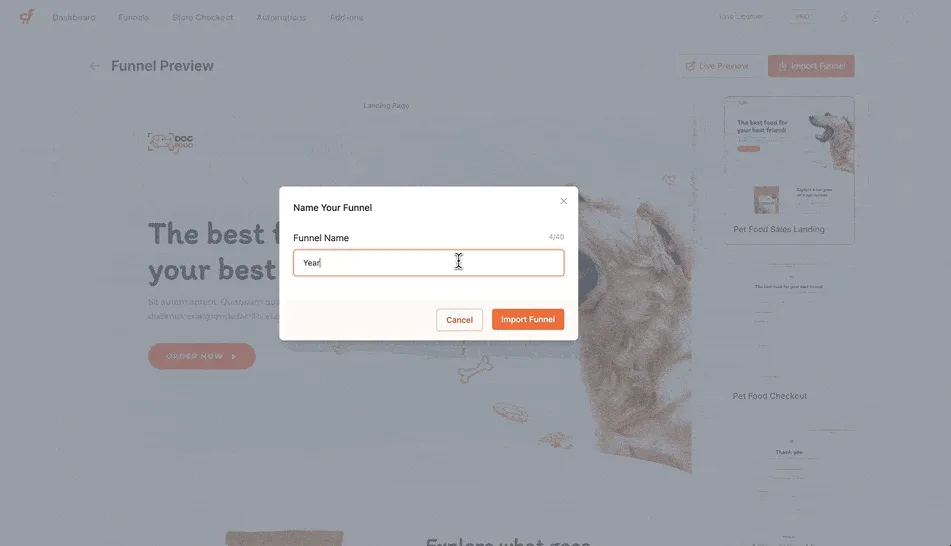
Templates import into your page builder, where you change copy, colors and images like any other page. Premium templates come with the Pro and Suite plans.
Funnel steps and per-step numbers
Each funnel lists its steps in order, such as checkout and thank-you, with views, conversions and revenue beside each one. The header shows total orders, revenue, average order value and order bump revenue for the date range you pick. You can also turn on Store Checkout, which applies a CartFlows checkout to your whole store rather than one funnel.
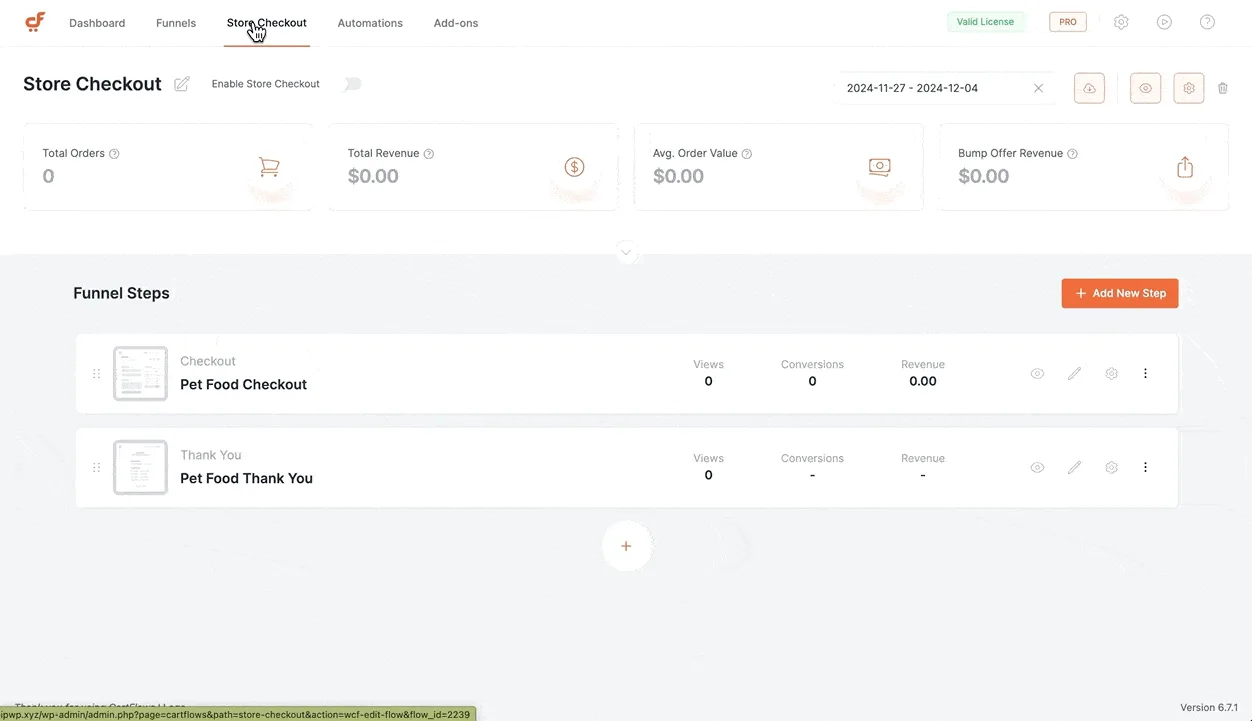
Seeing the numbers per step matters once a funnel has more than three or four steps, because a drop-off point is easy to spot. Advanced funnel analytics are listed on the Pro and Suite plans.
Checkout products and order bumps
Each checkout step carries its own products, quantities and discounts, plus an auto-applied coupon and product options. Tabs on the same panel hold the order bumps, the checkout form fields and dynamic offers. Order bumps sit on the checkout page as a checkbox offer, such as a warranty or an accessory, and the cart total updates when the buyer ticks it.
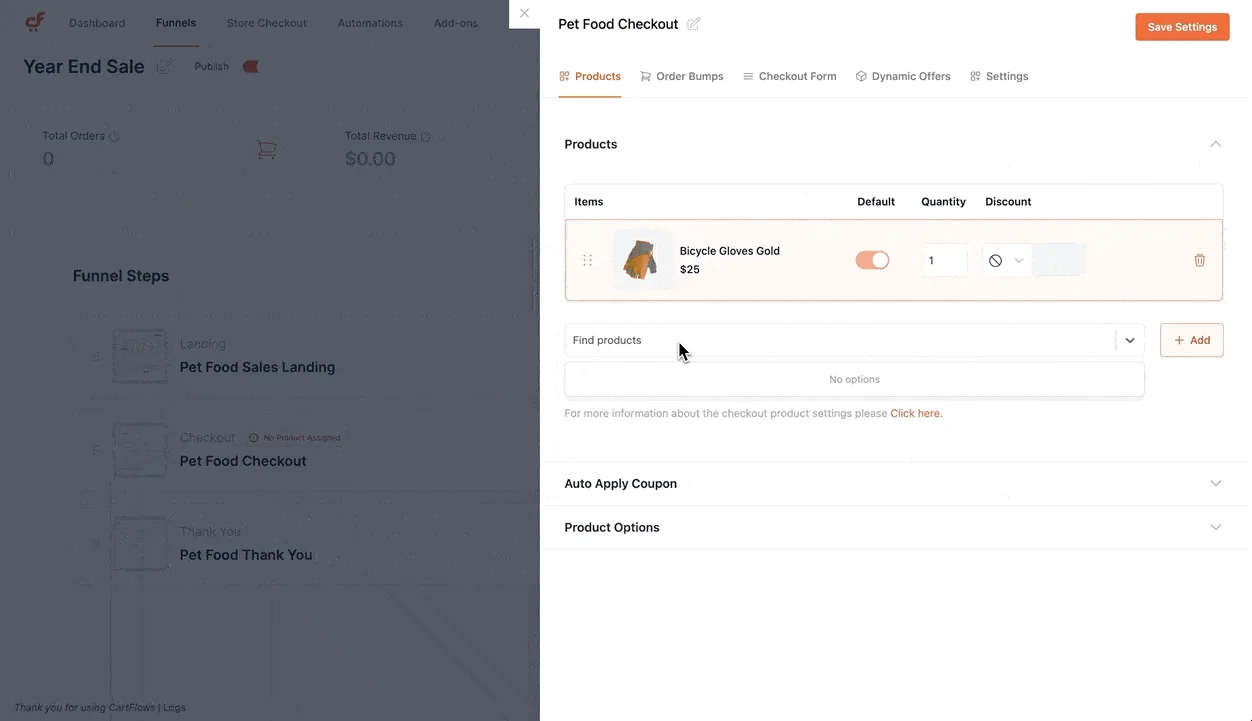
Dynamic order bumps are not in Starter. On the pricing page they are crossed out for Starter and included from Pro up. For ideas on what to offer, see our WooCommerce order bump ideas.
One-click upsells and downsells
Upsells and downsells appear after payment and before the thank-you page. An upsell step carries its own product panel, with options to replace the main order or skip buyers who already own the item. Like order bumps, smart routing and downsells are Pro and Suite features.
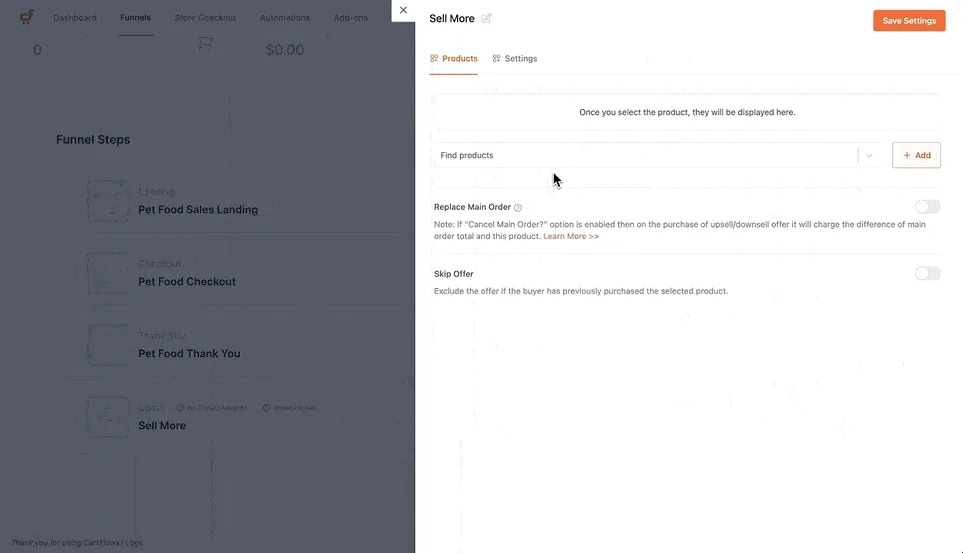
One-click offers rely on gateways that can charge a saved payment method. Check CartFlows’ supported gateway list against yours before you plan one.
A/B split testing
You duplicate a step, change the copy, layout or offer, and CartFlows splits traffic between the versions and tracks which one converts. A/B split testing is listed on the Pro and Suite plans, not Starter.
Speed and compatibility
CartFlows renders funnel pages through your page builder, so a checkout built in a heavy builder loads that builder’s scripts and styles too. On budget hosting, test a funnel checkout on a phone before sending paid traffic to it.
Funnel checkouts also replace the default WooCommerce checkout layout. Plugins that add fields or widgets to the standard checkout may not show up until you place them in the funnel template. The current release is version 3.3.0, and it needs WordPress 5.8 and PHP 7.2 or later.

CartFlows pricing: what you actually pay
Three paid tiers make up the CartFlows lineup, each pairing an introductory first-year price with a steeper renewal. Pro and Suite also offer lifetime licenses, alongside a basic free version on WordPress.org. Prices below are from cartflows.com/pricing, checked in October 2026.
| Plan | First year | Renewal | Lifetime | Sites |
|---|---|---|---|---|
| Starter | $99 | $149/yr | not offered | 1 |
| Pro | $199 | $299/yr | $699 | 3 |
| Suite | $299 | $449/yr | $999 | 30 |
Starter covers funnels and checkout pages: checkout layouts, product options and custom thank-you pages. Pro adds what most people buy CartFlows for: dynamic order bumps, one-click upsells and downsells, smart funnel routing, A/B testing, advanced analytics and premium templates. Suite adds three separate products to the Pro feature set: Cart Abandonment Recovery Pro, Modern Cart Pro (a slide-out cart with in-cart upsells) and Power Coupons Pro.
All paid plans carry a 14-day money-back guarantee, and you can upgrade later by paying the difference. Pro’s lifetime license can also be paid in six installments of $119.
CartFlows review: pros and cons
The pros and cons below come down to one trade: CartFlows gives you full design control over each funnel, and asks you to build each funnel.
Pros
- Ready-made funnel templates that import into the major page builders.
- Views, conversions and revenue shown for every funnel step.
- Order bumps, one-click upsells, funnel routing and A/B testing on Pro and Suite.
- A lifetime license option on Pro and Suite.
- 200,000+ active installs and a 4.8 rating on WordPress.org.
Cons
- Starter leaves out order bumps, upsells and A/B testing, so most stores need Pro.
- Every plan renews at about 50% above its first-year price.
- Funnels are built per product or campaign, which doesn’t scale to a large catalog.
- Page-builder checkouts load extra scripts and can slow mobile checkout.
- Plugins that rely on the default checkout layout may need manual placement.
Who should pick something else
If your store sells across a broad catalog, you probably want offers triggered by cart rules rather than a funnel built for each product. A rule-based plugin displays upsells and order bumps directly inside existing WooCommerce pages with zero page-builder overhead. We make one, Smart Offers (see our Smart Offers vs CartFlows comparison), and our roundup covers the best WooCommerce upsell plugins.
Is CartFlows worth it?
Start with where your revenue comes from. If most of your sales come from 1 or 2 products you advertise directly, a CartFlows funnel is built for exactly that, and Pro’s A/B testing earns its keep. Budget on Pro’s renewal price, not Starter’s first-year price.
If sales are spread across dozens of products, count the funnels you’d have to build and maintain before you buy. Then test a funnel checkout on a staging copy of your store, with your gateway and checkout plugins active, before it goes live. If you are still deciding on the checkout itself, our guide to multi-step vs one-page checkout covers the trade-offs, and WooCommerce one-click upsells explains how post-purchase offers work.
How much does CartFlows cost?
Starter is $99 for the first year and renews at $149; Pro is $199 ($299 renewal, or $699 lifetime); Suite is $299 ($449 renewal, or $999 lifetime). All paid plans include a 14-day money-back guarantee.
Is there a free version of CartFlows?
Yes. CartFlows has a free version on WordPress.org that builds funnels with landing, checkout and thank-you pages. Dynamic order bumps, one-click upsells and downsells, A/B testing, advanced analytics and premium templates come with the Pro and Suite plans.
What is the difference between CartFlows Starter and Pro?
Starter covers 1 site and builds funnels and checkout pages. Pro covers 3 sites and adds dynamic order bumps, one-click upsells and downsells, smart funnel routing, A/B testing, advanced analytics and premium templates.
Does CartFlows slow down WooCommerce checkout?
It can. Funnel pages render through your page builder, so a checkout built in a heavy builder loads its scripts alongside WooCommerce’s own. The effect depends on the builder and your hosting, so test the funnel checkout on a phone, over mobile data, before you send paid traffic to it.
Is CartFlows a good fit for a store with hundreds of products?
It’s possible, but it’s a lot of upkeep. CartFlows is organized around individual funnels, each with its own products and offers, so offering upsells across hundreds of products means building and maintaining many funnels. It works best when a few products bring in most of the revenue.