
How to Use AI-Powered Advanced Search for WooCommerce Products
Searching for specific products in WooCommerce using complex conditions, like finding products without SKUs, low stock items in specific categories, or products in certain price ranges, can be tedious when setting up multiple advanced search conditions manually.
With Smart Manager’s AI-Powered Advanced Search, you can simply describe what you’re looking for in your own language, whether it’s English, Arabic, French, Spanish, or any other language, and AI will automatically configure the search conditions for you, all in just a few seconds.
Steps to Use AI-Powered Advanced Search for WooCommerce Products in Smart Manager
- Go to the Smart Manager dashboard and navigate to Settings > General Settings.
-
In the “AI Integration” section:
- Select Cohere from the “Model” dropdown.
- Enter your Cohere API key in the “API key” field.
You’ll need a Cohere account to generate an API key. For more information on how to create the API key, refer to this documentation.
- Save the settings.
-
Using the top navigation bar, search for and select
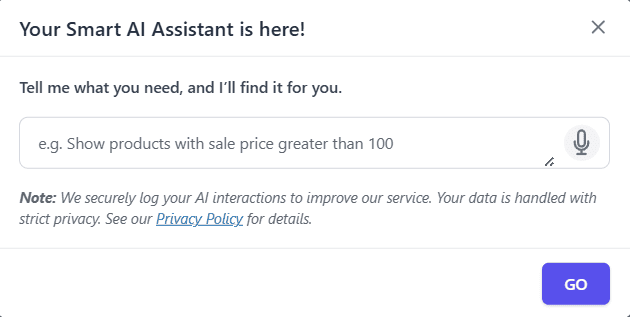
Productsdashboard from the dropdown menu. - In the navigation bar, click on the ✨ icon (located just before the Advanced Search toggle). This will open a modal where you can enter or speak your search prompt.
- Enter your search prompt in any language (e.g., “Show products without SKUs”, “Mostrar productos sin stock”, “عرض المنتجات بدون SKU”, “Afficher les produits en rupture de stock”).
- Click the “GO” button to search.
- Smart Manager will automatically configure the advanced search conditions based on your prompt and apply them. You can see the search results immediately and also review the configured search conditions in the Advanced Search panel.
That’s it. Happy managing!
Note(s):
- AI-Powered Advanced Search functionality is available only in the Pro version.
- You’ll need a Cohere account to use this feature.
- This feature is currently available for the Products dashboard only. If you need this feature for other dashboards (Orders, Coupons, Posts, etc.), please contact us to raise a feature request.
- We securely log your AI interactions to improve our service. Your data is handled with strict privacy. See our Privacy Policy for details.