


Imagine customers looking forward to receiving a package from your store every month, not because they placed a new order, but because they subscribed to it. That’s the power of a WooCommerce subscription box.
Customers subscribe once and automatically receive curated products on a recurring schedule, whether it’s coffee beans, skincare essentials, snacks, pet supplies, or hobby kits.
For store owners, this creates a predictable stream of recurring revenue while building stronger, long-term customer relationships.
Whether you’re launching your first subscription business or adding recurring products to an existing WooCommerce store, this guide will show you how to plan, build, price, and grow a successful subscription box business using WooCommerce.
What is a WooCommerce subscription box?
A WooCommerce subscription box is a recurring product that automatically delivers curated physical items to customers on a weekly, monthly, quarterly, or custom schedule. Instead of making repeat purchases, customers subscribe once and are billed automatically at each renewal.
Unlike a traditional online store that depends on one-time sales, a subscription box business focuses on recurring revenue, customer retention, and long-term relationships. With WooCommerce and a subscription plugin, you can automate recurring billing, renewal orders, subscription management, and customer self-service, making it easier to scale your business.
Why start a WooCommerce subscription box business?
A subscription box business offers a predictable revenue model by turning one-time buyers into recurring customers. Instead of relying on repeat purchases, customers subscribe once and receive curated products on a weekly, monthly, or quarterly schedule.
This model benefits both customers and store owners.
For customers
- Convenient recurring deliveries without placing repeat orders
- Discover new products through curated selections
- Enjoy a personalized unboxing experience
For store owners
- Predictable recurring revenue
- Higher customer lifetime value (CLV)
- Better inventory and demand forecasting
- Improved customer retention through recurring subscriptions
That’s why subscription boxes have become popular across industries such as coffee, snacks, skincare, pet supplies, books, wellness products, and hobby kits.
WooCommerce subscription box ideas to inspire your business
Subscription boxes work best for products customers use regularly or enjoy discovering. If you’re looking for inspiration, here are some successful subscription box business ideas powered by recurring deliveries.
- Coffee subscription boxes Atlas Coffee Club delivers coffee beans sourced from different countries every month. Coffee is consumed regularly, making it a natural fit for recurring subscriptions.
- International snack boxes Bokksu delivers curated Japanese snacks to subscribers worldwide. Limited-edition snacks and seasonal products encourage customers to stay subscribed to discover something new each month.
- Beauty and skincare boxes Birchbox became popular by sending personalized beauty samples every month. Personalization and replenishable beauty products naturally encourage repeat subscriptions.
- Meal kit boxes HelloFresh delivers ready-to-cook meal kits on a recurring schedule. Meal kits solve a recurring weekly need, making subscriptions convenient for busy households.
- Pet subscription boxes BarkBox sends toys and treats tailored for dogs every month. Pets need treats and toys regularly, creating a natural recurring purchase cycle.
These businesses show how everyday products can become a recurring experience customers look forward to.
How to choose products for your subscription box?
Not every product is a good fit for a subscription model. The best subscription boxes include products customers use regularly, enjoy discovering, or need to replenish over time.
| Works well | Less suitable |
|---|---|
| Coffee and tea | Furniture |
| Skincare | Large appliances |
| Pet treats | One-time luxury purchases |
| Snacks | Highly customized products |
| Books | Very low-margin products |
What do you need to start a subscription box with WooCommerce?
Launching a WooCommerce subscription box business doesn’t require a complex tech stack. You only need a few essential components to automate recurring orders and payments.
However, before you launch, check for these things:
- Decide your billing frequency.
- Choose whether customers can pause subscriptions.
- Define your shipping schedule.
- Set cancellation policies.
- Estimate fulfillment costs.
Once you’ve planned these details, you’ll need the following components:
- A WooCommerce store Your online storefront where customers can browse, purchase, and manage their subscriptions.
- A subscription plugin WooCommerce doesn’t support recurring billing out of the box. You’ll need a subscription plugin to create subscription products, automate renewals, and manage subscriber accounts.
- A recurring payment gateway Choose a payment gateway that supports automatic recurring payments, such as Stripe, so customers can be billed securely every renewal cycle.
- A subscription product Create a monthly, quarterly, or yearly subscription product with your preferred billing schedule, pricing, and shipping frequency.
Once these components are in place, your WooCommerce store is ready to start selling subscription boxes and generating recurring revenue.
How to create a subscription box in WooCommerce?
To run a WooCommerce subscription box business, you need a tool that manages recurring billing and subscription renewals.
Smart Subscriptions makes this process simple.
The plugin allows WooCommerce stores to create subscription products and automate recurring payments directly from the dashboard.
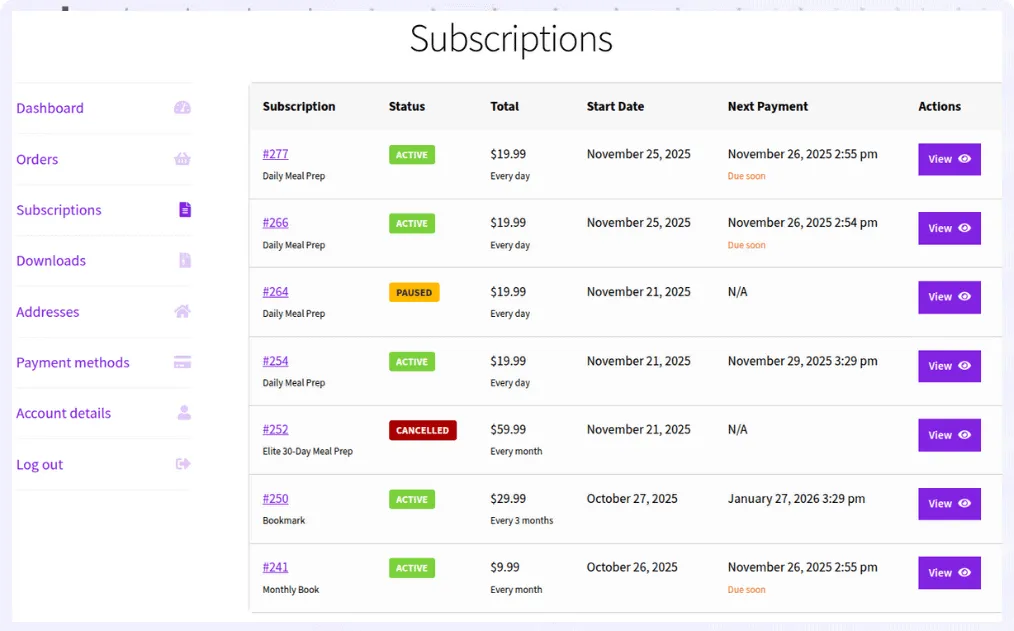
For example, imagine launching a Monthly Coffee Discovery Box priced at $25 per month.
Subscribers receive a curated box each month containing:
- two specialty coffee packs
- tasting notes
- a surprise roast
Steps to create the WooCommerce subscription box product
- Go to
WordPress Admin > Products > Add New - Enter the product name, for example, Monthly Coffee Discovery Box
- In Product data, select
Simple Subscription - Set the
Subscription Pricelike $25 - Set
Billing Interval >1 - Choose
Billing Period > Month - Click
Publish
Your subscription box product is now live.
Check out this detailed guide to set up WooCommerce subscription products.
Customers can subscribe once and receive their box automatically every month.
Best practices for running a successful WooCommerce subscription box business
Launching a subscription box is only the beginning. Long-term success depends on delivering consistent value, keeping subscribers engaged, and maintaining healthy profit margins. Here are proven strategies used by successful subscription box businesses.
Deliver more value than customers expect
Customers are more likely to renew when the perceived value of each box exceeds its price. For example, if your subscription costs $30 per month, aim to deliver products worth around $45–$50.
Small additions like sample products, exclusive items, or printed guides can increase the perceived value without significantly increasing costs.
Make a great first impression
The first delivery often determines whether a customer continues their subscription. Consider offering incentives such as:
- A discounted first box
- A free trial
- A bonus product in the first shipment
With Smart Subscriptions, you can easily offer free trials or discounted introductory pricing when creating subscription products.
Keep every delivery exciting
Subscribers stay engaged when each box offers something new. Build anticipation by introducing seasonal themes, limited-edition products, or sneak peeks of upcoming boxes through email and social media.
Price your subscription for long-term profitability
Your subscription price should cover product costs, packaging, shipping, payment processing fees, marketing expenses, and leave enough margin for sustainable growth.
Review your costs regularly as shipping rates, supplier pricing, and customer acquisition costs change over time.
Example: Pricing a monthly coffee subscription box
Before setting your subscription price, calculate all fulfillment costs—not just the products inside the box. This helps ensure your pricing supports sustainable growth while covering operational expenses.
| Expense | Estimated cost (USD) |
|---|---|
| Curated coffee products | $12.00 |
| Custom packaging | $3.00 |
| Shipping & fulfillment | $6.00 |
| Payment processing fees | $1.00 |
| Total cost per box | $22.00 |
| Subscription selling price | $35.00 |
| Estimated gross profit | $13.00 (37%) |
Your ideal profit margin depends on your products, fulfillment model, and customer acquisition costs, so treat this example as a starting point rather than a fixed benchmark.
Key takeaway: While a $35 monthly subscription generates $13 in gross profit per order in this example, remember that marketing, customer support, discounts, refunds, and business overhead also affect your final profit margin. Review your pricing regularly as supplier and shipping costs change.
Key subscription box metrics to track
Launching your subscription box is just the beginning. Tracking a few key performance indicators (KPIs) helps you measure growth, identify customer retention issues, and make informed business decisions.
| Metric | Why it matters | How to improve it |
|---|---|---|
| Monthly Recurring Revenue (MRR) | Measures the predictable revenue generated from active subscriptions each month. | Acquire new subscribers and reduce cancellations. |
| Customer Lifetime Value (CLV) | Shows how much revenue an average subscriber generates before they cancel. | Increase retention with personalized offers, loyalty rewards, and excellent customer service. |
| Churn Rate | Tracks the percentage of subscribers who cancel during a specific period. | Offer flexible plans, clear communication, and consistently valuable subscription boxes. |
| Renewal Rate | Measures how many subscribers continue after each billing cycle. | Deliver a great first experience and maintain consistent product quality. |
| Average Order Value (AOV) | Shows the average amount customers spend per order. | Offer premium subscription tiers, add-ons, or one-time upsells. |
| Customer Acquisition Cost (CAC) | Measures how much it costs to acquire a new subscriber. | Improve organic traffic, referral programs, and customer retention to lower acquisition costs. |
Review these metrics regularly to understand what’s driving growth and where your subscription business needs improvement.
Start your WooCommerce subscription box business with confidence
A WooCommerce subscription box can transform one-time purchases into predictable recurring revenue while giving customers a reason to return month after month. With the right products, pricing strategy, and recurring billing setup, you can build a subscription business that scales over time.
WooCommerce provides the flexibility to sell subscription boxes, and a dedicated subscription plugin helps automate recurring payments, renewals, and subscriber management.
If you’re ready to launch your first subscription box, Smart Subscriptions makes it easy to create subscription products, manage renewals, and grow recurring revenue from your WooCommerce store.
FAQs
Can WooCommerce handle subscription boxes without a plugin?
No. WooCommerce doesn’t support recurring billing or subscription management by default. You’ll need a subscription plugin to create subscription products, automate renewals, and process recurring payments.
Which payment gateways support WooCommerce subscriptions?
Payment gateways that support recurring payments, such as Stripe, are commonly used for WooCommerce subscription businesses. Always verify that your chosen gateway supports automatic renewals in your region.
How often should I ship subscription boxes?
Monthly subscriptions are the most common, but weekly, quarterly, or custom billing and shipping schedules can also work depending on your products and customers’ buying habits.
How should I handle shipping costs for a subscription box?
You can include shipping in the subscription price or charge it at checkout. Many subscription box brands include shipping in the price to keep the checkout experience simple.
What happens if someone subscribes in the middle of the month?
You can ship a box immediately or schedule the first box for the next dispatch date. Clearly explaining your shipping schedule helps avoid confusion.
Should subscriptions be month-to-month or require a commitment?
Both models work. Month-to-month subscriptions are easier to sell, while 3- or 6-month commitments help reduce cancellations. Many brands start with monthly plans and later introduce longer plans.