


Want to accept recurring payments in WooCommerce?
By default, WooCommerce does not support recurring billing. If you want to automatically charge customers weekly, monthly, or yearly for subscriptions, memberships, digital products, or recurring services, you’ll need a subscription plugin and a payment gateway that supports recurring billing.
This guide explains how WooCommerce recurring payments work, what you’ll need to set them up, common challenges to avoid, and the easiest way to start accepting subscription payments.
What are recurring payments?
Recurring payments are automatic charges that happen on a fixed schedule.
Instead of customers making a payment every time they want access to something, they subscribe once and the system charges them automatically at each billing cycle.
For example:
- a membership site charging $10 every month
- a creator newsletter billed yearly
- a coffee subscription delivering beans every month
For store owners, recurring payments help create predictable recurring revenue instead of relying only on one-time purchases.
Businesses that use recurring payments
Recurring payments power many types of online subscription businesses.
Instead of one-time transactions, customers pay regularly to continue receiving access, services, or products.
Here are some common examples:
- Streaming platforms: Services like Netflix and Spotify charge users every month for continued access to movies, shows, and music.
- Creator memberships: Platforms like Patreon allow creators to receive recurring support from subscribers in exchange for exclusive content or community access.
- Software subscriptions: Tools such as Adobe Creative Cloud or Notion charge users monthly or yearly for continued access.
- Product subscriptions: Ecommerce businesses selling coffee, supplements, or pet food often offer recurring delivery plans.
These models work well because customers receive ongoing value while businesses benefit from predictable recurring revenue.
Why use recurring payments?
Recurring payments provide predictable revenue while making purchasing easier for customers.
They’re commonly used for:
- membership websites
- SaaS products
- online courses
- subscription boxes
- digital downloads
- maintenance services
- consulting retainers
For customers, recurring billing removes the need to manually renew every month. For businesses, it improves retention and creates more consistent cash flow.
What you need to set up recurring payments in WooCommerce
To enable Woocommerce recurring payments with Stripe, you need three components to work together.
WooCommerce store
This is your ecommerce platform where customers subscribe, manage their accounts, and make payments.
Subscription plugin
WooCommerce doesn’t support recurring billing by default. A subscription plugin manages things like billing cycles, renewals, and subscription status.
If you’re comparing available options before choosing one, this guide to WooCommerce subscription plugins explains the differences between the most popular solutions.
Payment gateway
A gateway like Stripe securely stores payment methods and automatically charges customers at each billing period.
Once these three components are connected, your store can start accepting recurring subscription payments.
Manage WooCommerce recurring payments with Smart Subscriptions
Managing subscriptions involves much more than charging customers every month. You also need to handle renewals, failed payments, billing schedules, customer self-service, and subscription changes.
Smart Subscriptions for WooCommerce helps automate these tasks while keeping setup simple for WooCommerce store owners.
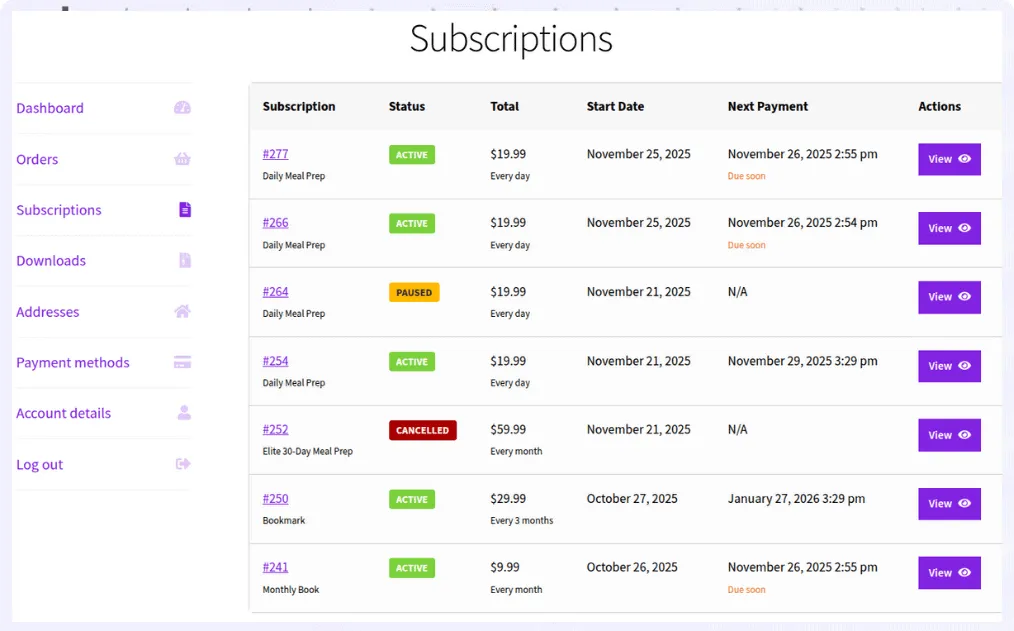
With Smart Subscriptions you can:
- create subscription products in minutes
- offer weekly, monthly, quarterly, or yearly billing
- accept automatic recurring payments through Stripe
- retry failed payments automatically
- allow customers to pause, resume, or cancel subscriptions
- manage subscriptions directly from WooCommerce
Unlike larger subscription plugins that include features many stores never use, Smart Subscriptions focuses on getting recurring billing running quickly without unnecessary complexity.
How to set up recurring payments in WooCommerce?
Once you have a subscription plugin installed and a payment gateway connected (see how to set up WooCommerce recurring payments with Stripe), setting up recurring payments in WooCommerce is straightforward.
In most cases, it comes down to four simple steps:
- create a product in WooCommerce
- choose a subscription product type
- set the price and billing cycle (weekly, monthly, or yearly)
- publish the product
That’s it. Customers can subscribe once, and payments are charged automatically based on the billing schedule.
Why Stripe is the preferred payment gateway for recurring payments?
Most WooCommerce payment gateways can process one-time payments, but not all of them support automatic recurring billing.
Stripe supports secure payment tokenization, automatic renewals, retry logic for failed payments, and saved payment methods, making it one of the most reliable choices for subscription businesses.
When paired with Smart Subscriptions, Stripe lets you automate the complete subscription lifecycle without requiring customers to manually renew every billing cycle.
Common issues with recurring payments in WooCommerce
Even with the right setup, recurring payments can run into issues if a few key areas are overlooked.
Failed renewals due to card issues
Expired cards, insufficient funds, or bank declines are the most common reasons subscriptions fail. Without retry logic, these payments are lost immediately.
Subscriptions not renewing on time
This is often caused by WordPress cron issues or misconfigured schedules. If background processes don’t run reliably, renewals can be delayed or skipped.
Incorrect billing intervals
Small mistakes in interval settings (like choosing the wrong billing period) can lead to unexpected charges or gaps in renewals.
Payment gateway limitations
Not all gateways handle recurring billing the same way. Some don’t support proper tokenization or automatic retries, leading to failed payments.
Lack of customer communication
If customers aren’t informed about renewals or failed payments, it increases cancellations, disputes, and support requests.
Best practices for recurring payments in WooCommerce
To run recurring billing smoothly, treat it as an ongoing system, not a one-time setup.
Enable automatic retries for failed payments
Many failed payments can be recovered within a few days. Retry logic helps you recover revenue without manual effort.
Keep billing cycles simple
Monthly or yearly plans are easier for customers to understand and reduce confusion.
Test the full subscription flow before launch
Check not just checkout, but renewals, failed payments, and cancellations.
Make billing terms clear
Clearly show pricing, billing frequency, and cancellation terms on product pages to avoid disputes.
Monitor subscription performance
Track failed payments, cancellations, and active subscriptions regularly to catch issues early.
Avoid overcomplicating your setup
Start simple. Add complexity only when your business actually needs it.
Start accepting recurring payments in WooCommerce
Recurring payments make it easier to build predictable revenue and long-term customer relationships. While WooCommerce doesn’t support recurring billing on its own, adding the right subscription plugin and payment gateway gives you everything needed to automate renewals.
If you’re looking for a straightforward solution, Smart Subscriptions lets you create subscription products, automate recurring Stripe payments, manage renewals, and give customers control over their subscriptions—all without the complexity of enterprise subscription plugins.
Start with a simple setup, test your subscription flow, and expand as your business grows.
Faqs
How do I choose the right billing cycle for my subscription?
Choose a billing cycle based on how frequently customers receive value. Monthly plans work well for ongoing access, while yearly plans are better for long-term commitments and improving retention.
Can I offer both one-time purchases and subscriptions in the same store?
Yes. WooCommerce allows you to sell regular products alongside subscription products, giving customers the option to buy once or subscribe.
How can I reduce failed payments in WooCommerce subscriptions?
You can reduce failed payments by enabling automatic retries, sending payment reminders, and using a reliable payment gateway that supports saved payment methods.
What payment gateways support WooCommerce recurring payments?
Stripe is one of the most popular options because it supports automatic recurring billing, saved payment methods, retries for failed payments, and subscription management.
What’s the difference between recurring payments and subscriptions?
Recurring payments are the automated charges. A subscription is the customer agreement that defines billing frequency, duration, pricing, renewals, and access.