


Getting customers to place the first order is already expensive. So when someone finally buys from your WooCommerce store, the last thing you want is for that relationship to end after a single purchase.
That’s exactly why post purchase coupons work so well.
Instead of constantly chasing new customers, you can encourage existing buyers to come back with offers like: “Get 15% OFF on your next order” or “Here’s free shipping on your next purchase.”
In this guide, you’ll learn how to create post purchase coupons in WooCommerce using Smart Coupons.
Why do post purchase coupons work so well?
Getting a new customer is getting more expensive for almost every WooCommerce store owner. That’s why repeat purchases matter so much.
That’s exactly why post purchase coupons work.
The customer already trusts your store enough to place one order. So instead of convincing a completely cold visitor to buy, you’re simply giving an existing customer a reason to come back.
Sometimes even a simple: “10% OFF on your next order” or “Free shipping if you reorder this week” is enough to drive another purchase.
How to create post purchase coupons in WooCommerce?
Let’s say you sell skincare products in your WooCommerce store.
A customer purchases a face cleanser for the first time. Now instead of relying on them to come back on their own, you want to encourage another purchase before the product runs out.
So after the purchase, you automatically give them: “Get 10% OFF on your next skincare order within 10 days.”
This works especially well for products customers naturally reorder, like skincare, supplements, coffee, pet products, and wellness items.
Now let’s set this up in WooCommerce using Smart Coupons.
Step 1: Create the post purchase coupon
Go to: WooCommerce → Marketing → Coupons → Add coupon
Now:
- Enter the coupon code, for example: SKINCARE15
- Under
General → Discount type, selectPercentage discount - Set
Coupon amountto 10
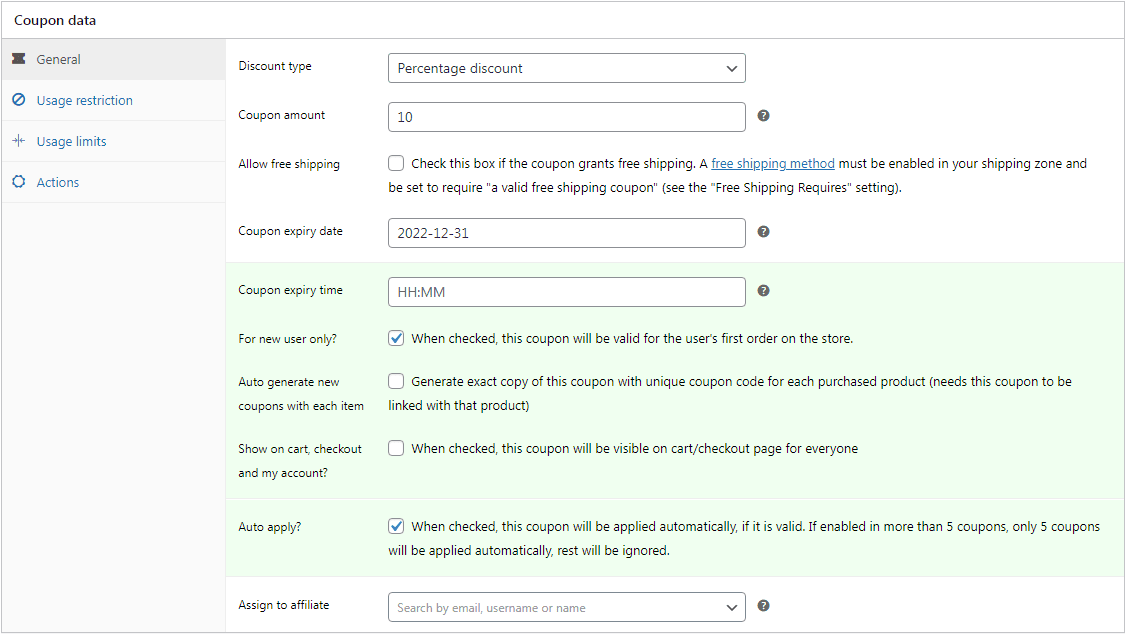
- Set an
Expiry dateto create urgency - Configure usage restrictions or limits if needed
- Once done, click
Publish.
Step 2: Link the coupon to your product
Now let’s automatically issue this coupon whenever someone purchases your face cleanser.
- Go to:
WordPress Admin → Products - Edit your skincare product.
- Under the
General tab, look for theCoupons field - Search and select the coupon you created earlier: SKINCARE15
- Click
Update
That’s it.
Now whenever customers purchase that product, they’ll automatically receive the linked coupon for their next order.
Step 3: Show coupon details on the product page (optional)
You can also show customers that they’ll receive a reward after purchase.
For example, on your product page, visitors can see something like: “Get 10% OFF on your next skincare order after purchase.”
This works well because customers know about the reward before placing the order.
- To enable this, go to:
WooCommerce → Settings → Smart Coupons - Now scroll to:
Display coupons - Enable
Include coupon details on product’s page, for products that issue coupons - Then click
Save changes.
Now customers will automatically see the coupon details directly on eligible product pages.
Real ways WooCommerce stores use post purchase coupons
The nice thing about post-purchase coupons is that you can use them in different ways depending on how your store works.
Maybe you want customers to reorder faster. Maybe you want to push subscriptions, increase average order value, or bring seasonal buyers back again.
Here are some practical ways WooCommerce stores usually use post purchase coupons.
Encourage faster repeat purchases
A lot of WooCommerce stores use post-purchase coupons simply to bring customers back faster.
For example, after someone places their first order, you can automatically offer: “Get 15% OFF your next order within 7 days.”
The short expiry window creates urgency and gives customers a reason to reorder sooner instead of forgetting about your store completely.
Turn one-time buyers into subscribers
If you sell products customers reorder regularly, post-purchase coupons can work really well for subscriptions.
For example, a skincare or supplement store might offer: “Subscribe now and save 20% on future deliveries” right after someone purchases a starter kit or first-time product.
At that point, the customer has already tried your product and is much more likely to commit to recurring orders.
Offer store credit instead of discounts
Not every store wants to keep giving percentage discounts.
Some WooCommerce stores reward customers with store credit instead, like: “You earned $20 store credit for your next order.”
This usually feels more rewarding to customers while protecting your margins better than constant coupon discounts.
Bring seasonal shoppers back again
Black Friday and holiday shoppers often buy once and disappear.
That’s why many stores automatically send a follow-up offer after those purchases, like: “Come back next month and get 10% OFF your next order.”
It’s a simple way to turn seasonal traffic into long-term customers.
Reward bigger orders differently
Some stores offer stronger post-purchase rewards only for high-value orders.
For example: “Spend over $200 and unlock a $30 reward coupon.”
This encourages customers to spend more while making the reward feel exclusive.
Move slower inventory quietly
Post-purchase coupons can also help promote products you want to sell more of without running a storewide sale.
For example, if someone buys sneakers, a fashion store could automatically send: “20% OFF jackets on your next order.”
This feels more targeted and avoids discounting your entire catalog.
Increase average order value on the second purchase
Many supplement and wellness stores use post-purchase coupons to push bundles instead of individual products.
For example: “Get 15% OFF any combo pack on your next order.”
Customers were already planning to buy again. The coupon simply encourages them to spend a little more next time.
Don’t let the customer journey end after the first order
Getting the first sale in WooCommerce already takes effort. So if a customer has purchased from your store once, that’s usually the best time to encourage the next purchase too.
Even a simple post-purchase coupon can help bring customers back faster, increase repeat purchases, and improve customer lifetime value without relying entirely on ads.
With Smart Coupons, you can automate those offers directly inside WooCommerce and reward customers at the exact moment they’re most likely to buy again.
FAQs
What is a post purchase coupon in WooCommerce?
A post-purchase coupon is a coupon customers receive after completing an order. Stores usually use these coupons to encourage repeat purchases, subscriptions, or future orders.
Can I link coupons to specific WooCommerce products?
Yes. Smart Coupons lets you link coupons to specific WooCommerce products, so customers receive the coupon only after purchasing those products.
What is the best expiry time for post-purchase coupons?
Most WooCommerce stores use shorter expiry windows like 7–14 days because they create urgency and encourage customers to place the next order faster.
Should post-purchase coupons offer discounts or free shipping?
That depends on your margins and products. Some stores use percentage discounts, while others use free shipping or store credit to encourage repeat purchases without heavily discounting products.