
A customer buys once, and the relationship ends there. Subscription businesses work differently.
Instead of constantly chasing new sales, you turn one purchase into predictable recurring revenue.
Customers subscribe once and receive products, services, or access regularly while payments happen automatically.
This model powers many successful businesses today, from streaming platforms to ecommerce brands and digital services.
In this guide, you’ll learn how to sell subscriptions with WooCommerce, what tools you need, and how to turn your products into recurring revenue streams.
Understanding the subscription business model
A subscription business is simple: customers sign up once and pay automatically on a recurring schedule, monthly, quarterly, or yearly, to keep receiving a product, service, or access.
You already use subscriptions in everyday life.
- You pay Netflix or Spotify every month for entertainment.
- You might subscribe to Amazon Subscribe & Save for household essentials.
- Many professionals pay monthly for tools like Adobe Creative Cloud.
Instead of one-time purchases, customers keep paying as long as they continue receiving value.
For businesses, this creates predictable recurring revenue and stronger customer relationships. For customers, it offers convenience and consistency.
Depending on what you sell, subscriptions can take different forms. Let’s take a look at them.
Product subscriptions
Customers receive the same product regularly because they use it frequently and need replenishment.
Examples:
- Coffee beans delivered every month
- Vitamins or supplements
- Pet food subscriptions
- Skincare refills
This model works well for products people use repeatedly.
Subscription boxes
Subscription boxes deliver curated products on a schedule, often with an element of surprise.
Popular global examples include:
- HelloFresh – weekly meal kits
- FabFitFun – seasonal beauty and lifestyle boxes
- Bokksu – Japanese snack boxes
Customers subscribe for the experience and discovery.
Digital subscriptions
Digital subscriptions give customers ongoing access to digital products or services.
Examples include:
- Netflix or Spotify for streaming
- Adobe Creative Cloud for design tools
- Paid newsletters or online communities
Since delivery is digital, these businesses can scale quickly.
Service subscriptions
Some businesses offer recurring services instead of products.
Examples include:
- Website maintenance plans
- Marketing retainers
- Coaching programs
- Cleaning services
Customers pay regularly while the service continues.
The key idea is simple: once someone subscribes, revenue repeats automatically as long as the subscription remains active.
What you need to sell subscriptions with WooCommerce?
Setting up subscriptions in WooCommerce isn’t complicated, but you do need a few key components working together.
Here are the three essentials.
1. WooCommerce
First, you need a WooCommerce store.
WooCommerce handles the core ecommerce functions, products, orders, customers, and checkout. If you already run a WooCommerce store, you’re halfway there.
2. A subscription plugin
WooCommerce supports regular products by default, but recurring billing isn’t built in.
To sell subscriptions, you need a plugin that can handle things like:
- recurring billing cycles
- automatic renewals
- subscription status management
- customer subscription controls
The plugin essentially manages the entire subscription lifecycle.
3. A payment gateway that supports recurring payments
Since subscriptions involve automatic billing, your payment gateway must support recurring payments.
Popular options include:
- Stripe
- PayPal
These gateways securely store billing details and charge customers automatically at each renewal period.
Once these three pieces are in place, your WooCommerce store is ready to start selling subscription products.
How to start selling subscriptions with WooCommerce?
WooCommerce supports regular products out of the box, but it does not include built-in support for automatic recurring billing.
That means if you want customers to pay monthly or yearly for products, services, or memberships, you’ll need a subscription solution that can handle recurring payments and subscription management.
Many WooCommerce stores use the WooCommerce Subscriptions plugin to add subscription functionality.
It allows store owners to create recurring products, manage subscription renewals, and give customers control over their subscriptions.
However this can be a complex solution if you are a small business or just starting out.

Another option is Smart Subscriptions for WooCommerce, a lightweight plugin built specifically for WooCommerce stores that want a simpler way to launch subscription products.
Instead of dealing with complex configurations, it lets you create recurring products directly inside your WooCommerce dashboard.
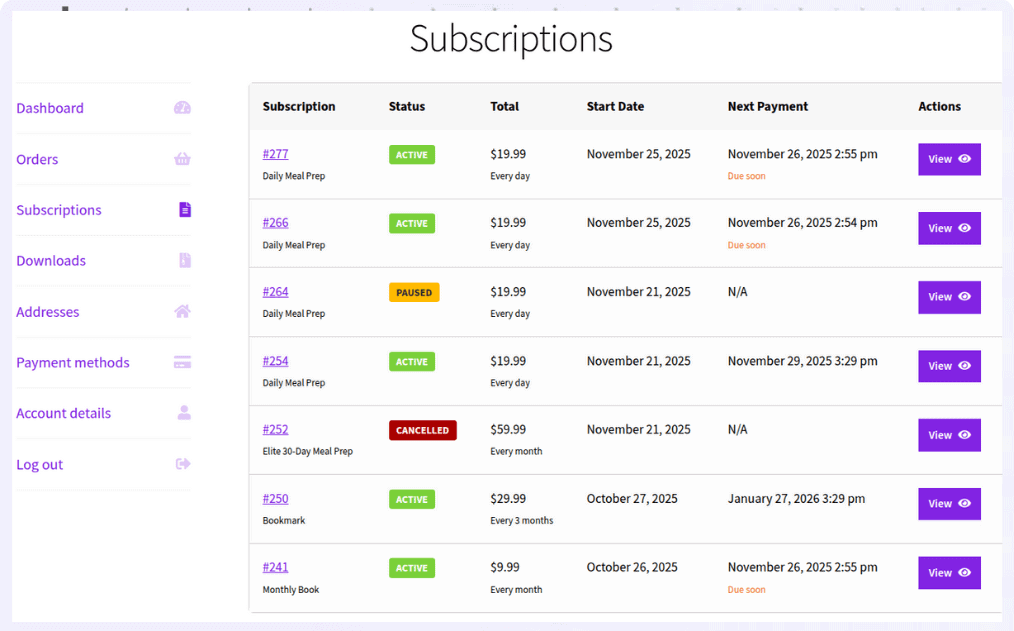
Here are some key features you’ll love:
- Simple subscription product type for quick setup
- Flexible billing cycles (daily, weekly, monthly, yearly)
- Stripe-powered recurring payments
- Smart retry system to recover failed payments
- Customer controls to pause, resume, or cancel subscriptions
This makes it easier for WooCommerce stores to launch and manage subscription products without complex setups.
Now let’s see how to create a subscription product in WooCommerce using Smart Subscriptions for WooCommerce.
How to sell subscriptions with WooCommerce (step-by-step)
Let’s say you want to sell a monthly coffee subscription for $19.99. Customers subscribe once, and WooCommerce automatically charges them every month.
Here’s how to create that subscription product using Smart Subscriptions for WooCommerce.
- Go to
WordPress Admin > Products > Add New - Enter the product name and description
- In Product data, select
Simple Subscription - Set the
Subscription Price(example: $19.99) - Choose the
Billing Interval(example: 1) - Select the
Billing Period(example: Month for a monthly subscription) - (Optional) Add a free trial by setting
Trial LengthandTrial Period - Click
Publish
Your subscription product is now live.
Customers can subscribe once, and payments will renew automatically based on the billing cycle you set.
Check out this detailed guide to set up WooCommerce subscription products.
How to successfully sell subscriptions?
Launching a subscription product is just the first step. The real challenge is convincing customers to subscribe. Here are some strategies that work.
Offer a subscribe-and-save option
Many ecommerce stores increase conversions by offering a discount for subscription purchases.
For example:
- One-time purchase: $20
- Subscribe and save: $18/month
Customers get a better deal, and your store gains predictable recurring revenue.
Offer annual plans
Annual subscriptions improve cash flow and reduce churn.
For example:
- $20/month
- $200/year
Customers save money, and you secure longer commitments.
Choose products customers need regularly
Subscriptions work best for products that naturally run out.
Some examples are:
- coffee or tea
- supplements
- pet food
- skincare products
- household essentials
These products encourage repeat purchases without extra marketing effort.
Reduce subscription cancellations
Keeping subscribers is just as important as acquiring them.
Some ways to reduce churn include:
- sending renewal reminder emails
- offering flexible pause options
- allowing easy subscription management
- recovering failed payments automatically
Even small improvements here can significantly increase subscription revenue.
Start building recurring revenue
Subscriptions transform how WooCommerce stores grow.
Instead of relying on one-time purchases, you build a base of loyal customers who generate revenue month after month.
With the right pricing strategy, the right products, and reliable subscription tools, WooCommerce stores can create sustainable recurring income.
Start with one subscription product, test your pricing, and refine your strategy as your subscriber base grows.
Get Smart Subscriptions for WooCommerce
FAQs
Can I offer a discount for annual subscriptions instead of monthly?
Yes. Create two subscription products, one billed monthly and another billed yearly at a discounted price. This encourages customers to commit longer while improving your cash flow.
What happens if a subscription payment fails?
Most subscription plugins retry the payment automatically. Smart Subscriptions for WooCommerce includes a smart retry system that reattempts failed payments before canceling the subscription.
Can I sell both one-time and subscription versions of a product?
Yes. Many stores offer a one-time purchase option alongside a subscribe-and-save option so customers can choose what works best for them.
Will customers be notified before a subscription renews?
Yes. Subscription plugins can send automated email reminders before the renewal date so customers know when their next payment will be charged.
Can I limit how long a subscription runs?
Yes. You can set a fixed number of billing cycles so the subscription ends automatically after a specific period.