

In affiliate marketing, performance is everything. The more your affiliates sell, the more your business grows — it’s a win-win, right?
Well… not always.
Most affiliate programs stick to flat commission rates. Same percentage, whether an affiliate drives 5 sales or 500.
Guess what? Your top affiliates leave.
High-performing affiliates deserve performance-based commissions. When they’re rewarded for volume, they go all in.
That’s where tiered commissions structure (volume commissions / performance commissions) come in. It’s a smarter way to motivate your best performers — the more they sell, the more they earn.
And for you? More revenue, more loyalty, more growth.
Let’s break down how volume-based commissions change the game and how you can set it up in WooCommerce.
Why tiered commissions are a game-changer?
Flat commissions are fine… until your best affiliates start wondering, “Why am I working harder for the same reward?”
Here’s why tiered-based commissions (also called sales tiers or volume commissions) are the real MVP:
- Motivate top performers to outperform themselves: Higher sales tiers push affiliates to work harder. When they know more sales means more earnings, they go the extra mile.
- Reduce churn among high-value affiliates: Flat commissions feel unfair to top contributors. Tiered rewards show you value their effort — and help keep them loyal.
- Add a gamified layer to your program: Affiliates “level up” by crossing order tiers. More fun = more engagement.
- Drive long-term commitment: Since the commission is based on overall performance over time, affiliates stay active longer to reach higher tiers.
- Target specific sales goals strategically: Want to sell more of a certain category, product, or through a specific payment method? Set tiered commissions around those goals.
New feature alert: Tiered commissions structure
If you’re ready to turn your affiliate program into a performance-powered growth engine, Affiliate for WooCommerce has your back.
This plugin gives you full control over your commissions, affiliate management, tracking, and reporting.
Affiliate for WooCommerce has the best commission system in the market. And it has now added one more: Tiered Commissions, also known as Volume or Performance based commission.
Now, you can reward affiliates based on:
- Valid Referral Orders
- Revenue
- Customers
- Last Referral (Days)
That means:
- Better incentives for long-term performance
- Flexible, tier-based commission setup
- And a whole lot more sales without extra manual effort
Want to explore other types of commission plans like payment methods or product taxonomies? Check out this article.
Enough of this theory, now let’s see how to actually set up a tiered commission structure with Affiliate for WooCommerce.
Tiered commission based on valid referral orders
Let’s say you want to reward affiliates with higher commissions as they bring in more orders. For example:
- Affiliates with less than 1,000 orders get a 30% commission.
- Affiliates with 1,000 or more orders get a 35% commission.
Steps to set up order-based commission:
- Go to
WooCommerce > Affiliates > Plans. - Click on
Add a Plan. - Give a name to your plan – say, Commission for Less than 1000 Orders.
- Under
Commission, selectPercentageand then type 30. - Now under
Rules, set the rule asAffiliate – Valid Referral Orders < 1000. - Under the
Actionstab, set the action to decide whether you want to reward commission for only the first matched product in the order or give commission for all matched products. Then choose what happens with any other products in the order — match another commission plan, provide default commission or apply zero commission. - Set the commission plan as
Active. - Click on
Save.
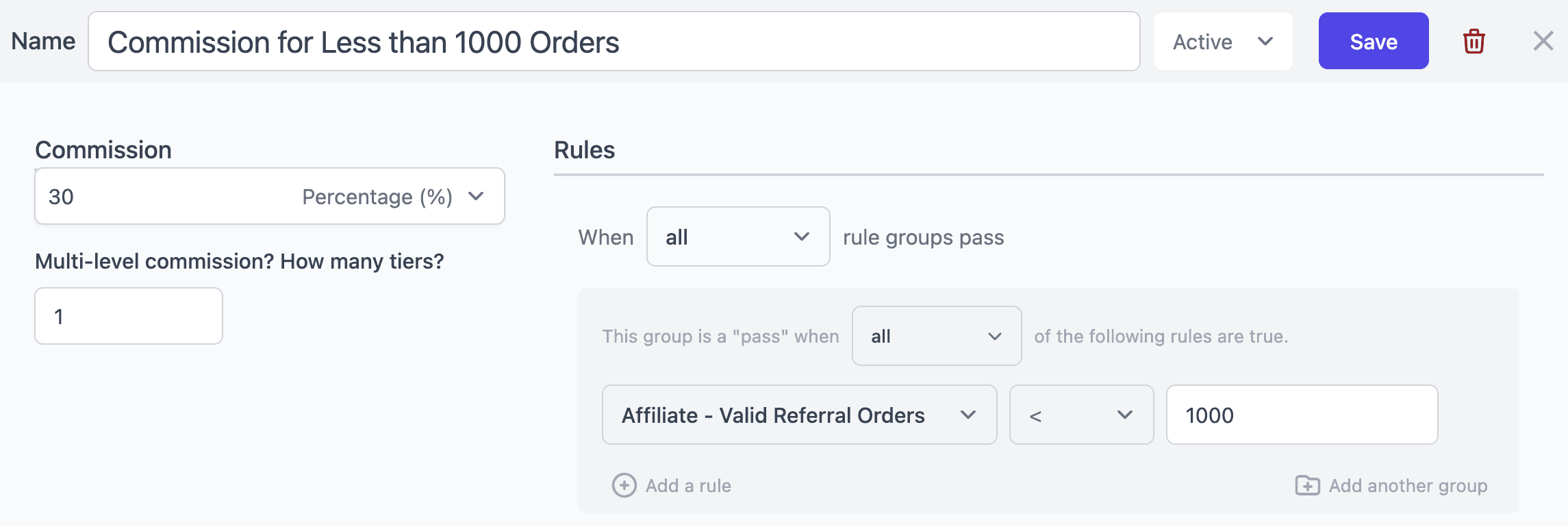
Now create one more new plan:
- Follow the same steps as above. Just in
Commission, set35%as commission. - Set the plan name.
- And under
Rules, set the rule asAffiliate – Valid Referral Orders >= 1000. - Under the
Actionstab, decide whether to provide commission or not to other products if any in the order. - Set the commission plan as
Active. - Click on
Save.
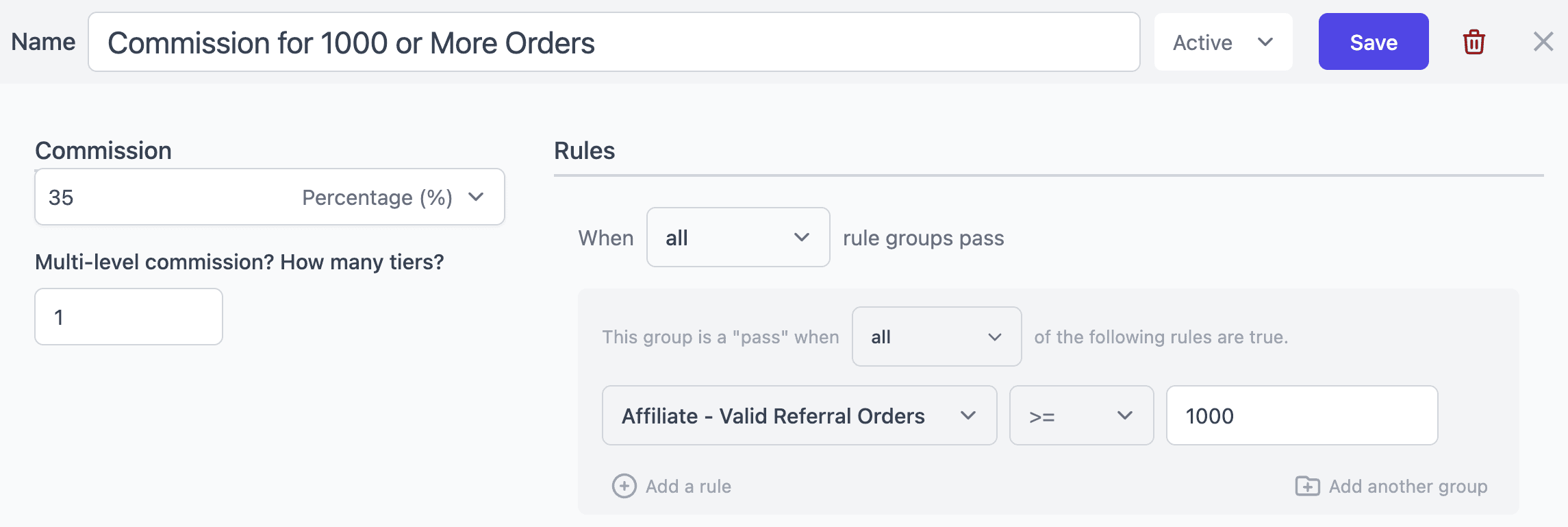
And this is how you can easily create tiered based commission based on orders.
Tiered commission based on revenue
Another powerful way to motivate your affiliates is by rewarding them based on the total revenue they generate.
You can now create a tiered commission structure based on affiliate revenue — a perfect strategy to recognize your top-performing affiliates and push them to achieve higher sales milestones.
Let’s look at an example:
- Affiliates who’ve generated less than $5,000 in revenue earn a 20% commission.
- Affiliates who’ve generated $5,000 or more in revenue earn a 25% commission.
Here’s how you can set up revenue-based tiered commission:
- Go to
WooCommerce > Affiliates > Plans. - Click on
Add a Plan. - Give your plan a name — for example, Commission for Less than $5,000 Revenue.
- Under
Commission, select Percentage and enter 20. - In the
Rulessection, chooseAffiliate – Revenue < 5000. - Set the desired rules under the
Actionstab to give commission for other products in the order. - Set the commission plan status to
Active. - Click
Save.
Now, create the next tier:
- Click
Add a Planagain. - Name it — for instance, Commission for $5,000+ Revenue.
- Under
Commission, select Percentage and enter 25. - In the
Rules, setAffiliate – Revenue >= 5000. - Under the
Actionstab, set the required options. - Then set commission plan status to
Active. - Click
Save.
And you’re done!
Your affiliates will now earn commissions based on the total revenue they bring in.
Tiered commission based customers
Want to reward your affiliates not just for the number of orders or revenue but for the number of unique customers they bring in?
This setup is simple and perfect if you want to encourage affiliates to focus on acquiring new customers rather than just repeat sales.
The more customers they bring, the higher their commission tier.
Let’s look at an example:
- Affiliates who have referred fewer than 50 unique customers get a 20% commission.
- Affiliates who have referred 50 or more unique customers get a 25% commission.
Here’s how you can set up customer-based tiered commission:
- Go to
WooCommerce > Affiliates > Plans. - Click
Add a Plan. - Enter a plan name – for example, Commission for Less than 50 Customers.
- Under
Commission, choose Percentage and enter 20. - In the
Rulessection, setAffiliate – Customers < 50. - Set the desired options under the
Actionstab. - Set the commission plan status to
Active. - Click
Save.
Now create another plan for the next tier:
- Click
Add a Planagain. - Enter a name – say, Commission for 50+ Customers.
- Under
Commission, choose Percentage and enter 25. - In Rules, set
Affiliate – Customers >= 50. - Set the desired options under the
Actionstab. - Activate the commission plan.
- Click
Save.
And that’s it!
Your affiliates will now automatically earn commissions based on the total number of unique customers they’ve referred.
Tiered commission based on last referral (days)
Reward your affiliates based on their recent activity — specifically, the number of days since their last referral.
This feature helps you identify and motivate affiliates who are regularly bringing in referrals, while also re-engaging those who haven’t been active for a while.
Here’s an example:
- Affiliates whose last referral was within the last 30 days earn a 25% commission.
- Affiliates whose last referral was older than 30 days earn a 15% commission.
Here’s how you can set up this plan:
- Go to
WooCommerce > Affiliates > Plans. - Click on
Add a Plan. - Give your plan a name — for example, Active Affiliates (Last 30 Days).
- Under
Commission, select Percentage and enter 25. - In the
Rulessection, chooseAffiliate – Last Referral (Days) → in last → 30. - Set the appropriate options under the
Actionstab. - Set the commission plan as
Active. - Click
Save.
Now, let’s create another plan for less active affiliates:
- Click
Add a Planagain. - Name it — for instance, Inactive Affiliates (Older than 30 Days).
- Under
Commission, select Percentage and enter 15. - In the
Rules, chooseAffiliate – Last Referral (Days) → older than → 30. - Set the appropriate options under the
Actionstab. - Set the commission plan to
Active. - Click
Save.
Your affiliate system will now automatically assign commission rates based on how recently affiliates brought in their last referral.
Now, let’s see how to make the best use of these tiered commissions for your business.
Tiered commission setup ideas you can steal
With Affiliate of WooCommerce, you can club tiered commissions with other rules based on affiliate tags, payment methods, and more.
Here are a few practical and creative examples to inspire your setup:
Tiered commission based on orders and affiliate tag
Many affiliates may have already generated 100 valid orders for your store. Now, you can choose to reward only those affiliates who have crossed this milestone and belong to your “Gold” tag or group.
Let’s say you want to offer a 10% commission only when both conditions apply i.e. they’ve crossed 100 valid referral orders and hold the Gold affiliate status.
In the same way, you can reward a 15% commission to affiliates who have generated more than 100 but fewer than 200 valid orders in the past and are tagged as Gold affiliates.
So, you have to create two plans and set these rules:
- In the first plan, under
Commission, select Percentage and enter 10 andAffiliate - Valid Referral Orders <= 100. Now, add another ruleAffiliate - Tags → any of → Gold. - In the second plan, under
Commission, select Percentage and enter 15,Affiliate - Valid Referral Orders >= 101andAffiliate - Valid Referral Orders <= 200within the same rule group. Now, add another ruleAffiliate - Tags → any of → Gold.
Tiered commission based on the number of customers and affiliate tag
Many affiliates may be referring customers to your store. Now, you want to reward only those affiliates who bring in new customers and also belong to your Pro Affiliates tag.
Let’s say you want to offer a 10% commission only when both conditions apply — the affiliate has referred 1–10 unique customers and holds the Pro Affiliates tag.
Similarly, you can reward a 15% commission to affiliates who have generated more than 10 but fewer than 25 customers in the past and are tagged as Pro Affiliates.
So, you have to create two new rules as follows:
- Under
Commission, select Percentage and enter 10 andAffiliate - Customers ≤ 10. Now add another ruleAffiliate - Tags → any of → Pro Affiliates. - Under
Commission, select Percentage and enter 15 andAffiliate - Customers ≥ 11andAffiliate - Customers ≤ 25. Now add another ruleAffiliate - Tags → any of → Pro Affiliates.
Tiered commission based on orders and payment method
Suppose, you want to reward your affiliates based on how many orders they generate and the payment methods used.
Let’s say you want to offer a 15% commission only when an affiliate has generated 1–20 valid orders and the customer pays using PayPal or Stripe.
In the same way, you can reward a 20% commission to affiliates who have generated 21 or more valid orders, as long as those orders are completed using PayPal or Stripe.
To enable this, you have to create two plans and set these rules:
- Under
Commission, select Percentage and enter 15 andAffiliate - Valid Referral Orders <= 20. Now add another ruleOrder - Payment Methods → any of → PayPal, Stripe. - Under
Commission, select Percentage and enter 20 andAffiliate - Valid Referral Orders >= 21. Now add another ruleOrder - Payment Methods → any of → PayPal, Stripe.
Tiered commission for orders and specific affiliate
Let’s say you want to reward your rockstar affiliate Amanda based on the number of orders she generates.
You can offer a 15% commission when Amanda has generated 1–100 valid orders for your store.
In the same way, you can reward a 20% commission once Amanda crosses 101 and up to 500 valid orders.
So, create two plans as follows:
- Under
Commission, select Percentage and enter 15 andAffiliate - Valid Referral Orders <= 100. Now add another ruleAffiliate → any of → Amanda (amanda19@example.com). - Under
Commission, select Percentage and enter 20 andAffiliate - Valid Referral Orders >= 101andAffiliate - Valid Referral Orders <= 500. Now add another ruleAffiliate → any of → Amanda (amanda19@example.com).
Tiered commission for orders and specific product
Now, you want to reward your affiliates based on their past order volume and the current product being sold.
Let’s say an affiliate has already generated 1–10 valid orders in the past. If their current referral order is for the Bluetooth Keyboard, you can reward them with a $100 commission.
In the same way, if an affiliate has generated 11–25 valid orders in the past and their current referral order is for the Bluetooth Keyboard, you can offer a $150 commission.
Here’s how you’d configure the rules in your affiliate platform:
- Under
Commission, select Flat and enter $100 andAffiliate - Valid Referral Orders <= 10. Now add another ruleProduct → any of → Bluetooth Keyboard. - Under
Commission, select Flat and enter $150 andAffiliate - Valid Referral Orders >= 11andAffiliate - Valid Referral Orders <= 25. Now add another ruleProduct → any of → Bluetooth Keyboard.
Tiered commission based on orders and product taxonomy
Let’s say you want to reward your affiliates based on their past order volume and the brand of the current product.
Let’s say an affiliate has generated 1–20 valid orders in the past. If the current referral order belongs to the Adidas brand, you can reward them with an 18% commission.
Similarly, if an affiliate has generated 21–50 valid orders in the past and the current product brand is Adidas, you can offer a 25% commission.
Here’s how to set it up:
- Under
Commission, select Percentage and enter 18 andAffiliate - Valid Referral Orders <= 20. Now add another ruleProduct - Brands → any of → Adidas. - Under
Commission, select Percentage and enter 25 andAffiliate - Valid Referral Orders >= 21andAffiliate - Valid Referral Orders <= 50. Now add another ruleProduct - Brands → any of → Adidas.
Tiered commission based on orders and product category
Now, you want to reward your affiliates based on their past order volume and the category of the current product.
Let’s say an affiliate has generated 1–8 valid orders in the past. If the current referral order belongs to the Luxury category, you can reward them with a 25% commission.
In the same way, if an affiliate has generated 9 or more valid orders in the past and the current product falls under the Luxury category, you can offer a 30% commission.
Here’s how to set it up:
- Under
Commission, select Percentage and enter 25 andAffiliate - Valid Referral Orders <= 8. Now add another ruleProduct - Categories → any of → Luxury. - Under
Commission, select Percentage and enter 30 andAffiliate - Valid Referral Orders >= 9. Now add another ruleProduct - Categories → any of → Luxury.
Tiered commission based on revenue generated and product category
Many affiliates may have already generated revenue for your store. Now, you want to reward them based on their past revenue contribution and the category of the current product.
Let’s say an affiliate has generated revenue up to $5,000 in the past. If the current referral order belongs to the Electronics category, you can reward them with an 18% commission.
In the same way, if an affiliate has generated $5,001–$10,000 in revenue in the past and the current product falls under the Electronics category, you can offer a 25% commission.
Create two new plans as follows:
- Under
Commission, select Percentage and enter 18 andAffiliate - Revenue ≤ 5,000. Add another ruleProduct - Categories → any of → Electronics. - Under
Commission, select Percentage and enter 25 andAffiliate - Revenue ≥ 5,001andAffiliate - Revenue ≤ 10,000. Add another ruleProduct - Categories → any of → Electronics.
Tiered commission based on last referral (days) and payment method
Many affiliates may have referred customers at different times. Now, you want to reward them based on how recently they referred a customer and the payment method used in the current order.
Let’s say an affiliate has generated a referral in the last 30 days. If the current order is paid using PayPal, you can reward them with a 20% commission.
In the same way, if an affiliate’s last referral was older than 30 days and the current order is paid via PayPal, you can offer a 10% commission.
Set two plans as follows:
- Under
Commission, select Percentage and enter 20 andAffiliate - Last Referral (Days) → in last → 30. Add another ruleOrder - Payment Methods → any of → PayPal. - Under
Commission, select Percentage and enter 10 andAffiliate - Last Referral (Days) → older than → 30. Add another ruleOrder - Payment Methods → any of → PayPal.
Turn affiliates into sales machines
Overall, flat commissions might be easy, but they’re not enough if you want to scale.
Your high-performing affiliates need to feel seen, valued, and — most importantly — rewarded for their hustle.
A tiered commission structure doesn’t just motivate; it transforms your affiliate program into a dynamic, performance-driven machine.
So, whether you’re rewarding based on total orders, number of customers, product type, payment method, last referral (days) or revenue tiers — Affiliate for WooCommerce gives you the control to set it up exactly how you want.