
Renting out bikes, cars, boats, or bicycles sounds straightforward until you try to manage it online.
The moment inventory starts moving in and out, things get complicated. One bike goes out for a few hours, another for two days. A car comes back late. A boat needs downtime before the next booking. Availability changes constantly, and manual tracking stops working very quickly.
This is where most WooCommerce setups struggle.
WooCommerce can sell products, but rentals aren’t just sales. They involve time, quantity, returns, and reuse of the same assets.
That’s why many store owners end up trying WooCommerce booking plugins meant for hotels or appointments, only to realise they’re not designed for managing physical inventory that moves.
What WooCommerce rental businesses actually need is a booking and rental manager that understands assets, not rooms or time slots.
In this post, we’ll look at why vehicle rental setups for bikes, cars, boats, bicycles, and similar assets break and how businesses can manage bookings and availability more effectively using Smart Rental & Booking for WooCommerce by StoreApps.
Rentals today are asset-based, not appointment-based
Modern rentals aren’t about blocking time on a calendar. They’re about managing physical assets that move in and out of inventory.
When someone rents a bike, car, or boat, they’re taking a real item out of circulation for a specific period.
That item may need cleaning, charging, or inspection before it can be rented again.
This is where rentals differ from appointments:
- Appointments assume fixed time slots and unlimited reuse
- Rentals depend on quantity, duration, and turnaround time
Any booking and rental manager for vehicles or equipment needs to be built around this asset-based reality.
Once you view rentals this way, it’s clear why many booking systems struggle.
Where do most booking systems fall short?
Most booking systems are built around a simple assumption: one booking equals one time slot.
That works for appointments, meetings, or stays. It starts breaking down the moment you’re dealing with physical assets that move in and out.
Many popular booking plugins were originally designed for hotels or appointments and later adapted for rentals.
They focus on calendars and time slots, not on inventory that needs to be tracked, returned, and reused.
This creates a few common problems for rental businesses:
- Availability is treated as a date range, not tied to actual quantity.
- Multi-day or hourly rentals require manual adjustments.
- There’s no concept of inventory returning after use.
- Turnaround time for cleaning, charging, or maintenance is ignored.
- Admins end up approving or rejecting bookings manually.
WooCommerce on its own doesn’t solve this either. It understands products and stock, but not rental periods, overlaps, or assets being unavailable between bookings.
The result is familiar: overbookings, constant double-checks, and workarounds that don’t scale once bookings increase.
For rentals, the problem isn’t booking dates. It’s that most systems aren’t built to manage assets that move.
This confusion isn’t theoretical. It shows up repeatedly when rental businesses ask for help choosing a booking plugin, for example in discussions like this thread.
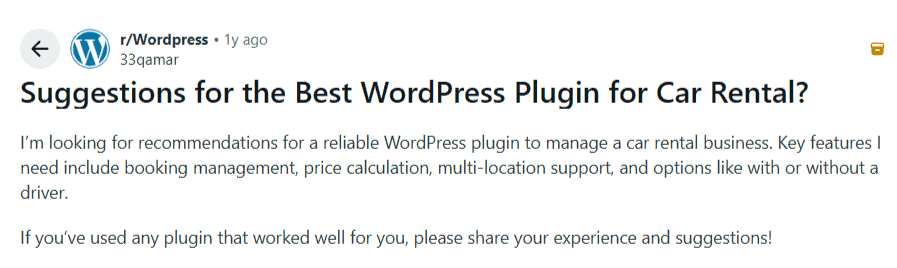
This is where most rental businesses realise they need more than a calendar.
What a booking & rental manager must handle (for vehicles & equipment)
A booking and rental manager for vehicles and equipment has to do more than display a calendar. It needs to reflect how physical assets actually move in and out of inventory.
At a minimum, it should handle:
- Availability tied to both dates and quantity
Rentals aren’t unlimited. If you have five bikes or three cars, the system must block bookings once that inventory is booked for a given date range. - Hourly and daily rentals without manual math
Some customers rent for a few hours, others for several days. Pricing should adjust automatically based on duration, without admin intervention. - Asset return and turnaround time
When a rental ends, the item shouldn’t instantly become available if it needs cleaning, charging, inspection, or maintenance. Buffer time between bookings is essential. - Security deposits as part of the booking flow
High-value rentals often require refundable deposits. These should be handled during checkout, not through follow-up emails or manual tracking. - Clear visibility into active and upcoming rentals
Store owners need to see what’s out today, what’s returning soon, and what’s available next week, all from one place, without spreadsheets or external tools.
Without these fundamentals, even a good-looking booking interface starts breaking down as rental volume grows.
So what does a system look like when it’s designed around these realities instead of working against them?
A simpler way to manage vehicle rentals in WooCommerce
Smart Rental & Booking for WooCommerce is built for rental businesses where inventory moves: vehicles, equipment, and assets that go out, return, and get reused.
It adds rental logic directly to WooCommerce products, without hotel-style workflows or external systems.
What this enables:
- Availability based on dates + quantity
- Hourly, daily, or mixed rentals with automatic pricing
- Turnaround time for cleaning, charging, or maintenance
- Refundable or partial security deposits at checkout
- Optional add-ons like driver service, insurance, GPS, and equipment
- Live availability calendar on product pages
- Rental-specific order status and booking visibility
- Everything managed inside WooCommerce, no spreadsheets
Customers book rentals like a normal product and store owners get controlled, predictable operations.
Smart Rental & Booking for WooCommerce fits real-world rental workflows without the complexity of enterprise fleet software.
Let’s see how this works in a real setup.
How to set up a car rental in Woocommerce?
Let’s say you run a small car rental business in Austin, Texas, and you rent out a Toyota Corolla 2022 (Automatic).
You have 3 Corollas, and you want customers to book them online for daily or short-term rentals.
Here’s how you set it up using Smart Rental & Booking for WooCommerce:
- Install and activate the plugin. The required rental settings and database tables are created automatically.
- Go to
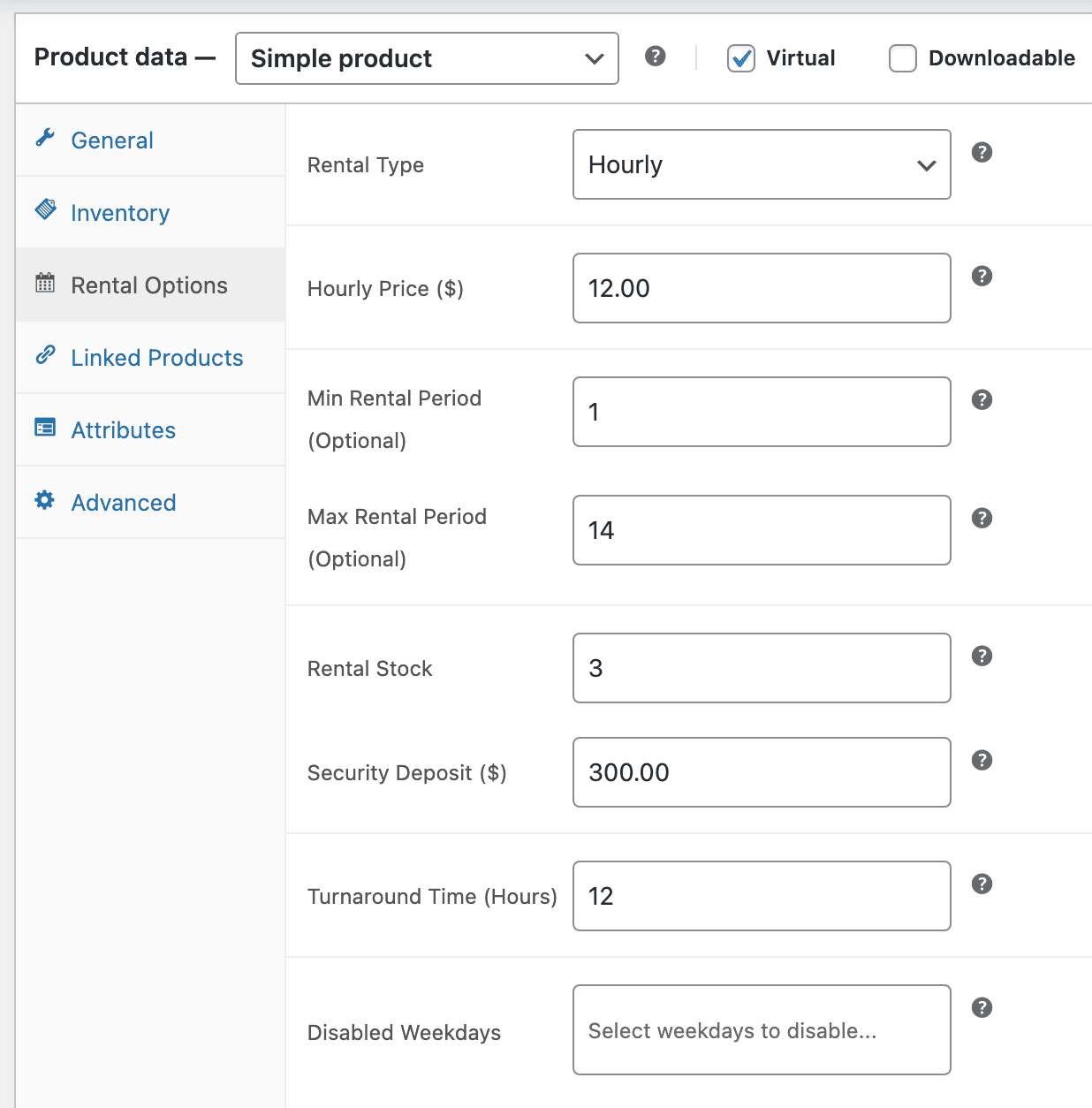
Products > Add Newand create aSimple productnamed “Toyota Corolla 2022- Automatic”. - Set the stock to 3.
- Click on the
Enable Rental Productoption on the product page. - In the
Rental Optionssection, configure:- Set the rental pricing to $12 hourly, $75 per day, or both.
- Set the
Minimum rental durationas 1 day andmaximum rental durationas 14 days. - Set the available rental dates.
- You can also add a refundable security deposit of $300.
- Any extra charges or add-ons: GPS ($5 per day), Child seat ($7 per day).
- Add 12-hour buffer time between rentals for charging, cleaning, inspection, or maintenance, and block specific weekdays or date ranges if required.
- Save and publish the product.
Once published, customers see an availability calendar on the product page.
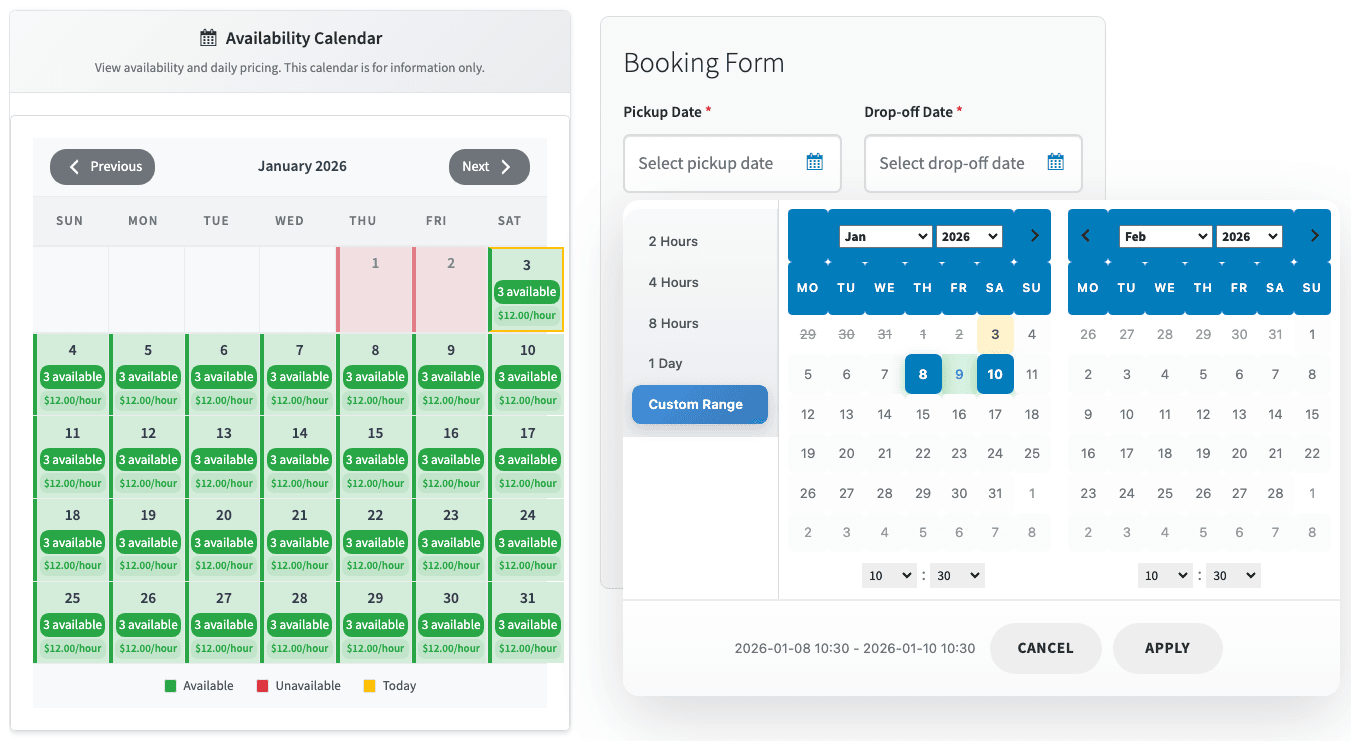
They select their rental dates and quantity, add the product to cart, and complete checkout like a regular WooCommerce order.
They also get notified via email about their rental booking.
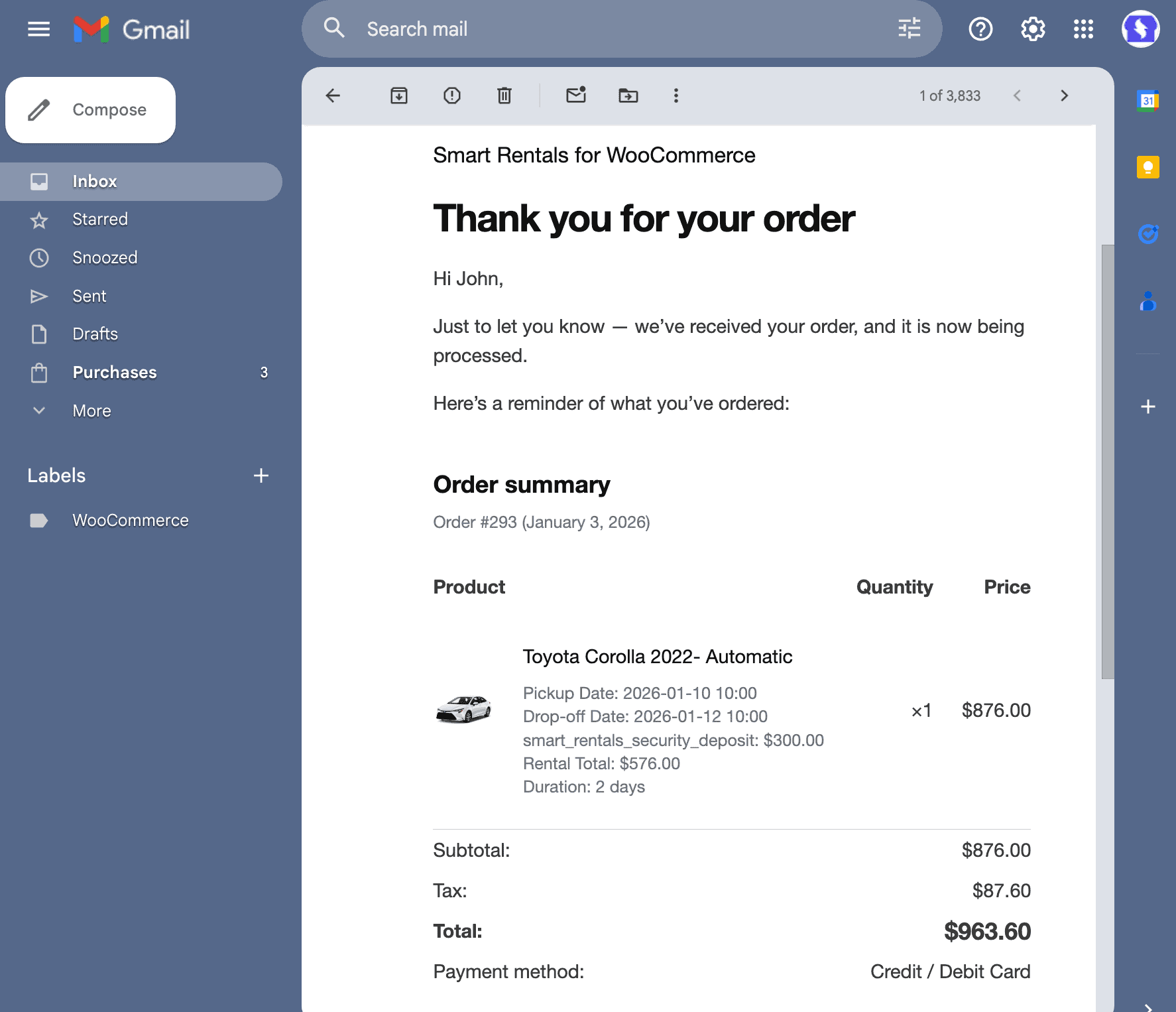
Availability updates automatically, so assets can’t be double-booked.
All bookings appear in your WooCommerce dashboard, where you can track rental periods, quantities, order status, and payments in one place.
Once the basics are set up, the same structure can support many different rental situations like bikes, boats, bicycles, etc.
Common rental scenarios Smart Rental & Booking for WooCommerce supports
Once rentals go online, small setup choices decide whether things stay smooth or turn messy.
Here are different real-world scenarios where businesses use Smart Rental & Booking for WooCommerce in practical ways.
Offer hourly rentals on weekdays and full-day rentals on weekends
Rent bikes or scooters for short weekday trips and longer weekend bookings using the same inventory, without creating separate products.
Prevent double bookings when you have limited vehicles
Block cars automatically once they’re booked for a date range, so the same vehicle doesn’t appear available until it’s returned.
Add cleaning or inspection buffer between rentals
Keep assets unavailable after return for charging, cleaning, or inspection instead of booking them back-to-back.
Collect refundable security deposits for high-value rentals
Take deposits for cars, boats, or expensive equipment directly at checkout instead of handling them offline.
Block inventory for multi-day events
Reserve tents, chairs, or sound systems across setup and teardown days, even if the event lasts only one evening.
Stop bookings automatically during peak seasons
Once inventory fills up during holidays or tourist seasons, availability closes automatically without manual checks.
Enable rentals only during specific months
Open bookings only during your operating season for camping gear, water-sports equipment, or seasonal rentals.
Rent different quantities to different customers
Allow one customer to rent a single bike while another rents five, with availability adjusting in real time.
Offer cars with optional add-ons like drivers or GPS
Let customers book a car first, then choose extras like a driver, GPS, or child seat during checkout.
Run rentals without complex fleet software
Manage bookings, availability, deposits, and payments entirely inside WooCommerce, without spreadsheets or external tools.
When you step back, all these scenarios point to the same underlying problem.
From manual bookings to controlled rentals
Renting out bikes, cars, boats, or equipment isn’t hard. Keeping availability, dates, and inventory in sync is where most setups struggle.
Smart Rental & Booking for WooCommerce brings rental logic to WooCommerce in a way that actually fits vehicle and equipment rentals.
It helps businesses manage bookings based on real assets, without hotel-style workflows or enterprise complexity.
If you’re looking for a simpler way to manage bookings and rentals for bikes, cars, boats, bicycles, or other equipment on WooCommerce, Smart Rental & Booking is built for exactly that.
Buy Smart Rental & Booking for WooCommerce
FAQs
Can WooCommerce handle rentals without a booking plugin?
WooCommerce by default can sell products and manage stock, but it doesn’t understand rental duration, overlapping dates, or assets being unavailable between bookings. For rentals, additional rental logic is required.
Can I manage multiple rental products with different rules?
Yes. Different rental products can have their own pricing, availability, duration limits, deposits, and blocked dates. This is useful when renting different types of assets with different conditions.
What’s the difference between a booking plugin and a rental plugin in WooCommerce?
Booking plugins focus on reserving time slots. Rental plugins are designed to manage physical inventory that goes out, returns, and gets reused. This difference matters for bikes, cars, equipment, and similar assets.
Do rental bookings work with the normal WooCommerce checkout?
Yes. Rental bookings are added to the cart and checked out like regular WooCommerce products. Rental details such as dates, duration, and deposits appear in the cart, checkout, and order emails.
Can rentals work alongside normal product sales?
Yes. Rental products and regular sale products can exist together in the same WooCommerce store. Rentals don’t affect how non-rental products are sold or managed.