
How to Find High-Value Customers in WooCommerce by Lifetime Spend
Identifying your high-value customers based on their lifetime spend (the total amount they’ve spent across all orders) can be challenging when you have hundreds or thousands of customers. Manually reviewing order histories to calculate customer lifetime value and find top spenders is time-consuming and impractical.
With Smart Manager, you can quickly filter customers by their lifetime spend and identify your most valuable customers in seconds, helping you target them for loyalty programs, exclusive offers, or personalized marketing campaigns.
Steps to Find High-Value Customers by Lifetime Spend
-
Go to the Smart Manager dashboard. Using the top navigation bar, search for and select
Usersdashboard from the dropdown menu. -
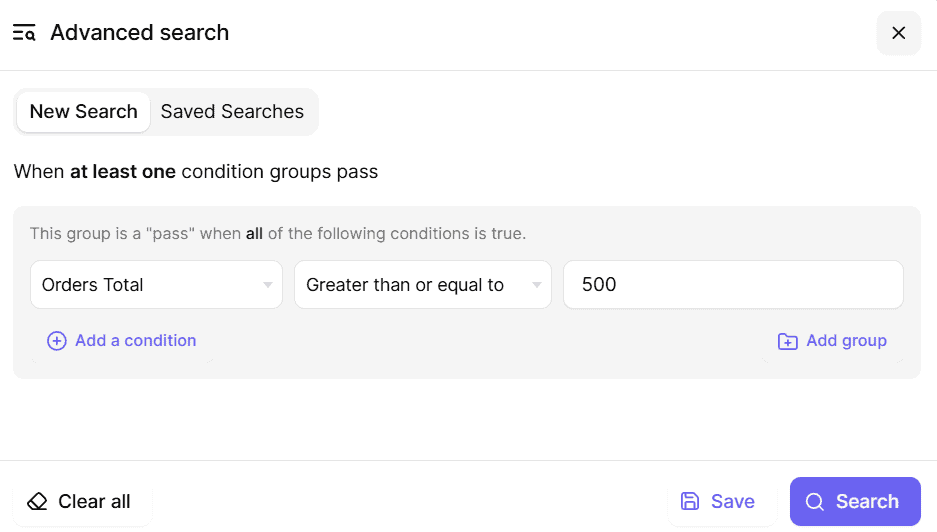
Use Advanced Search to filter users by their total order spend:
- From the Field dropdown, select ‘Orders Total’.
- From the Operator dropdown, select the comparison you need (e.g., ‘Greater Than’, ‘Equal to’, ‘Less Than’).
- In the Value field, enter the total order amount (e.g., 100 to find customers who spent more than $100).
- Click Search to display all customers matching your criteria.
-
Example: To find customers with a minimum total purchase amount of $500:
- Field: Orders Total.
- Operator: Greater Than or Equal to.
- Value: 500.
- This will show all customers who have spent $500 or more.
- To export the filtered customer data, use the Export CSV feature to save the list for further analysis or marketing campaigns.
That’s it. Happy managing!
Note(s):
- You can use these steps to find customers based on any spending range, whether it’s your highest spenders, low spenders, or anywhere in between.
- The Users dashboard and Advanced Search functionality for Users are available only in the Pro version.