
Want to accept Bitcoin, Ethereum, or other cryptocurrencies in WooCommerce?
The easiest way is to use a WooCommerce crypto payment gateway plugin. These plugins let customers pay with cryptocurrency while you receive payments either in crypto or your local currency.
In this guide, we’ll compare four trusted WooCommerce crypto payment gateways: Coinbase Commerce, OpenNode, HAYVN Pay, and DePay Payments, based on supported cryptocurrencies, fees, payouts, ease of setup, and merchant control.
What is the best crypto payment gateway for WooCommerce?
The best WooCommerce crypto payment gateway depends on how you want to manage cryptocurrency payments.
| Plugin | Cryptocurrencies | Settlement | Fees | Best For |
|---|---|---|---|---|
| Coinbase Commerce | BTC, ETH, LTC, USDC, + more | Crypto or fiat (via exchange) | Varies by plan | Broad crypto support, large stores |
| OpenNode | Bitcoin only | Instant (BTC, USD, or both) | Competitive / Lightning low fees | Bitcoin-focused stores |
| HAYVN Pay | BTC, ETH + others | Fiat direct to bank (hours) | 1% flat fee, no setup costs | Avoiding crypto volatility |
| DePay Payments | Multi-chain (ETH, BNB, Polygon, Solana) | Direct to your crypto wallet | No intermediary fees | Full crypto control, Web3 stores |
If you’re looking for broad cryptocurrency support and an easy setup process, Coinbase Commerce is the most popular option for WooCommerce stores.
Why accept WooCommerce crypto payments?
Writing about cryptocurrency is a huge blog in itself. If you are interested in how it works, have a look at this cryptocurrency article.
About 300 million people worldwide hold cryptocurrency. So, accepting payments via cryptocurrency will help you tap customers who you never reached before.
And you have some awesome benefits:
- Get your earnings transferred to you in your local currency (select currencies via bank/exchange partners) or as cryptocurrency.
- Take payment from anyone, virtually anywhere, at any time, without any local currency set up.
- Lower transaction fees.
- Receive payments without any delays.
- Cut several unnecessary middle-men.
- Save money on transactions, banking fees and chargebacks.
For additional benefits, check out this post on how to accept WooCommerce crypto payments.
There are a few cons as well:
- Cybersecurity breaches, prone to hackers
- Fluctuating prices
- They do not adopt government regulations as the tech
- Scalability – process fewer transactions and at a faster speed compared to the giants like Visa and Mastercard.
But cryptocurrency has boundless potential. And if you pair it with WooCommerce, you unlock the great potential to increase your reach and boost your sales.
How do you accept WooCommerce crypto payments?
To accept cryptocurrency payments in WooCommerce:
- Choose a crypto payment gateway.
- Install and activate its WooCommerce plugin.
- Create and verify your payment account.
- Connect the gateway to WooCommerce using API credentials.
- Choose which cryptocurrencies you want to accept.
- Test the checkout process before going live.
Most WooCommerce stores use Coinbase Commerce, OpenNode, HAYVN Pay, or DePay Payments to accept cryptocurrency payments.
Top 4 crypto payment plugins for WooCommerce
Before moving to the plugins, you must choose between a custodial and non-custodial crypto payments provider.
If you choose a Custodial crypto payments provider, the service provider manages your crypto accounts on your behalf. It is a fully-integrated WooCommerce extension, has low transaction fees and settlements are sent directly to your bank account in fiat currency.
However, if you choose a non-custodial crypto payments provider, you have full control and sole responsibility over the security and management of your crypto accounts.
For more differences, refer to this blog.
Coming back to the plugins, the list available for accepting crypto payments on WooCommerce is big. But not all of them are secure. Some may also lack essential features.
To make things easy, we have compiled a list of the four best crypto payment gateways that WooCommerce has partnered with. A big thanks to them, this, eliminates confusion and helps make a decision easier.
Coinbase Commerce
Coinbase Inc, the largest cryptocurrency exchange in the United States by trading volume, develops this plugin.
The Coinbase Commerce plugin is the most popular one, used by 10K+ users. Add this plugin to your store and your customers will have the option to pay with various cryptocurrencies, including Bitcoin, Ethereum, and Litecoin.
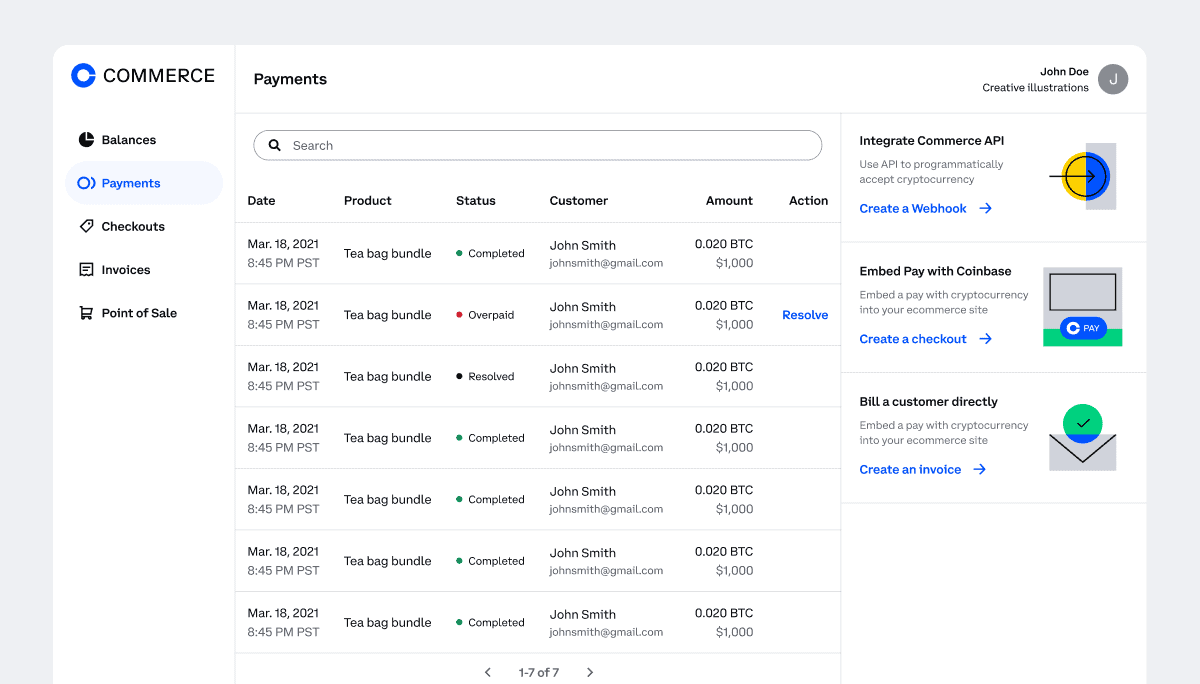
Features and Benefits:
- Handles the payment processing and conversion rates automatically.
- Choose which assets you want to accept as payment and convert them into cash or stablecoins whenever you need them.
- You can manage your crypto funds yourself or opt for Coinbase’s managed service to handle custody.
- Access transaction reporting tools for efficient accounting and reconciliation.
- Turnkey API: Create customized workflows and provide unique experiences.
- Manage fewer chargebacks and enjoy lower fees compared to certain traditional payment methods.
- Vast user base – 103 million verified users, 11,000 institutions, and 185,000 ecosystem partners across 100+ countries.
- Coinbase’s established reputation ensures secure investment, spending, saving, earning, and use of cryptocurrencies.
OpenNode Bitcoin Payments
OpenNode Bitcoin Payments extension allows merchants to settle funds in Bitcoin, USD, or both instantly. It is compatible with any Bitcoin wallet, making it easy to set up and start offering Bitcoin payments to your customers within minutes.
Features and Benefits:
- With OpenNode, funds are settled instantly, providing you with fast access to your funds.
- Payment amounts are calculated using up-to-date exchange rates, ensuring accurate pricing for customers.
- The extension enables instant Bitcoin payments through the Lightning Network, allowing for faster and more efficient transactions, and low processing fees.
- Native SegWit address support: The extension supports traditional on-chain transactions using the new Native SegWit addresses (Bech32), providing flexibility and compatibility.
- Schedule withdrawals free of charge.
Download OpenNode Bitcoin Payments
HAYVN Pay
The third crypto payments extension, HAYVN Pay allows you to securely accept cryptocurrency payments from customers worldwide, with the option to receive immediate fiat (traditional) money.
As a globally regulated platform, HAYVN Pay settles payments directly to your bank account, eliminating the need for you to hold cryptocurrencies and providing a secure payment solution for new global markets.
Features and Benefits:
- You receive the exact amount displayed on the invoice in your preferred traditional currency, such as USD, AUD, and AED. EUR support will be added soon.
- Do not bother with fluctuations in cryptocurrency values. You always receive the exact amount in your chosen traditional currency.
- No setup fees, monthly charges, or hidden costs. It will directly deduct a flat fee of 1% from each payment, thus making it affordable for the users.
- Swift payment settlements, with funds reaching your bank account within hours.
- Utilize the HAYVN Pay Console to manage and track your cryptocurrency transactions, with detailed reports available for your convenience.
- Extensive regulations, require all users to undergo a Know-Your-Customer (KYC) process. This safeguards your business, customers, and ensures compliance with regulatory standards.
- The onboarding and KYC process is similar to that of opening a bank account and would be typically be completed in 24-48 hours.
DePay Payments
This extension enables you to process cryptocurrency payments directly on your WooCommerce store and receive them into your crypto wallet without any intermediaries involved.
DePay Payments supports various blockchains such as Ethereum, BNB Smart Chain, Polygon, and Solana, and is compatible with most crypto wallets.
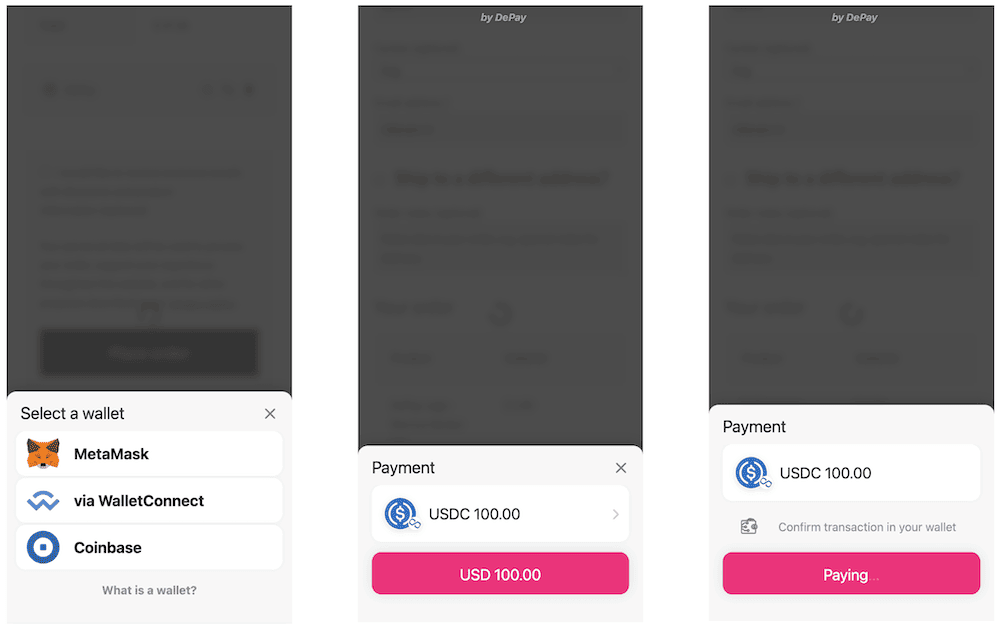
Features and Benefits:
- Customers can make cryptocurrency payments using mobile devices or WalletConnect QR codes.
- Payments settle immediately, eliminating the risks of fraud and chargebacks.
- Offering a frictionless, one-click Web3 payment experience to your customers, reducing the likelihood of abandoned carts.
- Customers can use any token that can be exchanged with the cryptocurrencies that you accept.
Which WooCommerce crypto payment gateway should you choose?
Finding a good plugin is just like choosing a perfect pair of shoes—you look into a few things like comfort, style, and fit. Similarly, there are things you must consider while choosing the best plugin.
In the upcoming section, we have listed some key points you can consider before you make your decision:
| If you… | Choose |
|---|---|
| You want the widest crypto support | Coinbase Commerce |
| You only accept Bitcoin | OpenNode |
| You want fiat in your bank, no crypto held | HAYVN Pay |
| You want full wallet control, no middleman | DePay Payments |
| You run a high-volume international store | Coinbase Commerce or HAYVN Pay |
| You want the lowest possible fees | OpenNode (Lightning Network) |
| Your customers are Web3 / DeFi users | DePay Payments |
Key factors to evaluate
The right plugin depends on three things: which cryptocurrencies your customers actually use, whether you want to hold crypto or receive fiat, and how much control versus convenience you need.
- Cryptocurrency support: If your customers pay with anything other than Bitcoin, OpenNode is out. If they’re on multiple chains (Polygon, Solana, BNB), DePay is the only option that covers them all.
- Fiat vs. crypto settlement: HAYVN Pay is the clearest choice if you want no crypto exposure — you get fiat in your bank within hours. Coinbase Commerce offers conversion but it’s not automatic by default. OpenNode lets you split. DePay is crypto-only.
- Fees: HAYVN Pay is transparent at 1% flat. OpenNode’s Lightning Network fees are typically the lowest for Bitcoin. Coinbase Commerce fees vary by plan. DePay has no intermediary fees but you handle everything yourself.
- Compliance and KYC: HAYVN Pay requires KYC (24-48 hours). Coinbase Commerce also requires account verification. DePay requires no account with the provider — but you’re responsible for your own regulatory compliance.
Custodial vs non-custodial crypto payment gateways
Before making your final decision, it helps to understand the biggest difference between crypto payment providers: who controls the funds.
Custodial gateways manage the crypto on your behalf and often convert it to fiat. Non-custodial gateways send payments directly to your wallet, giving you full control but also full responsibility.
| Feature | Custodial (Coinbase Commerce, HAYVN Pay, OpenNode) | Non-Custodial (DePay Payments) |
| Wallet ownership | Provider manages custody | You control the wallet |
| Fiat settlement | Usually available | Not available |
| KYC requirements | Typically required | Usually not required |
| Setup complexity | Easier | More technical |
| Security responsibility | Shared with provider | Fully yours |
| Best for | Traditional businesses | Web3-native stores |
Choose custodial if your goal is simply to accept crypto payments and receive funds with minimal technical involvement. Choose non-custodial only if you’re comfortable managing wallet security, seed phrases, and crypto operations yourself.
Final verdict
For most WooCommerce stores adding crypto as a payment option for the first time, Coinbase Commerce is the safest starting point — broad currency support, an established reputation, and a large existing user base.
If your customers are specifically Bitcoin users and you want the lowest fees, OpenNode is the better fit.
If avoiding crypto volatility is your priority and you want fiat in your bank as fast as possible, HAYVN Pay’s 1% flat fee and same-day settlement make it the most straightforward option.
If you’re building for a Web3 audience and want zero intermediaries, DePay Payments is the only one built for that use case.
None of these is a wrong choice, they serve different store types. Match the plugin to how your customers pay and how you want to receive funds.
FAQ
Can WooCommerce accept cryptocurrency payments?
Yes. WooCommerce does not natively support cryptocurrency payments, but you can enable them using crypto payment gateway plugins such as Coinbase Commerce, OpenNode, HAYVN Pay, or DePay Payments.
Which cryptocurrencies can I accept in WooCommerce?
It depends on the payment gateway. Most providers support major cryptocurrencies such as Bitcoin (BTC), Ethereum (ETH), Litecoin (LTC), and stablecoins. Some gateways also support Solana, Polygon, and other blockchain networks.
Do I need a crypto wallet to accept cryptocurrency payments?
Not always. Custodial providers such as Coinbase Commerce and HAYVN Pay can handle storage and settlement for you. Non-custodial providers like DePay require you to manage your own wallet.
Are crypto payments refundable in WooCommerce?
Yes, but the refund process depends on the payment gateway. Since cryptocurrency transactions are irreversible on the blockchain, refunds are usually handled manually through the payment provider.
Can I receive crypto payments in my local currency?
Yes. Some gateways automatically convert cryptocurrency payments into fiat currencies such as USD, EUR, or GBP before settlement.
What is the safest crypto payment gateway for WooCommerce?
Established providers such as Coinbase Commerce, OpenNode, and HAYVN Pay are generally considered among the safest options because they provide strong security measures, compliance controls, and established reputations.