
WooCommerce doesn’t support recurring payments out of the box. Even if you connect Stripe, you can only accept one-time payments.
To enable recurring billing, most store owners use WooCommerce Subscriptions + Stripe, but that setup comes with higher costs and more complexity than many stores actually need.
If you’re looking for a simpler and more cost-effective way to run recurring payments with Stripe, there’s a better approach.
This guide shows you how WooCommerce recurring payments with Stripe work, what your options are, and how to set them up without overpaying for features you don’t need.
The cost problem with WooCommerce recurring payments
Most guides recommend using WooCommerce Subscriptions with Stripe.
But here’s the reality:
- WooCommerce Subscriptions is a paid plugin (annual cost)
- Setup is more complex than needed for simple use cases
- Many features go unused for smaller stores
If your goal is just to charge customers on a recurring basis, this setup can be overkill and expensive.
Two ways to set up WooCommerce recurring payments
If you have WooCommerce and Stripe in place, you need one more thing: a subscription plugin. There are two solid options depending on how complex your setup is.
| Setup | What you get | Cost & complexity | Best for |
|---|---|---|---|
| WooCommerce Subscriptions + Stripe | Advanced subscription features, multiple gateways, flexible billing rules | Higher cost, more setup time, complex configuration | Stores with advanced subscription needs |
| Smart Subscriptions + Stripe | Simple recurring billing, Stripe-focused, faster setup | Lower cost, quick setup, minimal configuration | Stores that want straightforward recurring payments |
Which option should you choose?
Choose WooCommerce Subscriptions, if you need advanced billing logic, multiple payment gateways, or plan switching.
Choose Smart Subscriptions + Stripe, if you want a simple, faster, and more cost-effective way to run recurring payments.
For most WooCommerce stores using Stripe, a simpler setup is enough to run recurring payments without unnecessary cost or complexity.
When do you actually need WooCommerce Subscriptions?
WooCommerce Subscriptions is a robust plugin, but robust doesn’t always mean right for you.
It makes sense if your store needs:
- Multiple subscription plans with different pricing or billing cycles (like monthly and annual options)
- Plan switching, where customers can upgrade or downgrade without disrupting billing
- Support for multiple payment gateways beyond Stripe
- Free trials or sign-up fees (charge upfront or delay first payment)
- Advanced billing rules like custom renewal dates or prorated charges
If your store has two or more of these requirements, WooCommerce Subscriptions is worth the investment.
But if you read that list and thought “I don’t need any of that”, you probably don’t need it.
A simpler way to run WooCommerce recurring payments with Stripe
If your setup is straightforward, you don’t need a heavy subscription system.
Smart Subscriptions for WooCommerce with Stripe gives you everything required to run recurring billing, without unnecessary complexity or high cost.
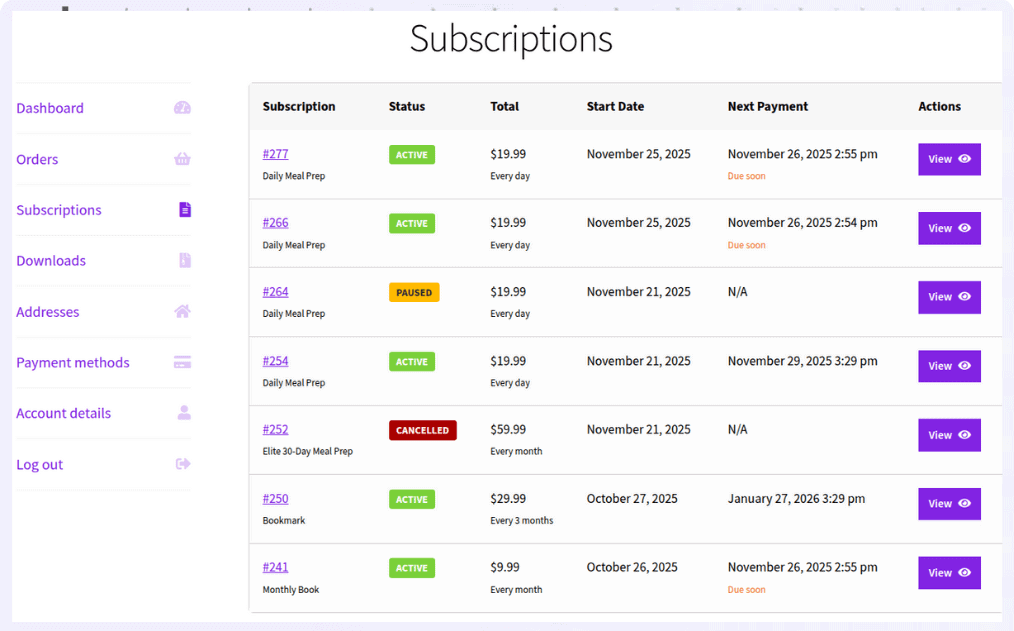
With it, you can:
- create subscription products directly inside WooCommerce, just like regular products
- set flexible billing cycles (weekly, monthly, yearly) based on your offering
- accept automatic recurring payments via Stripe without manual intervention
- retry failed payments automatically to recover lost revenue
- let customers manage subscriptions (pause, resume, or cancel) from their account
You set it up once, and billing runs on its own.
No complex configuration. No features you’ll never use. Just recurring payments that work.
How to set up WooCommerce recurring payments with Stripe
Once Smart Subscriptions for WooCommerce is installed and Stripe is connected, setting up your first subscription product takes less than five minutes.
- Create a new product in WooCommerce
- Enter the product name and description
- Select
“Simple Subscription”in theProduct Datadropdown - Set your
subscription price(amount charged per cycle) - Choose the
billing interval(every 1, 2, or 3 cycles) - Select the
billing period(weekly, monthly, or yearly) - Add a free trial if needed (optional)
Publishthe product
After this, customers can subscribe once, and payments are charged automatically based on the billing schedule.
Note: Before publishing, ensure Stripe is connected, pricing and billing are correct, subscription details are clear, emails are enabled, and a test purchase is completed.
Start accepting recurring payments with Stripe.
Get Smart Subscriptions for WooCommerce
The right setup depends on your needs
WooCommerce recurring payments with Stripe aren’t complicated, but choosing the right setup makes a big difference.
If your store needs advanced features, WooCommerce Subscriptions can work.
But if you just want reliable recurring billing without overpaying or overcomplicating things, a simpler setup like Smart Subscriptions with Stripe is often the better choice.
Start with what you actually need, not what the most complex solution offers.
FAQs
Do I really need WooCommerce Subscriptions to use Stripe for recurring payments?
No. WooCommerce Subscriptions is one option, but it’s not the only way. If your setup is simple and you’re using Stripe, a lighter subscription plugin can handle recurring billing without the added cost and complexity.
Is WooCommerce Subscriptions worth the cost for small stores?
Not always. If you don’t need advanced features like multiple gateways, plan switching, or complex billing rules, the cost may not justify the value. Simpler setups often work better for small to mid-sized stores.
What is the most cost-effective way to run recurring payments with Stripe?
For most stores, using a lightweight subscription plugin with Stripe is the most cost-effective approach. It allows you to automate billing without paying for features you may not use.
Will switching to a simpler subscription setup affect existing customers?
If you’re starting fresh, there’s no issue.
But if you already have active subscriptions, switching setups may require careful handling, especially for payment methods and renewal schedules.
Can I start simple and upgrade to WooCommerce Subscriptions later?
Yes. Many stores begin with a simpler setup and move to a more advanced solution only when they need additional features like complex billing logic or multiple gateways.