

Imagine customers waiting for a package from your store every month, not because they placed a new order, but because they subscribed to it.
That’s the idea behind a WooCommerce subscription box business. Customers subscribe once and receive curated products on a recurring schedule, coffee beans, snack boxes, skincare kits, hobby supplies, and more.
For entrepreneurs and WooCommerce store owners, this model turns one-time buyers into predictable recurring revenue.
And the best part? You can run a subscription box business directly from your WooCommerce store with the right setup.
Why subscription boxes are a powerful eCommerce model
Subscription boxes work well because they create value for both customers and businesses.
For customers
- Convenient as products arrive automatically on a schedule
- Discovery because customers get to try new products regularly
- Experience as the excitement of receiving and unboxing something new
For store owners
- Predictable recurring revenue
- Higher customer lifetime value
- Easier inventory and demand planning
This is why many entrepreneurs build subscription boxes around products people already love, coffee, snacks, skincare, pet supplies, and hobby kits.
Popular WooCommerce subscription box ideas entrepreneurs are building
Subscription boxes work best with products customers enjoy regularly or love discovering.
Some successful examples include:
- Coffee subscription boxes
Atlas Coffee Club sends coffee beans sourced from different countries every month. - International snack boxes
Bokksu delivers curated Japanese snacks to subscribers worldwide. - Beauty and skincare boxes
Birchbox became popular by sending personalized beauty samples every month. - Meal kit boxes
HelloFresh sends weekly boxes with ready-to-cook meal kits. - Pet subscription boxes
BarkBox delivers toys and treats for dogs every month.
These businesses show how everyday products can become a recurring experience customers look forward to.
What you need to start a subscription box with WooCommerce
Starting a WooCommerce subscription box business doesn’t require a complicated setup. You only need a few key pieces working together.
- WooCommerce store
Your ecommerce platform where customers browse products and manage subscriptions. - A subscription plugin
WooCommerce doesn’t support recurring billing by default, so you need a plugin to manage subscriptions and renewals. - Recurring payment gateway
Gateways like Stripe allow automatic billing for each subscription cycle.
Once these pieces are in place, your WooCommerce store is ready to start selling subscription boxes.
How to create a subscription box in WooCommerce?
To run a WooCommerce subscription box business, you need a tool that manages recurring billing and subscription renewals.
Smart Subscriptions makes this process simple.
The plugin allows WooCommerce stores to create subscription products and automate recurring payments directly from the dashboard.
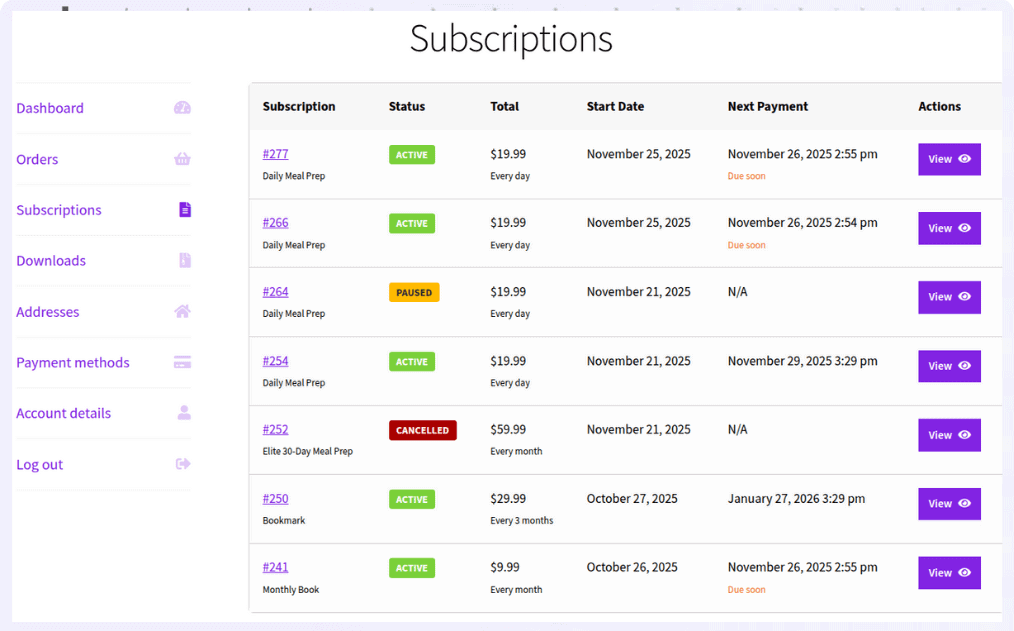
For example, imagine launching a Monthly Coffee Discovery Box priced at $25 per month.
Subscribers receive a curated box each month containing:
- two specialty coffee packs
- tasting notes
- a surprise roast
Steps to create the WooCommerce subscription box product
- Go to
WordPress Admin > Products > Add New - Enter the product name, for example, Monthly Coffee Discovery Box
- In Product data, select
Simple Subscription - Set the
Subscription Pricelike $25 - Set
Billing Interval >1 - Choose
Billing Period > Month - Click
Publish
Your subscription box product is now live.
Check out this detailed guide to set up WooCommerce subscription products.
Customers can subscribe once and receive their box automatically every month.
Get Smart Subscriptions for WooCommerce
How successful brands make subscription boxes irresistible
Launching a subscription box is easy. Making customers excited to receive it every month is what drives long-term success.
Here are a few strategies successful WooCommerce subscription box brands use.
Make the box feel more valuable than its price
Customers should feel like they’re getting more value than what they pay.
For example, if a box costs $30, the perceived value of the products inside should feel closer to $45–$50. This creates excitement and keeps customers subscribed longer.
Coffee brands often include a bonus tasting sample or brewing guide. Skincare brands may add trial products alongside the main items.
Small surprises make the box feel special.
Use the first box to win the customer
The first delivery is critical. If the first box impresses the customer, the chances of keeping them subscribed increase dramatically.
Many brands offer incentives like:
- discounted first box
- free trial pack
- bonus product in the first delivery
With Smart Subscriptions, you can easily offer a free trial or discounted first box when creating the subscription product.
Create anticipation every month
Subscription boxes succeed because they feel like an experience.
Customers should look forward to receiving the next box.
You can build anticipation by:
- teasing upcoming items on social media
- including limited edition products
- introducing seasonal themes
This keeps the subscription fresh and exciting.
Keep pricing profitable from day one
A common mistake subscription box startups make is underpricing.
Your subscription price should cover:
- product costs
- packaging
- shipping
- marketing
- profit margin
For example:
- Product cost > $12
- Packaging + shipping > $6
- Total cost > $18
If the subscription price is $30/month, the remaining margin supports marketing and business growth.
Pricing correctly from the start makes the business sustainable.
Build a subscription box customers look forward to
Subscription boxes turn everyday products into a recurring experience customers look forward to.
Instead of relying only on one-time purchases, you build a steady stream of recurring revenue while creating stronger relationships with your customers.
With WooCommerce and Smart Subscriptions, launching a WooCommerce subscription box is straightforward. Create your box, set the billing cycle, and let recurring orders run automatically.
Whether it’s coffee, snacks, skincare, or hobby kits, a well-curated subscription box can become one of the most reliable revenue streams for your store.
FAQs
How should I handle shipping costs for a subscription box?
You can include shipping in the subscription price or charge it at checkout. Many subscription box brands include shipping in the price to keep the checkout experience simple.
How do I manage inventory when subscriber numbers change?
Most stores use the subscriber count before the renewal cutoff date to estimate how many boxes to prepare. Setting a clear monthly cutoff helps avoid over-ordering inventory.
Should subscriptions be month-to-month or require a commitment?
Both models work. Month-to-month subscriptions are easier to sell, while 3- or 6-month commitments help reduce cancellations. Many brands start with monthly plans and later introduce longer plans.
What happens if someone subscribes in the middle of the month?
You can ship a box immediately or schedule the first box for the next dispatch date. Clearly explaining your shipping schedule helps avoid confusion.
Can I use multiple suppliers for my subscription box?
Yes. Many subscription box businesses source products from multiple suppliers and assemble the boxes themselves or through fulfillment partners.
WooCommerce handles the orders while the subscription plugin manages billing.