

If you’re looking for a WooCommerce Subscriptions alternative, the right choice depends on how complex your subscription setup is.
WooCommerce Subscriptions is built for advanced use cases, multiple plans, multiple payment gateways, and custom billing rules.
But many stores don’t need that.
If you’re simply charging customers on a recurring basis, same product, fixed billing cycle, and a single gateway like Stripe, a simpler solution can be faster to set up and easier to manage.
This guide helps you decide which approach fits your store.
Note: This isn’t going to be a direct comparison. Both tools are built for different levels of subscription needs.
What are you actually trying to build?
Before choosing any WooCommerce Subscriptions alternative, take a step back.
What exactly do you want subscriptions to do for your store?
Because not all subscription setups are the same. You might be trying to:
- sell a monthly product like coffee, supplements, or pet food
- offer access to content, courses, or a community
- build something more advanced with multiple plans and billing rules
And this is where most store owners get stuck.
They pick a tool first… without being clear on the setup. Your setup defines the tool you need.
When WooCommerce Subscriptions is the right choice
If your setup goes beyond basic recurring billing, WooCommerce Subscriptions is one of the most powerful options available.
It’s the official WooCommerce extension, built to handle advanced subscription models at scale.
Try this plugin if you need:
- multiple subscription plans with different pricing and billing schedules
- plan changes like upgrades, downgrades, or switching anytime
- support for multiple payment gateways
- free trials, sign-up fees, or custom billing rules
- detailed subscription management (renewals, edits, customer activity)
- both physical and digital subscription products
- built-in reports for recurring revenue and active subscribers
It also gives customers control:
- manage subscriptions from their account
- update payment methods
- switch plans or cancel anytime
Best suited for:
- SaaS-style products
- membership platforms
- complex service subscriptions
In short, WooCommerce Subscriptions is built for flexibility, control, and advanced subscription logic.
But that level of flexibility also means more setup and complexity, which isn’t always necessary for simpler use cases.
When you don’t need a complex subscription setup?
WooCommerce Subscriptions is built for flexibility. But many stores don’t need that much control.
Your setup might be straightforward:
- one or two subscription products
- fixed billing cycles like monthly or yearly
- a single payment gateway like Stripe
- no complex rules or configurations
In this case, the goal is simple.
Get subscriptions running reliably, without extra setup.
That’s where a simpler approach like Smart Subscriptions for WooCommerce fits better.
A simpler WooCommerce Subscriptions alternative for everyday needs
If your goal is straightforward recurring billing, Smart Subscriptions for WooCommerce offers a simpler way to get there.
It’s built for WooCommerce stores that want to launch subscriptions quickly without dealing with unnecessary complexity.
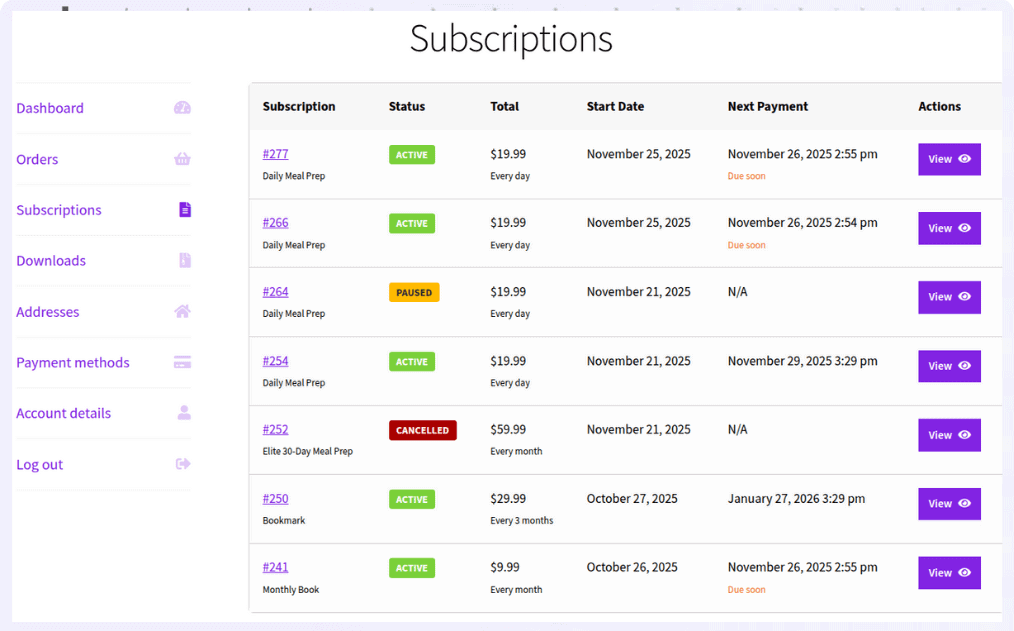
It works well when you need:
- a simple way to create subscription products inside WooCommerce
- flexible billing cycles (weekly, monthly, yearly) without complex setup
- automatic recurring payments with Stripe
- built-in handling for failed payment retries
- basic customer controls like pause, resume, or cancel subscriptions
Instead of trying to cover every advanced use case, it focuses on what most stores actually need: set it up quickly, and let recurring payments run automatically
So if your subscription model is simple and you want something that just works, this approach tends to be a better fit.
Get Smart Subscriptions for WooCommerce
Common use cases where a simpler setup just works
Not every store needs a complex subscription system. In many cases, a simple setup does the job better.
Here’s how store owners actually use it.
Sell a monthly product (coffee, supplements, pet food)
Suppose you’re selling something customers need every month. You just want them to subscribe once and get it delivered regularly.
For example: “Get fresh coffee delivered every month.”
You don’t need multiple plans or complex logic. Just a clean recurring setup.
Run a simple membership or content access
Let’s say you charge users monthly for access to a course, newsletter, or community.
For example: “Join for $10/month.”
You’re not managing plans or upgrades.
You just need payments to renew automatically.
Offer “subscribe and save” on products
You want to increase repeat purchases by offering a subscription option.
For example: “Subscribe & save 10% every month.”
Customers choose between one-time or recurring. That’s it.
Sell curated monthly boxes
Let’s say you send a box every month: coffee, snacks, skincare, anything.
For example: “Monthly coffee discovery box.”
Customers subscribe once. You ship on schedule. No complex setup needed.
Offer basic service subscriptions
Suppose you charge monthly for a service like maintenance, coaching, or support.
For example: “Website maintenance – $25/month.”
You just need recurring billing to run reliably.
A 30-second decision framework
If you’re still deciding, here’s the simplest way to look at it.
| Use case | Best choice |
|---|---|
| Complex subscription logic | WooCommerce Subscriptions |
| Multiple payment gateways | WooCommerce Subscriptions |
| Simple recurring billing | Smart Subscriptions |
| Stripe-based subscriptions | Smart Subscriptions |
| Faster setup | Smart Subscriptions |
The smart move? keep it simple
Most WooCommerce stores don’t struggle because of missing features. They struggle because the setup doesn’t match what they actually need.
WooCommerce Subscriptions is powerful for a reason. It’s built for stores that need flexibility and control.
But if your setup is simpler, a lighter approach often works better.
Choose the tool that matches how your store actually runs.
Or start simple. You can always scale later.
FAQs
Can I start with a simple subscription plugin and upgrade later?
Yes. Many stores begin with a simple setup to validate their subscription model, then move to more advanced tools as their needs grow.
Can I offer both one-time purchase and subscription for the same product in WooCommerce?
Yes. You can offer a one-time purchase and a subscription option side by side. This is commonly used for “subscribe and save” models to increase repeat purchases.
What is the best WooCommerce Subscriptions alternative?
For simple recurring billing with Stripe, Smart Subscriptions is the most straightforward WooCommerce Subscriptions alternative. It handles automatic payments, billing cycles, and subscription management without the complexity of the official plugin.
Can customers pause or skip a subscription in WooCommerce?
Yes. Many subscription plugins allow customers to pause, resume, or skip deliveries directly from their account dashboard.
How do I price a subscription product in WooCommerce?
Your price should cover product cost, shipping, payment fees, and leave margin for profit. Many stores also offer discounts for longer billing cycles like yearly plans.