
Your subscription businesses always thrive on retention. Every new customer you acquire represents a potential for long‑term recurring revenue.
Yet, the biggest challenge subscription store owners face isn’t always about acquisition but it’s the churn.
Churn happens quietly for WooCommerce stores. Customers cancel, payments fail or subscribers simply don’t renew. At first, it looks like a minor dip, but over time those small leaks add up, eroding your recurring revenue and making growth harder to sustain.
For store owners, churn can be especially frustrating as you’ve invested in SEO and ads, optimized marketing funnels and built attractive offers, but if customers don’t stay with your business, all that effort loses impact.
So, if you’re here to know how to reduce subscription churn in WooCommerce, you’re in the right place.
In this feature, you’ll know:
- What subscription churn really means, the impact it has on your business, types of churn
- Benefits of low churn
- Why it happens in WooCommerce
- Proven strategies to reduce churn
What is subscription churn? How to calculate customer churn?
In WooCommerce subscriptions business, churn is the rate at which your subscribers cancel, fail to renew or stop paying for your subscription products. In simple terms, it’s the percentage of customers you lose over a specific period.
If you start the month with 100 subscribers and end with 90, your churn rate is 10%. It sounds simple but the implications run deep.
Each lost subscriber represents lost recurring revenue; it’s the money you were counting on that suddenly disappears. That’s why you have to implement relevant customer retention strategies to mitigate the loss due to churn.
The formula to calculate subscription or customer churn is simple:
Subscriber Churn Rate = (Subscribers Lost During Period/Total Subscribers at Start of Period) × 100
For example, if you had 500 subscribers at the beginning of the month and lost 25, your monthly churn rate is 5%.
But here’s where most store owners make mistakes. They look at churn as just a number. They don’t feel the weight of it.
Real impact of churn on your business
Churn doesn’t just reduce your subscriber count. It compounds over time and hinders your growth potential.
Impact #1: Revenue loss is exponential
Losing 5% of subscribers monthly might seem manageable. But compound that over a year.
You’re not losing 60%; you’re losing far more when you factor in the revenue those subscribers would have generated.
A subscriber paying $30/month represents $360/year. Lose 50 subscribers? That’s $18,000 in annual recurring revenue gone from your store.
Impact #2: Customer acquisition costs skyrocket
Every subscriber you lose needs to be replaced just to maintain current revenue.
That means more ads spend, more marketing effort and more resources devoted to acquisition instead of growth.
Impact #3: Lifetime value decreases
Customer Lifetime Value (CLTV) is the total revenue a subscriber generates over their entire relationship with your business.
High churn means shorter customer or subscriber relationships. Shorter relationships mean lower CLV.
Lower CLV means you can afford to spend less on acquisition. It’s a vicious downward spiral.
Impact #4: Affects growth potential
Here’s the math that keeps subscription business owners awake at night. If your churn rate exceeds your growth rate, your business shrinks.
You can acquire 100 new subscribers monthly, but if you’re losing 120, you’re going backwards.
Impact #5: Team morale suffers
Constantly losing customers affects your team. Your support staff hear complaints while the marketing team feels pressure to acquire more.
Everyone in the business feels the impact of a high churn rate in your business.
Types of subscription churn in WooCommerce
If you understand the different types of churns, it’ll help you address them effectively. Let’s break down the main types you’ll encounter in your WooCommerce subscription business.
Voluntary churn
This is when subscribers actively choose to cancel. They made a conscious decision to end their relationship with your business.
Voluntary churn happens when customers feel they’re not getting enough value, when their needs change, when they find better alternatives or when they’re simply dissatisfied with some aspect of your product or service.
For example, a subscriber to your monthly skincare box decides she has too many products accumulating. She doesn’t need more items right now. She logs into her account and clicks “Cancel Subscription.” This is voluntary churn driven by changing needs.
Here’s another example: A customer subscribed to your premium content membership finds that your competitors are offering similar content for less. He or she cancels to switch providers. This is voluntary churn driven by competitive alternatives.
Involuntary churn
This is when subscribers lose access due to payment failures, not because they wanted to leave. Their credit card may have expired. The payment was declined. Insufficient funds caused a transaction failure.
Involuntary churn is frustrating because these subscribers didn’t actually want to cancel. They just couldn’t pay successfully.
For instance, a loyal subscriber has been paying $49/month for your software subscription for 18 months. Their credit card expires. The renewal charge fails. Without a proper retry system, their subscription cancels automatically. They didn’t even know it happened until they lost access.
That’s massive and the good news is that it’s almost entirely preventable if you put the right system in place.
Active churn
Active churn occurs when subscribers take deliberate action to cancel. They log into their account, navigate to subscription settings and click cancel.
They might contact support to request cancellation. Either way, they actively ended the subscription.
Passive churn
Passive churn happens without direct customer action. The subscription simply expires, lapses or fails without the subscriber actively managing it. This often overlaps with involuntary churn but can also include subscribers who simply don’t care enough to renew.
Suppose a subscriber to your annual membership receives renewal reminders but ignores them. The subscription expires. They didn’t actively cancel — they just didn’t actively continue.
If you want to reduce this churn, you’ll need proactive engagement and frictionless renewal processes.
Early-stage churn
This occurs when subscribers cancel shortly after signing up; within the first 30 to 90 days. It signals problems with onboarding, unmet expectations or poor initial experience.
Suppose a customer subscribes to your monthly supplement box. The first box arrives late and is damaged. They cancel your subscription immediately. A poor first impression often leads to early-stage churn.
Late-stage churn
This happens when long-term subscribers eventually leave after months or years of loyalty. They’ve been with you a while, but something changed.
Imagine a subscriber has been receiving your monthly coffee subscription for two years. Their taste preferences evolved. They want variety you don’t offer. After 24 months, they finally cancelled their subscription.
Late-stage churn often indicates evolving customer needs, competitive pressure or accumulated small frustrations that eventually reached a tipping point.
Benefits of low churn in WooCommerce subscription business
Reducing churn in your WooCommerce store changes everything. Even small improvements can lead to massive gains. In the end, you’ll end up with more subscribers rather than lost ones.
- Predictable revenue: Stable recurring payments make cash flow reliable, forecasting easier and growth planning more confident.
- Higher customer lifetime value: Longer retention means more revenue per subscriber, plus upsells, add‑ons and premium upgrades.
- Reduced customer acquisition costs: Lower churn reduces the need to constantly replace lost customers, improving marketing efficiency.
- Stronger brand reputation: Satisfied subscribers leave reviews, refer friends and promote your store organically.
- Better customer insights: Long‑term subscribers generate valuable data for personalization, product improvements and targeted offers.
- Competitive edge: High retention builds loyalty that competitors can’t easily replicate, creating a protective moat.
- Sustainable growth: Each new subscriber adds to a growing base instead of just replacing losses, fueling long‑term profitability.
Why does subscription churn happen in WooCommerce stores?
Churn in WooCommerce subscription businesses often stems from issues tied directly to how subscriptions are managed and experienced within the platform. Here are the most common causes:
- Failed payments: WooCommerce subscriptions rely heavily on payment gateways. If cards expire, banks decline charges or payment retries aren’t configured, customers can unintentionally churn.
- Complex checkout or renewal process: A clunky checkout flow, unclear renewal terms or lack of transparency in billing can frustrate customers and lead to cancellations.
- Limited flexibility for customers: If subscribers can’t easily pause, downgrade or switch plans, they may cancel altogether instead of adjusting their subscription.
- Poor communication: Without automated email reminders for renewals, failed payments or upcoming charges, customers may feel disconnected and cancel due to uncertainty.
- Overwhelming admin management: Store owners using WooCommerce’s default admin views may struggle to manage hundreds of subscriptions efficiently. Errors or delays in handling customer requests can cause dissatisfaction and churn.
- No incentives for loyalty: If subscriptions don’t include perks like discounts, free shipping or something exclusive, customers may leave for competitors offering more value.
- Competitive alternatives: Competitors launch similar or improved products, which makes alternatives more appealing. Even satisfied customers may switch if something looks fresher, cheaper or more innovative. Churn rises when you don’t highlight your unique value or adapt to market changes.
How to reduce subscription churn in WooCommerce: 7 proven strategies
Here are seven proven strategies to reduce subscription churn in your WooCommerce store. Implement these systematically and you’ll see customer retention rates improve significantly.
Implement robust failed payment recovery
In WooCommerce subscription stores, failed payments are the single biggest driver of involuntary churn.
Configure automatic payment retries with Smart Subscriptions for WooCommerce plugin, starting within 24 hours and spaced over several days, to recover temporary declines.
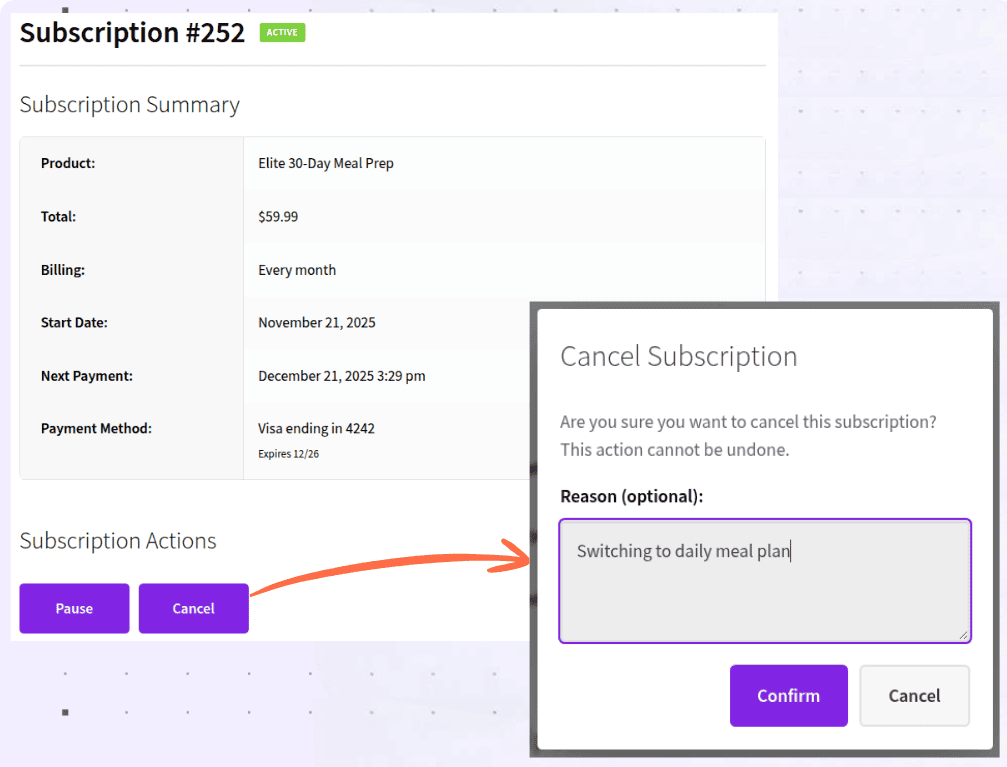
The plugin has a smart dunning solution that implements automatic failed retry solution to recover payments during churn. On top of that, you’ll also get churn reasons and apply new retention strategies based on such reasons.
You can then pair this with clear, mobile‑friendly emails that guide customers to update payment details in one click.
Create a good onboarding experience
The first few days after signup determine whether a WooCommerce subscriber sticks around. Use automated welcome emails to thank customers, explain billing cycles and guide them to their dashboard or first product delivery.
For physical subscriptions, integrate tracking updates directly into WooCommerce emails so customers know exactly when orders ship and arrive.
For digital ones, highlight the most valuable content or features immediately to deliver a “quick win.”
Continuously demonstrate value
You’re far less likely to cancel when you can clearly see the benefits of your WooCommerce subscription.
That’s why you should receive monthly recap emails showing exactly what you got—whether it’s new content, shipped products or usage stats from your membership. You deserve to know the numbers too: “This month, you accessed $120 worth of premium content for just $29.”
You should also feel celebrated for your loyalty. Anniversary emails with rewards or discounts remind you that your commitment matters.
And when you see other subscribers’ success stories or reviews inside WooCommerce emails, it reinforces that you’re part of a thriving community. When the value is consistently visible and personalized to you, cancelling stops.
Offer flexible subscription options
Rigid subscription setups in WooCommerce often push customers to cancel when all they really want is flexibility.
Enable pause functionality so subscribers can temporarily stop billing without losing their account.
Offer different billing frequencies (monthly, bi‑monthly, quarterly) and allow downgrades to lower‑priced plans to retain budget‑conscious users.
Create a strategic cancellation flow
WooCommerce stores can reduce churn by designing cancellation flows that offer alternatives before a customer leaves.
Use cancellation reasons (too expensive, not using, need a break) to trigger tailored options like discounts, downgrades or pauses.
Present special offers, such as a bonus product or discounted renewal, to win back undecided subscribers.
Implement a customer feedback loop
Feedback is critical for spotting churn risks in WooCommerce subscriptions. Use surveys, quick polls in customer dashboards and exit surveys to capture subscriber sentiment.
Monitor support tickets for recurring issues and act quickly to resolve them.
Use data to identify at‑risk subscribers
Don’t wait for cancellations. You can predict them using subscription analytics. WooCommerce subscription analytics tools like Putler help track churn reasons and other KPIs like ARPU, MRR, CLTV, active subscriptions, etc.
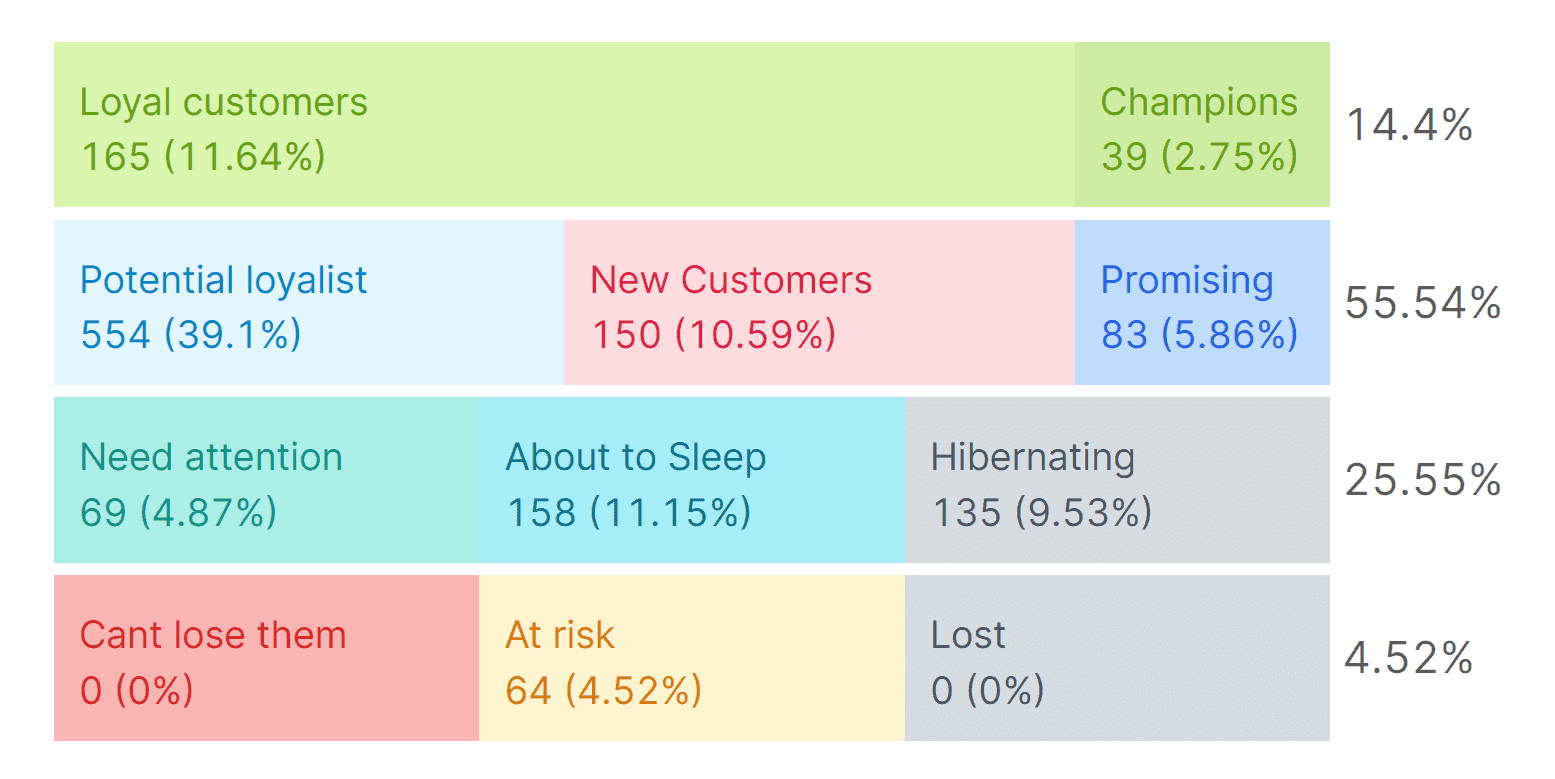
Putler helps increase customer retention by providing real-time, consolidated analytics, enabling RFM segmentation to identify at-risk customers and offering detailed insights into customer behavior patterns and subscription metrics.
You can then email those at-risk customers to retain them.
Final thoughts
Subscription churn is the silent threat to every WooCommerce recurring revenue business.
If left unchecked, it drains revenue, inflates acquisition costs and makes sustainable growth impossible. You end up working harder just to stand still.
Throughout this guide, you’ve learned what subscription churn really means and how it impacts your business at every level. If you need a simple and lightweight subscription tool with a Stripe payment gateway for recurring payments, Smart Subscription for WooCommerce is the real deal.
But subscription or customer churn is not inevitable. You can put in the right strategy to reduce churn. Use tools like Putler to identify why customers are leaving and get in touch with them with emails or chat to retain effectively.
FAQs
Why is reducing churn so important for subscription businesses?
High churn erodes predictable revenue and increases customer acquisition costs. Retention is more profitable than constantly acquiring new customers, making churn reduction essential for sustainability.
What are the most common causes of churn in WooCommerce stores?
Typical causes include failed payments, lack of perceived value, poor customer communication, limited flexibility (no pause or downgrade options) and weak engagement strategies.
How can WooCommerce plugins help reduce churn?
Plugins like Smart Subscriptions for WooCommerce and Putler offer features such as churn reasons, payment retry logic, flexible billing cycles, pause/resume options and automated email reminders. WooCommerce analytics and customer behavior tools like Putler are a game-changer. Putler can help get you high customer retention with RFM segmentation to identify customers who are or may leave your store.
What’s the first step to tackling churn in my WooCommerce store?
Start by analyzing churn data: track cancellations, failed payments and customer feedback. Once you understand why customers leave, you can apply targeted strategies like better communication, loyalty rewards or flexible subscription options.