
Selling the same product to the same customer over and over is expensive.
Every new order usually means another marketing campaign, another ad click or another email.
Subscription products change that.
Instead of convincing customers to buy every time, they subscribe once and WooCommerce automatically charges them on a recurring schedule while you build more predictable revenue.
Whether you sell coffee, skincare, memberships, software or digital services, subscriptions can turn repeat purchases into an automated revenue stream.
In this guide, you’ll learn how to sell subscriptions with WooCommerce, what you need to get started, how to choose the right subscription plugin and best practices for growing a successful subscription business.
What do you need to sell subscriptions with WooCommerce?
Setting up subscriptions in WooCommerce isn’t complicated, but you do need a few key components working together.
Here are the three essentials.
1. WooCommerce
First, you need a WooCommerce store.
WooCommerce handles the core ecommerce functions, products, orders, customers, and checkout. If you already run a WooCommerce store, you’re halfway there.
2. A subscription plugin
WooCommerce supports regular products by default, but recurring billing isn’t built in.
To sell subscriptions, you need a plugin that can handle things like:
- recurring billing cycles
- automatic renewals
- subscription status management
- customer subscription controls
The plugin essentially manages the entire subscription lifecycle.
3. A payment gateway that supports recurring payments
Since subscriptions involve automatic billing, your payment gateway must support recurring payments.
Popular options include:
- Stripe
- PayPal
These gateways securely store billing details and charge customers automatically at each renewal period.
Once these three pieces are in place, your WooCommerce store is ready to start selling subscription products.
Which WooCommerce subscription plugin is right for your store?
Since WooCommerce doesn’t support recurring billing natively, you’ll need a subscription plugin. The two most popular options are WooCommerce Subscriptions and Smart Subscriptions for WooCommerce, but they’re designed for different needs.
That means if you want customers to pay monthly or yearly for products, services, or memberships, you’ll need a subscription solution that can handle recurring payments and subscription management.
Many WooCommerce stores use the WooCommerce Subscriptions plugin to add subscription functionality.
It allows store owners to create recurring products, manage subscription renewals, and give customers control over their subscriptions.
WooCommerce Subscriptions is a feature-rich solution that supports many advanced subscription scenarios. However, some smaller stores may prefer a simpler setup if they primarily need recurring products, automatic renewals and Stripe-powered payments without additional configuration.

Another option is Smart Subscriptions for WooCommerce, a lightweight plugin built specifically for WooCommerce stores that want a simpler way to launch subscription products.
Instead of dealing with complex configurations, it lets you create recurring products directly inside your WooCommerce dashboard.
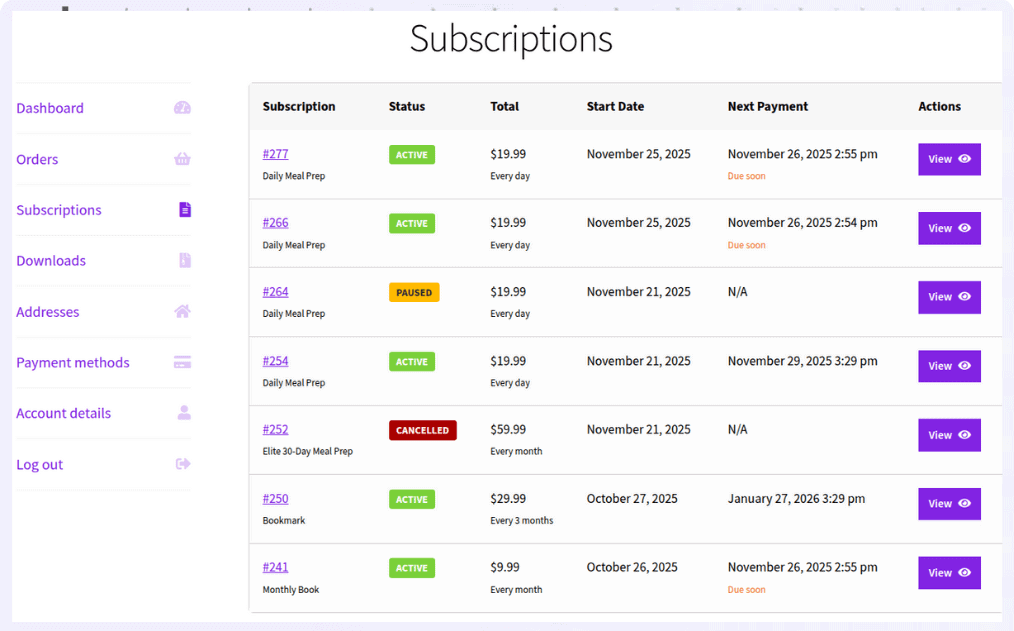
Here are some key features you’ll love:
- Simple subscription product type for quick setup
- Flexible billing cycles (daily, weekly, monthly, yearly)
- Stripe-powered recurring payments
- Smart retry system to recover failed payments
- Customer controls to pause, resume, or cancel subscriptions
This makes it easier for WooCommerce stores to launch and manage subscription products without complex setups.
Now let’s see how to create a subscription product in WooCommerce using Smart Subscriptions for WooCommerce.
How to sell subscriptions with WooCommerce (step-by-step)
Let’s say you want to sell a monthly coffee subscription for $19.99. Customers subscribe once, and WooCommerce automatically charges them every month.
Here’s how to create that subscription product using Smart Subscriptions for WooCommerce.
- Go to
WordPress Admin > Products > Add New - Enter the product name and description
- In Product data, select
Simple Subscription - Set the
Subscription Price(example: $19.99) - Choose the
Billing Interval(example: 1) - Select the
Billing Period(example: Month for a monthly subscription) - (Optional) Add a free trial by setting
Trial LengthandTrial Period - Click
Publish
Your subscription product is now live.
Customers can subscribe once, and payments will renew automatically based on the billing cycle you set.
Check out this detailed guide to set up WooCommerce subscription products.
What can you sell as a WooCommerce subscription?
Subscriptions aren’t just for monthly product deliveries.
With the right subscription plugin, you can turn almost any product or service customers buy repeatedly into a recurring purchase. Whether you sell physical products, digital downloads, memberships or ongoing services, WooCommerce can automate billing and renewals for you.
Here are some of the most common subscription models.
Physical product subscriptions
These are products customers naturally run out of and need to reorder on a regular basis.
Popular examples include:
- Coffee and tea
- Pet food
- Vitamins and supplements
- Skincare and personal care products
- Household essentials
Customers subscribe once, and WooCommerce automatically renews their subscription based on the billing schedule you choose.\
Subscription boxes
Instead of sending the same product every time, subscription boxes deliver a curated selection of products on a recurring schedule.
Popular examples include:
- HelloFresh for meal kits
- FabFitFun for beauty and lifestyle products
- Bokksu for Japanese snack boxes
This model works well when customers enjoy discovering something new with every delivery.
Digital subscriptions
WooCommerce can also sell recurring access to digital products and online services.
Examples include:
- Online courses
- Paid newsletters
- Membership communities
- Software subscriptions
- Premium digital content
Since everything is delivered online, there are no inventory or shipping costs after purchase.
Service subscriptions
Recurring billing isn’t limited to products.
Many businesses charge customers automatically for ongoing services such as:
- Website maintenance
- Marketing retainers
- Business consulting
- Cleaning and maintenance services
- Coaching programs
Instead of manually invoicing clients every month, subscriptions automate recurring payments while creating more predictable revenue.
Which products work best as subscriptions?
Subscriptions work best for products customers naturally reorder after a predictable period.
Products like coffee, supplements, pet food, skincare, software and memberships are ideal because customers already expect to buy them again.
Products that customers purchase only occasionally, such as furniture or luxury items, are usually better suited to one-time sales.
A simple rule is this: if customers naturally think, “I’ll need this again next month,” it’s probably a good subscription product.
How to increase WooCommerce subscription sales
Creating a subscription product is easy. Getting customers to subscribe—and stay subscribed: is where the real opportunity lies.
Here are some proven strategies WooCommerce stores use to grow recurring revenue.
Offer a subscribe-and-save discount
One of the simplest ways to encourage subscriptions is to reward customers for committing to recurring purchases.
For example:
- One-time purchase: $20
- Subscribe and save: $18/month
Even a small discount gives customers an incentive to subscribe while helping your store generate more predictable recurring revenue.
Offer annual subscription plans
Some customers are happy to pay upfront if it means saving money over the long term.
For example:
- $20/month
- $200/year
Annual plans improve cash flow, reduce subscription cancellations and require customers to make fewer purchasing decisions throughout the year.
Should you offer a free trial?
Free trials reduce the risk for first-time subscribers by letting them experience your product or service before committing to recurring payments.
For example, a 7-day free trial on a $20/month subscription gives customers time to see the value before they’re charged.
Smart Subscriptions for WooCommerce supports this out of the box. Check out this guide on how to add free trials to WooCommerce subscriptions.
Free trials work especially well for digital products, memberships and services where customers need to experience the product before deciding to subscribe.
Make it easy to manage subscriptions
Customers are more likely to subscribe when they know they’re in control.
Let subscribers pause, resume, upgrade or cancel their subscriptions without contacting support. Giving customers flexibility builds trust and often reduces unnecessary cancellations.
Reduce subscription cancellations
Winning a new subscriber is valuable, but keeping them subscribed is even more valuable.
A few simple improvements can significantly increase customer lifetime value:
- Send renewal reminder emails before the next billing date.
- Allow customers to pause subscriptions instead of cancelling them.
- Recover failed payments automatically using smart payment retries.
- Make subscription management simple from the customer’s account page.
Many subscription businesses grow not by acquiring more customers, but by keeping existing subscribers for longer.
Common mistakes when selling WooCommerce subscriptions
Subscriptions create recurring revenue, but only when customers continue renewing.
Here are a few mistakes that often reduce subscription retention:
- Choosing products customers don’t need regularly.
- Making cancellation difficult or confusing.
- Offering only monthly plans instead of annual options.
- Ignoring failed payment recovery.
- Not reminding customers before renewals.
A successful subscription business isn’t just about acquiring subscribers. It’s about giving customers a good reason to stay subscribed.
Start building recurring revenue
Subscriptions change the way WooCommerce stores grow.
Instead of relying on one-time purchases, you build a predictable stream of recurring revenue from customers who already trust your business.
You don’t need to turn your entire catalogue into subscriptions overnight. Start with products customers naturally reorder, test different pricing and billing intervals, and refine your strategy as you learn what works.
The most successful subscription businesses don’t convince customers to buy something they don’t need. They simply make repeat purchasing easier.
FAQs
Can I offer a discount for annual subscriptions instead of monthly?
Yes. Create two subscription products, one billed monthly and another billed yearly at a discounted price. This encourages customers to commit longer while improving your cash flow.
What happens if a subscription payment fails?
Most subscription plugins retry the payment automatically. Smart Subscriptions for WooCommerce includes a smart retry system that reattempts failed payments before canceling the subscription.
Can I sell both one-time and subscription versions of a product?
Yes. Many stores offer a one-time purchase option alongside a subscribe-and-save option so customers can choose what works best for them.
Will customers be notified before a subscription renews?
Yes. Subscription plugins can send automated email reminders before the renewal date so customers know when their next payment will be charged.
Can I limit how long a subscription runs?
Yes. You can set a fixed number of billing cycles so the subscription ends automatically after a specific period.
Can I convert an existing WooCommerce product into a subscription?
Yes. With a subscription plugin like Smart Subscriptions for WooCommerce, you can create a subscription version of an existing product or offer customers both a one-time purchase and a subscription option.