
Subscriptions can turn one-time purchases into recurring revenue, but the model only works when customers have a repeatable reason to buy.
That might be a product they regularly consume, a service they continuously need, or content they want ongoing access to.
WooCommerce is a good fit for this model because subscription products can be configured around recurring billing schedules, pricing, trials, expiration, and other subscription terms. With the right subscription plugin, you can turn an ordinary WooCommerce store into a recurring-revenue business.
But the technology is the easy part.
The harder question is: what should you sell on subscription?
The best subscription ideas usually solve one of three problems:
- The customer needs to replenish something regularly.
- The customer wants continued access to something valuable.
- The customer wants a curated experience without repeatedly making the purchasing decision.
In this guide, we’ll explore 15 WooCommerce subscription business ideas, how each model works, who it’s best suited for, and what to consider before launching one.
Why start a subscription business with WooCommerce?
A normal WooCommerce store is often built around individual transactions. A customer buys a product, receives it, and decides later whether to return.
A subscription changes that relationship. Instead of repeatedly asking customers to make the same purchasing decision, you create an agreement around future purchases.
For example:
One-time model: Customer buys a $30 bag of coffee.
Subscription model: Customer receives a fresh bag every month for $30/month.
That difference can make revenue more predictable, but it also changes how you operate the store. You need to think about renewal frequency, recurring pricing, inventory and fulfillment, payment failures, cancellations, customer retention, and subscription management.
WooCommerce’s subscription system supports recurring billing schedules such as weekly, monthly, and yearly intervals, along with options such as trials, signup fees, subscription expiration, and billing-date alignment.
So the opportunity isn’t simply “put a product on subscription.” It’s finding a product or service where recurring purchasing makes sense for the customer.
What makes a good subscription business idea?
Before choosing an idea, ask these five questions.
Does the customer need it repeatedly?
A product that gets consumed, expires, becomes outdated, or requires ongoing support is naturally better suited to subscriptions. Coffee is a good example, a customer finishes the coffee, so another purchase makes sense. A desk lamp isn’t naturally recurring because the customer doesn’t normally need another one every month.
Can you predict the customer’s buying cycle?
The closer your billing cycle matches the customer’s actual usage, the easier the subscription is to justify. For example: coffee → monthly, software → monthly or annually, pet food → every 4–8 weeks. Don’t force everything into a monthly subscription. WooCommerce supports different billing intervals, so your subscription can follow the customer’s actual consumption cycle.
Is there a reason to stay subscribed?
Acquisition gets someone through the door. Retention determines whether the subscription becomes a business. Ask: “What will make this customer want the next renewal?” That could be replenishment, convenience, new content, ongoing service, personalization, or access to a community.
Can you deliver the value consistently?
A subscription creates an ongoing promise. If you sell a monthly box, you need reliable inventory and fulfillment. If you sell a membership, you need enough new or useful content to justify continued access. If you sell maintenance, you need to actually perform the service every billing cycle.
Does recurring billing make the offer easier, not harder?
A subscription should remove repetitive decisions for the customer. If customers have to constantly change products, contact support, or manage complicated billing, the subscription can become more work than a normal purchase.
15 WooCommerce subscription business ideas
1. Coffee subscription
Coffee is one of the clearest examples of a replenishment subscription. Customers consume the product regularly, which creates a natural reason to reorder.
For example, Blue Bottle Coffee lets customers choose from multiple coffee subscriptions and select their preferred delivery cadence. Customers can also change, pause, or cancel their subscription, making the model flexible enough to accommodate different consumption patterns.
For example: Freshly roasted coffee — $25/month
You could offer monthly delivery, different roast options, multiple bag sizes, decaf options, and subscriber-only blends.
Best for: Coffee roasters, specialty coffee brands, local cafés, and ecommerce stores selling packaged coffee.
2. Skincare subscription
Skincare products lend themselves to replenishment because customers typically use them repeatedly. You could sell monthly skincare boxes, cleanser refills, serum subscriptions, personalized routines, or seasonal skincare kits.
For example: Monthly skincare essentials — $39/month
Instead of making customers remember when to reorder, the subscription handles the repeat purchase.
3. Pet supplies subscription
Pet owners repeatedly purchase food, treats, grooming supplies, litter, and toys. This creates several possible subscription models.
- Replenishment: 30-day supply of dog treats — $20/month
- Curation: Monthly dog toy + treat box — $35/month
- Hybrid: Monthly essentials + surprise toy — $45/month
The hybrid model combines predictable replenishment with the excitement of a subscription box.
4. Subscription box
Subscription boxes are built around curation rather than simple replenishment. Instead of allowing customers to choose every item, you create a themed experience. Examples include snacks, books, skincare, stationery, coffee, beauty products, hobby supplies, and wellness products.
Birchbox illustrates this model well. Its current subscription offering combines recurring delivery with curation and personalization: subscribers receive a selection of beauty and wellness products, with options to customize their box. Birchbox also offers different payment structures, including monthly and prepaid plans.
The important distinction is that customers aren’t only paying for the products, they’re paying for discovery and convenience. That gives you more room to differentiate than simply selling the same product every month.
5. Digital membership
You don’t need to ship anything to run a subscription business. You can sell ongoing access to premium articles, tutorials, downloadable resources, templates, webinars, private communities, or educational material.
For example: Premium marketing resources — $19/month
The customer isn’t buying a specific file, they’re paying for continued access to a growing library.
Best for: Creators, educators, consultants, publishers, and niche communities.
6. Online course membership
Instead of selling one course for a single upfront payment, you can build a membership around continuous education.
MasterClass is a good example of the access-based model. Its membership gives subscribers ongoing access to 200+ classes from instructors across multiple categories, with new classes added over time. The membership is currently billed annually and automatically renews, so the value comes from continued access rather than ownership of one course.
For example: Digital Marketing Learning Hub — $29/month
Subscribers could receive new lessons, monthly workshops, templates, case studies, Q&A sessions, and updated learning material. This works particularly well in fields where information changes frequently.
A niche newsletter can become a subscription business. The customer pays for recurring access to information they consider valuable: industry research, investment analysis, ecommerce insights, job opportunities, or niche market intelligence.
8. Software or SaaS access
If you sell software through WooCommerce, subscriptions can provide the recurring billing model behind access to the product.
For example: SEO reporting software — $49/month
The customer continues paying because the software continues providing value. This model has a different retention requirement from physical products, activation and ongoing product value become critical.
9. Website maintenance subscription
Services work particularly well as subscriptions when the work happens continuously.
For example: WordPress maintenance — $49/month
The subscription could include updates, backups, uptime monitoring, security checks, minor fixes, and monthly reports. Instead of selling maintenance as a series of individual tasks, you package ongoing support into a predictable recurring service.
10. Coaching subscription
Coaching doesn’t always need to be sold as a one-time package. You could offer recurring access to monthly coaching calls, group sessions, accountability, private resources, community access, and ongoing feedback.
For example: Fitness coaching community — $29/month
The subscription works because the customer receives ongoing support rather than a single finished product.
11. Digital template or resource library
If you continuously create useful digital assets, you can sell access to the library.
Canva Pro demonstrates the broader access-based model: subscribers get ongoing access to Canva’s premium stock photos, videos, graphics, GIFs, audio, and other creative resources rather than purchasing individual assets one at a time.
For example: Canva template library — $15/month
Subscribers might receive new templates every month, access to previous templates, commercial-use resources, seasonal collections, and tutorials.
12. Household essentials
Products customers routinely consume can be excellent subscription candidates, cleaning supplies, personal-care products, toiletries, paper products, laundry products, filters, and disposable supplies.
The key advantage is convenience. Instead of remembering to reorder something every few weeks, customers receive it automatically.
13. Food subscription
Food businesses can use subscriptions for both replenishment and discovery, monthly snack boxes, meal kits, specialty ingredients, sauces, spices, baked goods, or healthy food boxes.
A useful distinction:
- Replenishment subscription: “Send me the same product regularly.” — competes heavily on convenience.
- Discovery subscription: “Send me something interesting every month.” — can compete on curation and experience.
14. Community membership
A paid community can become a recurring-revenue business when members receive ongoing access to people, information, or experiences they value.
For example: Ecommerce founders community — $25/month
Membership could include private discussions, monthly expert sessions, networking, templates, member-only events, and educational resources.
The community itself is the recurring value.
15. Professional support subscription
Businesses can package ongoing expertise into a monthly subscription: technical support, SEO support, design support, bookkeeping, consulting, marketing assistance, or IT support.
For example: WooCommerce support — $99/month
Instead of charging separately for every small request, you provide an agreed level of ongoing support. This model is particularly attractive for agencies and freelancers because recurring contracts make revenue more predictable.
Which WooCommerce subscription model should you choose?
The 15 ideas above fall into three broad categories.
| Model | Customer pays for | Examples |
|---|---|---|
| Replenishment | Regularly needed products | Coffee, skincare, pet supplies |
| Curation | New or selected products | Subscription boxes, snacks, discovery boxes |
| Access and service | Ongoing value | Memberships, courses, software, support |
This distinction matters because each model has a different retention strategy.
Replenishment: Your priority is convenience. Make ordering automatic and let customers easily change quantities, pause, or cancel when their needs change.
Curation: Your priority is novelty and discovery. Customers need a reason to look forward to the next delivery.
Access and services: Your priority is ongoing value. Customers need to keep receiving useful content, support, functionality, or community benefits.
How to validate a WooCommerce subscription idea before launching
Don’t build a complete subscription system before knowing whether customers want the offer. Start with the recurring need.
Step 1: Look at existing purchase behavior
If customers already buy the same product repeatedly, that’s a strong subscription signal. If customers regularly reorder coffee every 4–6 weeks, you’re not inventing a subscription need, you’re making an existing buying behavior easier.
Step 2: Calculate the economics
Before offering a discount, calculate:
Subscription contribution margin = recurring revenue − product cost − fulfillment − shipping − payment fees − subscription-specific costs
A subscription that increases order frequency but destroys margin isn’t necessarily a successful subscription business.
Step 3: Match billing to consumption
Don’t automatically choose monthly. If customers consume your product every six weeks, a six-week billing cycle may be more natural than forcing a monthly shipment. WooCommerce supports recurring schedules beyond a simple monthly model, including different intervals and periods.
Step 4: Decide what happens when customers want to leave
Retention isn’t about making cancellation difficult. Give customers sensible alternatives where appropriate:
- Pause
- Skip
- Change frequency
- Downgrade
- Switch products
These options are particularly useful when the customer’s problem isn’t dissatisfaction but simply “I have too much right now.”
Step 5: Test the entire renewal journey
A subscription isn’t complete when checkout succeeds. You also need to test what happens when the next payment succeeds, the payment fails, the customer cancels, the subscription reaches its end date, the customer changes billing details, and the customer needs to manage the subscription.
How to create a subscription product in WooCommerce
Let’s understand how to create a subscription product with a simple example.
Imagine you want to offer a monthly coffee bean subscription where customers receive freshly roasted coffee every month for $299.
- First, install and activate the Smart Subscriptions for WooCommerce plugin on your store. Note that Smart Subscriptions currently supports automatic renewals via Stripe, so you should also install and connect the WooCommerce Stripe gateway.
- After activating the plugin, go to
WooCommerce > Settings > Smart Subscriptions. In this section, configure the general settings and make sure the subscription functionality is enabled. - Next, go to
WooCommerce > Products > Add Newand create your subscription product. For example, you could name the product Monthly Coffee Bean Subscription. Add a detailed description explaining what customers will receive, such as freshly roasted coffee beans delivered every month. You can also upload product images and write a short description. - Scroll down to the
Product Datasection and chooseSimple Subscriptionfrom the dropdown menu. - In the
Subscription Pricefield, enter the amount customers will pay for each billing cycle. For example, you can set the price to $299. - Enter your input in the
Billing IntervalandBilling Period. Select 1 and Month in the respective fields, meaning you’ll charge your customer every month. - If you want to attract new customers, you can offer a trial before billing begins. For example, set
Trial Lengthto 7 andTrial Periodto Day to give customers a 7-day free trial. - You can optionally attach coupons to the subscription product to run promotional offers such as discounts for the first billing cycle. Additionally, entering a value in the Cost of Goods field helps you track profitability by recording the approximate cost involved in delivering the product.
- Click
Publishto make the subscription product live.
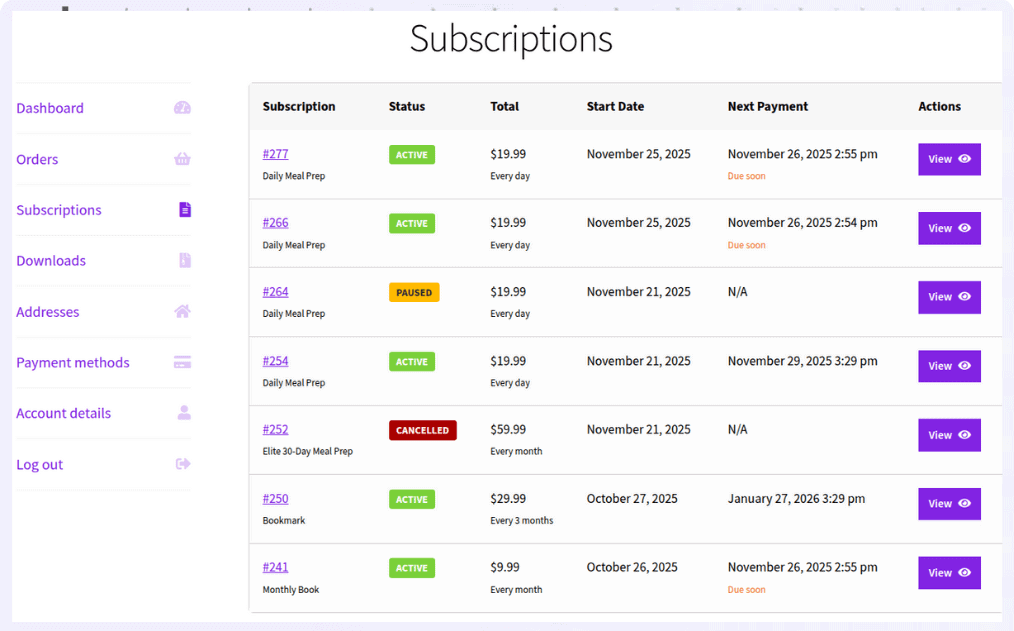
When customers buy your product, they will see their purchase details in their accounts section. They also get the option to cancel or pause the subscription anytime.
Get Smart Subscriptions for WooCommerce
Final thoughts
The best WooCommerce subscription businesses don’t start with a plugin. They start with a repeatable customer need.
Coffee works because customers drink it. Skincare works because customers use it. Software works because customers need continued access. Memberships work because customers want ongoing value. Services work because customers need continued support.
Once you identify that recurring need, WooCommerce gives you the infrastructure to turn it into a repeatable purchasing experience.
Start with one product, one audience, and one clear reason to subscribe. Then use customer behavior, not assumptions, to decide whether to add more plans, billing frequencies, products, or subscription benefits.
Get Smart Subscriptions for WooCommerce
FAQ
What is the best subscription business to start with WooCommerce?
There isn’t one universally best subscription business. The strongest candidates usually have predictable repeat demand, healthy margins, and a clear reason for customers to continue buying. Replenishment products such as coffee, skincare, pet supplies, and household essentials are often easier to explain because customers already understand why they need another purchase.
Is WooCommerce good for subscription businesses?
Yes. WooCommerce can support subscription-based businesses when paired with a subscription solution that provides recurring billing and subscription management. The right setup depends on whether you’re selling physical products, digital access, memberships, or ongoing services.
Can I sell both subscriptions and one-time purchases in WooCommerce?
Yes. WooCommerce subscription solutions can support both purchasing models. WooCommerce Subscriptions, for example, allows a product to be offered as a one-time purchase, subscription, or both depending on the configuration. This is useful for “subscribe and save” offers where customers can choose between convenience and commitment.
How often should a WooCommerce subscription renew?
The billing frequency should reflect how often customers actually consume or need the product. Weekly, monthly, quarterly, and annual billing can all make sense depending on the business model. WooCommerce Subscriptions supports different billing intervals and periods.
Do subscription businesses need free trials?
Not necessarily. Free trials are more appropriate when customers need time to experience an ongoing service or digital product before deciding whether to pay. Replenishment products often have a clearer value proposition and may work better with an introductory discount or subscriber benefit.
How can I make a WooCommerce subscription profitable?
Focus on the economics of the entire customer lifecycle, not just the first subscription payment. Track acquisition cost, recurring gross margin, fulfillment costs, payment fees, cancellation rates, failed renewals, and customer lifetime value. A subscription becomes valuable when the recurring relationship generates enough margin to justify acquiring and serving the customer.