

Bulk editing is one of those tasks that seems simple until your WooCommerce catalog starts growing.
Updating prices, changing categories, editing stock, managing variations, or modifying custom fields one product at a time quickly becomes frustrating. That’s why spreadsheet-style editors like WP Sheet Editor have become popular among WooCommerce store owners.
However, WP Sheet Editor isn’t the right fit for everyone.
Some users want a simpler interface. Others need better WooCommerce-focused workflows, easier filtering, or more affordable pricing. And in some cases, what they actually need isn’t a spreadsheet editor at all—it’s an import tool that can automate large-scale product updates.
That’s why choosing the right alternative depends less on finding the plugin with the longest feature list and more on finding one that matches how you manage your store.
Key takeaways
If you’re looking for a quick recommendation, here’s what we found during our research:
- Best overall alternative: Smart Manager is the closest replacement to WP Sheet Editor for everyday WooCommerce bulk editing.
- Best for imports and migrations: WP All Import is ideal for importing supplier catalogs, CSV/XML files, and automating data updates.
- Best modern spreadsheet experience: Setary offers a clean interface with an intuitive editing workflow.
- Best official WooCommerce solution: WooCommerce Bulk Table Editor is a good choice if you prefer extensions from the WooCommerce ecosystem.
- Best free option: iThemeland Woo Bulk Product Editor Lite is suitable for basic bulk editing without an upfront cost.
In this guide, we compared five popular WP Sheet Editor alternatives for WooCommerce, evaluating them on ease of use, bulk editing capabilities, pricing, compatibility, and real-world usability. Whether you’re running a small online shop or managing thousands of products across multiple stores, this comparison will help you choose the right tool for your workflow.

Why you can trust this comparison
This isn’t a roundup based solely on feature lists. We reviewed each plugin’s official documentation, pricing, WooCommerce compatibility, update history, and community feedback from merchants and developers. We also considered practical factors like ease of use, bulk editing workflows, and suitability for different store sizes to help you choose the right tool—not just the one with the longest feature list.
How we evaluated these plugins
Rather than comparing feature lists alone, we looked at how these plugins perform in everyday WooCommerce management.
Our evaluation focused on the areas that matter most to store owners and WordPress administrators:
- Bulk editing capabilities – How efficiently can you update products, variations, categories, prices, inventory, and other WooCommerce data?
- Ease of use – Is the interface intuitive enough for everyday editing, or does it require a steep learning curve?
- WooCommerce compatibility – Does the plugin work well with common WooCommerce data, including products, orders, coupons, and custom fields?
- Performance on larger catalogs – Can it handle stores with thousands of products without slowing down your workflow?
- Pricing and overall value – Do the features justify the cost, and is the free version useful for real-world tasks?
- Maintenance and support – We reviewed update frequency, documentation, and the quality of available support resources.
- Community feedback – We also considered recurring themes from merchant discussions, developer feedback, and user reviews to understand where each plugin performs well—and where it falls short.
One recurring theme across community discussions was that many users compare spreadsheet editors with import tools, even though they’re designed for different jobs. We’ve highlighted those differences throughout this guide so you can choose the plugin that best fits your workflow rather than simply picking the one with the most features.
Quick comparison: Best WP Sheet Editor alternatives at a glance
| Plugin | Best for | Free version | Spreadsheet editing | Import & automation | HPOS support |
|---|---|---|---|---|---|
| Smart Manager | Everyday WooCommerce bulk editing | ✅ | ✅ | Limited | ✅ |
| Setary | Clean, modern spreadsheet editing | ❌ | ✅ | ❌ | Check current documentation |
| WP All Import | Imports, migrations, supplier feeds | Limited | ❌ | ✅ | ✅ |
| WooCommerce Bulk Table Editor | Official WooCommerce bulk editing | ❌ | ✅ | ❌ | Check current documentation |
| iThemeland Woo Bulk Product Editor Lite | Free WooCommerce bulk editing | ✅ | ✅ | ❌ | Check current documentation |
The 5 Bbest WP Sheet Editor alternatives compared
No single plugin is the right choice for every WooCommerce store.
Some focus on fast spreadsheet-style editing, while others are built for importing supplier catalogs, automating updates, or managing large product databases. During our research, we found that the best choice depends largely on how you manage your store rather than how many features a plugin offers.
Here’s a closer look at the five alternatives we evaluated.
Smart Manager — Best overall WP Sheet Editor alternative for WooCommerce
If your goal is to replace WP Sheet Editor with a tool that feels familiar but offers a streamlined WooCommerce workflow, Smart Manager is the strongest option we evaluated.
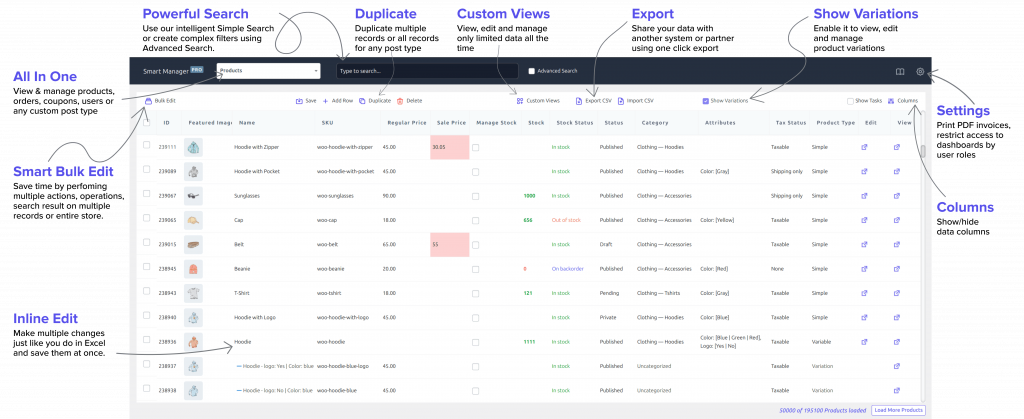
Built specifically for WooCommerce and WordPress, Smart Manager lets you view and edit your store data in a spreadsheet-like interface. Instead of opening dozens of product pages, you can update prices, stock, categories, sale dates, attributes, SKUs, and custom fields directly from a single screen.
During our research, Smart Manager consistently stood out because it balances powerful bulk editing features with an interface that’s approachable even for non-technical store owners.
Key features
- Spreadsheet-style editing for WooCommerce data
- Bulk edit thousands of products in a few clicks
- Advanced search and filtering
- Inline editing without opening individual products
- Bulk update prices, inventory, categories, attributes, and custom fields
- Manage products, orders, coupons, customers, and more from one dashboard
- Duplicate records and perform mass actions quickly
- Support for custom post types and popular WooCommerce extensions
What we liked
- Designed specifically for WooCommerce workflows.
- Easy to learn, even if you’ve never used spreadsheet editors before.
- Excellent filtering options for targeted bulk updates.
- Handles everyday store management tasks efficiently.
- Active development with comprehensive documentation.
Where it falls short
- Some advanced capabilities are available only in the Pro version.
- Users who only need occasional product updates may find the premium version unnecessary.
Pricing
- A free version is available with basic functionality.
- The Pro version unlocks advanced bulk editing, unlimited records, powerful filters, and productivity features for growing stores. The Pro version is priced at $199/year.
Best for
- WooCommerce store owners
- Agencies managing multiple stores
- Stores with large product catalogs
- Teams that frequently update products, pricing, inventory, or categories
Setary — Best for a clean, modern spreadsheet experience
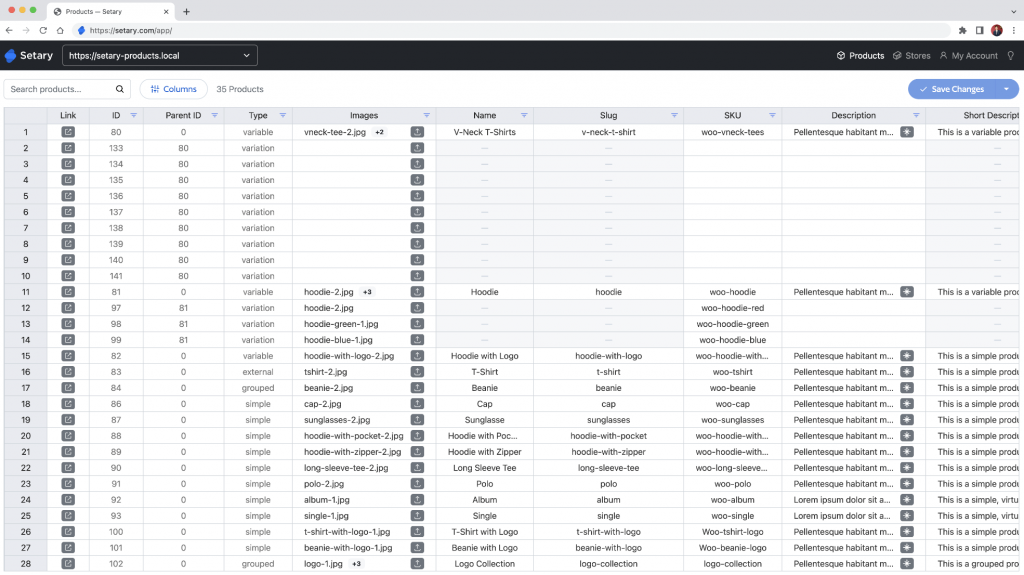
Some spreadsheet editors become overwhelming as more features are added over time. Setary takes a different approach by emphasizing a clean interface and a straightforward editing experience.
Instead of presenting dozens of options upfront, it focuses on helping users navigate and edit WordPress and WooCommerce data quickly.
A recurring theme during our research was that many users value simplicity just as much as advanced functionality. For store owners who primarily want a modern spreadsheet editor without unnecessary complexity, Setary is worth considering.
Key features
- Spreadsheet-style editing
- Bulk updates for WooCommerce data
- Advanced filtering
- Inline editing
- Custom field support
- Quick search tools
What we liked
- Clean and modern interface.
- Easy to understand for new users.
- Fast editing workflow.
- Good filtering capabilities.
Where it falls short
- Smaller user community than more established plugins.
- Fewer tutorials and third-party resources.
- Less market recognition compared to long-standing competitors.
Pricing
- Premium plugin with commercial licensing.
- Pricing varies depending on the selected plan.
Best for
- Small to medium WooCommerce stores
- Users who prefer simplicity
- Store owners switching from cluttered spreadsheet editors
WP All Import — Best for imports, migrations, and supplier catalogs
Although WP All Import often appears in “WP Sheet Editor alternatives” lists, it’s important to understand that it serves a different purpose.
WP Sheet Editor and Smart Manager are designed for editing existing WooCommerce data.
WP All Import is designed for bringing data into your store.
That distinction matters.
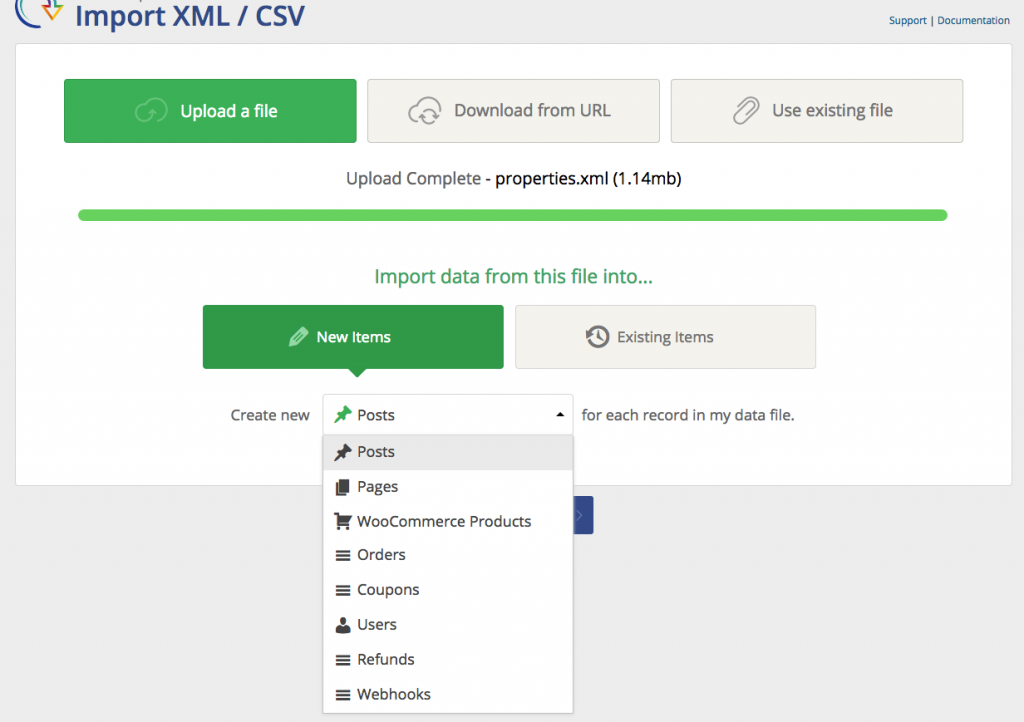
If you regularly import supplier catalogs, migrate WooCommerce stores, sync inventory from external systems, or schedule automated updates, WP All Import is one of the strongest tools available.
Developers frequently mentioned its flexibility when working with complex CSV or XML files, while agencies appreciate the ability to automate recurring imports.
Key features
- Import CSV, XML, Excel, and other structured data
- Scheduled and automated imports
- Drag-and-drop field mapping
- Import products, variations, customers, orders, and custom fields
- WooCommerce integration
- API and developer-friendly customization
- Supports large product catalogs
What we liked
- Extremely flexible import engine.
- Excellent for migrations and supplier feeds.
- Handles complex data structures well.
- Powerful automation options.
Where it falls short
- Not designed for spreadsheet-style editing.
- Steeper learning curve than traditional bulk editors.
- More functionality than many small stores actually need.
Pricing
- Limited free functionality is available.
- Advanced WooCommerce importing features require the premium version.
Best for
- Large WooCommerce stores
- Agencies
- Developers
- Businesses importing supplier catalogs
- Store migrations
- Automated inventory updates
WooCommerce Bulk Table Editor — Best official WooCommerce bulk editing solution
If you prefer using extensions developed for the WooCommerce ecosystem, WooCommerce Bulk Table Editor is worth considering.
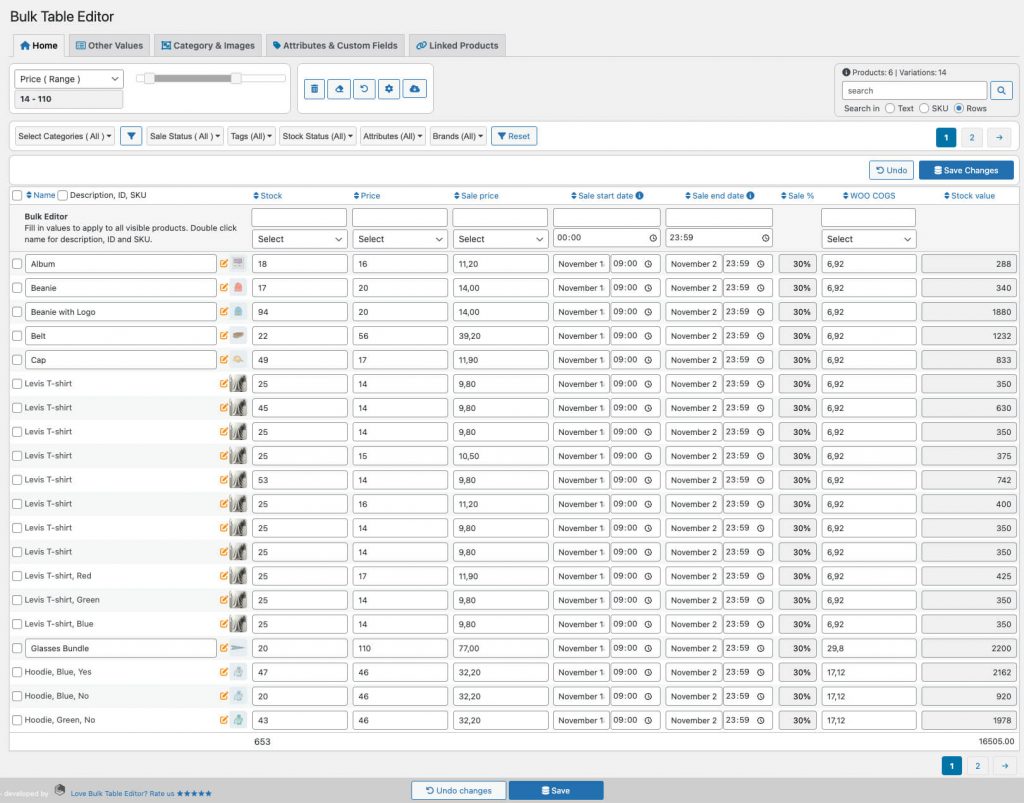
Unlike standalone spreadsheet plugins, this extension focuses on helping merchants edit WooCommerce products in a familiar table layout while staying within the official WooCommerce environment.
During our research, we found it’s a good fit for store owners who prioritize compatibility and official support over having the most advanced bulk editing toolkit.
Key features
- Spreadsheet-style product editing
- Bulk update product data from a single screen
- Inline editing for faster changes
- Search and filter products
- Edit product prices, inventory, stock status, and other common fields
- Works within the WooCommerce admin experience
What we liked
- Developed for the WooCommerce ecosystem.
- Familiar interface for WooCommerce users.
- Straightforward workflow for everyday product updates.
- Suitable for stores that prefer official extensions.
Where it falls short
- Focuses mainly on product editing rather than broader WordPress content management.
- Fewer advanced bulk editing features compared to dedicated spreadsheet editors.
- Premium extension with no free version.
Pricing
- Available as a premium WooCommerce extension.
- Pricing is based on an annual subscription.
Best for
- WooCommerce-first businesses
- Store owners who prefer official WooCommerce extensions
- Small to medium product catalogs
- Merchants looking for a straightforward bulk editing experience
Get WooCommerce Bulk Table Editor
iThemeland Woo Bulk Product Editor Lite — Best free WP Sheet Editor alternative
Not every WooCommerce store needs an advanced premium plugin.
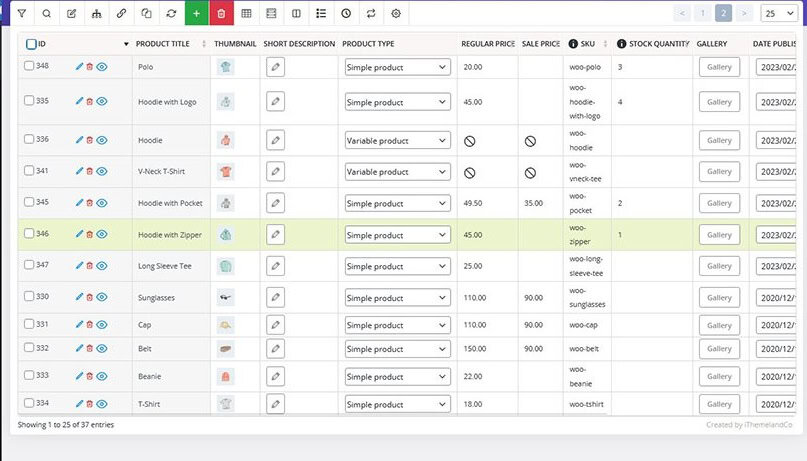
If you only need to update products occasionally and want to avoid paying for a subscription, iThemeland Woo Bulk Product Editor Lite provides a practical starting point.
It offers spreadsheet-style editing with essential bulk editing features, making it attractive for smaller stores or merchants who want to test this style of product management before investing in a premium solution.
A recurring theme across user reviews is that many merchants begin with the Lite version and upgrade only if they outgrow its capabilities.
Key features
- Spreadsheet-style product editing
- Bulk editing tools
- Product filtering
- Inline editing
- Support for common WooCommerce product fields
- User-friendly interface
What we liked
- Free to get started.
- Easy installation.
- Suitable for occasional bulk edits.
- Good introduction to spreadsheet-style WooCommerce management.
Where it falls short
- Advanced functionality requires upgrading.
- Better suited for smaller stores than enterprise-sized catalogs.
- Fewer workflow automation features than premium competitors.
Pricing
- The Lite version is free.
- Premium plans unlock additional editing capabilities and advanced features.
Best for
- Small WooCommerce stores
- Beginners
- Budget-conscious merchants
- Users evaluating spreadsheet editing before purchasing a premium plugin
Feature comparison: Which WP Sheet Editor alternative fits your workflow?
Choosing the right plugin isn’t about finding the longest feature list—it’s about matching the plugin to your daily workflow.
Here’s how the five alternatives compare across the features that matter most to WooCommerce store owners.
| Feature | Smart Manager | Setary | WP All Import | WooCommerce Bulk Table Editor | iThemeland Lite |
|---|---|---|---|---|---|
| Spreadsheet-style editing | ✅ | ✅ | ❌ | ✅ | ✅ |
| Bulk product editing | ✅ | ✅ | Limited | ✅ | ✅ |
| Inline editing | ✅ | ✅ | ❌ | ✅ | ✅ |
| Advanced filtering | ✅ | ✅ | N/A | Basic | Basic |
| Product variations | ✅ | ✅ | ✅ | ✅ | Limited |
| Custom fields | ✅ | ✅ | ✅ | Limited | Limited |
| Orders & customers | ✅ | Limited | ✅ | ❌ | ❌ |
| Import & export automation | Limited | ❌ | ✅ | ❌ | ❌ |
| Large catalog support | Excellent | Good | Excellent | Good | Fair |
| Learning curve | Easy | Easy | Moderate–High | Easy | Easy |
| Free version | ✅ | ❌ | Limited | ❌ | ✅ |
What stood out during our research
Rather than declaring one plugin the winner in every category, several clear patterns emerged:
- Smart Manager delivered the most complete day-to-day WooCommerce editing experience.
- Setary impressed with its clean, user-friendly interface.
- WP All Import was the clear choice for importing, syncing, and automating large product catalogs.
- WooCommerce Bulk Table Editor appealed to merchants who prefer official WooCommerce extensions.
- iThemeland Lite offered a solid entry point for smaller stores looking for a free spreadsheet editor.
One important takeaway is that spreadsheet editors and import tools solve different problems. If you’re mainly editing existing products, choose a spreadsheet editor. If you’re regularly bringing data into your store from suppliers or external systems, an import tool will save significantly more time.
Which WP Sheet Editor alternative is right for you?
If you’ve made it this far, you’ve probably realized there isn’t a single “best” plugin for everyone.
The right choice depends on how you manage your WooCommerce store. Some businesses spend most of their time updating products manually, while others rely on supplier imports or automated data syncs.
Here’s a quick recommendation based on common use cases.
| If you… | Recommended Plugin | Why |
|---|---|---|
| Edit products, prices, or inventory every day | Smart Manager | The closest replacement to WP Sheet Editor, with powerful spreadsheet editing and bulk actions. |
| Manage multiple WooCommerce stores for clients | Smart Manager | Advanced filtering and bulk editing make repetitive tasks much faster. |
| Import supplier catalogs or migrate stores | WP All Import | Built specifically for importing, mapping, and automating large datasets. |
| Prefer a clean, modern editing experience | Setary | Easy-to-use spreadsheet interface without unnecessary complexity. |
| Want an official WooCommerce extension | WooCommerce Bulk Table Editor | Good fit for merchants who prefer staying within the WooCommerce ecosystem. |
| Need a free bulk editing plugin | iThemeland Woo Bulk Product Editor Lite | Covers the essentials without requiring a paid license. |
During our research, one thing became clear: many users compare spreadsheet editors with import tools even though they’re designed for different jobs. If your goal is to edit existing WooCommerce data quickly, choose a spreadsheet editor. If your workflow revolves around bringing data into your store, an import tool will usually save you more time.
Conclusion
WP Sheet Editor remains a capable bulk editing plugin, but it isn’t the only option—and it won’t be the best fit for every WooCommerce store.
During our research, Smart Manager stood out as the strongest overall alternative for merchants who regularly edit products, inventory, pricing, orders, and other WooCommerce data. It offers the closest day-to-day experience while adding powerful filtering and productivity features that simplify large-scale store management.
That said, every plugin in this comparison serves a different purpose.
- Choose Smart Manager if you want the closest replacement for WP Sheet Editor.
- Choose Setary if a clean, modern interface is your priority.
- Choose WP All Import if your workflow depends on supplier imports, migrations, or automation.
- Choose WooCommerce Bulk Table Editor if you prefer using official WooCommerce extensions.
- Choose iThemeland Woo Bulk Product Editor Lite if you want a capable free option for basic bulk editing.
The best plugin isn’t necessarily the one with the most features—it’s the one that fits the way you work.
Before making your decision, consider how often you edit your store, how large your catalog is, and whether your biggest challenge is editing existing data or importing new data. Choosing a plugin that matches your workflow will save far more time than simply choosing the longest feature list.
Frequently asked questions
What is the best WP Sheet Editor alternative for WooCommerce?
For most WooCommerce stores, Smart Manager is the closest alternative to WP Sheet Editor.
It combines spreadsheet-style editing with advanced bulk actions, filtering, and support for WooCommerce products, orders, customers, coupons, and custom fields. If your team regularly manages store data, it offers one of the most complete editing experiences available.
However, if your primary task is importing supplier feeds or migrating stores, WP All Import is the better choice because it’s designed for automation rather than interactive editing.
Can these plugins edit WooCommerce product variations and custom fields?
Most premium plugins in this comparison support editing product variations and custom fields, although the level of functionality varies.
If your store relies heavily on variations, custom metadata, or advanced WooCommerce extensions, it’s worth reviewing each plugin’s documentation to confirm compatibility with your specific setup before purchasing.
What’s the difference between a spreadsheet editor and an import plugin?
This is one of the biggest points of confusion.
A spreadsheet editor helps you modify existing WooCommerce data directly from your dashboard. It’s ideal for updating prices, stock, categories, attributes, and other product details in bulk.
An import plugin, on the other hand, is designed to bring new data into your store from CSV, XML, APIs, or other external sources. It’s the better choice for supplier catalogs, store migrations, and automated data synchronization.
If you’re replacing WP Sheet Editor because you spend hours manually editing products, you’ll probably be happier with another spreadsheet editor than with an import tool.