

Managing a WooCommerce store becomes more challenging as your product catalog grows. Tasks like updating prices, inventory, categories, or product details one item at a time can quickly turn into hours of repetitive work.
A good WooCommerce bulk edit plugin helps you update hundreds or even thousands of products in minutes. Some tools focus on simple product edits, while others also let you manage orders, coupons, customers, or import large datasets.
To help you choose the right plugin, we reviewed five of the most popular WooCommerce bulk edit solutions. We compared their features, ease of use, pricing, scalability, support, and real user feedback to understand where each one performs best.
Whether you’re running a small store or managing a large WooCommerce catalog, this guide will help you compare the available options and choose the plugin that fits your workflow.
Why choosing the right WooCommerce bulk edit plugin matters
As your WooCommerce store grows, manual product updates become increasingly difficult. Whether you’re updating prices before a sale, reorganizing categories, or applying a supplier’s latest price list, editing products one by one quickly becomes inefficient.
Choosing the right bulk edit plugin isn’t just about saving time. It also helps reduce errors, handle large updates more efficiently, and simplify everyday store management.
Here’s what can happen when your bulk editing tool isn’t the right fit:
| Risk | Business impact |
|---|---|
| Pricing mistakes | A missing preview or undo option can turn a simple pricing error into a catalog-wide problem. |
| Slow bulk updates | Large operations may freeze the admin area or exceed your server’s available memory. |
| Compatibility issues | Plugins that don’t keep up with WooCommerce, HPOS, or PHP updates can create maintenance problems. |
| Limited import options | Some plugins edit existing products well but don’t support importing supplier files or large datasets. |
| Extra software costs | Product-only editors often require additional plugins to manage orders, coupons, or customers. |
How we evaluated these WooCommerce bulk edit plugins
We didn’t rely on feature lists alone. To make this comparison as practical as possible, we reviewed each plugin’s documentation, pricing, changelog, WordPress.org ratings, support forums, and real user feedback. We also considered how well each plugin performs for both small stores and large WooCommerce catalogs.
Each plugin was evaluated based on:
- Features and editing capabilities
- Ease of use
- Performance with large product catalogs
- Scalability
- Support quality
- Customer reviews and overall reputation
- Pricing and value for money
- Long-term updates and reliability
Every WooCommerce store has different requirements. Rather than declaring a single winner based solely on features, we focused on where each plugin performs best so you can choose the one that matches your store’s needs and workflow.
Our quick recommendations
If you’re short on time, here’s a quick overview of the plugin we recommend for different WooCommerce store needs. Keep in mind that there’s no single “best” plugin. The right choice depends on your store size, workflow, and the type of bulk editing you do most often.
| Requirement | Recommended Plugin |
|---|---|
| Best Overall | Smart Manager (StoreApps) |
| Best for Beginners | PW WooCommerce Bulk Edit (Pimwick) |
| Best Budget Option | PW WooCommerce Bulk Edit (Free Tier) |
| Best for Growing Stores / Agencies | WP Sheet Editor |
| Best for Enterprise Stores | YITH WooCommerce Bulk Product Editing |
| Best Customer Support / Best Value | Smart Manager (StoreApps) |
| Best for Developers / Power Users | BEAR — WOOBE (PluginUs) |
What surprised us during our research
After comparing documentation, pricing, customer reviews, and real-world feedback, a few patterns stood out across these plugins.
- Managing products isn’t the same as managing your store. Most plugins focus only on product editing. Smart Manager stood out because it also lets you manage orders, coupons, customers, subscriptions, and custom post types from the same interface.
- Importing data and bulk editing are different jobs. If you regularly receive supplier spreadsheets or migrate products between stores, a plugin with built-in import and export features, like WP Sheet Editor, can save significantly more time than a plugin designed only for editing existing products.
- The free version isn’t always enough. Some plugins offer generous free plans, while others reserve many useful features for their premium versions. It’s worth checking what you’ll actually need before deciding based on price alone.
- Large stores should pay attention to editing limits. Some plugins intentionally limit how many products can be loaded in a single batch to maintain performance. That isn’t usually a problem for smaller stores, but it can affect stores managing tens of thousands of products.
- Pricing isn’t just about the first year. Most plugins use annual subscriptions, while BEAR (WOOBE) follows a one-time purchase model. Depending on how long you plan to use the plugin, the long-term cost can be very different.
These insights helped shape our recommendations throughout this guide and may help you narrow down the right plugin before diving into the detailed reviews below.
Quick comparison table
The table below highlights the main differences between the five plugins. Use it as a quick reference before reading the detailed reviews of each plugin.
| Plugin | Best suited for | Starting Price¹ | Free version | Ease of Use | Support quality | Handles large catalogs | Our take |
|---|---|---|---|---|---|---|---|
| Smart Manager | All-round store management | ~$199/yr | Yes (Lite) | High | Excellent | Very high (100k+) | Best all-round WooCommerce management tool |
| WP Sheet Editor | Migrations, large catalogs, agencies | ~$49.99/yr (Woo add-on) | Yes (limited) | Medium | Good | Very high | Best choice for imports and migrations |
| YITH Bulk Product Editing | Established / enterprise stores | ~$79.99/yr | Yes | Medium | Good (premium desk) | High | Trusted brand, strong in-ecosystem |
| PW WooCommerce Bulk Edit | Beginners, budget, product-only | $59/yr | Yes (capable) | Very high | Good | Medium (1,000-row pulls) | Easiest plugin for beginners |
| BEAR (WOOBE) | Developers, agencies, power users | One-time, ~$49 range | Yes | Low (steep) | Fair (weekdays) | High | Maximum control, real learning curve |
Note: Prices shown are approximate and may change over time. Always check the plugin’s official pricing page before purchasing.
Individual plugin analysis
Smart Manager (StoreApps)
Not really a “bulk edit plugin” — a store-management cockpit. Products, variations, orders, coupons, users, subscriptions, and effectively any post type live inside one Excel-like grid in wp-admin. Built by StoreApps, also known for Smart Coupons and Affiliate for WooCommerce.
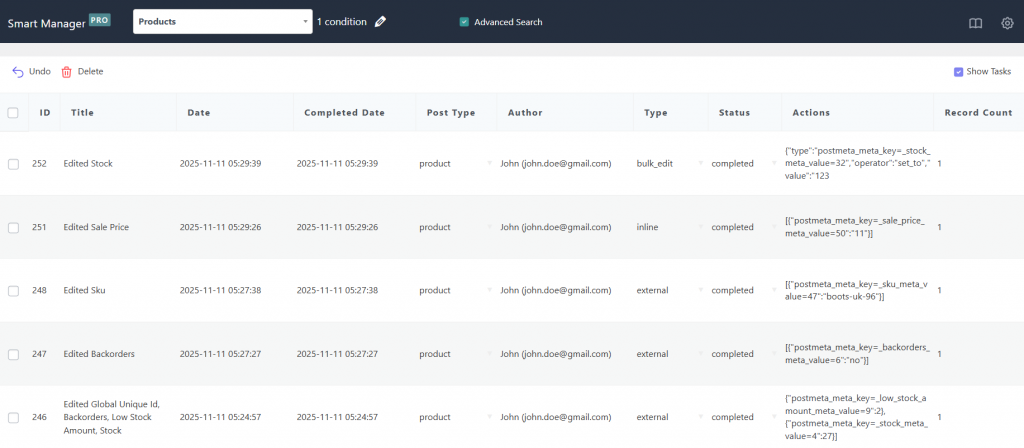
Key features: spreadsheet editor across products, orders, coupons, users and custom post types; inline + bulk operations (e.g. cut all prices 25%); advanced search with operators and saved searches; scheduled bulk edits and CSV exports (Pro); undo for bulk and inline edits — including changes made outside Smart Manager; bulk delete with permanent image removal; HPOS-compatible.
What we like: The breadth is the headline — fixing an order status, adjusting a coupon’s expiry, and repricing a category without leaving one screen is a real efficiency multiplier. Undo and live preview reduce the fear factor that stops people running big operations at all.
Drawbacks: It’s an editor, not an importer — no file-driven import, so a supplier price spreadsheet still means editing by hand. It struggles with true conditional (“if X then Y”) logic, and the free Lite tier is meaningfully restricted.
Community sentiment: Praise centers on time savings, reliable CSV exports, and standout support quality; the recurring theme is consolidation — “this replaced several other plugins.” Complaints are about Lite’s limits and a dashboard that feels broad at first.
Pricing: ~$199/year single site, with multi-site, lifetime, and enterprise tiers. Not the cheapest, but one license covers products and orders and coupons and users, so it often replaces two or three tools.
Best for stores with 1,000–100,000+ records and teams managing more than products. Avoid if you’re a tiny product-only shop on a budget, or your core need is importing files.
Verdict: The safest default for most serious stores whose needs go beyond products.
WP Sheet Editor
An Excel-style grid in wp-admin built around the one thing the others under-deliver: genuinely moving data in and out. Heavily used for migrations and supplier-feed syncing.
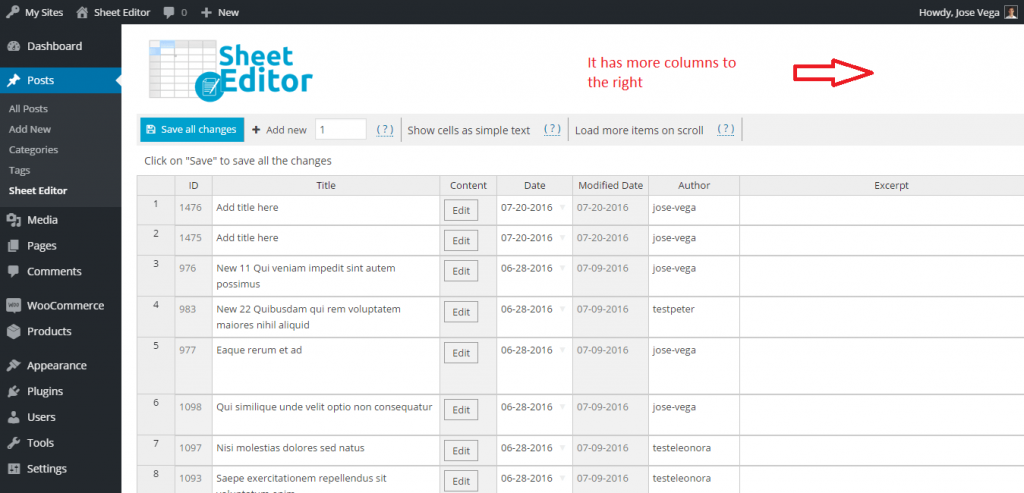
Key features: spreadsheet editor for products, variations, attributes, SEO and custom fields; math formulas (raise all prices 10%; copy field to field); search-and-replace across titles, SKUs, descriptions; real import/export between sites and from supplier data; a scheduling extension for automatic recurring jobs; explicit batch-size and delay controls for modest hosting.
What we like: Import/export is the genuine differentiator versus every other plugin here, and the batch-throttle controls are the most explicit in this comparison — pragmatic engineering for large catalogs on shared hosting.
Drawbacks: The free version is severely limited (simple products, prices only). There’s a real learning curve, pricing auto-renews annually, and the à la carte plugin structure means costs can creep with multiple editors.
Community sentiment: Reviewers describe migrations that “would have taken days” finishing in an afternoon, and appreciate that it doesn’t nag for reviews. Complaints: the free tier feels like a teaser and the modular pricing can confuse.
Pricing: WooCommerce add-on from ~$49.99 USD; broader bundles run $49–$98/year or $119–$239 lifetime; an All Plugins lifetime bundle is periodically discounted near $399.99.
Best for stores migrating in/out of WooCommerce, sellers syncing supplier files, and agencies (the lifetime bundle amortizes across clients). Avoid if you want zero-learning-curve occasional editing, or need one license to also manage orders and users.
Verdict: If the job is moving and transforming data, not just nudging it, this is the specialist to beat.
YITH WooCommerce Bulk Product Editing
One of the most recognizable names in WooCommerce extensions, with over a decade in the market. A spreadsheet-style grid emphasizing formula-based edits, presets, and edit history.
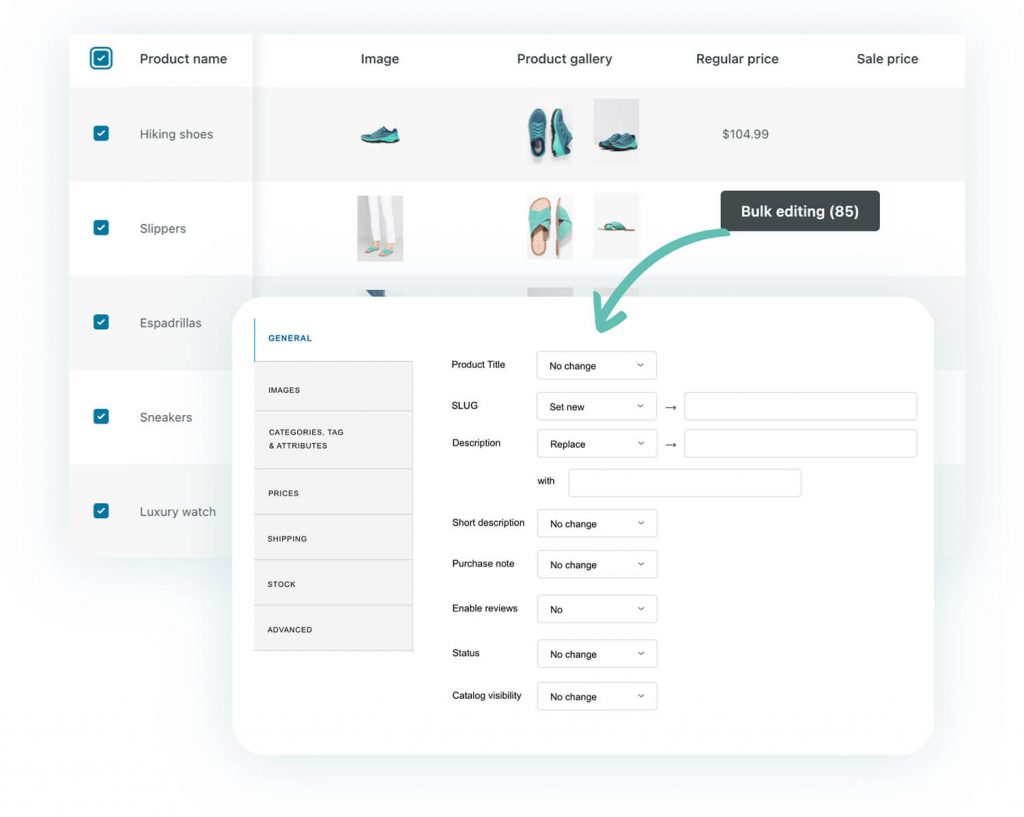
Key features: grid editing for simple, variable, grouped, and external products; formula-based changes (“increase selected prices by 10%”); bulk edit of names, SKUs, categories, attributes, images, dimensions; saved presets and custom views; undo via edit history; multilingual and multi-currency support.
What we like: Brand trust is the real asset — longevity and a professional premium support desk matter to risk-averse teams, and presets make recurring campaigns fast.
Drawbacks: Two well-documented friction points — variable-product pricing is indirect (you edit variations, not the product price field directly), and YITH’s own help center publishes guidance for speeding up the editor on large catalogs, a tell that performance can degrade with volume. The free version’s WordPress.org support forum is notably quiet; meaningful support requires the premium desk.
Community sentiment: Solid but more muted than the enthusiasm Smart Manager and BEAR inspire — “trusted and competent” rather than “beloved,” which is exactly what risk-averse larger stores want. Complaints cluster around variable-price confusion and occasional slowness.
Pricing: ~$79.99/year, single site, products-only — factor in that it won’t also cover orders or users.
Best for established/enterprise stores prioritizing vendor stability, businesses already on other YITH plugins, and international catalogs. Avoid if your catalog is variation-heavy with frequent direct price edits, or editor speed at scale is mission-critical (test first).
Verdict: The conservative, low-risk enterprise choice — strongest inside the existing YITH ecosystem.
Get YITH WooCommerce Bulk Product Editing
PW WooCommerce Bulk Edit (Pimwick)
The friendliest entry point in this category — a spreadsheet-and-grid hybrid for products and variations, built by Pimwick (developing WooCommerce plugins since 2016). Its defining touch: a live preview with price drops highlighted in red before you commit.
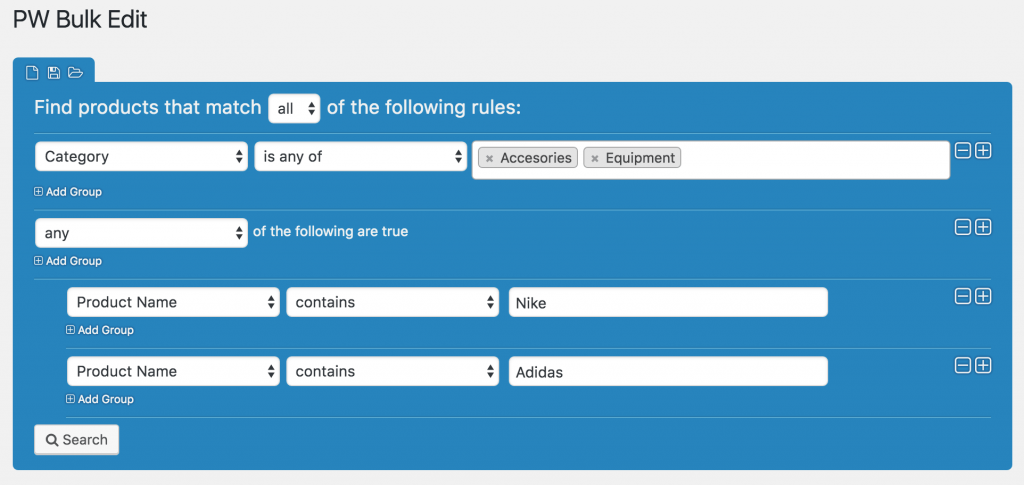
Key features: spreadsheet grid with inline editing and keyboard navigation; live preview of pending changes; undo/redo before saving; CSV export; HPOS-compatible; Pro adds regex search-and-replace, saved filters, automatic variable-product creation, and custom fields.
What we like: This is the tool you hand to a non-technical owner and trust them not to break anything — the preview-and-commit model directly addresses the biggest fear in bulk editing. As of mid-2026 it holds 235 reviews on WordPress.org, skewing strongly positive.
Drawbacks: By Pimwick’s own documentation, results are deliberately capped at 1,000 rows per pull to prevent browser-side slowdowns, and large result sets can still trigger PHP memory errors on weaker hosting — both addressed by tightening filters. It’s products-only, and refunds are limited once a Pro license is activated.
Community sentiment: “Does exactly what it should,” fast setup, and confidence from the preview; one reviewer noted a same-day reply over a holiday weekend. A minority find variation editing confusing in edge cases. It’s the plugin people recommend to others who are nervous about bulk editing.
Pricing: The most generous free tier here; Pro is an affordable, auto-renewing annual license.
Best for beginners, budget-conscious owners, and small-to-mid product-only catalogs. Avoid if you need to edit orders/coupons/users, run frequent 5,000+ record operations, or need import/automation.
Verdict: The best first plugin for most beginners and budget stores. Start free, upgrade only if you outgrow it.
BEAR — Bulk Editor and Products Manager Professional (formerly WOOBE)
The power-user’s tool, from developer realmag777/PluginUs, with roots back to 2012. Exposes essentially every WooCommerce field — custom taxonomies, meta fields, JSON meta — plus serious variation operations and a developer API. Free on WordPress.org; Pro sold on CodeCanyon.
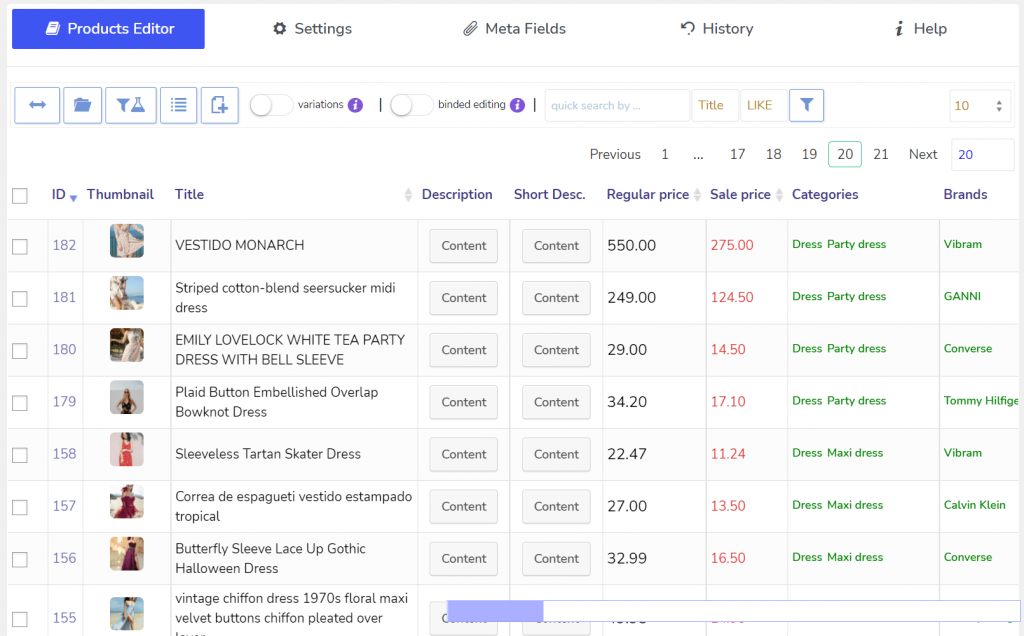
Key features: bulk editing of all WooCommerce fields including custom taxonomies and JSON meta; deep variation operations (create, swap, reorder, set default, convert simple → variable); search syntax with AND/NOT operators; export in native WooCommerce format and re-import via the native importer; operation history with rollback; developer API/hooks.
What we like: For raw control, nothing else here matches it. Reviewers migrating from other platforms repeatedly credit it with turning multi-day jobs into minutes; developers praise its extensibility.
Drawbacks: The interface is genuinely overwhelming on first contact, older/free builds carry a 100-items-per-page cap, and support runs weekdays only (a Friday ticket waits until Monday). This tool rewards investment and punishes impatience.
Community sentiment: The split is the most informative thing about it — developers and power users love it (“best tool I’ve tried,” strong rollback history), while some merchants bounce off the complexity and per-page cap.
Pricing: A one-time CodeCanyon purchase (typically ~$49 for a regular license) including limited-term support — a fundamentally different model from every annual subscription here. Over several years this can make it the cheapest premium option, provided you’re comfortable without subscription-model updates.
Best for developers, agencies needing deep multi-user editing, and heavy custom-field/taxonomy requirements. Avoid if you’re a non-technical solo owner or need polished support with weekend coverage.
Verdict: The most powerful, and over time potentially the cheapest — for those willing to climb the curve.
Side-by-side comparison: Where each plugin actually wins
No plugin wins in every category, and that’s exactly why choosing based on features alone can be misleading.
One pattern became clear during our research. Plugins generally fall into two groups:
| Dimension | Winner(s) | Why |
|---|---|---|
| Easiest setup | PW WooCommerce Bulk Edit | Install, filter, edit — minimal configuration. |
| Broadest scope | Smart Manager | Products, orders, coupons, users, and virtually any WordPress post type from a single interface. |
| Deepest field-level control | BEAR (WOOBE) | Supports custom taxonomies, meta fields, JSON data, variation operations, and API integrations. |
| Best data portability | WP Sheet Editor | Offers robust import/export capabilities along with scheduling features. |
| Most explicit performance controls | WP Sheet Editor | Lets you configure batch sizes and processing delays for large updates. |
| Best for 100k+ record catalogs | Smart Manager | Built to handle extremely large WooCommerce datasets efficiently. |
Depth vs. breadth, in one line: BEAR is deepest (how much you can do to one product); Smart Manager is broadest (how many data types you can manage) — match the axis to your actual need.
Which WooCommerce bulk edit plugin should you choose?
Your choice depends on how you manage your WooCommerce store and the kind of tasks you perform most often.
- Choose Smart Manager if you want to manage products, orders, coupons, customers, subscriptions, and other WooCommerce data from one spreadsheet-style interface.
- Choose PW WooCommerce Bulk Edit if you’re new to bulk editing or have a small store. Its free version offers plenty of functionality for everyday product updates.
- Choose WP Sheet Editor if you frequently import, export, or sync product data with supplier spreadsheets or external systems.
- Choose YITH Bulk Product Editing if you already use other YITH plugins and prefer staying within the YITH ecosystem.
- Choose BEAR (WOOBE) if you need advanced field-level editing and prefer a one-time purchase instead of an annual subscription.
Whichever plugin you choose, don’t start by editing your entire catalog. Test your changes on a small batch of products first, and always create a fresh backup before running large bulk updates. That way, if something doesn’t go as planned, you can restore your store quickly and avoid unnecessary downtime.
Final recommendation
After comparing these plugins, one thing became clear: there isn’t a single “best” WooCommerce bulk edit plugin. Each one is built for a different type of store and workflow.
If your day-to-day work goes beyond updating products and includes managing orders, coupons, customers, or subscriptions, Smart Manager offers the most complete solution. If you’re just getting started or have a smaller catalog, PW WooCommerce Bulk Edit provides an easy learning curve and a capable free version. For stores that frequently import supplier files or migrate data, WP Sheet Editor is the strongest choice. YITH WooCommerce Bulk Product Editing is a safe option for businesses already invested in the YITH ecosystem, while BEAR (WOOBE) is best suited to developers and advanced users who want maximum control.
One final tip: don’t choose a plugin based on the longest feature list. Think about the tasks you perform every week. A plugin that fits your workflow will save far more time than one packed with features you’ll never use.
Before purchasing, test the free version or demo if one is available, and verify the latest pricing, WooCommerce compatibility, and support policy on the vendor’s website. Spending a few extra minutes evaluating these details now can save you from switching plugins later as your store grows.
FAQ
Is there one “best” WooCommerce bulk edit plugin?
No. The right plugin depends on how you manage your store. If you only update products occasionally, a lightweight plugin may be all you need. If your workflow also involves orders, coupons, customers, or subscriptions, Smart Manager offers much broader functionality. Likewise, WP Sheet Editor is a better fit for stores that frequently import supplier files, while BEAR is aimed at advanced users who need deeper customization.
Will a bulk edit plugin slow down my WooCommerce store?
Not under normal circumstances. These plugins work inside your WordPress admin dashboard, so they don’t affect your storefront or customer experience. The only time you may notice slower performance is when processing very large batches on limited hosting. Running updates in smaller batches usually avoids this issue.
Are these plugins compatible with HPOS?
Most actively maintained WooCommerce bulk edit plugins now support High-Performance Order Storage (HPOS). Smart Manager and PW WooCommerce Bulk Edit explicitly support HPOS. Since compatibility can change with new releases, it’s worth checking the plugin’s changelog or documentation before purchasing.
Can these plugins import data from a supplier spreadsheet?
Not all of them. This is one of the biggest differences between the plugins in this comparison. WP Sheet Editor includes dedicated import and export tools, making it a better choice if you regularly receive supplier spreadsheets. Most of the others are designed to edit data that’s already in your WooCommerce store rather than import new data.
Is the free version of any of these plugins enough?
For many small stores, yes. PW WooCommerce Bulk Edit offers one of the most useful free versions and may be enough if you only need occasional product updates. As your catalog grows or your editing requirements become more advanced, you’ll likely need one of the premium versions.
Which plugin offers the best long-term value?
That depends on how you work. If you prefer a one-time purchase, BEAR may cost less over several years. If regular updates, ongoing support, and new features are important to your business, an annual subscription can be a better investment. Looking beyond the purchase price often leads to a better decision.
Can I bulk edit orders and coupons too?
Most WooCommerce bulk edit plugins focus primarily on products and product variations. If you also need to manage orders, coupons, customers, or subscriptions from the same interface, Smart Manager is the only plugin in this comparison that treats all of them as first-class data instead of focusing only on products.