
We’ve all been there.
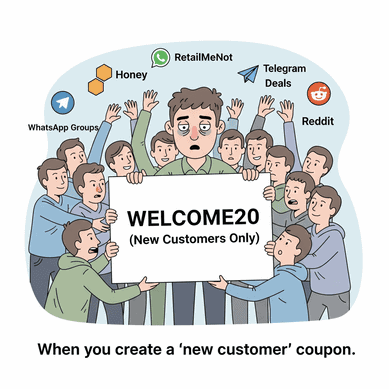
You create a “WELCOME20” coupon to be helpful, and a few hours later it’s floating around Honey, RetailMeNot, or someone’s WhatsApp deal group.
Suddenly, your “personalized” offer is being used by everyone.
That’s why smart store owners use one-time personalized coupon codes.
These are unique coupon codes created for a specific customer (usually restricted to their email) that can be used only once.
So even if someone shares the code, it won’t work for anyone else.
In this guide, you’ll learn how to create leak-proof personalized coupons using WooCommerce’s built-in settings, and how to automate the entire process if you don’t want to manually create coupons again and again.
Why generic coupon codes like WELCOME20 are a profit killer
Generic coupon codes look simple, but they’re risky.
Once a code like WELCOME20 becomes public, it can spread fast: coupon websites, browser extensions, influencers, Reddit threads… it’s almost impossible to control.
The result?
- Repeat customers keep using it even if it was meant for first-time buyers
- Customers share it like free money
- Your tracking becomes useless because one code gets used everywhere
- Your discount stops feeling exclusive (and starts feeling cheap)
A better approach is using one-time personalized coupon codes that expire after a single use and can be locked to a specific customer email.
And yes, WooCommerce can do this. You just need to know where the settings are.
How to create a one-time personalized coupon code in WooCommerce (default method)
Let’s say someone signs up for your newsletter and you promise:
“Get 10% off your first order.”
You want to send them a coupon code, but you don’t want it to get leaked or reused.
Here’s how to create a one-time personalized coupon code in WooCommerce:
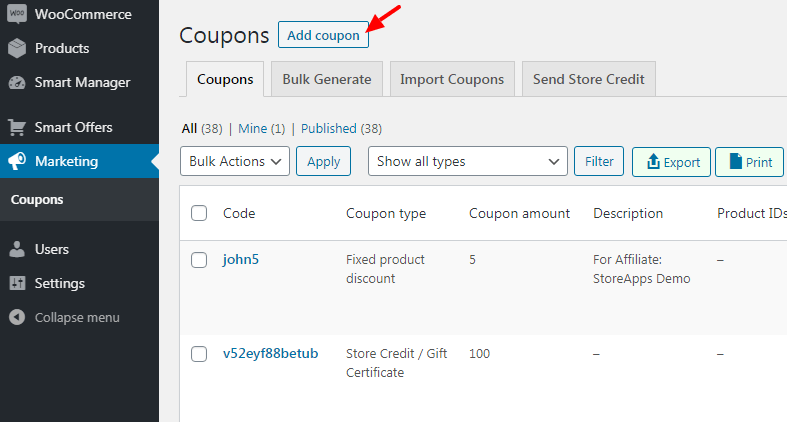
- Go to
WordPress Dashboard > Marketing > Coupons > Add New - Enter a coupon code like WELCOME-9K2X7
(or clickGenerate coupon code) - Under
General, choose the discount type and enter the coupon amount - Set a
Coupon expiry date(recommended) - Tick the
Auto apply?checkbox. - Open
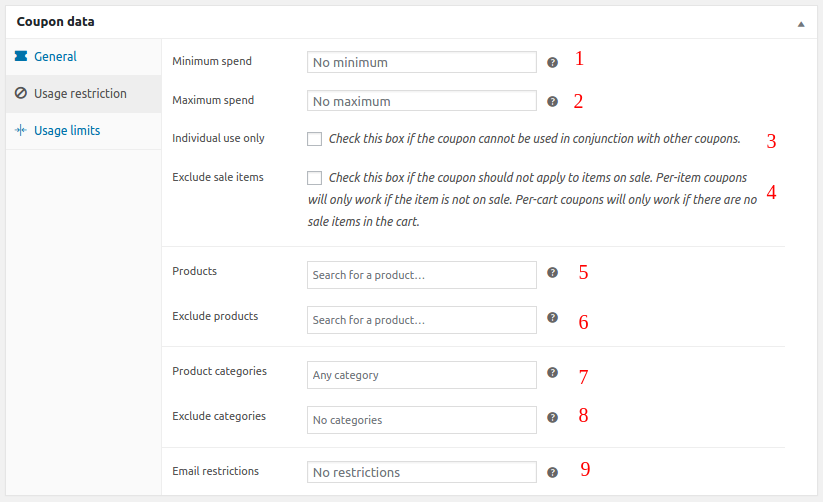
Usage restrictionand add the customer’s email underAllowed emails(this ensures only that customer can use it) - Optional but useful:
- Set
Minimum spendandMaximum spend - Enable
Individual use only(prevents stacking with other coupons) - Enable
Exclude sale items - Limit it to specific
ProductsorProduct categories
- Set
- Open
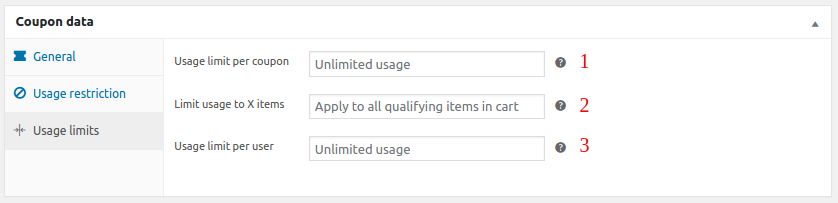
Usage limitsand set:Usage limit per coupon = 1Usage limit per user = 1
- Click
Publish
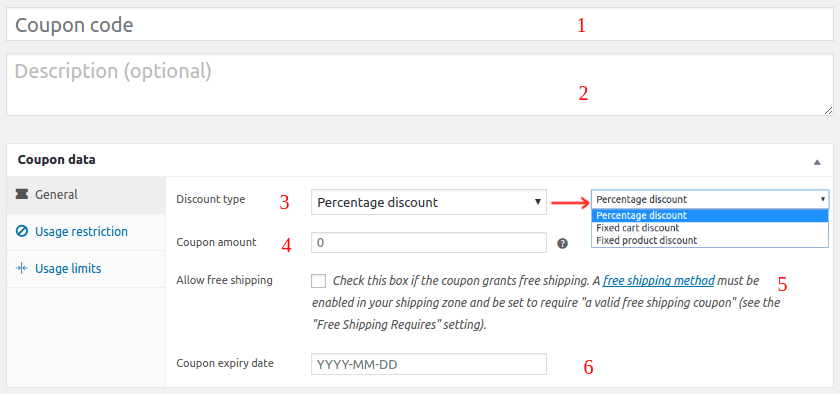
That’s it. Your coupon is now locked to one customer and can be redeemed only once.
Reality check
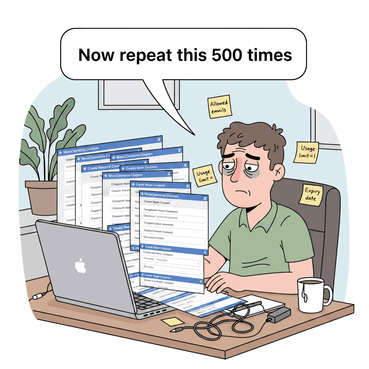
WooCommerce can create one-time personalized coupons… but the process is painfully manual.
Here’s what happens when you try to do this at scale:
- You have to create every coupon one by one
- You manually type customer emails into Allowed emails (every single time)
- There’s no quick way to generate 100–1000 unique coupon codes
- Tracking becomes messy because you’re basically running coupons like a spreadsheet project
Basically, WooCommerce can do it. Your time can’t.
That’s why we recommend you try Smart Coupons by StoreApps and bulk generate and manage personalized coupon codes in seconds.
Bulk generate one-time personalized coupon codes with Smart Coupons
With Smart Coupons by StoreApps, you can bulk generate hundreds (or thousands) of unique coupon codes in minutes.
Each coupon can still be:
- single-use
- trackable
- restricted
- expiry-controlled
- harder to abuse
This is perfect for campaigns like newsletter signups, influencer promos, win-back emails, or VIP discounts.
Now let’s see how bulk generation actually works.
How to bulk generate personalized coupon codes with Smart Coupons
To bulk generate unique coupon codes, go to:
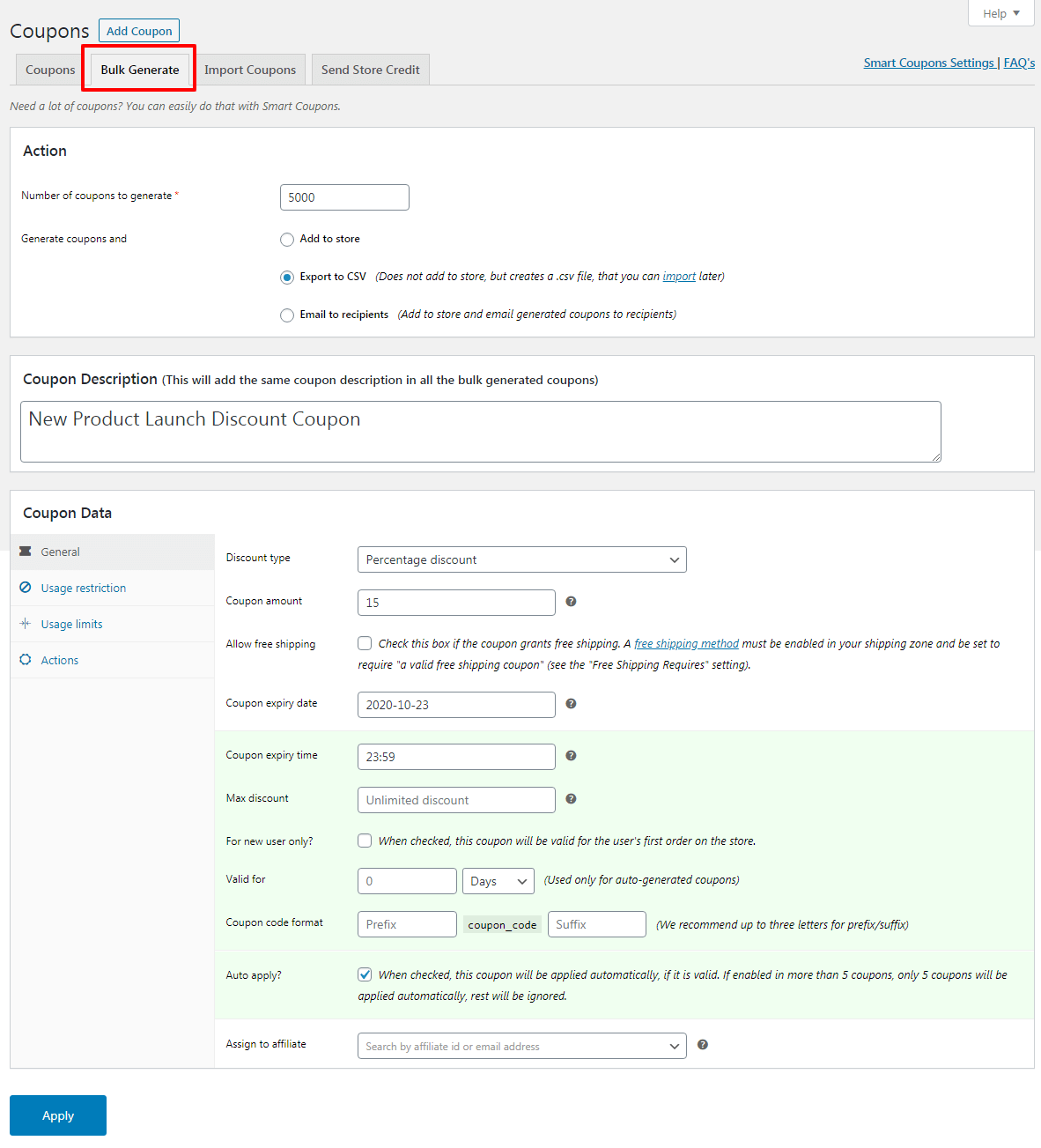
WordPress Dashboard > Marketing > Coupons > Bulk Generate
Now set up your coupons:
- Under
Number of coupons to generate, enter how many codes you want (example: 500) - Choose how you want to generate them:
Add to store(saves coupons directly in WooCommerce)Export to CSV(downloads a CSV file)Email to recipients(auto-send coupons to selected users)
- Under
Coupon Data > General, set:Discount type(percentage/fixed cart/fixed product)Coupon amountCoupon expiry date(optional)
- Under
Coupon Data > Usage restriction, you can control where the coupon applies:- set minimum/maximum spend
- enable
Individual use only - enable
Exclude sale items - restrict to specific products or categories
- Under
Coupon Data > Usage limits, set:Usage limit per coupon = 1Usage limit per user = 1
- Click
Apply
Smart Coupons will instantly generate the coupon codes in bulk, each one unique, single-use, and campaign-ready.
Pro tip: Use prefixes to track campaign performance
When bulk generating coupon codes, always add a short prefix like:
- WELCOME- (newsletter signup)
- WINBACK- (inactive customers)
- VIP- (loyalty/VIP segment)
- IG- (Instagram influencer campaign)
- BF- (Black Friday sale)
This makes your coupon reports instantly readable, so you can quickly tell which campaign is driving sales, without digging through random codes like X7K29Q.
Smart ways to use one-time personalized coupon codes (with real examples)
Bulk generating coupons is easy. The real magic is how you use them.
Here are some high-converting examples that work across most WooCommerce stores:
- Newsletter signup (without coupon leaks)
Instead of showing
WELCOME10on your popup, send a unique code likeWELCOME-8KD29via email. It feels exclusive, and even if it gets shared, it won’t work twice. - Abandoned cart recovery (the cleanest use case)
Send a one-time coupon 2–3 hours after cart abandonment. If they buy, the coupon is automatically “dead.” No repeat abuse.
- Win-back campaigns for inactive customers
Create a batch of codes for customers who haven’t purchased in 60–90 days. Add urgency like a 5-day expiry and you’ll often revive dead segments.
- VIP rewards for your top customers
Generate special codes only for high-value customers. Example: VIP-29KX7. This protects your margins while still rewarding loyalty.
- Influencer promotions (without public coupon leaks)
Instead of a public code like
INSTA20, give influencers a list of unique codes to share. You get better tracking and no one code goes viral. - Customer support “sorry” coupons
When someone complains about delayed delivery or a damaged product, send a single-use apology coupon. It solves the problem without turning into an unlimited discount loophole.
- Birthday/anniversary coupons
Send a personalized one-time coupon with a short expiry. Customers love this because it feels like a real gift, not a generic marketing trick.
Core WooCommerce vs Smart Coupons (quick comparison)
So the real question is not can WooCommerce do it?
How fast can you do it at scale?
Here’s a quick comparison:
| Feature | WooCommerce (Default) | Smart Coupons by StoreApps |
|---|---|---|
| Create one-time coupon codes | ✅ Yes | ✅ Yes |
| Restrict coupon to customer email | ✅ Yes | ✅ Yes |
| Bulk generate hundreds/thousands of unique codes | ❌ No | ✅ Yes |
| Export coupon codes to CSV | ❌ No | ✅ Yes |
| Email coupon codes to recipients | ❌ No | ✅ Yes |
| Add campaign prefixes (VIP-, WINBACK-, etc.) | ❌ No | ✅ Yes |
| Best for | Occasional one-off coupons | Bulk campaigns + automation |
Final thoughts
If you’re only creating a one-time coupon for a single customer, WooCommerce’s built-in settings are enough.
Just remember the real formula:
- Allowed emails = personalization
- Usage limit = one-time use
But if you’re running campaigns like newsletter signup rewards, abandoned cart recovery, VIP discounts, or win-back offers, manual coupon creation becomes a time drain fast.
That’s where Smart Coupons by StoreApps makes life easier by letting you bulk generate unique one-time coupon codes, export them, or even email them directly, without doing everything one by one.
Want to run personalized coupon campaigns without manual work?
Start creating leak-proof coupons with Smart Coupons
FAQs
What happens if a customer enters a different email at checkout?
If you’ve added an email inside Allowed emails, the coupon will only work when the checkout email matches exactly. If a different email is used, the coupon will fail automatically.
Can I generate coupon codes that look personalized but still stay secure?
Yes. Use branded prefixes like VIP- or WELCOME- combined with random strings. This keeps the code readable while making it impossible to guess or reuse.
Should I use percentage discounts or fixed discounts for one-time coupons?
Fixed discounts are easier to control for predictable margins. Percentage discounts work better for higher cart values where average order value varies.
How do I prevent customers from stacking personalized coupons with other coupons?
Enable Individual use only in coupon settings. This prevents the coupon from being combined with any other discount code.
Is it better to send one-time coupon codes immediately after signup or after first visit?
Sending immediately after signup usually increases conversions. Delaying it slightly (for example, 1–2 hours) can sometimes increase cart value if paired with a minimum spend requirement.
Can I bulk generate one-time personalized coupon codes in WooCommerce without a plugin?
No. WooCommerce allows single coupon creation, but it does not support bulk generation of unique codes. You’ll need a tool like Smart Coupons to generate hundreds or thousands at once.
Do one-time personalized coupon codes improve tracking?
Yes. Since each customer receives a unique code, you can track campaign performance, influencer impact, or email segments much more accurately compared to using a single public coupon.