

If you’re searching the internet for the right WooCommerce subscription plugin, you shouldn’t only think of its features and pricing. You should also think about compatibility.
You need to know which plugin works best for your type of business, how easy it is to set up and whether it gives you the flexibility to grow.
You need a plugin to handle recurring billing, renewals, trials and subscription management.
And, there are several plugins available in the market.
Some are powerful but expensive. Some are simple but limited in features. Others fall somewhere in between.
So how do you choose the right one?
In this article, you’ll get more than a feature list — you’ll see how each plugin stacks up, what kind of businesses they suit and the pros and cons that matter when you’re the one running the store.
What to look for before choosing a WooCommerce subscription plugin
Not all WooCommerce subscription plugins are built the same.
Some are lightweight and easy to launch, while others are packed with advanced features but come with complexity.
Before buying one, you need to weigh all the essentials carefully. Because once your subscriptions start running, switching plugins later can be messy, time‑consuming and risky for your recurring revenue.
Think of this as choosing the core for your subscription business. You want reliability, flexibility and good support from day one.
Is the plugin easy to set up?
Some plugins require heavy configuration or technical knowledge. You may need to tweak code, set up multiple options or spend hours reading documentation.
Others let you launch a subscription product in minutes with simple settings and intuitive dashboards.
If you’re running a small store or launching your first subscription product, ease of setup matters a lot.
Complicated plugin setups slow you down, frustrate you and delay your launch. A plugin that’s simple to configure means you can focus on growing your business instead of installation and troubleshooting.
Do I get billing flexibility?
Subscriptions rarely follow a single model. You may want to offer monthly billing, yearly plans, free trials, signup fees or variable subscription pricing.
A good plugin should allow flexible billing cycles and pricing models without forcing you into one rigid structure.
Customers expect choice and you should be able to deliver it.
If your plugin can’t handle different billing scenarios, you’ll end up limited in how you package and sell your products.
What about payment gateway compatibility?
Recurring billing only works if the payment gateway supports it.
Make sure the plugin supports reliable gateways like Stripe, PayPal and Authorize.net.
Some plugins rely heavily on specific gateways, while others support many.
Choose wisely, because payment gateway compatibility determines whether your customers can pay smoothly and whether you can expand globally.
If your gateway options are limited, you risk losing customers who prefer different payment methods.
Also consider cost and long‑term pricing
Subscription plugins vary widely in price; some charge yearly licenses, others offer lifetime plans.
You should consider not just the initial cost, but also renewal costs, support plans and update policies.
A cheaper plugin today might cost more in the long run if renewals are expensive or updates aren’t included.
Think beyond the first purchase; what will this plugin cost you over three years?
If you’re serious about subscriptions, long‑term affordability matters more than short‑term savings.
Am I getting a good brand reputation and support?
Subscription systems power recurring revenue in your business. If something breaks, you need fast support.
Always check developer reputation, documentation quality, customer reviews and update frequency.
Reliable support is often overlooked until you need it.
A plugin backed by a trusted brand will always give you peace of mind. You don’t want to be stuck with unanswered tickets when your subscribers are waiting.
Top WooCommerce subscriptions plugins compared
Here’s a quick comparison of four popular subscription plugins.
| Features | Smart Subscriptions for WooCommerce | WooCommerce Subscriptions | YITH WooCommerce Subscription | Sumo Subscriptions for WooCommerce |
|---|---|---|---|---|
| Free trial | ||||
| Flexible billing periods | ||||
| Stripe payment gateway | ||||
| PayPal payment gateway | ||||
| Subscriber self-management | ||||
| Admin management | ||||
| Pause and cancel subscriptions | ||||
| Sign-up fees | ||||
| Variable subscriptions | ||||
| Renewal synchronization | ||||
| Failed payment retry | ||||
| Proration | ||||
| Email notifications | ||||
| Coupons | ||||
| Ease of setup | Very easy | Moderate | Moderate | Easy |
| Support quality | Dedicated A+ human support | Average | Average | Average |
WooCommerce subscriptions plugins reviewed
In this section, we review the four popular WooCommerce subscription plugins.
Not just by features or pricing but by how they actually work and which type of business they suit best.
Smart Subscriptions for WooCommerce
StoreApps, the brand behind popular plugins like Smart Coupons and Affiliate for WooCommerce, is backing Smart Subscriptions for WooCommerce. It is a lightweight plugin designed to help store owners launch recurring products quickly.
Instead of overwhelming users with complex settings, the plugin keeps your workflow clean and straightforward.
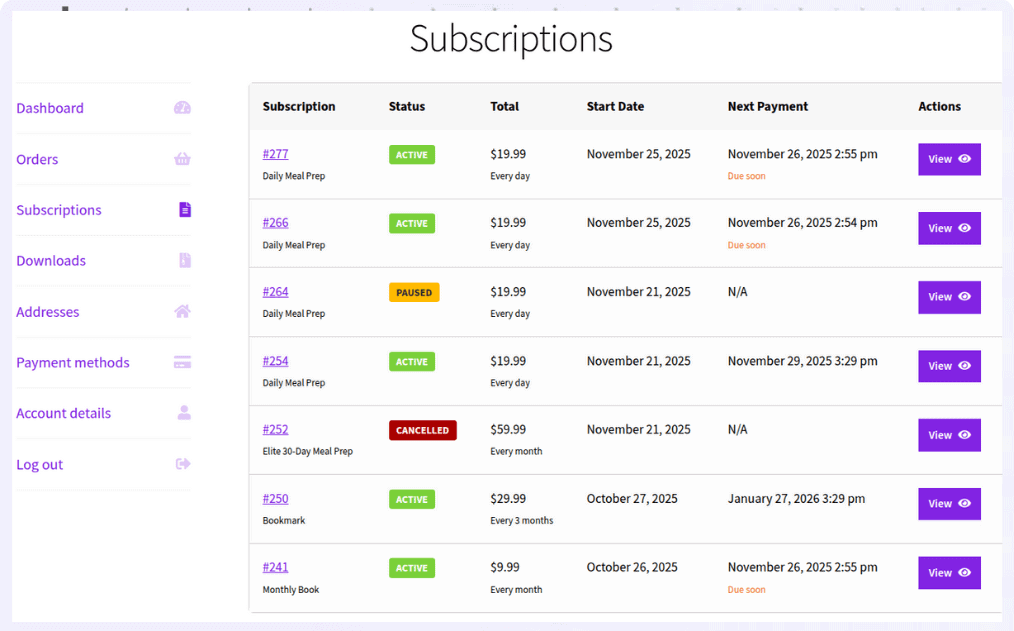
The plugin has a clear mandate to follow: give WooCommerce store owners a straightforward, reliable and affordable alternative to the dominant players in this space.
It’s particularly well-regarded among small to mid-sized stores that are either launching their first subscription product or migrating away from more expensive plugins.
It’s particularly strong for stores using Stripe as their payment gateway. If you’re a solo entrepreneur, a small team or a store that’s adding subscriptions to an existing WooCommerce product catalog, you should consider the Smart Subscriptions plugin.
Key features:
- Full free trial support with configurable trial lengths in days, weeks or months
- Flexible billing cycles — daily, weekly, monthly, annual intervals
- Subscriber self-management dashboard — pause, cancel
- Automated trial end reminders, renewal notifications and failed payment emails
- Stripe integration with support for delayed billing during trial periods
- Clean, intuitive admin interface with no steep learning curve
Pros
- Excellent value at an affordable price point
- Fastest setup of any plugin on this list and genuinely beginner-friendly
- Full Stripe integration with free trials
- Dedicated plugin support, responsive and knowledgeable
- Regular updates and improvements
- Official WooCommerce extension developer
Cons
- Newer to the market
- No demo version
- May not suit enterprise-level stores
Pricing: $49 a year
WooCommerce Subscriptions
WooCommerce Subscriptions is the official subscription extension from Automattic.
It’s the most widely used and most thoroughly documented subscription plugin in the WooCommerce ecosystem.
For a lot of store owners, it remains the default choice simply because of its pedigree and deep integration with the WooCommerce core.
WooCommerce Subscriptions has 100k+ active installs. It’s been developed and refined for years.
This plugin is battle‑tested at scale. Major WooCommerce subscription businesses run on it. It’s the benchmark against which every other plugin is measured.
The Automattic team maintains it aggressively and updates are frequent. You can use it with virtually every WooCommerce extension out there.
WooCommerce Subscriptions makes the most sense for established or scaling stores with complex subscription requirements — multiple tiers, prorated upgrades, synchronized billing and deep integration with other WooCommerce extensions.
Key features:
- Every billing interval imaginable — daily, weekly, monthly, annual and custom
- Full free trial and sign-up fee support
- Subscriber self-management including pause, cancel, upgrade and downgrade
- Manual renewals as a fallback for failed automatic payments
- Prorated upgrades and downgrades between subscription tiers
- Synchronized renewals — bill all subscribers on the same day of the month
- Extensive support for third-party WooCommerce extensions
- Multiple subscription products in a single checkout
Pros
- Official WooCommerce product
- Support for a wide range of payment gateways
- Advanced billing features like proration and synchronized renewals
- Very flexible billing system
- Strong documentation
Cons
- Expensive yearly license
- Complex for beginners
- Not suitable for small stores
Pricing: $279 a year
YITH WooCommerce Subscription
YITH WooCommerce Subscription is part of the plugin suite built by YITH. With this plugin, you can sell products/services or subscription boxes with flexible billing and create an effective passive revenue system in your store.
If you already use YITH plugins for wishlists, reviews or account management, adding their subscriptions plugin makes a lot of sense from a compatibility and consistency standpoint.
It has a solid user base and receives regular updates that track closely with WooCommerce core releases.
YITH WooCommerce Subscription is well-suited for mid-sized stores that want a feature-rich plugin with good reporting, particularly stores that are already using other plugins in the YITH suite.
Key features:
- Free trials with configurable length in days, weeks or months
- Sign-up fees and discounted introductory pricing
- Pause, cancel and resume functionality from the subscriber account page
- Subscription switching, allows upgrades and downgrades between plans
- Manual renewal support for customers who prefer to pay manually
- Reminders and expiration notifications via email
- Full compatibility with YITH’s plugins ecosystem
- Downloadable product support for digital subscriptions
- Detailed subscription reports and revenue analytics in the admin
Pros
- Covers most subscription use cases thoroughly
- Strong compatibility with the broader YITH plugin ecosystem
- Built-in subscription reporting and revenue analytics
- Good documentation and support team
- Regular updates with reliable WooCommerce compatibility
Cons
- The interface can feel cluttered and complex for new users
- Full feature access requires the premium version; the free version is quite limited
Pricing: $199.99 a year
SUMO Subscriptions for WooCommerce
Sumo Subscriptions for WooCommerce positions itself as a budget-friendly WooCommerce subscription plugin.
It aims to deliver core subscription functionality at a price point that’s accessible to smaller stores and solo entrepreneurs. It covers the fundamentals — recurring billing, free trials, multiple billing intervals.
It’s a reasonable option for very small stores or for store owners who are testing a subscription model before committing to a higher-end plugin.
However, it lacks the depth of documentation, the community backing and the ongoing development investment of the top-tier plugin.
It has a good user base but a polarizing reputation due to its complex UI and average support.
Key features:
- Recurring billing with daily, weekly, monthly and annual intervals
- Free trial support for subscription products
- Sign-up fees on initial subscription checkout
- Order subscription for non-subscription and non-membership products
- Subscriber pause and cancel functionality
- Email notifications for renewals and payment failures
- Variable subscription support for multiple tiers
- Stripe and PayPal compatibility
- Basic subscriber management from the WooCommerce admin
Pros
- One-time payment model
- Affordable entry price
- Covers essential subscription features
- Simple setup, easy to start with
Cons
- Limited advanced features
- Not compatible with large stores
- Smaller user community
- High support response times
Pricing: $49 one-time
Final thoughts
If you’re an established enterprise store with complex billing logic and a healthy plugin budget, WooCommerce Subscriptions remains the gold standard.
If you need deep YITH integration or built-in analytics, YITH’s offering is worth the price.
If you’re on the tightest possible budget and keeping things simple, Sumo Subscriptions can get you started.
But if you’re a small to mid-sized store owner who wants to launch or grow a subscription business the right way — with proper free trial support, clean Stripe integration, flexible billing and a plugin that won’t overwhelm you or your wallet — Smart Subscriptions is the one to start with.
It gives you everything you actually need, solid support when you need help and a price point that makes sense.
FAQs
Do I really need a subscription plugin for WooCommerce?
Yes. WooCommerce by itself doesn’t handle recurring billing. A subscription plugin automates renewals, manages trials and keeps payments flowing without manual effort.
Which plugin is best for beginners?
If you’re just starting out, Smart Subscriptions for WooCommerce is a great choice. It’s simple, affordable and Stripe‑ready. You won’t get lost in complex settings, and support is strong.
Can I switch plugins later if I change my mind?
Technically, yes, but it’s messy. Active subscriptions don’t always migrate smoothly. That’s why choosing the right plugin upfront saves you headaches down the road.
What payment gateways should I look for?
Stripe and PayPal are the most common. Some plugins also support Authorize.net and local gateways. Always check compatibility before buying — your customers need a smooth checkout.
What’s the biggest mistake store owners make when choosing a plugin?
Going for the cheapest option without checking support, billing flexibility or gateway compatibility. Remember, subscriptions are recurring revenue — you can’t afford downtime.
Which plugin is best for scaling a subscription business?
If you’re aiming for growth and complex billing models, WooCommerce Subscriptions or YITH WooCommerce Subscription are better suited. They handle advanced scenarios and integrate with more extensions.