

WP Sheet Editor is one of the most versatile spreadsheet plugins for managing WordPress content, but its modular pricing means total costs add up quickly for e-commerce store owners. In this WP Sheet Editor review, we examine whether its spreadsheet editing grid justifies the cost for your store.
Clicking into product #247 out of 1,500 just to update a sale price or stock level feels like a punishment. That’s why spreadsheet-style plugins exist: to turn clunky single-record admin pages into a fast grid.
I spent time testing WP Sheet Editor across real store catalogs, reviewing documentation, evaluating merchant feedback, analyzing pricing models, and testing its add-on ecosystem. Here is the honest breakdown of what WP Sheet Editor does well, where costs escalate, and whether it fits your workflow.
What is WP Sheet Editor?
WP Sheet Editor is a suite of WordPress plugins developed by VegaCorp that converts standard WordPress data tables into interactive, spreadsheet-style grids inside your wp-admin dashboard.
Unlike all-in-one store management plugins that bundle a fixed set of features, WP Sheet Editor uses a modular philosophy. Rather than purchasing a single massive plugin, you choose specific spreadsheet editors for the exact data types you need to edit.
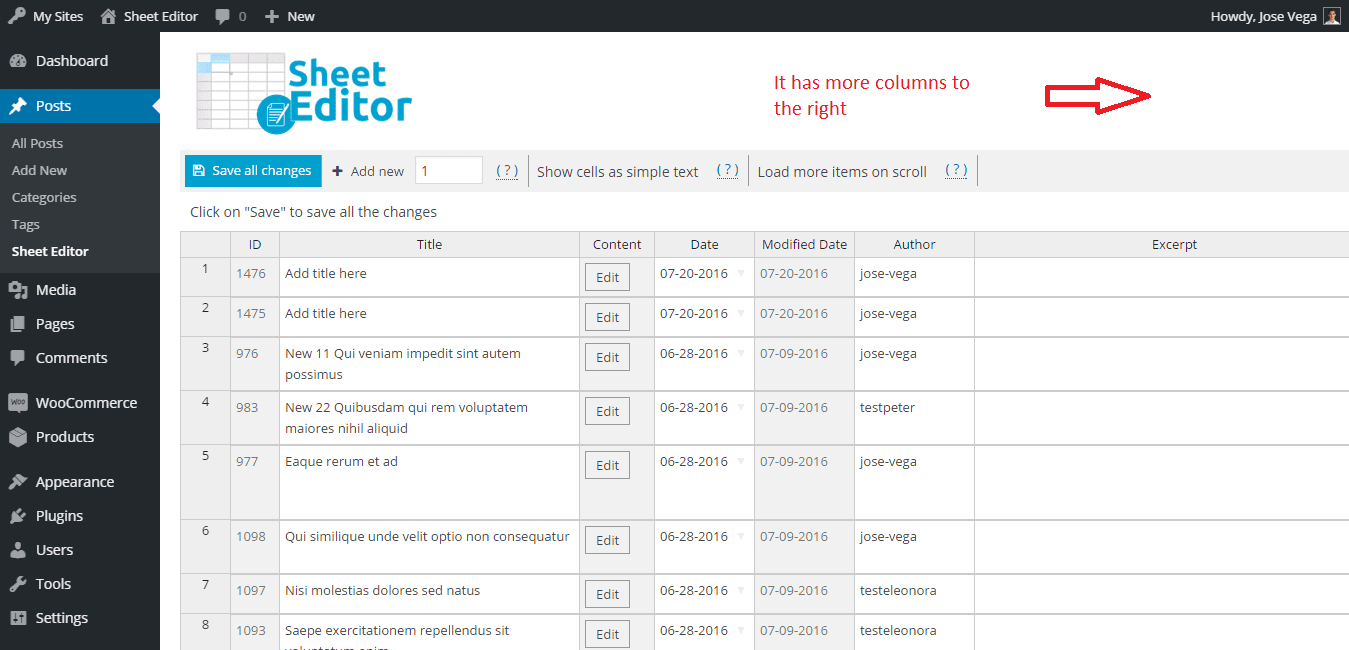
How the spreadsheet interface works
WP Sheet Editor renders your database records inside a clean grid resembling Excel or Google Sheets. You can edit text cells, toggle checkboxes, select dropdown values, and save your changes without reloading the browser page.
The grid includes frozen columns for core identifiers like ID and title, horizontal scrolling for custom fields, and inline cell editing for rapid manual updates.
The modular plugin architecture
WP Sheet Editor splits its software into standalone plugin modules:
- WooCommerce Products Spreadsheet: Dedicated editor for simple products, variable products, attributes, and stock levels.
- WooCommerce Orders Spreadsheet: Dedicated spreadsheet for viewing, filtering, and bulk-updating store orders.
- WooCommerce Coupons & Customers: Separate spreadsheet tools for promotions and user accounts.
- WordPress Posts, Pages & CPTs: Individual spreadsheets for standard content, media items, taxonomies, and custom post types like Advanced Custom Fields (ACF).
If you only need to bulk-edit blog posts, you buy only the Posts module. If you run a full WooCommerce store, you will likely need multiple modules or an all-inclusive bundle.
Core features and bulk editing workflows
WP Sheet Editor excels at turning repetitive bulk administration tasks into structured spreadsheet operations.
Bulk editing WooCommerce products and variations
Updating prices, stock statuses, weight measurements, or categories across thousands of catalog items is straightforward. You can select specific rows or apply a global bulk edit across your entire catalog.
The bulk editor supports formulas, such as increasing prices by 10%, appending text to titles, or replacing specific SKU prefixes across selected categories. Variable products and variations render cleanly in nested rows, allowing you to edit variation pricing without opening parent products individually.
Managing orders, users, and custom fields
When equipped with the corresponding plugin modules, WP Sheet Editor allows you to bulk-update order statuses, edit customer billing addresses, modify user roles, or update custom meta fields.
For stores relying on custom plugins or ACF, the editor automatically detects custom fields and exposes them as editable columns in the sheet.
Advanced search filters and spreadsheet formulas
Finding specific records in native WordPress can be frustrating. WP Sheet Editor includes advanced search modal filters that let you locate items by date ranges, stock levels, category combinations, or custom field values.
Once filtered, you can run batch formulas to modify matched records in one operation. You can also save search filters for routine maintenance tasks.
Power add-ons: Google Sheets sync and AI
Two optional add-ons extend WP Sheet Editor beyond simple wp-admin editing into automated data sync and AI content generation.
Live Google Sheets sync service
WP Sheet Editor offers a specialized Google Sheets Sync service. This integration connects your WordPress database directly to an actual Google Sheet stored in Google Drive.
Key benefits of Google Sheets sync include:
- Bi-directional syncing: Changes made in Google Sheets sync back to WordPress, and updates in WordPress push automatically to Google Sheets.
- Automated scheduling: Run recurring background syncs every hour, daily, or on-demand.
- Team collaboration: Allow team members or clients to update inventory in Google Sheets without granting them direct
wp-adminaccess.
Note that Google Sheets sync operates as an external SaaS integration and carries a separate annual subscription starting at ~$199/year for a single domain license.
WP Sheet Editor AI extension
The WP Sheet Editor AI add-on brings generative AI directly into your spreadsheet cells. By connecting your own API key from OpenAI (GPT-4o), Google Gemini, Cloudflare AI, or OpenRouter, you can run AI operations across thousands of rows.
Practical AI workflows include:
- Generating SEO meta titles and descriptions automatically from product titles.
- Writing short product descriptions or bulleted feature lists based on custom attributes.
- Translating taxonomy terms or category descriptions into multiple languages.
Because you supply your own API key, WP Sheet Editor does not add per-token markups. You pay your chosen AI provider directly for exact usage.
Pricing breakdown and total cost of ownership
Understanding WP Sheet Editor pricing requires examining both individual plugin module costs and bundle options.

Individual plugin licenses
If you only require one specific spreadsheet tool, individual plugin licenses start at $49.99 to $79.99/year for a single-site license. For example, buying only the WooCommerce Products Spreadsheet costs $49.99/year.
All Plugins Bundle and lifetime options
For store owners who need products, orders, coupons, and user management, purchasing individual plugins quickly becomes expensive. VegaCorp offers an All Plugins Bundle:
- Annual All Plugins License: ~$99.99/year for single site access to all spreadsheet extensions.
- Lifetime All Plugins License: ~$299.99 to $399.99 one-time payment for single site access.
Total cost considerations for full e-commerce stores
While the All Plugins Bundle offers strong value for core plugins, incorporating advanced services increases annual costs:
- Core All Plugins Bundle: ~$99.99/year
- Google Sheets Sync Service: ~$199.00/year
- AI Provider API usage: Variable based on token consumption
For simple sites, costs remain low. For complex store operations requiring live external sync, total annual software costs range between $300 and $500 per year.
Honest pros and cons
Every plugin involves tradeoffs. Here is the balanced view of WP Sheet Editor.
Where WP Sheet Editor excels
- Unmatched versatility: Supports virtually any WordPress post type, page, custom post type, media item, taxonomy, or ACF field.
- Modular purchasing: Allows non-ecommerce sites to buy only what they need without bloat.
- Flexible Google Sheets integration: True bi-directional sync for remote collaboration.
- Flexible AI integration: Uses direct API keys without vendor markup fees.
Where WP Sheet Editor falls short
- Plugin sprawl: Managing multiple separate plugins for products, orders, and users can feel fragmented on pure WooCommerce sites.
- Interface complexity: The grid contains dozens of settings, custom field detectors, and popups that require a learning curve for non-technical users.
- Cumulative add-on costs: Adding Google Sheets sync and individual extensions can make total ownership more expensive than all-in-one alternatives.
WP Sheet Editor review: verdict and who should buy
WP Sheet Editor is an outstanding choice if you manage a content-heavy WordPress site, work extensively with custom post types and ACF, or require automated Google Sheets synchronization for external teams.
If your primary objective is to clean up post metadata, manage custom taxonomies, or sync catalog edits with Google Drive, WP Sheet Editor is one of the most capable tools available.
For broader options, see our guide on 5 Best WP Sheet Editor Alternatives for WooCommerce.
Looking for an all-in-one WooCommerce alternative?
If your daily operations revolve strictly around running a WooCommerce store – managing products, fulfilling orders, editing coupons, and handling customer subscriptions – buying and managing multiple spreadsheet plugins may add unnecessary friction.
This is where Smart Manager takes a different architectural approach.
Instead of splitting store management across separate plugins, Smart Manager provides an all-in-one, Excel-like spreadsheet dashboard inside wp-admin.
If you prefer a single, consolidated plugin designed specifically for WooCommerce store management, explore Smart Manager for WooCommerce. You can also read our guide on 13 Clever Ways to Use The WP Sheet Editor.
Where to start
Testing your actual workflow requirements helps you choose the right tool for your store.
- Audit your data types: If you need to bulk-edit custom post types, media files, or ACF fields alongside products, test WP Sheet Editor’s free plugin modules on WordPress.org.
- Evaluate your WooCommerce scope: If your daily reality is managing products, variations, orders, and coupons from one place, test the live demo of Smart Manager.
- Calculate total plugin costs: Compare the annual cost of the individual add-ons you need against single-license all-in-one tools to ensure your choice fits your budget.
FAQs
Is WP Sheet Editor free?
WP Sheet Editor offers free versions of its core spreadsheet plugins on WordPress.org with basic editing features. Premium versions starting at $49.99/year enable advanced search filters, formulas, bulk updates, and custom field support.
Can I sync WP Sheet Editor with Google Sheets?
Yes. WP Sheet Editor offers a specialized Google Sheets Sync service (~$199/year) that enables bi-directional, scheduled, or automated syncing between your WordPress database and Google Sheets.
Does WP Sheet Editor slow down my WordPress site?
WP Sheet Editor runs spreadsheet operations within your browser and executes database updates in background batches. While large bulk edits on shared hosting can cause temporary server load, standard daily editing does not impact frontend site speed.
What is the main difference between WP Sheet Editor and Smart Manager?
WP Sheet Editor uses a modular approach with separate plugins for different post types and excels at non-WooCommerce content and Google Sheets sync. Smart Manager is an all-in-one WooCommerce store manager that handles products, orders, coupons, and customer data from one unified dashboard under a single license.