

Wouldn’t it be great if you could use your familiar Excel for WooCommerce store management? Instead of navigating through multiple sheets, get everything at a single place. Big time savings, improved store efficiency and better life. That’s what Natalie desired and achieved it using Smart Manager. Let’s see how.
About Natalie
Natalie runs her online WooCommerce store “yourlingeriewholesaler.co.uk” which sells luxury lingerie and hosiery collections from some of the industry’s most-established lingerie manufacturers, such as Leg Avenue, Elegant Moments and Coquette.
Established in 2007, the brand has been operating for nearly 15 years. Currently, her portfolio range consists of 600+ products, including festival wear, nightwear, fetishwear, and body accessories.
How difficult was store management for Natalie before using Smart Manager?
As Natalie told us, before Smart Manager, she only had a basic stock quantity input plugin and had to manage all the inventory with excel spreadsheets.
So, she had to deal with multiple spreadsheets to view inventory, keep updating quantities daily and using these sheets to refer to track orders. Now, navigating through multiple spreadsheets each time is a big pain. It’s also prone to errors.
And if you consider doing it with default WooCommerce, whether you want to add new products, add categories to them, track and modify order statuses, you need to go through each product and order to do it.
If you get stuck, it can impact your other business activities. Doing it for hundreds and thousands of products is a nightmare.
All Natalie needed was a global overview of her store inventory so that she could quickly update inventory, manage orders, bulk edit items and export files.
In short, she wanted freedom from these stressful and time-consuming tasks.
How Smart Manager made store management simple and quick?
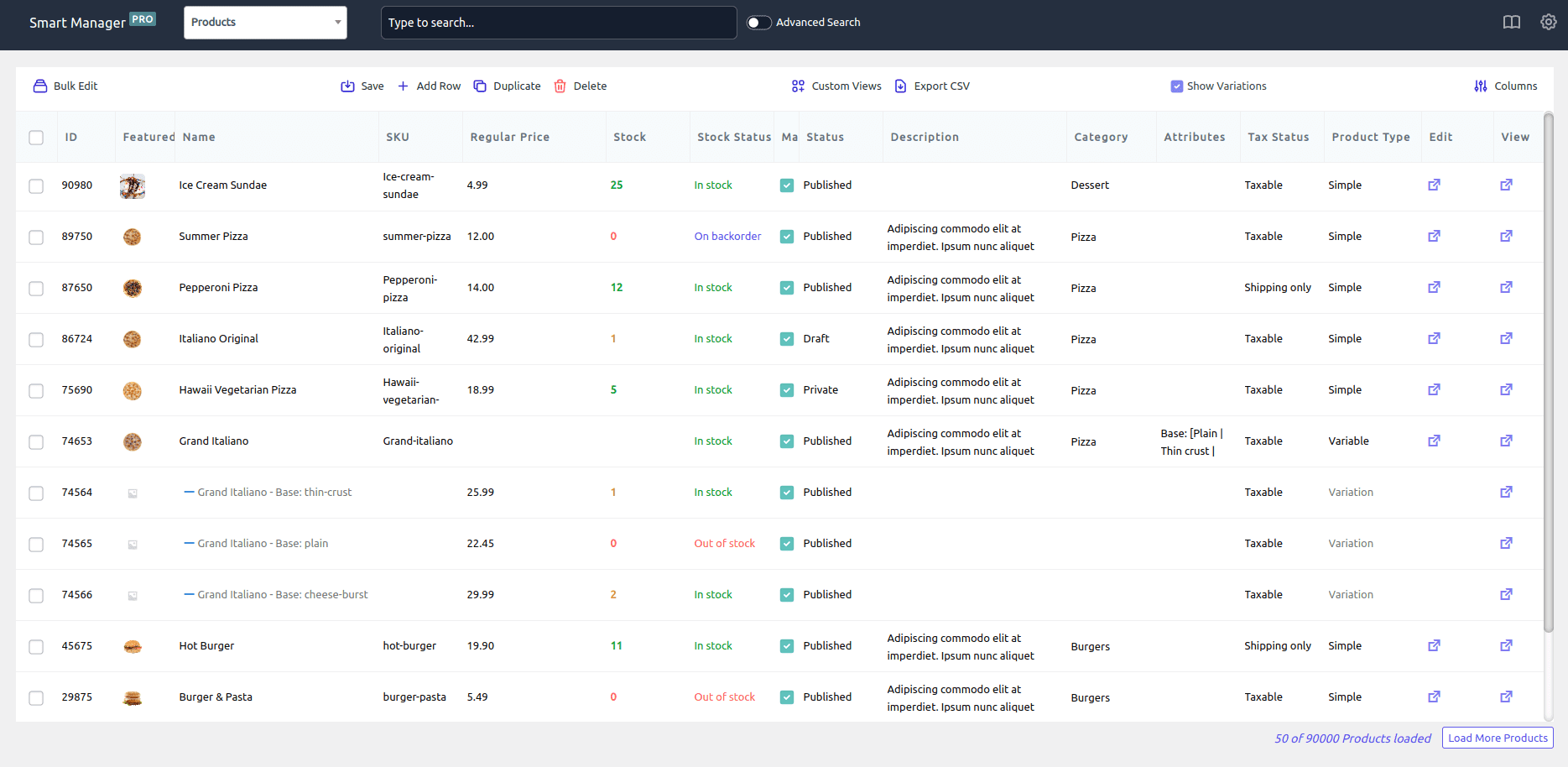
With Smart Manager, Natalie could achieve all mentioned above easily and have all of her data in one place. Here’s what she mentioned –
Entire store overview at one place
It’s easy to have all 600+ products listed in one place in an Excel-like spreadsheet, so navigation becomes easy and editing any product is just a click away.
Bulk editing products
Used the bulk edit feature to add certain items to a new category. If used the earlier method or the default WooCommerce way, it could have taken an hour or so. But not from now onwards. All I required is just to select the products and assign a category using the bulk edit feature. Takes hardly a minute.
Can also easily bulk edit prices, update stock as and when required and export data by applying filters.
Customers and order insights
However, where Smart Manager stood out for me is analyzing orders data and customer data.
I can check when a customer last ordered, see how many orders have been placed during a certain time frame and also manage orders as and when required.
Using this data, it becomes helpful to target specific customers using email marketing. Learn more about customer export and insights.
Helpful support
The StoreApps support team is really helpful and always aims to resolve any issues.
Why do I recommend Smart Manager?
Have been using this plugin for more than a year and become one of my favorite tools for WooCommerce inventory management.
If you want to get free from time-consuming store management tasks, do not hesitate to use Smart Manager. You would love it.
It’s a low-cost way to obtain a comprehensive systems management tool, without paying thousands for bespoke software.
Frequently Asked Questions
Does Smart Manager work for stores with hundreds of product variants, like apparel or lingerie?
Yes. Smart Manager displays every product in a single spreadsheet-style view, which is built to handle stores with hundreds or thousands of SKUs and variants, including apparel stores with multiple sizes, colors and styles per item.
Can Smart Manager replace Excel spreadsheets for WooCommerce inventory tracking?
Yes. Smart Manager gives you an Excel-like interface directly inside your WooCommerce dashboard, so you can view, bulk edit and export product, order and customer data without maintaining separate spreadsheets.
How much time can bulk editing save compared to manual updates?
Results vary by store, but Natalie’s team cut a task that took around 45 minutes down to under 10 minutes, a 75 to 80 percent time savings, by using Smart Manager’s bulk edit feature instead of updating products one by one.