
Selling fashion products online is easy. Getting consistent sales is the hard part.
Ads get expensive, SEO takes time, and Instagram reach is unpredictable.
That’s why many WooCommerce fashion stores run a fashion affiliate program. You only pay affiliates when they generate a sale, and they promote your products through their own audience.
In this guide, you’ll learn how to set up an affiliate program for your fashion store using Affiliate for WooCommerce.
Why affiliate marketing works so well for fashion stores
- Fashion buyers trust creators and influencers more than ads.
- Affiliates can promote products through styling videos, reels, and outfit reviews.
- You can offer higher commission on high-margin items like cosmetics and accessories.
- You only pay when an order is placed, so your marketing cost stays predictable.
Benefits of starting a fashion affiliate program
- Lower customer acquisition cost (CAC): You pay commission only after a sale happens.
- More sales through influencers: Affiliates already have an audience that trusts them.
- Boost repeat purchases: Affiliates keep promoting seasonal launches and new arrivals.
- Higher brand awareness: Your products get featured in reels, blogs, and style guides.
- Works for every niche: Clothing, jewelry, watches, perfumes, skincare, footwear, and more.
What makes a fashion affiliate program successful?
- Clear commission rates: Higher commission for accessories, cosmetics, and premium products.
- Affiliate-friendly coupons: Great for Instagram where clickable links are limited.
- Creative assets: Banners, product images, reels scripts, and seasonal promo creatives.
- Performance-based rewards: Higher commission for top affiliates.
How to set up an affiliate program for a fashion store in WooCommerce
So if you have realized the importance of having an affiliate program for your store, let’s see how to set it up.
As the core WooCommerce doesn’t have any mechanism to allow you to set up an affiliate program, you need a powerful plugin for it.
Affiliate for WooCommerce, the popular and official extension on the WooCommerce marketplace is all you need, to easily set up your affiliate program.
Simple to set up, with no jargon, you’ll have all the features you need to run a successful affiliate program.
Let’s set up your affiliate program.
Define your affiliate program terms
Once you purchase the plugin, install and activate it. Then, go to your WordPress Admin panel > WooCommerce > Settings > Affiliates.
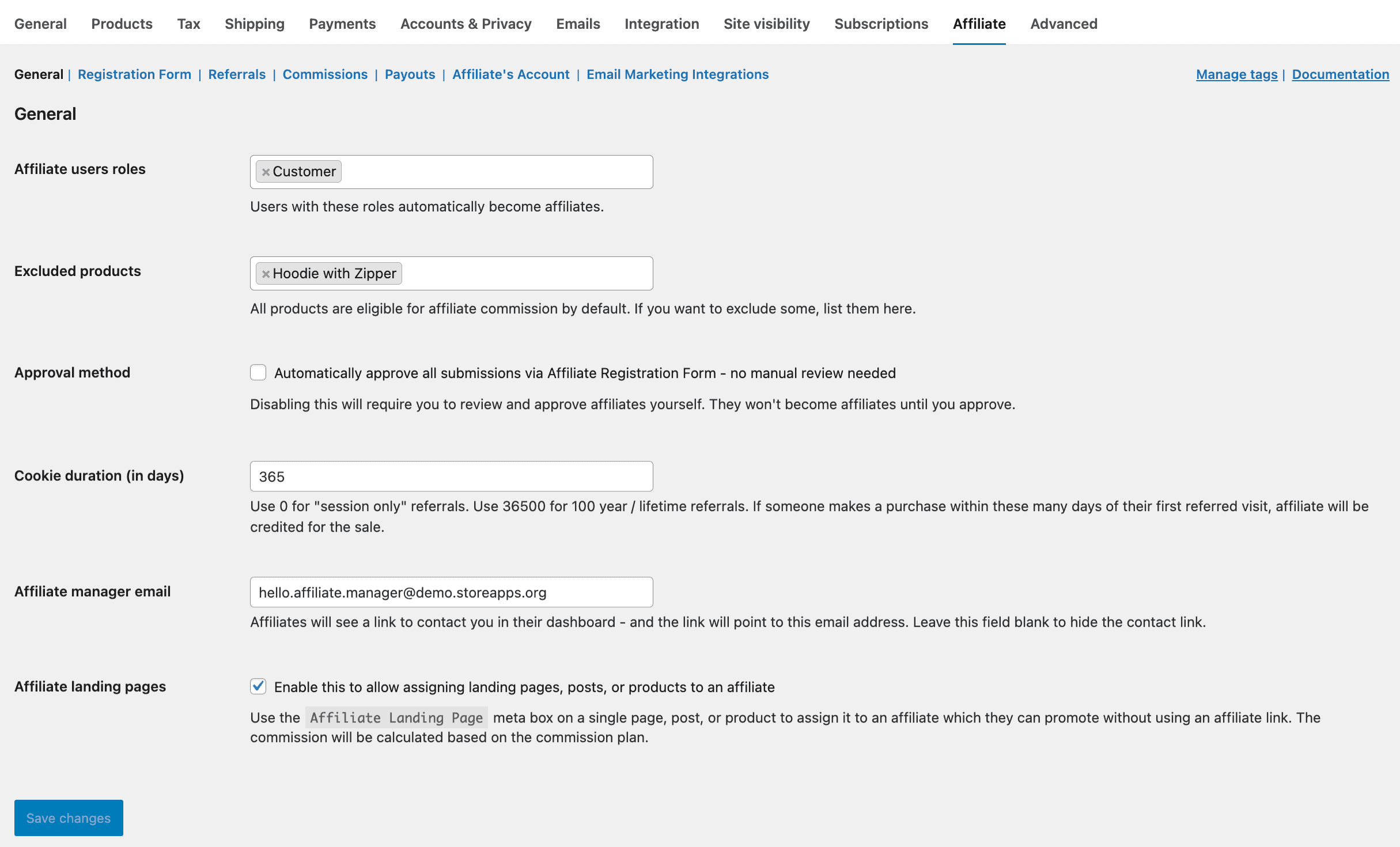
Here you can set some basic requirements for your affiliate program.
- The first thing you would come across is the registration form. Your affiliates can register via this form for your affiliate program. You can edit the form fields if required.
- You can decide which affiliate request to accept or reject manually or allow all the users to become your affiliates automatically. If you are selling expensive items, especially jewelry or watches, it is recommended to manually approve affiliates. You require only influential people as affiliates that can encourage users to buy expensive items.
- It is possible to choose which user roles will become your affiliates automatically. If you have set up a new clothing store and want more promotions, it is advisable to make all your Customers your affiliates.
- You would set a default commission rate for your store. The plugin allows you to set up different commission rates for different products and affiliates as well.
- 20% commission on the sale of t-shirts, jeans, shoes…
- 25% commission on the sale of eyewear and cosmetics
- 35% commission on the sale of jewelry
and so on…
- The default commission rate can also be set up as a tiered commission structure. For example, $20 commission to John and $10 commission to Rebecca on a successful referral by John. This is because John was referred by Rebecca for your affiliate program.
- You can exclude specific products from the affiliate commission if needed, or create special commission plans for premium categories like jewelry and watches. This helps you protect margins on high-ticket products while still rewarding top-performing affiliates.
- Tag affiliates based on their performance – Platinum, Gold, Silver, etc. You can filter them by tags quite easily.
- You can also assign coupons for referrals instead of links, avoid self-referrals, allow payout via PayPal and allow commission for recurring orders.
Save your changes.
Affiliate links and affiliate coupons
Affiliate for WooCommerce plugin gives store-owners a unique referral ID for each affiliate. Your affiliates can use the Referral URL generator to create a link for the products they want to promote. They will find it under their My Account > Affiliate > Profile.
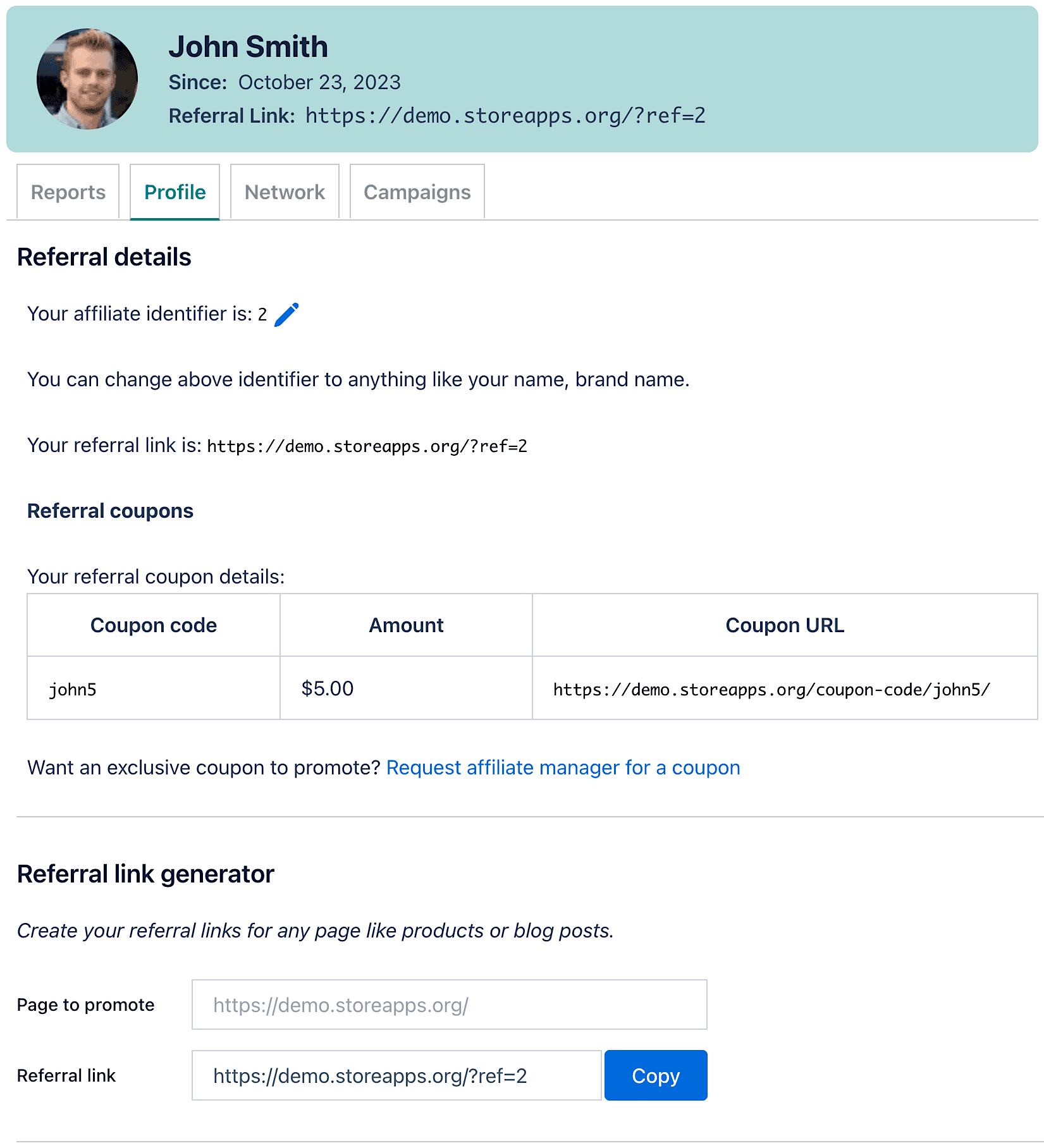
As shown, the referral URL is https://demo.storeapps.org/?ref=2.
Another example could be of promoting Nike shoes and the affiliate link would be like this: https://fashionworld.com/shoes/nike-sneakers-blue/?ref=7
Instead of referral links, affiliates can also promote products using a coupon. Affiliates can either contact the store admin for a coupon or they can generate one for themselves.
The affiliate will find the coupon code under My Account > Affiliate > Profile area.
Commission plans
This is when the Affiliate for WooCommerce plugin shines for fashion stores. Now, customers can buy more than one item at a time when shopping for fashion products.
If your store is very large and thousands of products are available, the commissions for all the products and affiliates won’t be the same.
The plugin provides full flexibility to set up a commission plan based on multiple conditions: product-based commission, affiliate-based commission, tag-based commission, tiered commission, or others.
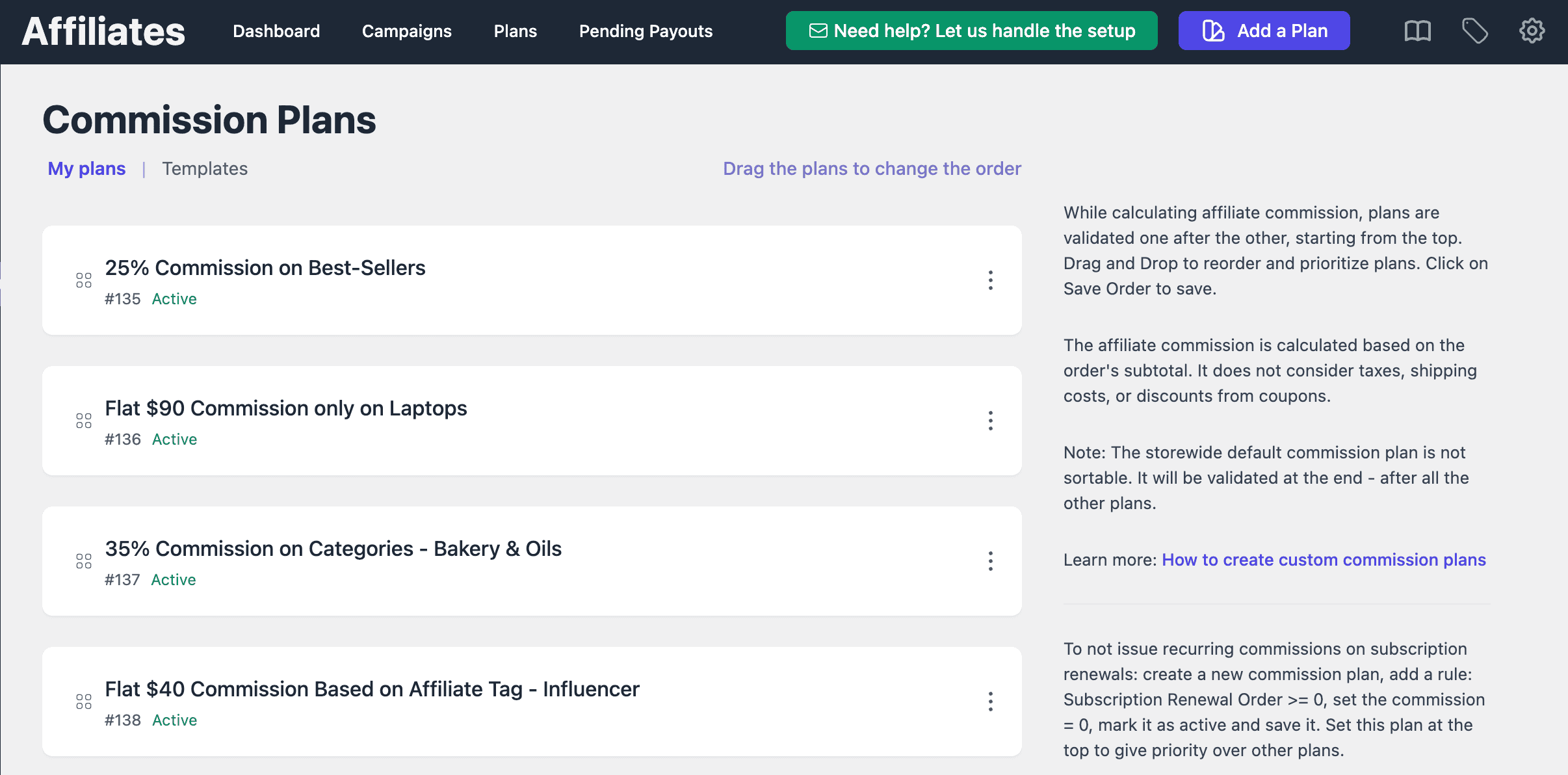
In the case of multiple products in an order, you can choose whether to assign different commissions on different products, commission only on the first product, choose storewide commission or give no commission.
Here are some popular commission plans you can create for your retail fashion store:
- 25% commission for product category ‘trekking shoes’ and 20% commission for product category ‘sneakers’.
- 35% commission only on Solitaire Diamond ring to affiliates Lisa and Nevil, 30% commission on other gold rings.
- 20% commission on a U.S polo t-shirt and no commission on the cap purchased in the same order. This is an example of no commission on upsells or cross-sells.
- 40% commission to affiliates having the ‘Influencer’ tag for the sale of Omega watches.
- 15% commission on the purchase of the Apple watch and 5% commission on the purchase of the watch strap in the same order.
- $5 flat commission on the purchase of Ray-Ban glasses and other matching commissions set for other products.
- $25 flat commission on a branded phone only to one affiliate.
- 20% commission on Ralph Lauren perfume and a storewide commission of 15% on branded lipsticks if present in the same purchase order.
- Three-tier commission – 15%, 10%, 5% on purchase of designer suits.
and hundreds of commission plans for thousands of products you can set up…
To create a commission plan, go to WooCommerce > Affiliates > Plans > Add a Plan.
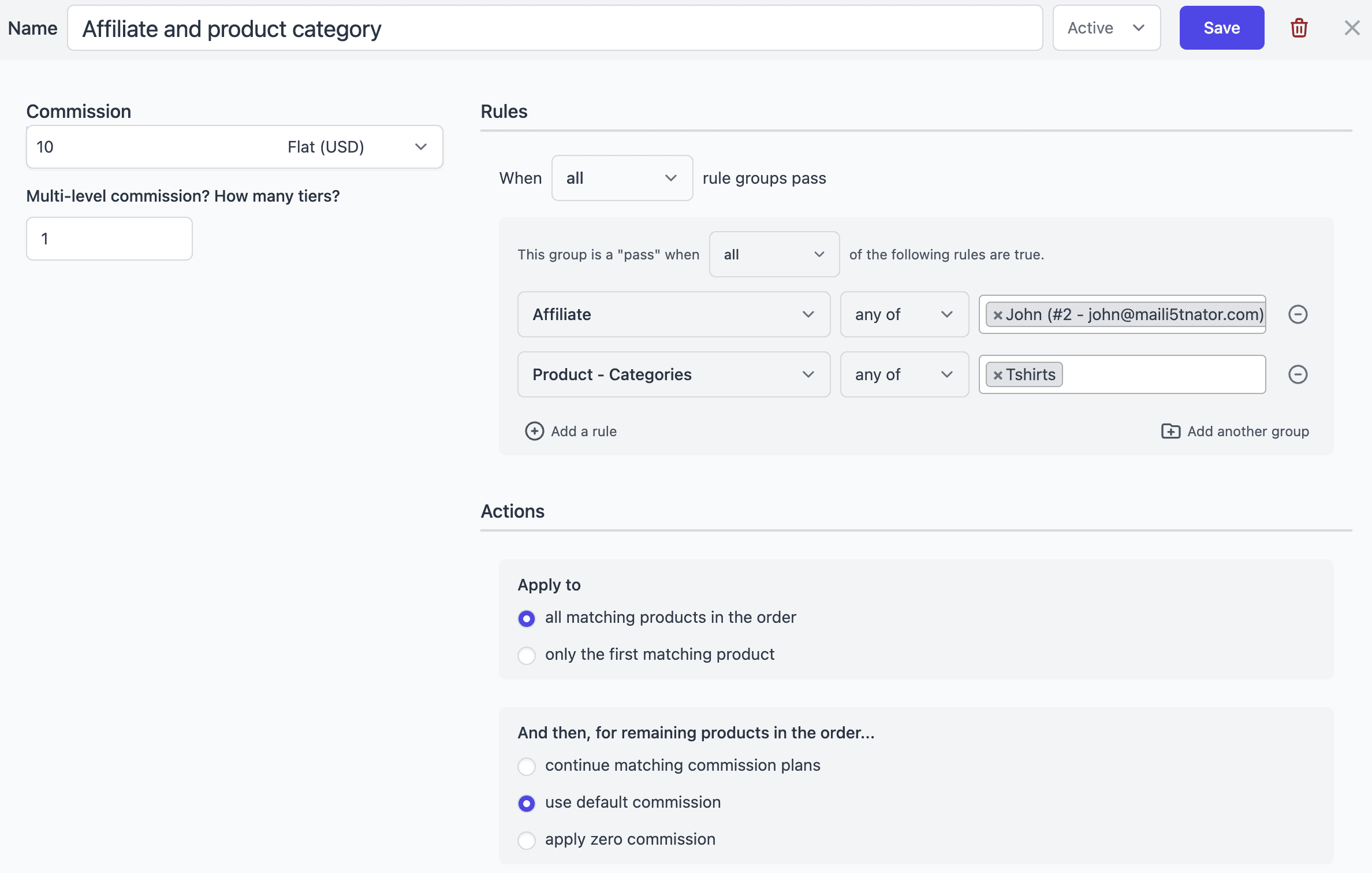
In the above plan, for instance, John will earn commission only on specific product category listed in the plan.
Affiliates will earn the desired commission based on the plans you create here.
Learn more about commission plans
Affiliate marketing campaigns
If you want to turn the tide in your favor, you need to help your affiliates with the resources they require to promote your brand and products better.
No doubt, it’s the strong visuals that keep the visitors engaged in your products. Description and price come secondary. Agreed?
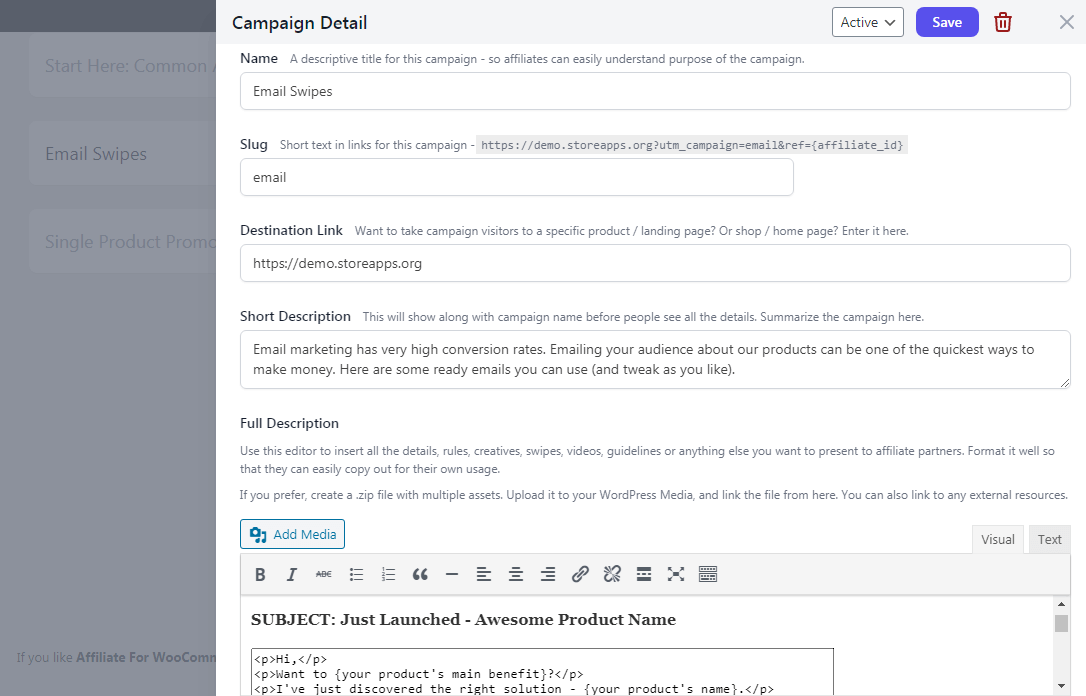
Affiliate for WooCommerce allows you to create marketing campaigns that provide your affiliates with all the marketing assets they need to promote your brand – images, videos, banners, logos, e-books, and product manuals.
Affiliates will then use these materials on their website for better promotion.
Learn more about creating affiliate marketing campaigns
Monitor referrals, sales, commissions…from one place
Affiliate for WooCommerce plugin provides everything in one single dashboard. You don’t have to struggle with different screens and menus to track revenue, affiliates, referrals, and payouts.
The plugin provides two dashboards – one for store owners and one for affiliates.
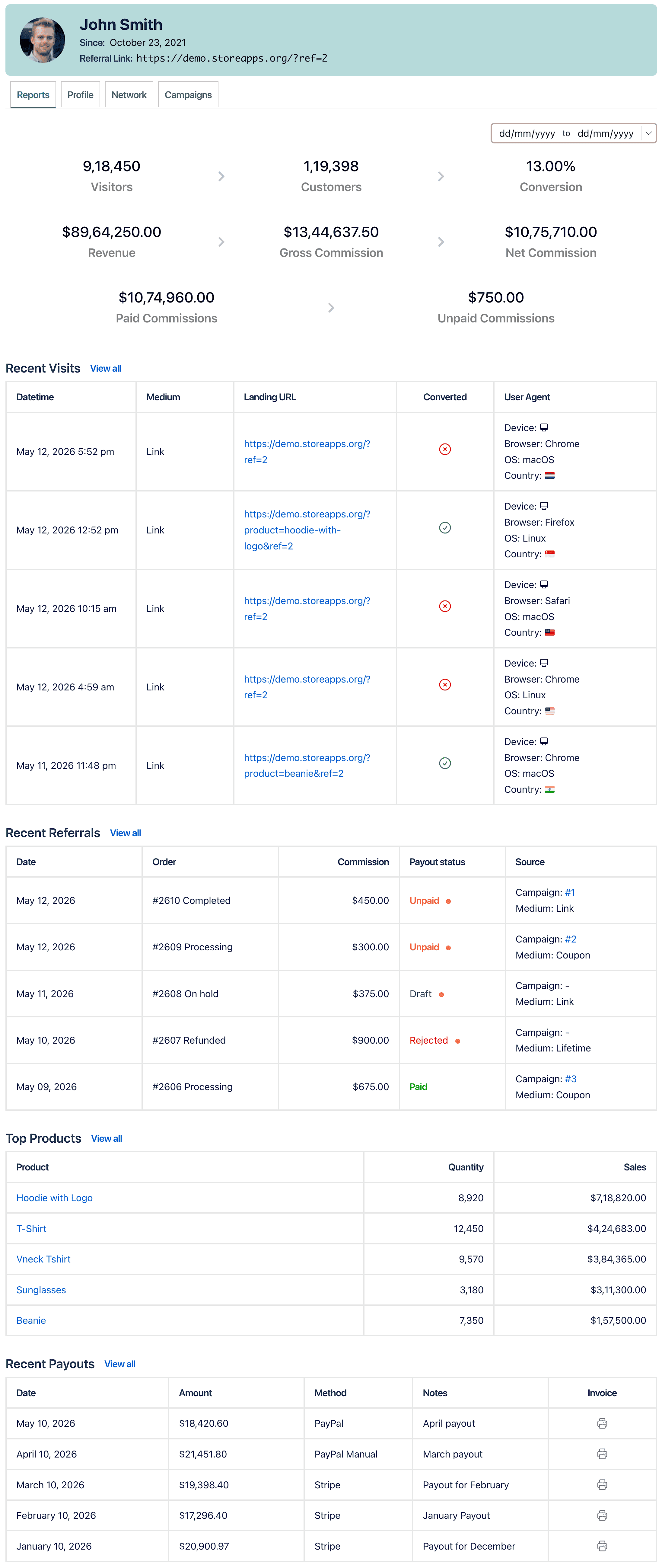
Store owners can track important metrics like net affiliate sales, unpaid commissions, refunds and complete details of each affiliate – payout method, order date, commission paid, payouts, parent affiliate assigned, visitor reports, etc.
Affiliates can track gross and net commission, total sales and conversion rate, details of products sold, commission earned from each customer, performance reports on their referral links or referral coupons shared, and payout history.
Affiliate payout
You can make commission payout in two ways:
- Commission payout via PayPal
- Manual commission payout
To explore more payout methods and strategies, check this guide: Affiliate payout options in WooCommerce.
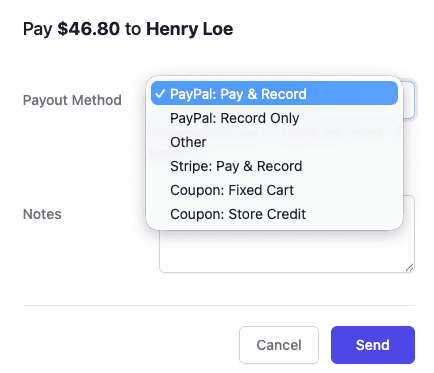
The manual commission payout is to keep a track of the commission payout. The actual payment of the commission is done by you outside the Affiliate for WooCommerce plugin. It can be done, using a bank transfer or other payment method.
You can also mark reward points for affiliates instead of payouts and then actually assign reward points or pay. Here’s how.
Fashion stores benefit from this since, in the lure of earning more points, affiliates promote them more. More the rewards, more the money earned later.
Whenever a visitor buys a product from your affiliates through the referral URL, you get your money as well as your affiliates. As simple as that.
Thus, these affiliates promote your products in their circle giving your products and your WooCommerce store a more global outreach.
Woopie! Your affiliate program is set up.
How to boost affiliate sales for your fashion store
Use affiliate coupons for Instagram promotions
Fashion products sell best on visual platforms like Instagram. Since clickable links are limited, coupon-based referrals work better for reels and stories.
Add short product videos, lifestyle banners, and new launch creatives inside affiliate campaigns so affiliates can promote faster.
Partner with micro-influencers for better conversions
Micro-influencers often deliver higher engagement than large creators. You can offer them special commission plans for premium categories like jewelry or watches.
What more Affiliate for WooCommerce plugin offers
- Real-time reporting about total sales, sales from affiliates, reports on individual affiliates’ performance…
- Pre-defined filters to search for affiliates
- Export affiliate data based on filters
- Set different affiliate commission rates for different users.
- Commission status syncs with WooCommerce order status automatically.
- Unlimited affiliate tracking – 1, 100, 1,000…track them all.
- Easily see a detailed log of every payout sent to affiliates
- Assign/unassign order to an affiliate
- Assign parent to the affiliate in a multi-tier affiliate program
- Compatible with Smart Coupons, WooCommerce Subscriptions
Get Affiilate for WooCommerce plugin
Ready to launch your fashion affiliate program?
Affiliate marketing is one of the easiest ways to grow a fashion store because it works even when you’re not actively running ads.
With Affiliate for WooCommerce, you can set up a complete affiliate program for your WooCommerce fashion store, manage commission rules, track referrals, and pay affiliates directly from your dashboard.
If you sell clothing, jewelry, watches, cosmetics, or accessories, a fashion affiliate program can help you build long-term sales without depending only on ads or Instagram reach.
FAQs
What is a fashion affiliate program?
A fashion affiliate program lets influencers, bloggers, and customers promote your fashion products using referral links or coupons. When they generate a sale, they earn a commission.
How do fashion affiliates promote products?
Fashion affiliates promote products through Instagram reels, YouTube styling videos, blog outfit guides, Pinterest boards, and discount coupons.
Can I set different commission rates for clothing and jewelry?
Yes. With Affiliate for WooCommerce, you can create commission plans based on product categories like clothing, watches, jewelry, cosmetics, and more.
Do affiliates need referral links, or can they use coupons?
They can use both. Coupons are especially useful for Instagram promotions where links are harder to share.
How do I track affiliate sales in WooCommerce?
Affiliate for WooCommerce tracks referrals, conversions, unpaid commissions, and payout history directly inside WooCommerce.