

Running a WooCommerce store involves constant small updates- stock, images, prices, and products.
At a few hundred products, this is manageable. At 45,000 products with thousands of variations, it becomes operationally heavy.
That’s what Gold Coast Trading Cards was dealing with. The store worked, but managing it had become slow and exhausting.
A lot of CSV files. A lot of clicking into products. A lot of time spent on work that shouldn’t take this long.
They didn’t change platforms. They didn’t rebuild their store.
They just changed how they manage it using Smart Manager.
Meet Gold Coast Trading Cards
Gold Coast Trading Cards is a well-established Australian business operating in the Rugby League trading cards market.
They’ve been in business for 15 years and have positioned themselves not just as a store, but also as a reference site for Rugby League cards going all the way back to 1963.
They cater to every kind of collector:
- Single cards
- Boxes and cases
- Live group breaks
- And large, highly detailed product catalogs
Their store now contains around 45,000 individual products, many of them with multiple variations and multiple images.
You can find them here:
What struggles Gold Coast Trading Cards faced before using Smart Manager
Like most WooCommerce stores, they relied on a mix of:
- CSV exports and imports
- And the default WooCommerce product editor
For simple products, the workflow looked like this:
- Export a CSV
- Edit data in the file
- Upload it back
- Then manually check products to make sure nothing broke
If a product was sold while they were working on the CSV, the data could go out of sync.
If they didn’t finish a task in one day, they had to export a fresh CSV the next day and start again.
For variable products, it was worse.
CSV files became overwhelming. So most work was done inside WooCommerce:
- Click product
- Edit
- Save
- Go back
- Open next product
- Repeat… again and again
Even if the same change had to be applied across 100+ products.
The worst part was managing and deleting old variations.
Before Smart Manager, deleting variations required deleting each one individually, confirming the action, and waiting for the page to reload every time.
Across 153 products with multiple variations, this added up to hours of repetitive manual work.
None of this was impossible. But it was slow, fragile, and inefficient.
How did Jarrod and team discover Smart Manager?
Interestingly, they weren’t even looking for a solution.
They assumed: “This is just how WooCommerce works.”
Smart Manager was suggested to them by their website support partner, Gina Ware from Here Comes The Cavalry, who had used it on another site for managing variations and had seen how much easier it made the work.
That suggestion changed how they looked at their entire workflow.
Why did Jarrod and team choose Smart Manager?
What stood out about Smart Manager was that it did not require any change to how their store was structured or how their team worked.
There was no migration, no new system to learn, and no need to rebuild existing workflows.
Smart Manager simply replaced their slowest and most manual tasks with a faster way of doing the same work:
- No CSV exports and re-imports
- No opening products one by one
- No working on outdated data
Once they saw that they could manage products and variations directly, in bulk, and on live data, the decision was straightforward.
How Smart Manager changed product management workflow
Today, Gold Coast Trading Cards manages their store directly inside Smart Manager instead of relying on CSV files or opening products one by one.
They use Smart Manager to:
- Adjust stock levels
- Edit prices
- Check and update images
- Add, change, or remove product images
- Work in bulk by showing only the columns needed for a specific task
Smart Manager also shows both variable products and their variations together in one place.
This makes it possible to manage variations at scale without opening each product individually.
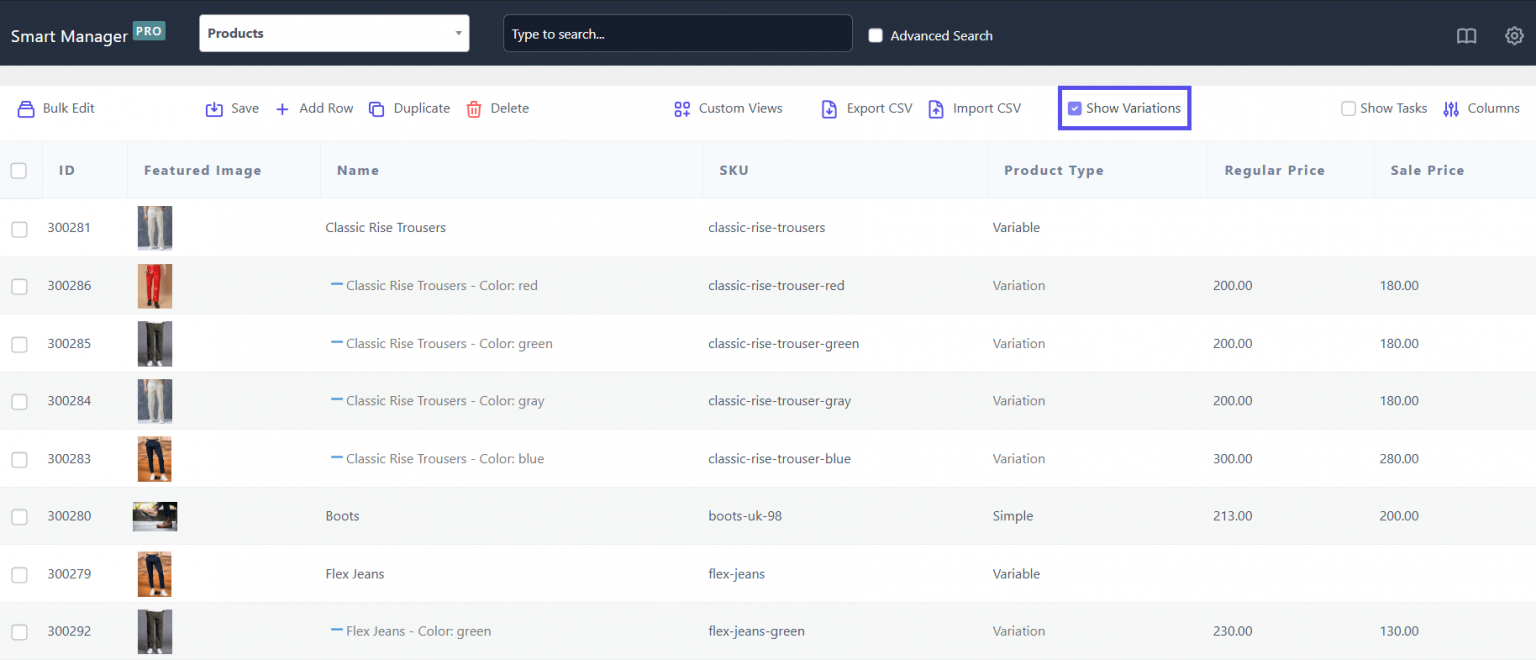
The most valuable improvement has been the ability to bulk delete old variations.
Instead of deleting variations one by one, the team can now filter out-of-stock variations, select them all, and delete them in a single action. This alone has saved a significant amount of time.
Why Gold Coast trading cards recommends Smart Manager
For Gold Coast Trading Cards, Smart Manager has become part of their normal daily operations.
It helps them keep a very large and complex WooCommerce catalog under control without adding more manual work.
Here’s their five star review for Smart Manager:
If you manage a large or fast-growing WooCommerce store, you can start with the free Smart Manager plugin for WordPress and upgrade later as your needs grow.
You’ll likely see the same value Gold Coast Trading Cards does.