
Even after every aspect of the affiliate program is top-notch, most brands still struggle to choose a rightful affiliate commission rate.
Sounds like you?
Well, you are not alone. Commission rates play a huge role in attracting affiliates and persuading them to join affiliate programs. So, it can be tough to choose the right commission rate.
At the same time, you need to fight off the market competition and keep your affiliates happy with fair payment.
So, how do you exactly decide on the right affiliate commission rate?
No worries! This article will help you to set the perfect commission rate for your WooCommerce affiliate program.
Let’s get started.
Factors to consider while choosing an affiliate commission rate
Put yourself in the place of that affiliate you’re planning to hire and ask yourself:
- What could be the ideal incentive for the effort I put in?
- What kind of a commission would keep me motivated to sell more?
These will help when choosing commission rates in your affiliate program.
Affiliate commission costs strategy
Do you deal in physical products where the production cost is high or in digital services where the profit margin is considerably more impressive than other services?
While digital courses/software may allow you to pay a hefty commission to your affiliates, other commodities with higher overhead costs may allow lesser pay.
So, you need to carefully set commission rates. Something that neither lets your affiliates feel underpaid nor makes a hole in your pocket.
A commission rate up to 20% seems better for physical products while for digital goods, it can reach 40%.
Analyzing competitors’ pricing structure
The idea is not to copy here but to learn from the competitors. Take advantage of their experiences and observe their pricing structure for affiliates.
Since they’re someone who has a similar business model (more or less), you can look up to them to decide an optimal commission rate for your affiliates.
Market density and niche focus
In a monopoly market, you will have an opportunity to be flexible with your rates. On the contrary, in a saturated market, you can’t help but offer high commission rates to fight cut-throat competition.
Also, if you deal with micro-niche products/services, you will have to offer attractive commissions to reach enough potential buyers. In contrast, affiliates promoting macro niche products might not expect a substantial affiliate high commission.
So, with the keto diet or other such popular micro-niche services, affiliates can expect or even demand considerably high affiliate commissions. Thus, make a wise decision.
Lower commissions for recurring subscriptions
It’s true, affiliates would choose reliable businesses and products with potentially high demand. They also expect to earn commissions on recurring subscriptions.
Further, even if the commission is low, the number of transactions will compensate for the low commission rate. This way, your business will register increased sales and affiliates will earn their desired profits. A win-win for both.
Offer value with lifetime commissions
What a great motivation to make your affiliate program more popular and successful among the masses!
Lifetime commissions let affiliates earn commission on all purchases of their referred customers as long as they are linked to them.
It also encourages affiliates to promote your brand and its products more on various platforms. In return, they continuously earn commissions on subsequent purchases.
Market your unique selling point
As they say, every business is different. Go beyond the point of comparing prices with everything and jot down a broader perspective in mind. Such as:
- Your product details
- Sales strategy
- Affiliate program’s unique point
Be open to experiments and learn from your mistakes. Eventually, every trial and error will bring you closer to the optimal commission rates. Then, you will be able to meet right affiliates to promote your products/services.
Further, you can always change the plan if it’s not working. Because commissions need not be those fixed rates you never change.
A commission rate based on affiliates’ experience, product sales and different perspectives mentioned above would bring great benefits in the long run.
To make it more streamline, a WordPress affiliate plugin would be a great fit for your business. We recommend the Affiliate for WooCommerce plugin.
Why choose Affiliate for WooCommerce plugin?
Affiliate for WooCommerce, built by StoreApps-the official WooCommerce extensions developer, would be the best fit for your affiliate program because it offers you the most significant and diverse features.
- Helps create and run a successful affiliate program for your WooCommerce store.
- Easy to create customized affiliate forms.
- Customizable affiliate referral links and coupons. Also, affiliates can turn default referral links into pretty links to promote your brand.
- Most powerful commission rules system to assign different commission rates.
- Set lifetime commission rates for all or specific affiliates.
- Create multi-tier commission plans (unlimited tiers).
- Set conditional commission plans based on product, customer’s first order, affiliate groups, specific affiliates, etc.
- Create different campaigns to share marketing material with affiliates, such as email swipes, product manuals, videos, etc.
- Set up a storewide commission rate for all affiliates.
- Assign higher commissions to selected affiliates or high-performing ones.
- Exclude specific affiliates, such as ‘Editor’, from earning commissions.
- Assign different commissions for one product and storewide commissions on another product in the same purchase order.
- Assign commission on the main product and not on upsells.
- Assign affiliates their custom landing pages and give a commission on every sale made through this page.
- Assign commission only on subscription parent orders or both parent and renewal orders.
- Payout commissions automatically via PayPal or manually.
and many more…
Now, come back to the commission rate discussions.
Affiliate for WooCommerce’s jaw-dropping commission system
The plugin allows you to set commission rates using powerful rule-based conditions. You can create commission plans based on affiliates, products, referral type, subscription orders, and even performance metrics like revenue or referral count.
You can set commission rates based on:
- Affiliate
- Affiliate – Customers
- Affiliate – Last Referral (days)
- Affiliate – Revenue
- Affiliate- Tags
- Affiliate – Valid Referral Orders
- Affiliate- Parent
- Product
- Product category
- Product taxonomy (type, brands, visibility, shipping classes, attributes, tags)
- Order – Coupons
- Order – Payment Methods
- Order – Subtotal
- Subscription parent orders
- Subscription renewal orders
- User – Logged In
- User- First Order
- User- Role
- Medium- Referral
Want to understand how each rule works? Refer to the official documentation.
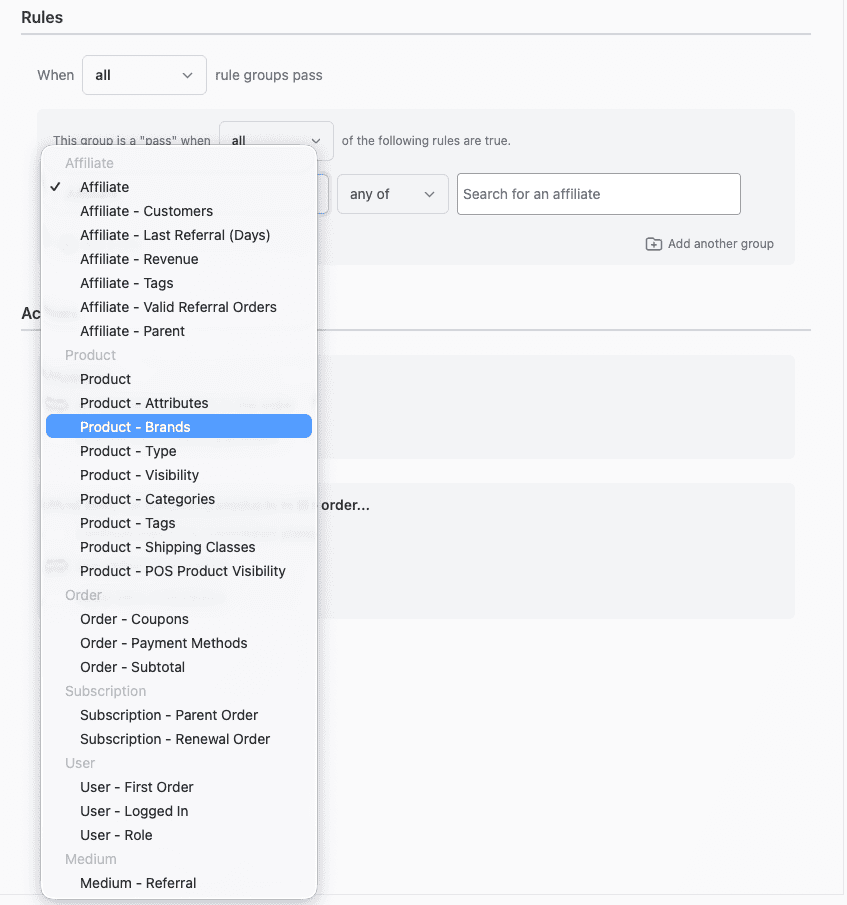
It wouldn’t be an overstatement to say that this is the only plugin that allows you to set commission rates based on so many rules.
Let’s dive deep into this treasure box to understand what kinds of plans you can set:
Storewide commission plan
It’s a default commission plan mandatory for every WooCommerce owner. It’s valid even when no other commission plan is applicable for an order. So, affiliates can still earn with this plan.
Note that you can not delete this plan or add any rules. However, the storewide commission plan lets you change the value or set a percentage or flat rate commission under ‘Commission’.
Affiliate-based commission
Affiliate-specific commission rates are useful when you need to exclude specific affiliates from earning commissions. Or, when you wish to set a specific commission rate only for selected affiliates, choose this commission plan.
For example, Jeremy gets a 25% commission rate on the sale of any product from the store. Meanwhile, Lisa gets a 20% commission on the sale of clothing products only.
Affiliate tag/groups-based commission
When you start your affiliate program full-fledged, after a while, you will be in a position to identify who is your star performer, who is performing extraordinarily and who isn’t bringing you enough sales.
You can segregate such entries by giving them specific tags or groups like Gold, Silver, Star Performer, Active Performer, Dormant and such.
So when you will be restructuring your price modules, you can set a condition and change the affiliate commission rate belonging to different tags/groups.
Therefore, creating affiliate groups-based commission rates saves you a lot of your valuable time and keeps the process simpler when you have a large number of affiliates.
Product-based commission
This is undoubtedly one of the most preferred commission plans. A product-specific commission rate can be different from the default storewide commission rate.
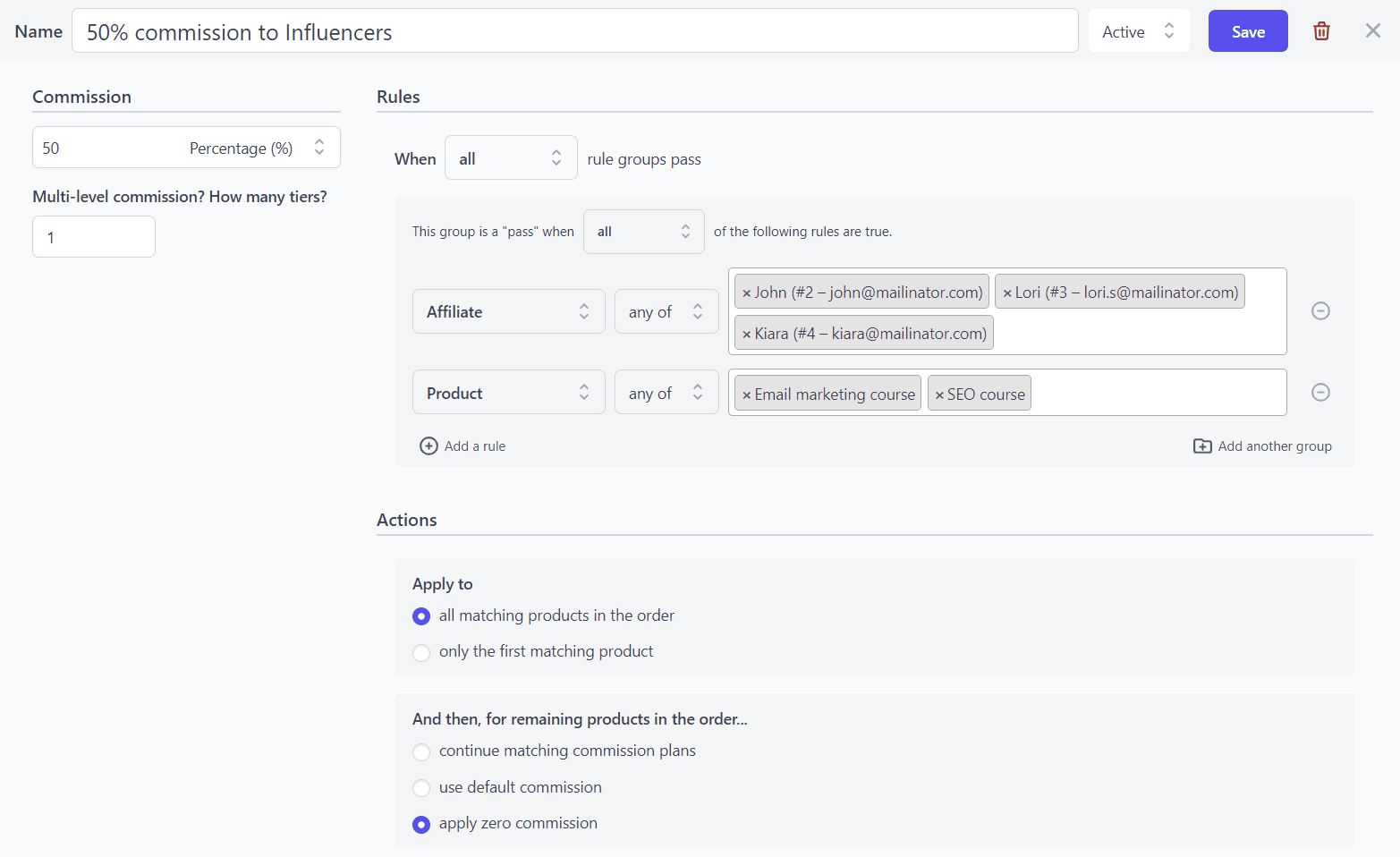
For example, the storewide commission rate is 25% on all products. But, there is a 50% commission on specific courses only for three of your affiliates.
So, if Kiara, Lori and John get you more sales for these courses, they deserve the commission based on the product and not on the price.
Product category-based commission
You might have affiliates who are good at selling certain types of products while other affiliates are great at selling other products.
As a WooCommerce store owner, you can create product category-based commission plans and choose selected affiliates to promote only specific product categories.
For example, if you have a departmental store, you can set a 20% commission on clothing but a 25% commission on beauty products.
Product taxonomy-based commission
You want to provide commissions only on Nike shoes or only on ‘Simple’ product types.
So you can set up plans to provide commissions based on product taxonomies like product categories, product tags, product attributes, brands, shipping classes, and even custom taxonomies.
Commission based on referral medium
An affiliate referral medium can be a link or coupon. This plugin enables you to create commission plans and set commission rates based on referral links and coupons.
With this, your affiliates get commission only when customers have bought the product through the referral link or coupon.
First order-based commission
Some also call it ‘new customer commission’.
As a business owner, you can choose to give affiliates a commission when their referred customer places their first order. It encourages affiliates to promote the brand to a diverse user base to bring new customers in.
If the same customer makes a purchase again, the affiliates won’t earn a commission.
Commission based on user roles
This plugin allows you to determine commission rates based on the affiliate’s user role, such as subscribers, customers, etc.
Set the user role in the commission plan and all affiliates falling into that category will receive that commission.
Commission based on subscription parent orders
Being compatible with WooCommerce Subscriptions, this plugin allows you to offer commissions to affiliates on subscription products.
Choose the appropriate commission rate on the parent order of the subscription product to give to all or selected affiliates.
For example, you offer a music subscription plan. Every time a customer subscribes to it for the first time, affiliates get the commission.
Commission on renewal orders (recurring commission)
The plugin allows you to give affiliates the commission on every renewal order.
Note that you have the flexibility to give affiliates the same commission on both parent and renewal or different commissions for parent order and renewal order.
Commission on renewal orders is usually based on the subscriptions’ billing schedule.
For example, if a product has a monthly subscription, then you can give a 15% commission on the first subscription and a 10% commission after every renewal. If the customer ends the subscription, the commission will stop too.
Another example would be of providing the same commission on parent order and renewals.
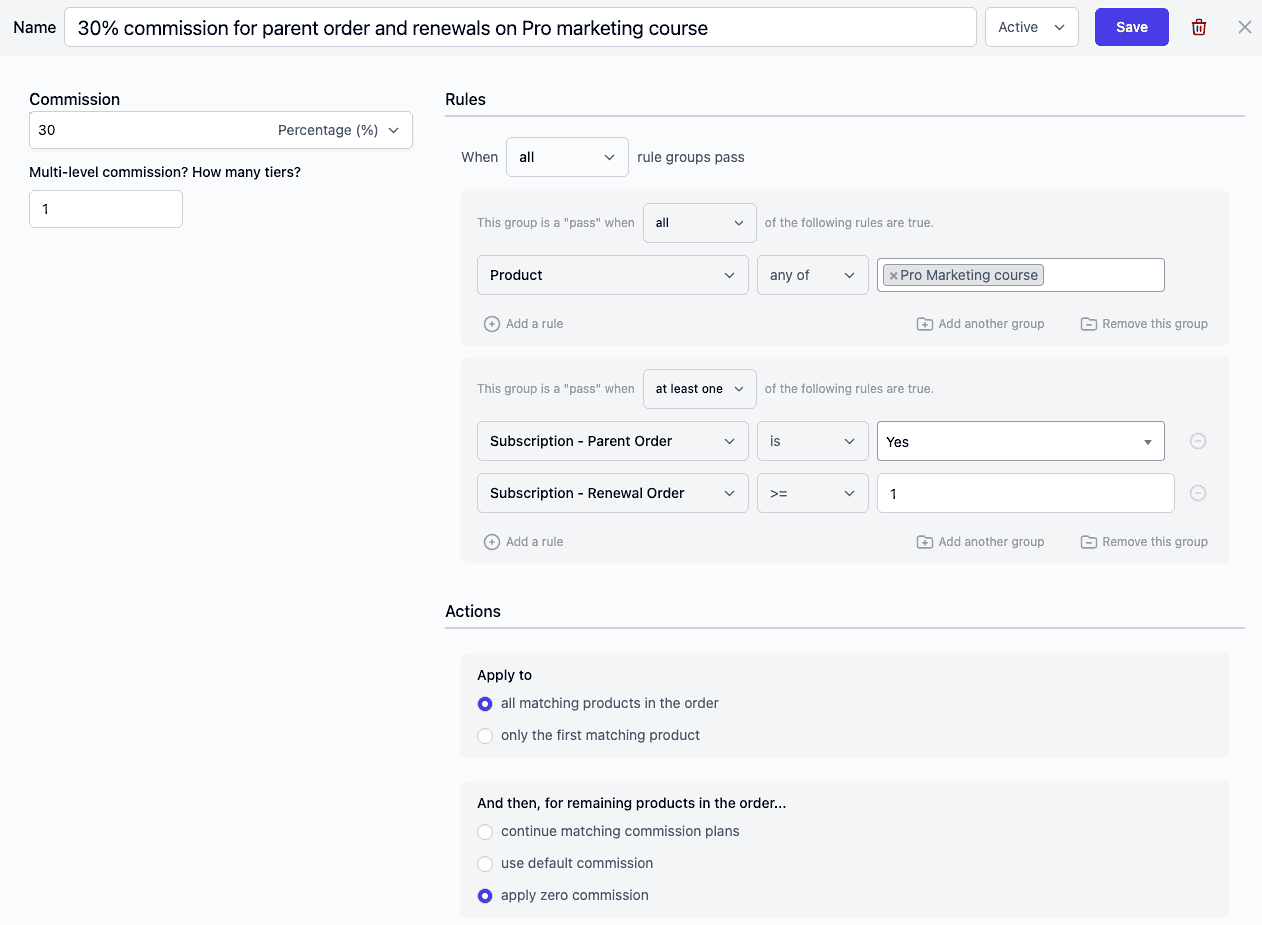
More about custom recurring commissions here
Lifetime commissions
As lifetime commissions are independent of browser cookies, it gives affiliates a chance to earn commissions on every future purchase of their linked customers.
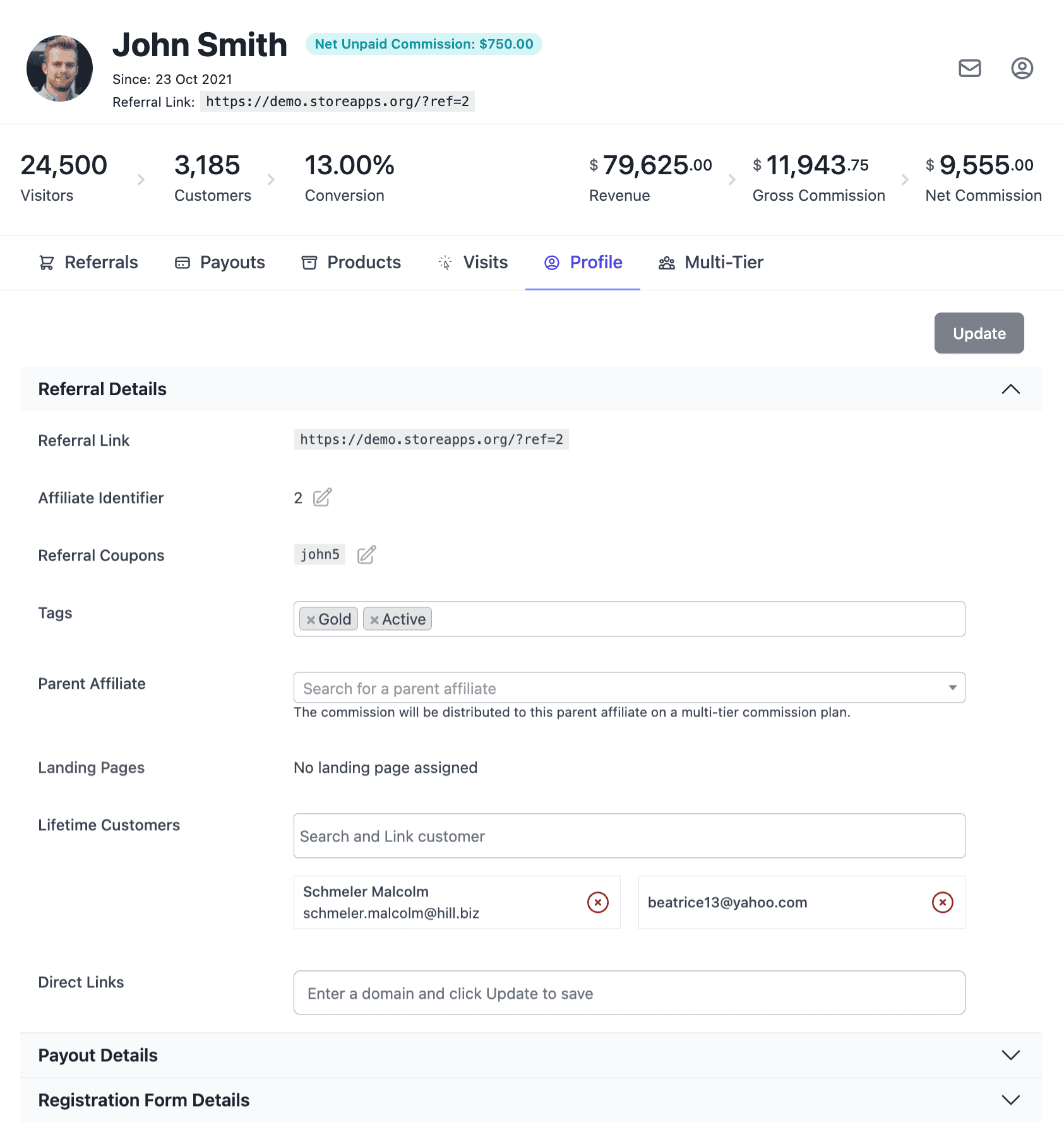
Note that this plugin also allows you to manually link/unlink customers to any affiliate for a lifetime commission from their profile.
In other words, affiliates earn commissions even if customers delete cookies or make a purchase on another device and/or without using a referral ID/coupon.
Multi-tier commission
The multi-tier commission plan helps affiliates earn commission not only from their sales but also from sales made by their child affiliates.
Let’s understand it with another example of a three-tier commission program with tier one – 30%, tier two – 20% and tier three – 15%.
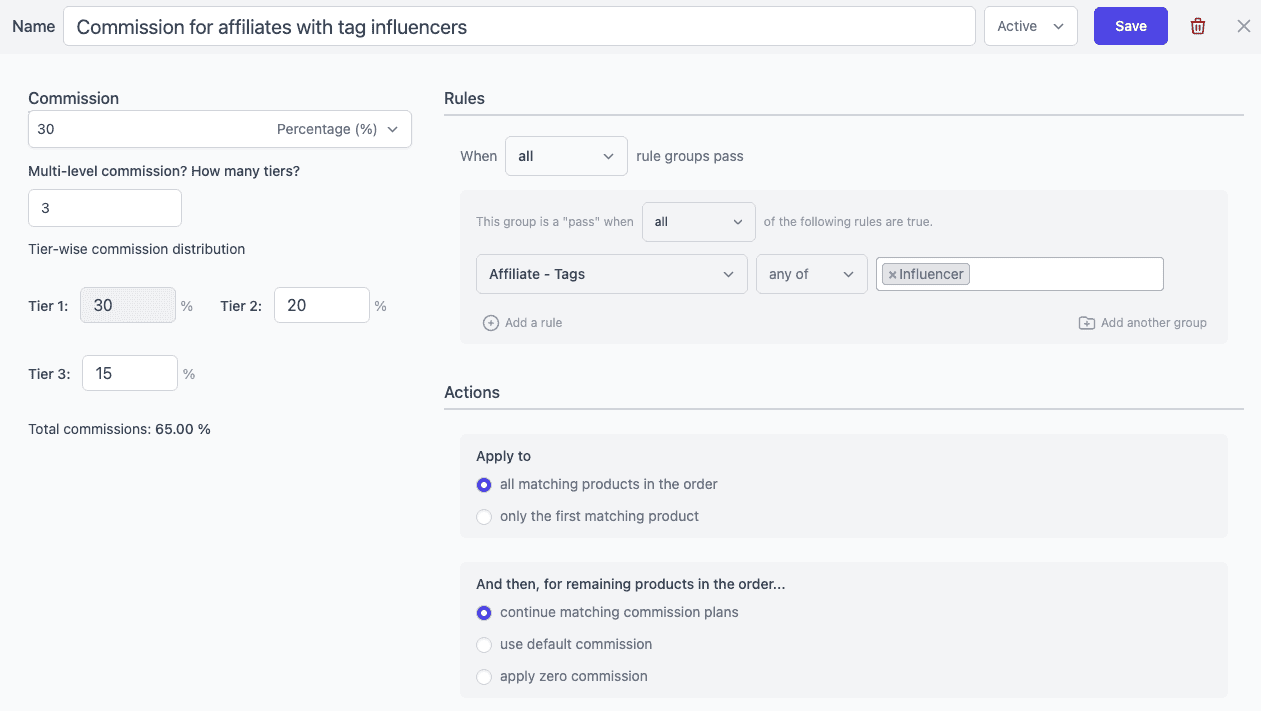
Oliver is already an affiliate and refers to John. Then, John refers Ivy to your affiliate program. All three of them are influencers. Now, when a customer buys using Ivy’s affiliate link, she gets a 30% commission. John gets a 20% commission and Oliver gets a 15% commission.
That’s for the three-tier commission plan. You can set up a multi-tier commission plan with unlimited tiers.
Tiered commission
Also known as performance based commission, the affiliates earn extra commission based on successful orders.
For example:
- $30 commission if an affiliate has crossed 200 orders
- $20 commission if an affiliate order count less than 200
Check the video for the setup.
Affiliate customers-based commission
This commission plan allows you to set commission rates based on how many unique customers an affiliate has referred to your store. It helps you reward affiliates who bring real customer acquisition instead of just repeat orders.
For example, you can offer a higher commission rate to affiliates who have referred more than 25 customers.
Affiliate revenue-based commission
This commission plan allows you to assign commissions based on the total revenue an affiliate has generated for your store over time. It is useful for building performance-based commission structures where top-selling affiliates earn higher rewards.
For example, you can set a 20% commission rate for affiliates who have generated more than $5000 in referral revenue.
Affiliate valid referral orders-based commission
This commission plan helps you set commission rates based on how many successful referral orders an affiliate has completed. It is ideal for rewarding affiliates who consistently drive conversions and sales.
For example, you can set a 25% commission rate for affiliates who have referred at least 5 valid orders.
Affiliate last referral (days)-based commission
This commission plan allows you to define commission rates based on how recently an affiliate has referred a customer. It is a great way to encourage consistent promotion and re-engage inactive affiliates.
For example, you can offer a higher commission rate to affiliates who have made a referral within the last 30 days.
User logged in-based commission
This commission plan helps you assign commissions based on whether the customer was logged in or placed an order as a guest. It is useful if you want different commission rates for new buyers vs existing customers.
For example, you can offer a higher commission rate for guest purchases to encourage affiliates to bring new customers.
Order coupons-based commission
This commission plan allows you to control affiliate commissions based on whether a coupon was used in the order. You can also apply conditions for specific coupons to manage promotions more strategically.
For example, you can stop affiliates from earning commission when customers use a specific discount coupon like SUMMER15.
Order payment methods-based commission
This commission plan lets you set commission rates based on the payment method used in the referral order, such as PayPal, Stripe, or Cash on Delivery. It is helpful if some payment methods have higher transaction costs or risks.
For example, you can reduce commission for Cash on Delivery orders and offer higher commissions for prepaid payment methods.
Order subtotal-based commission
This commission plan allows you to assign commissions based on the subtotal value of an order (before taxes, shipping, fees, and coupon discounts). It is useful for creating order-value based commission tiers.
For example, you can offer a higher commission rate for orders above $500 and a lower commission for orders below $25.
Learn more about these commission rules in the official documentation.
Conclusion
Affiliate marketing is an exciting opportunity and how well you play with your affiliate commission strategy will take your game to the next level.
Cherry on top, the Affiliate for WooCommerce plugin makes it easy for you to set different affiliate commission rates (global or individual).
Further, this plugin lets you onboard affiliates easily, create marketing campaigns, track affiliates’ performances, schedule automatic payouts, etc. It encourages transparency and helps make your WooCommerce affiliate program successful.
Get Affiliate for WooCommerce plugin
FAQ
Can affiliate commission rates be customized or negotiated with individual WooCommerce store owners?
Yes.
Are there any limitations or restrictions on earning affiliate commissions through WooCommerce?
There is no limit on earnings.
What is the typical affiliate commission rate for affiliate marketers promoting WooCommerce products?
For an affiliate program, a good affiliate commission rate ranges between 5% and 30%. However, the standard affiliate commission rate for affiliate marketers promoting WooCommerce products can vary depending on the specific affiliate program, products, agreement between the affiliate marketer and the merchant, etc.
This look great Akshat, but how do you set it up so that you only pay commission on product sales excluding tax and shipping charges?
Hi Brian,
the commission is calculated on products excluding tax and shipping charges by default.
When will “total referrals based commission” be released? I bought this plugin on the assumption this was already available and need it ASAP.
Hi,
I do not have any ETA for it but rest assured, I’ll surely update here once we add it to the plugin.
Total referrals based commission is now available in Affiliate for WooCommerce plugin. Read here: Setup Tiered Commissions (Volume Based) and give it a try.
How can we convert customers into affiliates automatically?
Hi Ramont,
The plugin provides a setting ‘Affiliate users roles’ that will show you different user roles. Select ‘Customer’ and save your setting. This will automatically convert your customers into affiliates.