Export Orders for WooCommerce
1-click WooCommerce orders export plugin
Tired of clunky orders export plugins? Smart Manager shows your orders in a live spreadsheet, lets you use smart filters and exports exactly what you need. Export 100s of orders fields – statuses, customer info, billing addresses, shipping data, line items, refunds, payment records and any WordPress post type in seconds.
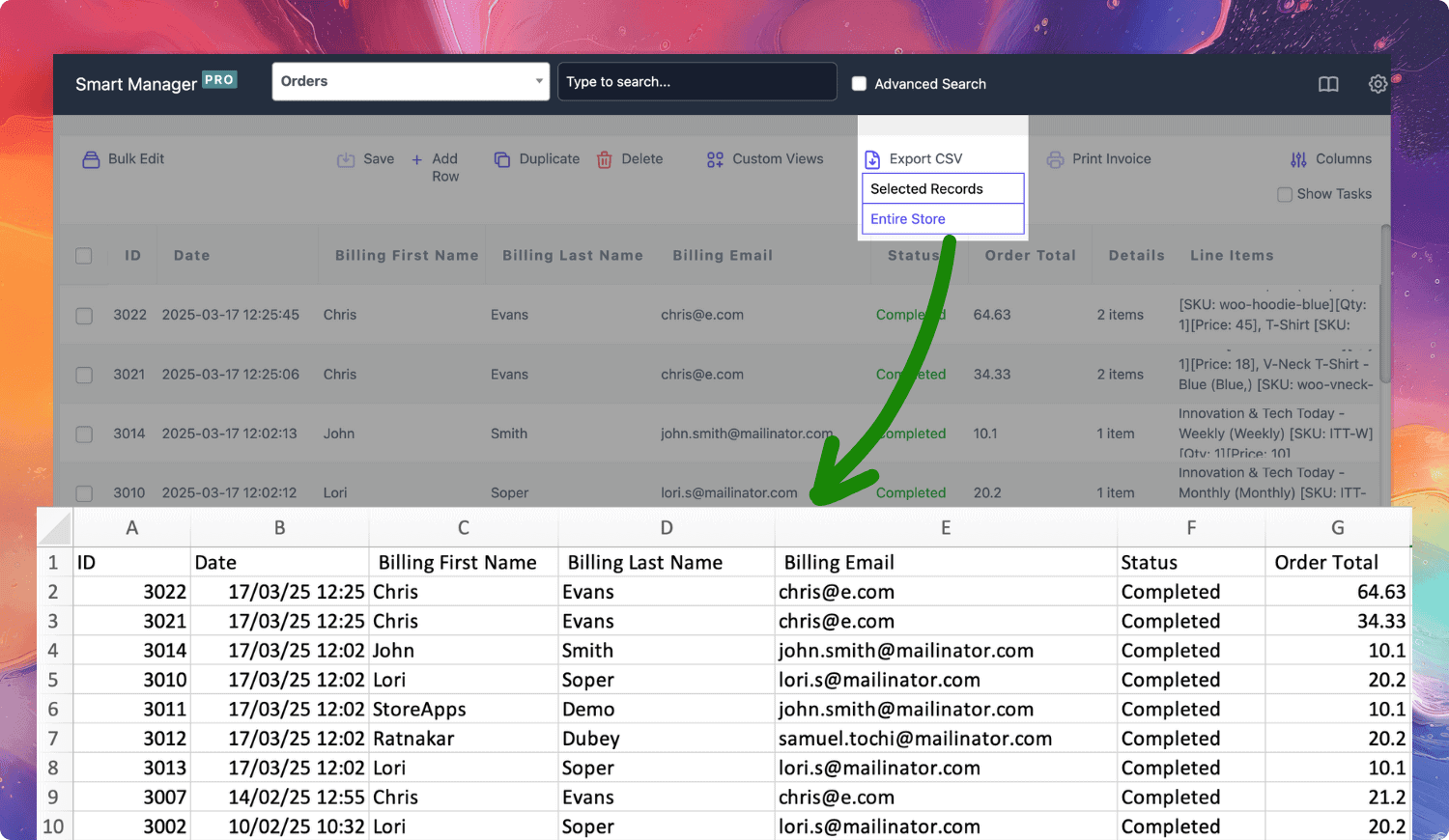
Growing stores need more than WooCommerce’s default exports
WooCommerce doesn’t include a built-in order export tool, so you get no advanced filtering, no column control, no saved export templates and not even line-item-level exports without using a plugin.
Smart Manager changes everything. It lets you see all your orders in a spreadsheet view, search instantly, filter deeply and export with one click. Export 50 orders or 50,000. Smart Manager, with a spreadsheet-like dashboard, handles it all. Get your order data in a CSV format. No export limits. No processing delays.
-
Export order statuses
Pending, processing, on-hold, completed, cancelled, refunded, failed — export them all or pick just one. Need only “Shipped” orders from this week? Done. Want all “refunded” orders for your accountant? You’re just a few clicks away.
-
All order information at your fingertips
Get order numbers, dates, totals, tax breakdowns, discount amounts and internal notes. Create a sales report with last month’s completed orders. Export all orders where coupons were applied. Get a list of high-value orders above $500 for VIP follow-ups.
-
Customer and billing details
Names, emails, phone numbers, billing addresses, company names — all exportable. Create an order list from last quarter’s buyers. Extract all orders from California for state tax reporting. Export B2B orders with company names for separate invoicing.
-
Filter by date, status or amount
Need orders from Black Friday weekend? Filter by date. Want only pending payments older than 5 days? Filter by status and date. Looking for orders between $200 and $1000? Set the range and export.
-
Export by payment or shipping method
Stripe orders only? PayPal refunds? Cash on delivery pending pickups? Filter by payment method and get your exports. The same goes for shipping — pull all express shipments for carrier reconciliation or local pickup orders for store preparation.
-
Export custom fields and metadata
Export custom meta fields, admin notes, customer messages and any personalized data attached to orders. Gift messages, delivery instructions, VAT numbers — if it’s stored with the order, Smart Manager exports it for you.
-
Your own custom exports
Create custom views with only the columns you care about. Order ID, customer email, total, shipping method — that’s it. Save the view. Next week, open Smart Manager and get the same view, apply fresh filters and export.
-
Unlimited exports
Export unlimited data anytime. No limits, no delays. No setup screens. No export wizards. Get complete store data whenever you need it.
Why store owners rely on Smart Manager 🧡
“Smart Manager plugin lets me manage over 200 products with ease. Probably 20 or 30 times quicker. It’s an absolutely invaluable tool.” – Brian Batcher
“Smart Manager makes our day way more productive. We now can change our stock in just 2 clicks instead of hours of work. Also, the support is really quick and helpful!” – Jasper
“Can easily bulk edit prices, update stock and export data by applying filters. What took 45 mins earlier, is now done in 10 minutes.” – Natalie
“This plugin keeps you calm while updating numerous products. I recommend it to everyone who doesn’t want to constantly enter product pages to make changes on price etc.” – Vanesa
“The smart Manager plugin is indispensable! It is possible to operate in bulk on anything: categories, attributes, tags, moving products from one category to another.” – Lolopo
“It requires 10 different plugins to do what Smart Manager does with only 1 plugin. It is light, sleek, fast and I can manage coupons, users, products, orders, etc.” – Nuno Palha
One plugin for simplified WooCommerce order handling
Filter orders before exporting, choose only the columns that matter and export exactly what your business needs in a CSV. Advanced search and filtering, bulk editing, export products, export customers and one-click exports in a single plugin.
-
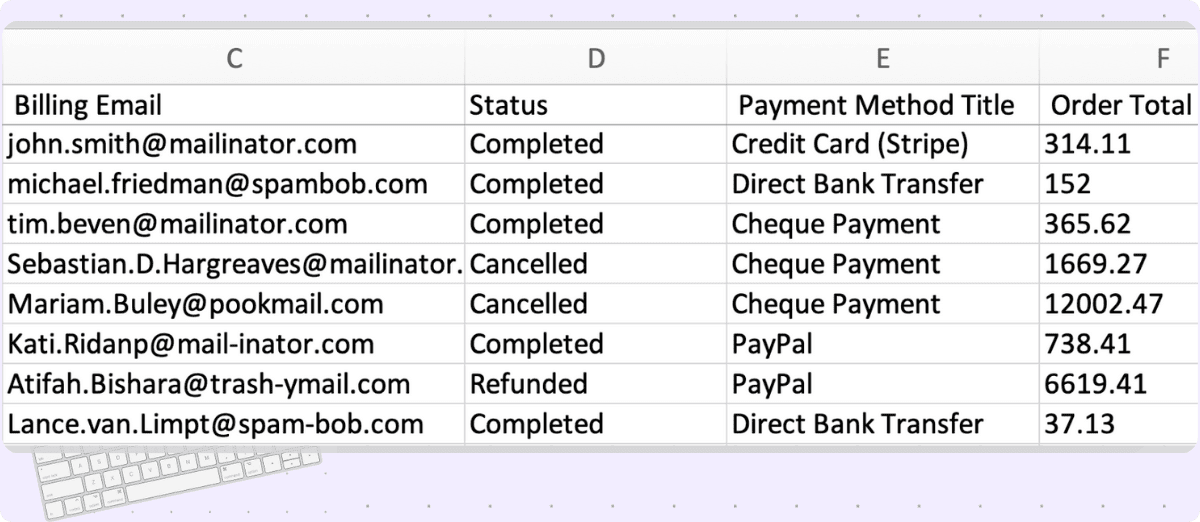
Let Smart Manager’s Advanced Search do the hard work for you. Export:
- Completed orders totaling over $300 for loyalty program outreach
- COD orders pending pickup for the delivery team handoff
- Orders placed between December 20th and 31st for holiday sales analysis
- Failed payment orders from last week for recovery emails
Apply order filters and export data
-
- Export renewal orders, parent orders, next billing dates, recurring totals and statuses. Example, pull subscriptions renewing next week for reminders.
- Export booking orders with dates, time slots, resources and confirmation statuses. Example, list all weekend bookings for staff planning.
- Export plans, activation and expiry dates and member details — for example, identify memberships nearing expiry for renewals.
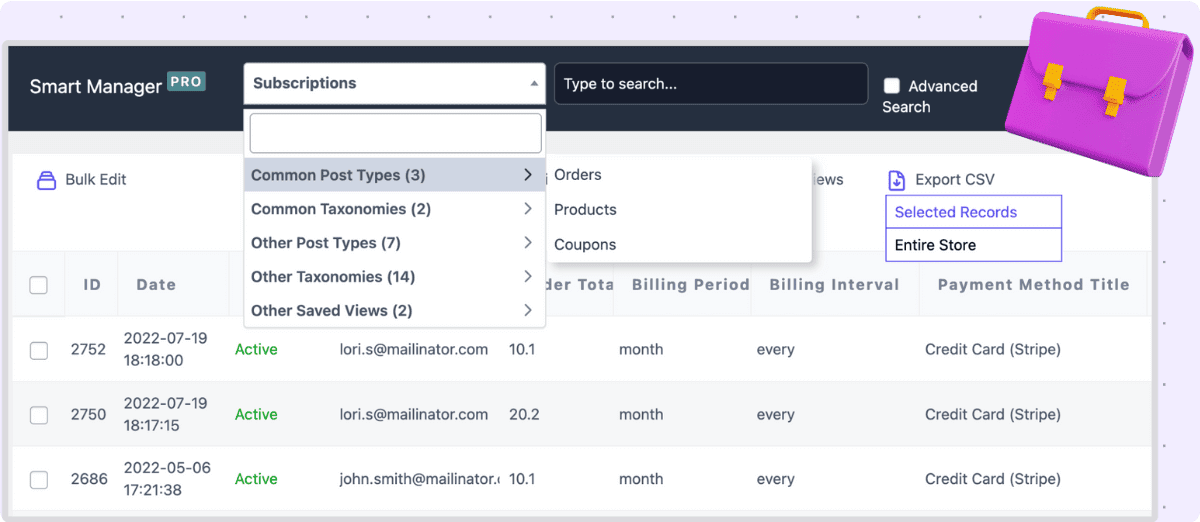
Subscriptions. Bookings. Memberships. Export everything.
-
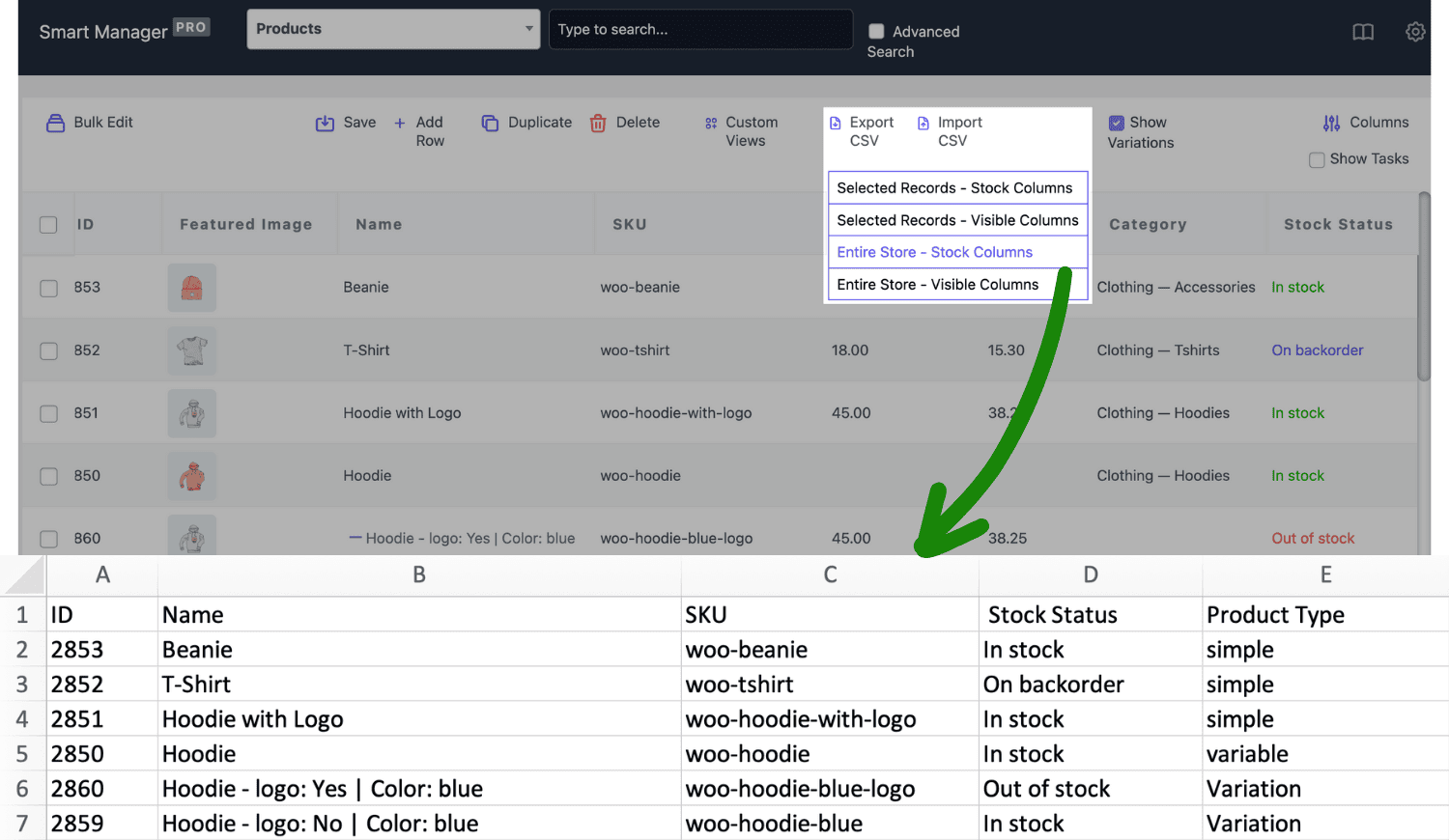
Export products, customers, coupons, blog posts.
- Products: Names, prices, stock levels, categories, attributes. Export low-stock items or pull sale products for promotion review.
- Customers: Names, emails, purchase history, lifetime value. Find customers with 5+ orders or export inactive buyers for win-back campaigns.
- Coupons: Codes, discount types, usage counts, expiry dates. List expired coupons for cleanup or export high-usage codes for performance analysis.
- Posts and pages: Titles, authors, publish dates, content.
Not just orders. Export products, customers and more
-
Here are more order management tools for you!
- Duplicate any order with intact details.
- Bulk edit and bulk status updates: Easily move 500 orders from “Processing” to “Completed” in one action. Then export the batch.
- Edit records inline, avoid mistakes by undoing changes, etc.
- Bulk delete test orders, cancelled orders or old data using advanced filters.
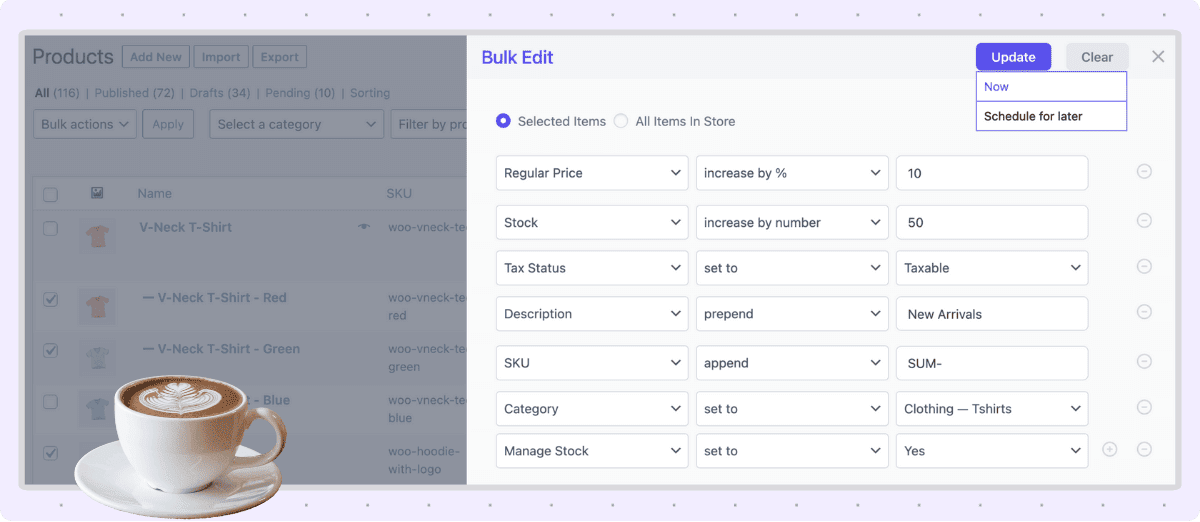
Export is just the beginning!
Manage data from other WooCommerce plugins
You get a whole new level of transformation when you integrate Smart Manager with others. Make use of other plugins and expand your store horizons easily. Automate things or manage store, the choice is completely yours.
- Smart Coupons – Bulk manage and edit store-wide discounts.
- Smart Offers – Optimize upsells, cross-sells and special deals.
- Chained Products – Modify bundled product rules in bulk. products.
- Affiliate for WooCommerce – Manage affiliate commissions and payouts effortlessly.
- Subscriptions for WooCommerce – Search, edit and delete expired subscriptions in one go.
- Bookings for WooCommerce – Modify multiple bookings within a specific date range.
- Memberships for WooCommerce – Inline edit membership details based on search filters.
- Product Add-Ons for WooCommerce – Inline edit membership details based on search filters.
Saved 75% time in store ops 🚀
For Natalie, who sells 600+ products, bulk editing and exporting data was challenging — WooCommerce’s basic export and manual CSV manipulation were time-consuming. Natalie needed a simple tool to export data instantly and bulk edit products.
With Smart Manager, Natalie now does edits in minutes and exports filtered data instantly — saving 75% of time in store management.
Smart Manager vs other WooCommerce order export tools competition
One look at this comparison shows why Smart Manager leads the export orders plugins pack. Export customers, export coupons, export products, advanced filtering, custom views, sortable columns — all in one tool.
| Features | Smart Manager | Order/Customer CSV Export | Order Export for WooCommerce | WooCommerce Order Export Lite |
|---|---|---|---|---|
| Export post types supported | Orders, products, coupons, customers, any WordPress post type | Orders, customers, coupons | Orders | Orders |
| Export all orders | Yes | Yes | Yes | Yes |
| Export order statuses | Yes | Yes | Yes | Yes |
| Export billing details | Yes | Yes | Yes | Yes |
| Export shipping details | Yes | Yes | Yes | Yes |
| Export payment method | Yes | Yes | Yes | Yes |
| Export order notes | Yes | Yes | Yes | Yes |
| Export custom fields/meta | Yes | Limited | Yes | Yes |
| Export products | Yes | No | No | No |
| Export coupons | Yes | Yes | No | No |
| Export users | Yes | No | No | No |
| Advanced filtering | Robust filtering, multi-condition, rule-based | Basic (status, date) | Basic | Basic |
| Custom column views | Save, switch, share, role-based | Custom formats | Limited | Basic |
| Sort columns before export | Drag-and-drop, fully customizable | Limited | No | Yes |
| Scheduled/automated exports | Yes | Yes | Pro only | Pro only |
| Export formats | CSV | CSV, XML | CSV | CSV, XLS, XML, JSON |
| Bulk actions (edit, delete, duplicate) | Yes | No | No | No |
| Undo changes | Yes | No | No | No |
| Inline editing | Yes | No | No | No |
| Export other plugin data | Subscriptions for WooCommerce, Affiliate for WooCommerce, Smart Coupons, WooCommerce Memberships for WooCommerce, Bookings for WooCommerce (100+) | Admin Custom Order Fields, Avalara, Checkout Add-Ons, Checkout Field Editor, Cost of Goods | Yes | Yes |
| Export for large stores | Fast | Slow | Slow | Slow |
| Ease of use | Very easy | Average | Easy | Complex |
One WooCommerce export orders plugin does it all
Order exports. Bulk edits. Status updates. Customer management. Product exports. Coupon tracking. Data cleanup. Report generation. Store analytics and migration preparation. Daily operations. The Smart Manager plugin takes care of all.
Pricing
Save more time, effort and money
Grab Smart Manager today and get fast exports, bulk edits and more. Double your savings by buying a 5-site license for under $250!
FAQ
- What if I buy one year license and then cancel?
-
You can certainly do that if you wish. Cancelation is easy. You can manage all your subscriptions easily from your account. But keep in mind that you are eligible for support and updates only if your license is active. So you will need to buy again at then prevailing prices if you cancel now and need updates later.
- How do you count number of sites for a license?
-
Each website – whether it is a subdomain, cross-domain, subdirectories… is considered a separate website. Learn more about it from here.
- What if I want a refund?
-
Refunds within 30 days of purchase, if the plugin is broken, and if we do not solve it in reasonable time, after mutual communication. Renewals, problems due to third-party plugins / themes / code / hosting etc do not qualify for a refund. Please read all our terms here.
- I have some other question. How do I contact you?
-
It’s good to have questions! Reach out to us with your questions and we will answer them at the earliest.
Buy with confidence – you’re in good hands
- You’re buying from the best!
-
Rest assured that you will be well taken care of when you buy from StoreApps.
- Top selling plugins for marketing and store management
- Official WooCommerce and GoDaddy partner
- Founded in 2011, one of the early Woo third party developers
- 40k+ customers, 300k+ users, millions of downloads
- Consistent 5 star review ratings
- WordPress community contributor, sponsor, speaker.

- Friendly support from top quality developers
-
Our plugins are easy to use. We also have ample documentation. But whenever you need further assistance, you will get support from the same people who develop these plugins! We make sure you succeed!