
E-commerce founders are constantly hunting for smart ways to scale and skyrocket their sales.
One of the most powerful ways to get your business flourishing is a WooCommerce multistore setup. Whether you’re running separate brands or targeting different global regions, the potential in WooCommerce multistore is very big.
However, as you go deeper with a multistore setup, you quickly come across a wall of complexity.
You find yourself jumping between different WooCommerce dashboards, manually syncing stock across stores, managing orders from different sites and praying that a sale on Store A doesn’t lead to an overselling nightmare on Store B.
On top of that, manual management is too difficult in such cases. But the good news is that you don’t have to manage everything manually.
The right WooCommerce multistore plugins can turn a messy multistore setup into a streamlined operation where products, inventory, customers and orders stay synchronized across stores.
In this guide, you’ll discover what a WooCommerce multistore is, why you need one and the 7 best multistore plugins that help you manage multiple stores in WordPress efficiently, without burning hours on repetitive tasks.
What is a WooCommerce multistore?
Multistore or multisite is a powerful feature of WordPress that allows you to run a network of websites from a single installation. Instead of setting up separate WordPress instances for each site, you can manage them all under one umbrella.
All you need to do is create a network of sites on WordPress and then install WooCommerce on each site (this feature in WordPress is called a WordPress multisite) to get things going.
Here’s what happens at the core:
- You install WordPress once, then enable the multisite function.
- From that single installation, you can spin up multiple sites — each with its own domain or subdomain or subdirectory, its own WooCommerce store and its own product and content strategy.
- As the network administrator, you control plugins, themes and updates centrally, while each site can still operate independently with its own branding and product catalog.
- Each of your multistore sites has its own entity with its own domain, design, products and settings, but they share a common core codebase.
So, instead of logging into separate dashboards, you can control inventory, products and data across multiple sites from one dashboard on WordPress.
For example, you might want to run:
- A US store
- A Canada store
- A global wholesale store
- A brand-specific retail store
Each store in your multistore setup can still have its own:
- Domain or subdirectory
- Language
- Currency
- Product selection
- Pricing strategy
With a multistore system in WooCommerce, the backend management becomes far easier. Though in some cases, you may need the help of expert WooCommerce developers to run and manage the entire system.
Why do store owners need a WooCommerce multistore setup?
Before we go ahead, let’s pause and ask the real question: is running WooCommerce multistores actually the right fit for your business?
The answer depends on your audience and product mix.
If your customers are vastly different or your product lines don’t belong under the same roof, then splitting into multiple stores is a good idea.
Here is why growing store owners like to go with multistore functionality on their existing e-Commerce business.
- Suppose you manufacture a wide range of products. Some are for local buyers in the US, while others appeal to a global audience. Putting them all in one store would confuse customers. With WooCommerce multistore, you can tailor the shopping experience to each region and deliver the right products to the right people.
- Suppose you’re selling both apparel and premium cosmetics. These products don’t share the same audience, tone or branding. Unless you’re building an Amazon-style marketplace, it’s far more effective to run multiple stores in WooCommerce — each designed to resonate with its specific customer base.
- If you run a wholesale business alongside a retail brand, you already know the pricing, product presentation and customer expectations are completely different. Splitting them into separate WooCommerce stores allows you to guide each audience to the right storefront, without diluting your messaging or confusing buyers.
- And, then you can also offer your products in specific currencies, languages and shipping rules for different regions.
7 best WooCommerce multistore plugins
Here are the 7 best plugins to enhance your WooCommerce multistore setup, assuming you have already configured your multisite environment in WordPress.
WooMultistore
One of the most popular solutions for running multiple WooCommerce stores is WooMultistore. It allows you to manage inventory, products and orders across several stores from a single place.
The plugin creates global products that are shared across all stores in the network, while still allowing each store to customize details like pricing, descriptions and availability.
A centralized stock system ensures inventory is tracked accurately to prevent overselling. Orders can be managed individually at the store level or viewed collectively at the network level.
How does it work for multistore?
The plugin replicates products across your entire network of WooCommerce stores, regardless of whether you use subdomains, subdirectories or completely different domains.
It synchronizes product data including content, imagery, galleries and metadata while giving you control over which products appear on which stores. The plugin also aggregates all orders from every store into a single WooCommerce orders page for centralized management.
It pushes changes from your main site to all connected stores automatically. Store owners gain complete visibility into network-wide inventory through unique product stock management that simplifies inventory evaluations.
And, network super administrators can view, manage and process orders from all stores through one unified interface.
Key features:
- Sync products across multiple WooCommerce stores, either individually or in bulk.
- Maintain accurate inventory with instant stock updates across all synchronized stores.
- Choose what to sync, including product titles, descriptions, images, prices, categories, reviews, attributes and more.
- Easily share coupons across your network of stores.
- Export orders (single or across all stores) to CSV or XLS formats.
- Support for Simple, Grouped, External and Variable products.
- Option to maintain sequential order numbers across all stores.
- Move licenses between development and production servers with ease.
Pricing: $249-379 (Single and developer-based license)
Product Vendors for WooCommerce
Though not a full-fledged WooCommerce multistore plugin, the Product Vendors for WooCommerce plugin converts your WooCommerce store into a robust multi-vendor marketplace.
This plugin lets you sell anything, including physical objects, digital downloads and even time-based bookings (with WooCommerce Bookings integration).
How does it help?
The plugin allows multiple vendors to sell physical, digital or even time-based products alongside your own, while you manage commissions, payouts and approvals centrally.
For store owners running multistore operations, this plugin helps by decentralizing product management. Vendors handle their own catalogs, shipping rules and customer notes — while you maintain oversight of sales, commissions and payouts.
When a buyer purchases a vendor’s product, the order details are automatically shared with that vendor.
This includes the buyer’s shipping and billing information along with the items ordered, enabling the vendor to process and fulfill the order smoothly.
Key features:
- Accept and approve vendor applications with built-in forms and email notifications.
- Set commissions as fixed amounts or percentages, per vendor, product or store-wide.
- Pay vendors instantly, manually, weekly, bi-weekly or monthly using PayPal Payouts integration.
- Get comprehensive insights into vendor sales, commissions and performance.
- Assign roles like Vendor Admin (full access) and Vendor Manager (limited access).
- Display vendor profiles, ratings and other details selectively for customer transparency.
- Vendors can manage their profile information, including logos and contact details. The vendors can also manage their products and set per-product shipping rules and view orders, add private or customer notes and track their sales performance.
Pricing: $119 (Billed annually)
Get Product Vendors for WooCommerce
Putler
Managing multiple WooCommerce stores without a solid business intelligence tool is like flying blind. You need an efficient analytics tool to keep an eye on all the numbers, and Putler is the best option for this.
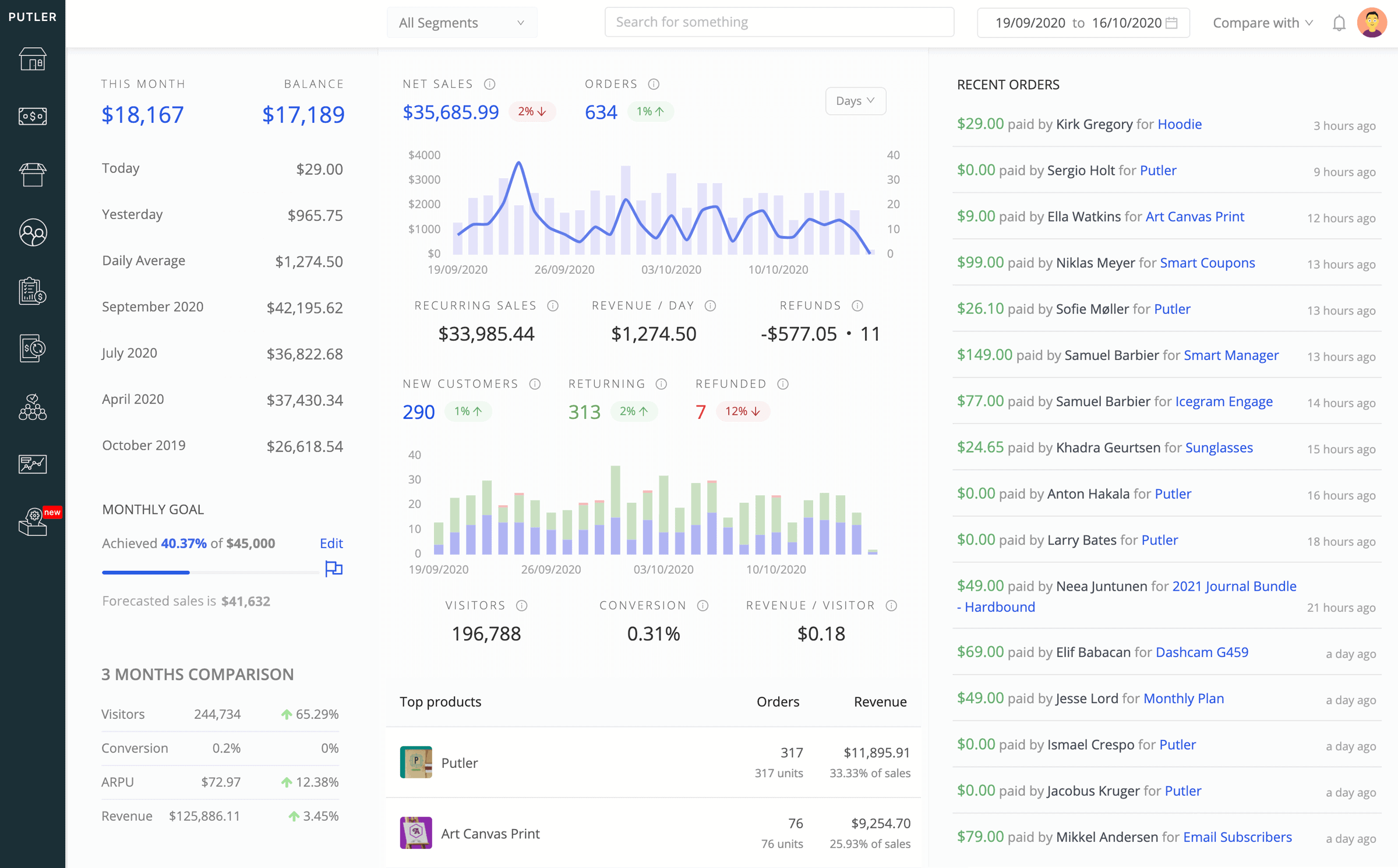
Putler, developed by StoreApps, can make your life easier by combining data from all of your stores into a single, unambiguous dashboard that you can use.
Putler’s WooCommerce integration allows you to track sales, orders, customers and subscriptions while providing more than 200 metrics to help you make informed decisions and more revenue.
It’s a must-have WooCommerce tracking tool for growing your multistore business, with over 7,000+ users worldwide.
How does it help?
With Putler, store owners gain a complete and accurate overview of cash flow, sales, products and customers across all their stores from one place.
The tool performs intelligent data cleaning and consolidation, fixing common data problems like duplicate customers across channels, transaction mismatches between stores and payment gateways and automatically applying currency conversion for stores operating in different currencies.
Store admins can also do performance comparisons between stores, track over 200 KPIs, access RFM customer segmentation and generate sales forecasts based on consolidated data.
Key features:
- Combine sales, orders, customers and product data from multiple stores.
- Automatically clean and merge data for error-free insights.
- Identify top-selling products, customer behavior, trends and more.
- View history, geolocation and enriched customer data.
- Track MRR, churn, ARR, LTV and other KPIs with ease.
- Filter data by RFM (recency, frequency, monetary value), location and behavior.
- Plan future growth using sales trends and forecasts.
Price: $20 per month (Starter plan)
WooCommerce Multisite Product Sync
With features like automated product synchronization, bulk sync options and compatibility with third-party plugins like ACF, WooCommerce Multisite Product Sync makes managing large multisite networks effortless and efficient.
How does it work?
WooCommerce Multisite Product Sync is built to automatically synchronize products, categories, media and stock across multiple WooCommerce sites in a WordPress Multisite network.
It supports syncing in all directions i.e. main site to subsites, subsites to main or across all sites — while giving you options to bulk sync, exclude specific metadata or even delete products network-wide when removed from the source.
Key features:
- Automatically sync simple, grouped, virtual, downloadable, external/affiliate and variable products across your multisite network.
- Includes general settings, inventory, shipping details, linked products, attributes, variations, advanced options and custom taxonomy.
- Sync product media such as featured images, galleries and downloadable files.
- Keep product categories, tags and custom taxonomies consistent across all sites.
- Bulk sync all products across all sites or sync products from the main site to sub-sites.
- Enable or disable stock synchronization as per your requirements.
- Automatically delete products from destination sites when removed from the source site.
- Exclude specific product metadata when syncing across sites.
Pricing: $30 (Regular license)
Get WooCommerce Multisite Product Sync
WooCommerce Multisite Duplicator
WooCommerce Multisite Duplicator by WeLaunch is an invaluable plugin designed to duplicate products between multiple WooCommerce stores (within a network) seamlessly.
How does it help a multistore front?
WooCommerce Multisite Duplicator makes product duplication across multiple WooCommerce sites effortless. Instead of manually recreating products, categories or attributes for each store, you can copy them instantly with bulk or single duplication options.
For store owners managing several storefronts, this plugin is a big time-saver. It allows you to replicate successful product setups across different sites, maintain consistency and speed up expansion into new regions or niches.
The plugin can also copy product variations, attributes, metadata (e.g., price), taxonomies (categories and tags) and images (with checks to avoid duplicates).
Key features:
- Add a duplicate link directly in the product list or product page for quick access.
- Redirect to the copied product after duplication for easy management.
- Set a custom post status and product suffix for duplicated products.
- Update products across sites by title, slug or SKU.
- Limit access to duplication features based on user roles or capabilities.
- Bulk delete or trash products network-wide.
Pricing: $49 (Regular license)
Get WooCommerce Multisite Duplicator
WooCommerce Product Sync Plugin
WooCommerce Product Sync Plugin is an excellent tool for automating and error-free product management in a WooCommerce multistore setup.
It easily syncs WooCommerce products, inventory and attributes with external APIs or supplier inventory.
You can also import and synchronize product IDs, SKUs, names, stock levels, custom fields and advanced attributes.
How does it help with a multistore arrangement?
The WooCommerce Product Sync plugin keeps your multistore ecosystem aligned by automatically syncing products, variations and inventory across all connected sites.
Store owners can import supplier catalogs instantly, ensure accurate stock levels and manage dynamic pricing without manual updates. Orders flow smoothly to the right fulfillment partner, making multistore management faster, leaner and far less error-prone.
Key features:
- Import product images to enhance the visual appeal of your product listings.
- Synchronize hierarchical categories and tags for better product organization.
- Modify supplier prices by adding your desired margins.
- Easily import and sync variable products with multiple attributes directly into WooCommerce.
- Automate synchronization at custom intervals, eliminating manual updates.
- Import products in the background without interrupting your workflow.
- Supports JSON, XML, CSV, ZIP and FTP formats for seamless integration with diverse data sources.
- Offers secure access with OAuth 2.0, Basic Authentication, API Keys or Bearer tokens.
- Sync attributes and custom fields created using ACF, providing extensive customization.
- Handles paginated API data efficiently for seamless imports.
Pricing: It has a free plan for importing and syncing simple products. $299 per year (Premium plan)
Stock Sync for WooCommerce
This plugin allows you to effortlessly synchronize stock quantities across multiple WooCommerce stores using a secure API-based solution.
It can automatically sync stock changes when a product is purchased, refunded or changed from the admin interface.
How does it work:
The Stock Sync for WooCommerce plugin keeps inventory levels consistent across multiple WooCommerce stores.
It designates one site as the Primary Inventory, which acts as the master record for stock quantities, while other sites function as Secondary Inventories. From the primary site, you can push updates to all connected stores or fetch and compare stock data to ensure accuracy.
Key features:
- Share and sync stock quantities instantly between two WooCommerce stores.
- View and manage synced products directly through the report interface.
- Push all stock quantities from one store to another seamlessly.
- Ensures synchronization tasks don’t slow down your website performance.
- Utilizes WooCommerce built-in REST API for secure and reliable store communication.
Pricing: It’s free on the WordPress repository. The pro plan costs $99 for 1-site network.
Get Stock Sync for WooCommerce
Let’s go with a multistore in WooCommerce
WooCommerce multistore is all about scaling your e-commerce business smartly: one installation, many sites and unified control.
It focuses on syncing products, orders and inventory. With this feature coupled with the right plugins, you can form a powerful backbone for your growing online stores.
Whether you’re managing regional stores, balancing wholesale and retail or building distinct brand identities, the right multistore plugin ensures your WooCommerce business runs smoothly.
Just pick the plugin that fits your biggest challenge today, and you’ll unlock the freedom to scale your multistore easily.
FAQs
I want to run multiple WooCommerce stores on the same domain. Is it possible?
Yes, you can but it depends on your setup. With WordPress Multisite, you can create subdomains (e.g., kids.yourstore.com, jewelry.yourstore.com) or subdirectories (e.g., yourstore.com/kids, yourstore.com/jewelry).
Each can host its own WooCommerce store while sharing the same WordPress installation.
Do I need WordPress Multisite for WooCommerce multistores?
Not necessarily. WordPress Multisite is one way to structure multiple stores, but WooCommerce multistore plugins can connect completely separate installations too. If your goal is centralized inventory, orders and customer data, plugins can definitely help.
How do I sync inventory across different multistores?
Inventory synchronization is the heart of multistore plugins. Instead of manually updating stock in each store, plugins automate the process.
For example, when a product sells in Store A, the stock count instantly updates in Store B. This prevents overselling and keeps your warehouses aligned. So, the best idea is to use a multistore inventory management plugin.
Will multistore affect the overall speed of the sites?
It can, but only if poorly configured. Running multiple stores means more data syncing, more queries and potentially heavier load.
However, with proper caching, optimized hosting and well-coded plugins, the performance impact is minimal. The key is to choose lightweight, well-supported plugins and invest in solid hosting.
How to secure my multistore setup?
Security becomes even more critical when you’re managing multiple stores. You should do the following to secure your multistore sites.
- Using SSL certificates for all stores.
- Keeping WordPress, WooCommerce and plugins updated.
- Enforcing strong user roles and permissions across the network.
- Using a centralized security plugin that covers all sites in your network.
- Regular backups should be done. Because one compromised store shouldn’t bring down the entire network.