

WooCommerce gives you the basics for creating discount coupons, but things get more complicated once you want to run BOGO deals, automatically apply discounts, reward returning customers, or set different rules for different shoppers. That’s where a plugin like WebToffee Smart Coupons comes in.
WebToffee coupons plugin adds more flexibility to WooCommerce’s built-in coupon system. You can create BOGO offers, auto-apply discounts, giveaway promotions, URL coupons, customer-specific offers, and more detailed usage restrictions without having to build each promotion from scratch.
In this WebToffee Smart Coupons review, I’ll look at how the plugin works, what you can do with it, what’s included in the free and Pro versions, its pricing, and the things worth checking before you build your store’s coupon strategy around it.
WebToffee Smart Coupons at a glance
WebToffee coupons plugin extends WooCommerce’s built-in coupon system with more ways to create, target, and apply promotions. The plugin covers both everyday discounts and more specific campaigns, including BOGO offers, giveaway products, auto-apply coupons, URL coupons, and purchase-history-based offers.
| What you want to do | WebToffee Smart Coupons |
|---|---|
| Run BOGO deals | Yes, including Buy X Get Y offers and quantity-based promotions |
| Automatically apply discounts | Yes |
| Give away products | Yes |
| Restrict coupons | Yes, using product, category, cart, customer, location, payment, shipping and other conditions |
| Schedule promotions | Yes |
| Use coupon links | Yes, with URL coupons |
| Reward previous purchases | Yes, using purchase-history conditions |
| Offer store credit and gift cards | Yes |
What can you do with WebToffee Smart Coupons?
The easiest way to understand WebToffee Smart Coupons is to look at what you’d actually use it for inside a WooCommerce store. The plugin keeps the familiar coupon workflow, then adds dedicated options for promotions that WooCommerce doesn’t handle as easily on its own.
How do BOGO promotions work in WebToffee?
WebToffee coupons plugin gives BOGO promotions their own setup instead of making you build everything through a standard WooCommerce coupon. From the dashboard, you can create Buy X Get Y offers and define the products, categories, quantities, and reward that should trigger the deal.
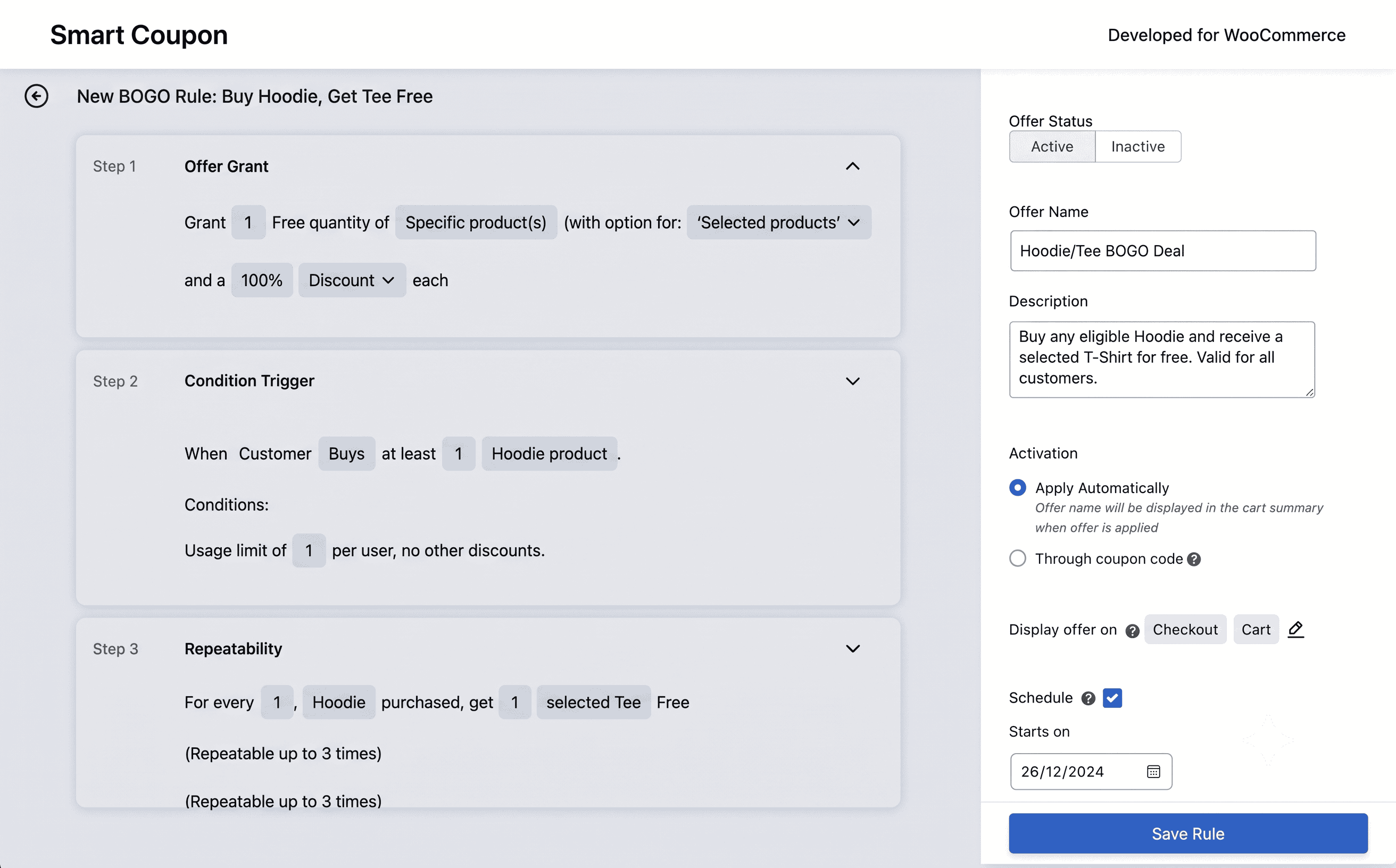
You can offer the reward for free or at a discount, and WebToffee gives you options for controlling which product receives the offer. Depending on the promotion, you can also use the cheapest or most expensive qualifying item.
You can choose whether the BOGO offer should apply automatically when the conditions are met or require a coupon code. That makes the same feature useful for both on-site promotions and campaigns where you want customers to enter a specific code.
For more details, see our guide on how to create a WooCommerce BOGO coupon.
Automating discounts with auto-apply coupons
Auto-apply coupons remove one small but unnecessary step from checkout: entering a coupon code manually.
You can configure a coupon to apply automatically when its conditions are met. For example, you could create a discount that becomes available once a customer’s cart reaches a particular value or contains qualifying products.
This can be particularly useful for promotions advertised directly on your store, where you want the discount to appear automatically instead of asking shoppers to remember a code.
WebToffee also lets you control how auto-apply coupons are handled, including the number of auto-apply coupons that can be applied to a cart. For a detailed configuration walkthrough, read our guide on auto-apply coupons in WooCommerce.
Granular usage restrictions and checkout rules
This is one of the areas where WebToffee goes considerably beyond basic WooCommerce coupons. You can control not just the discount amount, but also the conditions under which a customer qualifies.
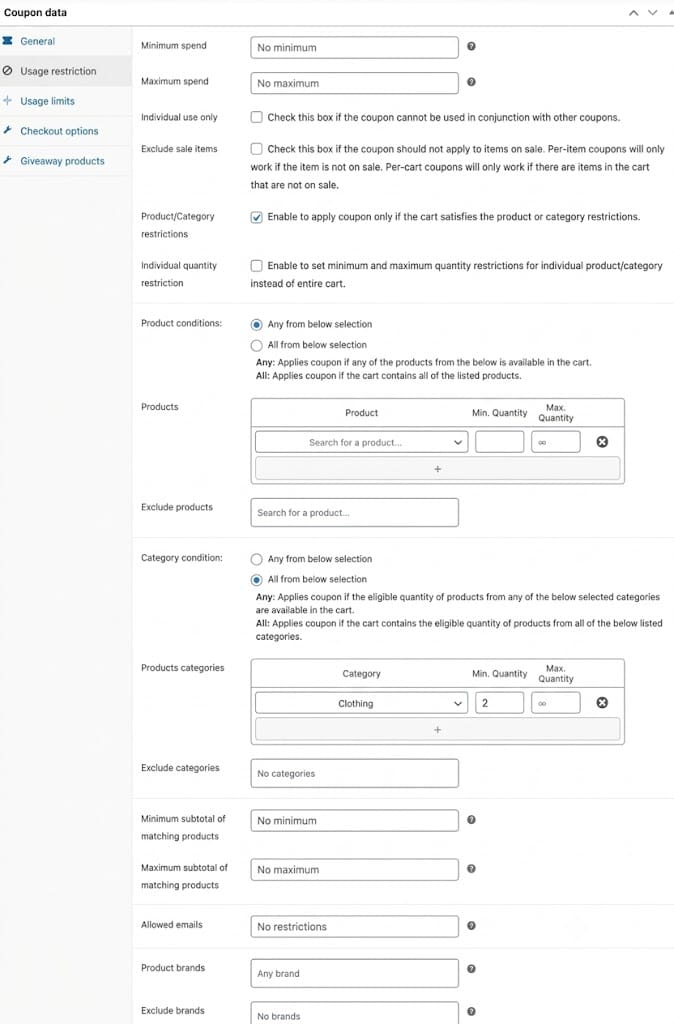
Depending on the promotion, you can restrict coupons by products, categories, cart value or quantity, user role, location, payment method, shipping method, and customer purchase history. Purchase-history rules can be based on factors such as previous order count, total amount spent, order dates, order status, or specific products a customer has purchased.
That gives you more room to create targeted promotions instead of relying on the same coupon for everyone. For example, you could offer a discount to returning customers, create a payment-method-specific offer, or limit a promotion to shoppers who have purchased a particular product before.
For more ways to control coupon usage, see our guide on how to prevent coupon abuse.
Bulk coupon generation and distribution
If you’re running a campaign that needs a large number of unique coupon codes, generating them one by one quickly becomes impractical.
WebToffee provides bulk coupon-generation functionality that lets you generate multiple codes using shared coupon rules. Depending on the workflow, generated coupons can also be exported for distribution.
This can be useful for campaigns such as affiliate promotions, customer-specific offers, or sending different codes to a large group of recipients. If bulk generation is an important part of your workflow, check the exact generation features included with the Smart Coupons license you’re considering, as WebToffee also offers a dedicated Coupon Generator product.
For more details, see our tutorial on how to bulk generate WooCommerce coupons.
Things to consider before buying WebToffee Smart Coupons
WebToffee Smart Coupons covers a lot of WooCommerce promotion scenarios, but a long feature list doesn’t necessarily mean every feature will fit your store. Before purchasing Pro, there are a few things worth checking, especially if you plan to run complex campaigns or manage a large number of coupons.
Check the exact features included in your plan
WebToffee offers both free and Pro versions of Smart Coupons, along with other WooCommerce promotion plugins. That makes it important to check where a particular feature actually lives before purchasing.
For example, you may see functionality related to coupon generation, gift cards, store credit, or advanced promotions across WebToffee’s product ecosystem. Don’t assume that every related feature is included in Smart Coupons Pro.
If a feature is essential to your store, verify it on the current Smart Coupons product page or documentation and check whether it’s available in the specific license you’re buying.
Test your exact BOGO or discount scenario
BOGO sounds simple until you start adding conditions. You may want to give customers a different product for free, trigger the offer after a certain quantity, restrict it to particular categories, or allow customers to choose from several qualifying products.
WebToffee supports a wide range of BOGO configurations, but your exact promotion matters more than the feature name. If your campaign is complicated, test it with the actual products, quantities, and conditions you intend to use before launching it.
Check how multiple discounts interact
If your store uses auto-apply coupons alongside manually entered codes, this deserves particular attention.
Test what happens when two eligible discounts are present at the same time. Check whether coupons can stack, which discount takes priority, and whether individual-use or exclusion settings behave as expected.
This is especially important for stores with tight margins. A coupon that works correctly on its own can produce a very different result when another promotion is active.
Make sure the customer-targeting rules match your needs
Customer-specific promotions can be much more useful than a generic coupon, but the available conditions matter.
If you want to reward previous customers, check whether you can target shoppers based on the purchase-history conditions you actually need, such as previous orders, spending amount, order status, purchase dates, or specific products purchased.
Also check which of these conditions are available in the version you plan to purchase. Don’t choose Pro simply because you need one customer-targeting feature without checking the complete workflow.
Look closely at store credit and gift card requirements
If store credit or gift cards are a major reason you’re considering Smart Coupons, look beyond the feature name.
Think about how customers will receive the credit, how they will use it, whether you need gift-card balances or expiry controls, and how the feature fits into your existing checkout and customer-account workflow.
WebToffee also offers separate products for some related functionality, so verify that Smart Coupons provides the workflow you need rather than assuming another WebToffee product is included.
Check bulk coupon requirements before committing
Bulk coupon generation can be useful for affiliate campaigns, influencer promotions, customer-specific offers, and large email campaigns. But there can be a big difference between generating multiple coupons and managing a complete bulk-coupon workflow.
If you need hundreds or thousands of unique codes, check whether your plan supports the generation, import, export, usage limits, and distribution workflow you need.
This is also an area where it’s worth checking WebToffee’s separate coupon-generation products so you don’t buy Smart Coupons expecting functionality that belongs to another plugin.
Check compatibility with your checkout setup
Coupons don’t operate in isolation. Your checkout, payment methods, shipping rules, product configuration, and other WooCommerce extensions can all affect how a promotion behaves.
Before rolling out an important campaign, test the coupon with your actual checkout flow. Pay particular attention to payment-method restrictions, shipping conditions, variable products, subscriptions, and other plugins that modify cart or checkout behavior.
A promotion that works in a basic test store may need additional testing in a heavily customized WooCommerce setup.
Think about how you’ll manage coupons at scale
A coupon plugin can be easy to use when you have ten active promotions and considerably harder to manage when you have hundreds.
Before purchasing, consider how you’ll organize recurring campaigns, seasonal coupons, customer-specific offers, auto-apply rules, and expired promotions. If your store runs promotions continuously, the day-to-day management experience matters just as much as the number of features.
It’s worth testing the dashboard with a realistic set of coupons rather than evaluating it only with one or two simple promotions.
Factor in the renewal cost, not just the first-year price
Smart Coupons Pro is sold as an annual subscription, so the initial purchase price isn’t the only cost to consider.
Look at the renewal terms and decide whether the ongoing updates and support are worth the recurring cost for your store. This is particularly relevant if you’re choosing between Smart Coupons and another coupon plugin with a different pricing model.
Don’t choose based on the feature count alone
WebToffee Smart Coupons has a broad feature set, but you may not need all of it.
Before buying, write down the promotions you actually plan to run, for example, BOGO deals, auto-apply discounts, first-order offers, returning-customer rewards, URL coupons, or store credit. Then check whether Smart Coupons handles those workflows without requiring additional plugins or workarounds.
That gives you a more useful basis for comparison than simply counting features on a pricing page.
WebToffee Smart Coupons Free vs Pro: what’s the difference?
The free version of WebToffee Smart Coupons is surprisingly capable. You don’t need Pro just to create more advanced promotions than WooCommerce’s default coupons allow.
With the free plugin, you can create percentage, fixed-cart, and fixed-product discounts, along with BOGO offers, giveaway products, auto-apply coupons, and URL coupons. You can also add restrictions based on products, categories, minimum or maximum spend, quantity, email, user role, payment method, and shipping method.
Pro is mainly useful when you need more control over how those promotions work. It adds features such as advanced BOGO rules, bulk coupon generation and import, more detailed scheduling, signup and abandoned-cart discounts, next-order and nth-order discounts, customer purchase-history conditions, and additional store-credit and coupon-management options.
So the choice isn’t simply basic vs advanced coupons. The free version already covers many common promotional campaigns. Pro becomes more relevant when you start running targeted, automated, or larger-scale coupon campaigns.
| Feature | Free | Pro |
|---|---|---|
| Percentage, fixed-cart and fixed-product discounts | ✓ | ✓ |
| Basic BOGO offers | ✓ | ✓ |
| Giveaway products | ✓ | ✓ |
| Auto-apply coupons | ✓ | ✓ |
| URL coupons | ✓ | ✓ |
| Product and category restrictions | ✓ | ✓ |
| Payment, shipping and user-role restrictions | ✓ | ✓ |
| Advanced BOGO options | Limited | ✓ |
| Bulk coupon generation and import | — | ✓ |
| Signup and abandoned-cart discounts | — | ✓ |
| Next-order and nth-order discounts | — | ✓ |
| Purchase-history-based coupon rules | — | ✓ |
| Advanced store-credit features | — | ✓ |
One thing to keep in mind: WebToffee has several separate WooCommerce promotion plugins, so feature names can overlap across products. If you’re comparing plans based on a specific feature, check the current documentation for that feature rather than assuming it belongs to Smart Coupons Pro.
How much does WebToffee Smart Coupons cost?
WebToffee Smart Coupons Pro is sold as an annual subscription. At the time of writing, the listed plans are:
- 1 site: $89/year
- Up to 5 sites: $129/year
- Up to 25 sites: $249/year
The subscription includes one year of updates and support, and WebToffee currently offers a 30-day money-back guarantee.
There’s also a free version available through WordPress.org, so you can test the core coupon workflow before paying for Pro.
Who should buy WebToffee Smart Coupons?
WebToffee Smart Coupons is a good fit for WooCommerce stores that have moved beyond basic discount codes and need more control over how promotions are triggered, targeted, and applied.
You should choose WebToffee Smart Coupons if:
- Your campaigns focus on BOGO offers, product giveaways, and seasonal sales.
- Shoppers need auto-applied discounts to eliminate checkout friction.
- You want a generous free tier to evaluate before purchasing Pro.
- Direct vendor support matters for solving theme-specific edge cases.
When should you consider a WebToffee Smart Coupons alternative?
WebToffee covers a wide range of WooCommerce coupon and promotion needs, so the right alternative depends on what you want to do beyond basic discounts.
If you’re comparing WebToffee with another all-in-one coupon plugin, look closely at the features you actually use, especially BOGO offers, gift cards, store credit, customer rewards, auto-apply discounts, and bulk coupon management.
Smart Coupons by StoreApps is another option worth considering if you’re looking for a broader coupon and customer-reward workflow. Rather than trying to decide from feature lists alone, compare the two plugins based on the promotions and customer-retention workflows your store actually needs.
We’ve covered those differences in detail in our WebToffee Smart Coupons alternative comparison.
What should you do next?
If you’re considering WebToffee Smart Coupons, start with the free version and test the promotions you actually plan to run.
Set up your main BOGO or discount campaign, test the coupon conditions in your real checkout flow, and check what happens when customers change quantities, remove qualifying products, or try to combine discounts.
Once you know which features you actually need, you can decide whether the free version is enough or whether the Pro plan, or another coupon plugin, makes more sense for your store.
FAQ
What is the main difference between WebToffee Smart Coupons Free and Pro?
The free version covers basic BOGO deals, simple auto-apply coupons, product restrictions, and URL coupons. The Pro version unlocks advanced BOGO rules, bulk coupon generation, abandoned cart and signup discounts, and purchase-history targeting.
Can I stack multiple WebToffee coupons in a single order?
Yes, but it depends on your settings. WebToffee lets you allow or restrict coupon stacking, set specific usage limits, and control how auto-apply coupons combine with manually entered promotional codes.
Can I create customer-specific discounts based on order history?
Yes, using WebToffee Smart Coupons Pro. You can trigger discounts based on total past spend, order count, specific products previously purchased, or customer user roles.
How do URL coupons work in WebToffee?
URL coupons apply a specified discount automatically when a customer clicks a unique link. If the cart meets the required conditions, the coupon is added to checkout without requiring manual code entry.
Does WebToffee Smart Coupons offer a money-back guarantee?
Yes. WebToffee offers a 30-day money-back guarantee for Pro plans, allowing you to test the advanced features risk-free.