

Selling digital products is easy. Getting consistent sales is the hard part.
Ads get expensive. SEO takes time. And social media can be unpredictable.
That’s why many store owners build an affiliate program for digital products. You only pay commission when a sale happens, and affiliates bring you buyers who already trust them.
In this guide, you’ll learn how to set up affiliate marketing for digital products in WooCommerce using Affiliate for WooCommerce.
Benefits of affiliate marketing for digital products
- Lower marketing cost: You pay commission only after a successful sale.
- Faster reach: Affiliates already have audiences that trust them.
- More sales without ads: Affiliates promote your product while you focus on improving it.
- Better SEO: Reviews and backlinks from affiliates can help your product pages rank.
- Scales easily: You can grow from 5 affiliates to 500 without hiring a marketing team.
- Higher margins: Digital products allow you to offer generous commissions and still stay profitable.
Let affiliates promote your digital products. You focus on collaborating with the right affiliates to build relationships and get revenue. That’s what affiliate marketing is about.
What makes affiliate marketing perfect for digital products?
- No shipping or inventory issues.
- Higher profit margins allow you to offer better commissions.
- Affiliates can promote using tutorials, reviews, and YouTube demos.
- You can reward top affiliates with higher commission plans.
How to set up an affiliate program for digital products in WooCommerce
Starting an affiliate marketing program for digital products is very straightforward using the Affiliate for WooCommerce plugin.
6500+ users have successfully set up and amplified their affiliate program using the plugin. Check out the real reviews.
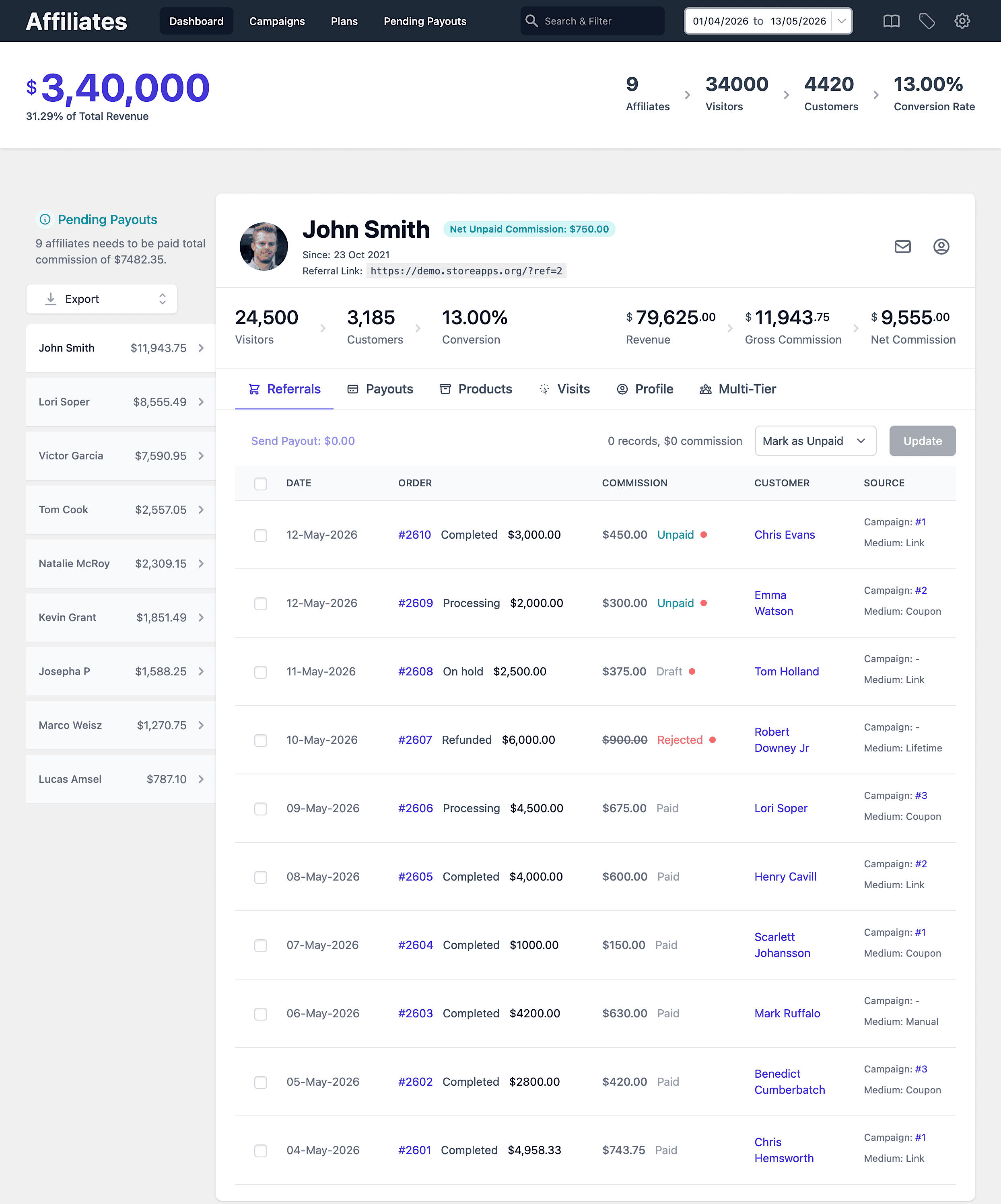
Affiliate links and coupons, commission rules, marketing campaigns…the plugin provides all the powerful tools for your digital products business. Let’s explore this more in detail.
Installation and activation
As this plugin is specifically designed for WooCommerce, there’s no need for integration steps. Just install and activate the plugin like you would for any other WooCommerce plugin.
Affiliate enrolment and settings
Enable affiliates to enroll in your program through the standard registration form. You can tailor the form fields using Elementor or Contact Form 7 to collect additional details from potential affiliates.
You can choose how affiliates get approved in your program. If you enable automatic approval, new applicants will be approved instantly. If you disable it, you can review each request manually and approve only the affiliates you want.
You also have the option to make existing customers your affiliate partners.
Configure some more settings based on your requirements:
- Set the storewide and custom commission rates
- Allow coupons for referral
- Allow lifetime commissions
- Issue recurring commissions (works with the WooCommerce Subscriptions plugin)

More about the settings here. Save them and you are ready for the next.
Referral links and coupons
The plugin assigns a unique referral ID to each affiliate. Affiliates can easily create a referral URL using the Referral URL generator to promote the digital product.
For instance: https://demo.storeapps.org/?product=woo-singles&ref=2
Alternatively, affiliates can use coupons for product promotion. Coupons can be either requested from the store admin or an affiliate can generate one for themselves.
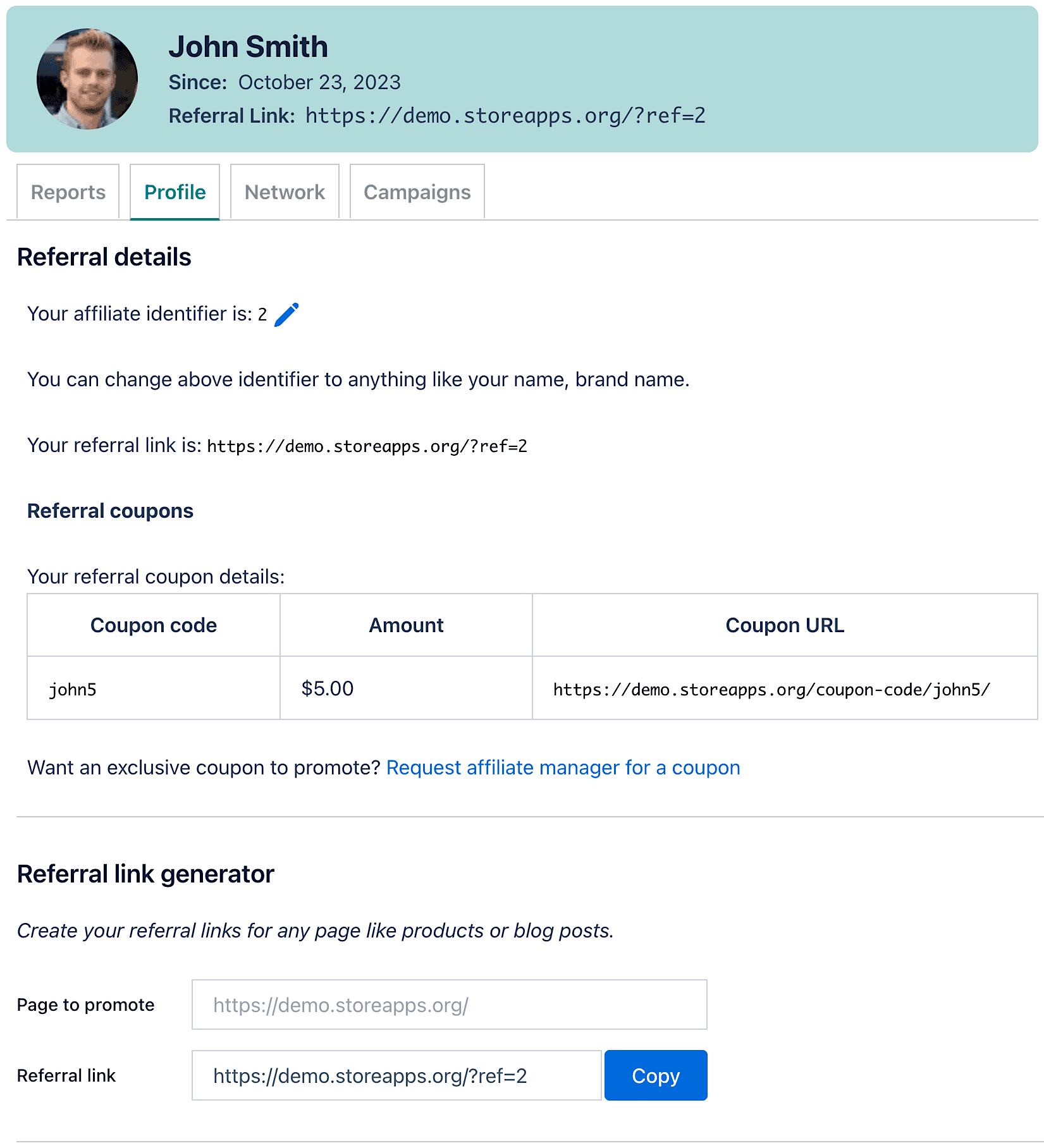
Customization is straightforward as well. Affiliates can personalize their affiliate ID by choosing their name or brand, such as: https://demo.storeapps.org/?ref=smith
Set flexible commission rules
Unlike physical products, digital products cannot go out of stock. There are also no shipping or overhead costs.
Even if you give higher commissions to specific affiliates who bring you more sales and loyal customers compared to others, you still make good money.
Using the Affiliate for WooCommerce plugin, you can create such customized commission rules using the Plans feature based on affiliates, affiliate tags, products, product categories and referral medium.
For example:
- 25% commission to all affiliates only on Themes (product category) but a storewide commission (20%) on other products.
- Assign a flat $10 commission to Maria and James for every sale of your low-selling ebooks.
- Your influencers – John, Lori and Kiara will earn a 50% commission on the sale of your email marketing and SEO courses.
- Set up a three-tier commission plan for your apps.
and many more…
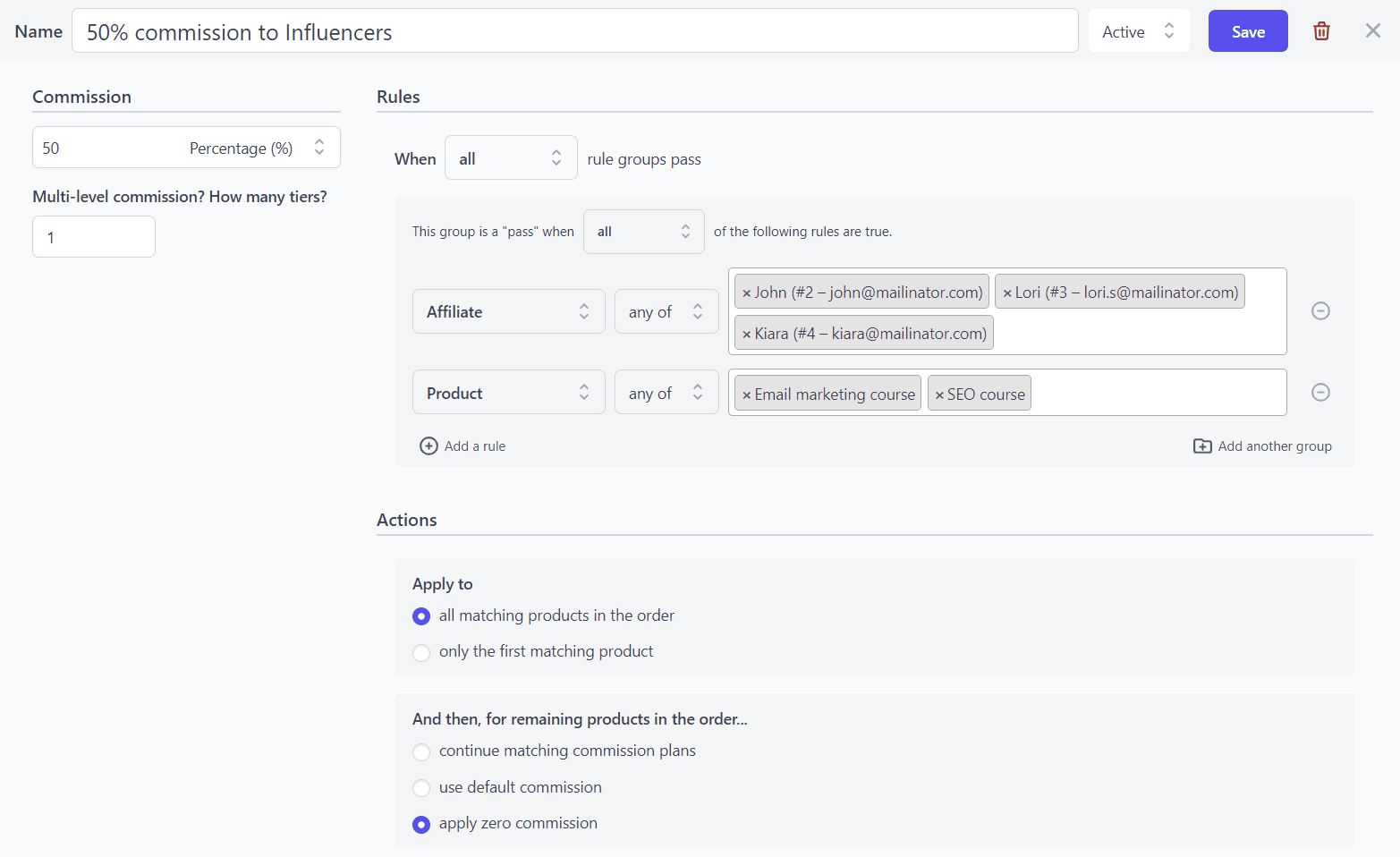
Such is the flexibility of the plugin. Refer to this blog on setting different commission rates.
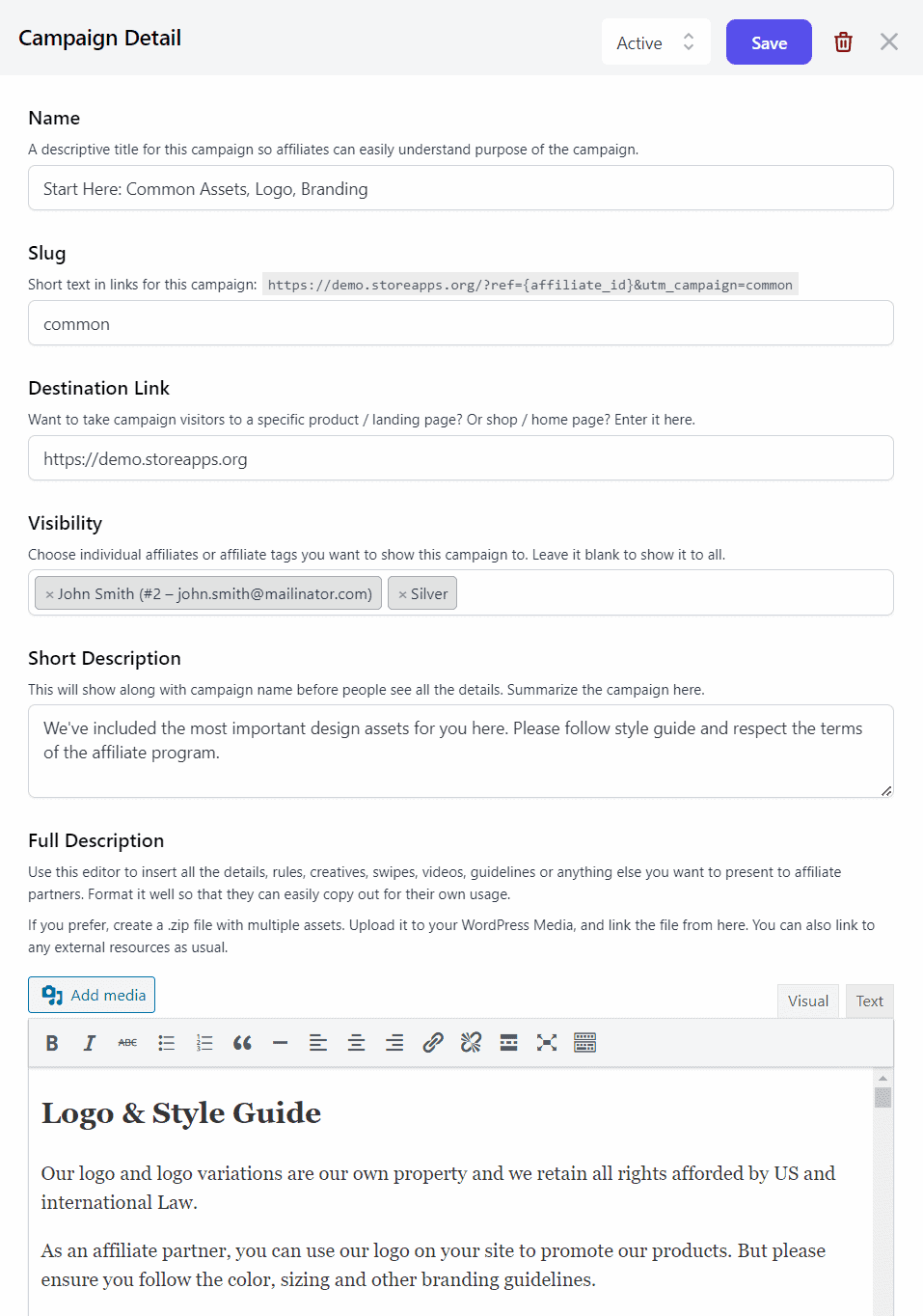
Create tailored marketing campaigns (creatives) for your affiliates, aligning with your brand’s identity.
Incorporate a range of assets: images, videos, PDFs, swipe files, banners, e-books, logos, and beyond within the campaigns. Empower your affiliates to utilize these resources across their platforms, amplifying your brand promotion.
Additionally, you have the option to either share these assets with all affiliates or restrict access to specific ones. For example, share banners and swipe files about your digital courses only with Influencers.
Making payments to affiliates
Paying affiliates on time is what keeps your affiliate program alive.
With Affiliate for WooCommerce, you can track unpaid commissions, mark payouts as paid, and maintain a clean payout history for every affiliate. You can pay commissions via PayPal or process payouts manually outside WooCommerce, depending on your workflow.
That’s it. Your affiliate program for digital products is set up.
Monitor everything from one place
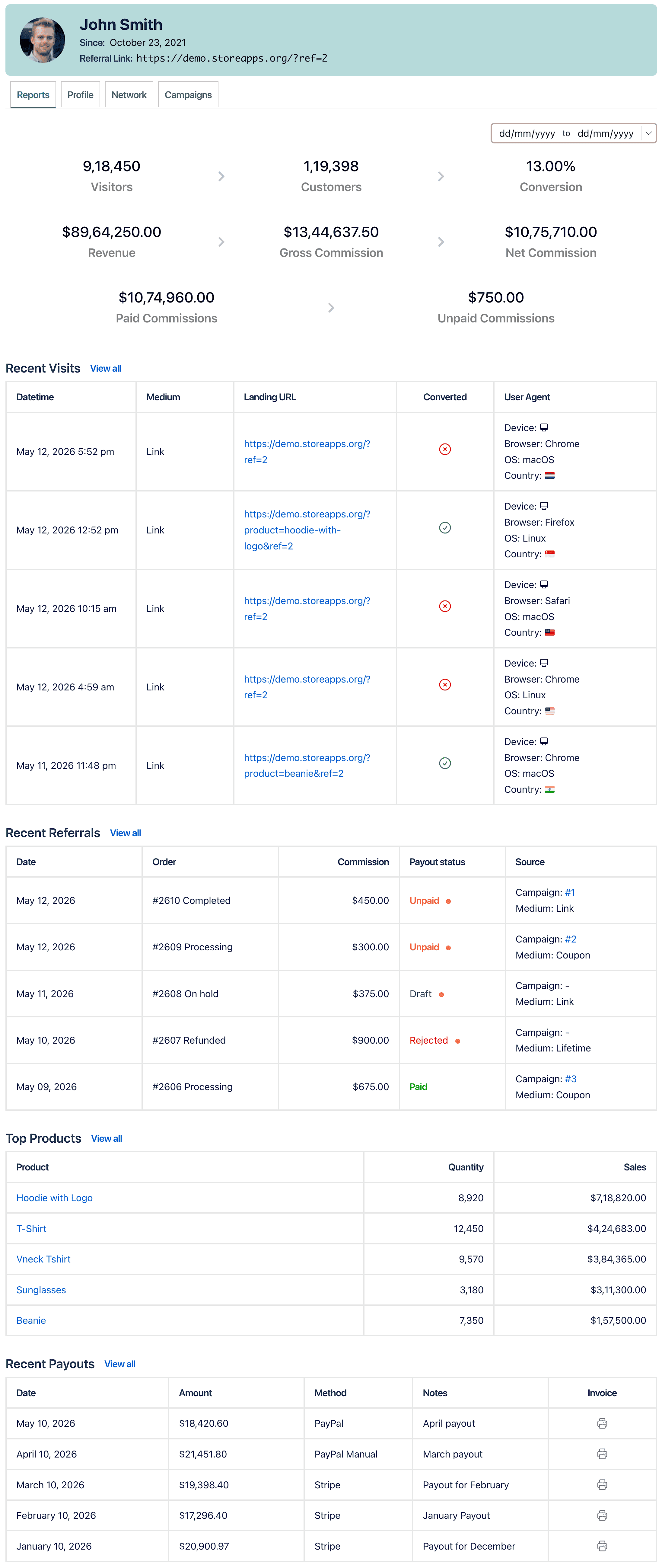
Simplicity is plugin’s focus, so you get all the essential metrics for a straightforward view of affiliate performance. No overwhelming data, just key insights at your fingertips.
Store owners can monitor net affiliate sales, outstanding commissions, refunds, payment methods, order dates, payouts, and additional details.
Moreover, there’s a specialized dashboard for affiliates to monitor their performance, including commissions, sales, and products sold. They can access campaign resources, view and personalize their affiliate URL, and gather insights.
Launch your affiliate program today
Affiliate marketing is one of the most cost-effective ways to grow a digital product business.
Instead of relying only on ads or social media, you can build a network of affiliates who promote your plugins, courses, themes, ebooks, or downloads and earn commission on every sale they generate.
With Affiliate for WooCommerce, you can create referral links, coupons, commission rules, and campaigns, and manage everything from a single WooCommerce dashboard.
FAQs
What is affiliate marketing for digital products?
An affiliate program lets partners promote your digital products using referral links or coupons. When they generate a sale, they earn a commission.
How do affiliates promote digital products?
Affiliates usually promote digital products through blogs, YouTube reviews, email lists, social media, and tutorials using referral links or discount coupons.
Can I set different commission rates for different digital products?
Yes. With Affiliate for WooCommerce, you can create commission plans based on products, categories, affiliates, tags, and referral medium.
Do affiliates need a referral link, or can they use coupons?
They can use either. Affiliates can promote using referral links, coupons, or both depending on your settings.
Can I manually approve affiliates in WooCommerce?
Yes. You can disable automatic approval and review each affiliate request manually before approving.
How do I track affiliate sales for digital products?
Affiliate for WooCommerce tracks referrals, conversions, unpaid commissions, and payout history directly inside WooCommerce.