Export Products for WooCommerce
1-click advanced export products for WooCommerce plugin
Export your entire WooCommerce catalog or filter precisely what you need with advanced export products for WooCommerce plugin. Manage and export hundreds of product fields and generate a CSV file. Export stock, image URLs, categories, attributes, variations, custom metadata and more without technical hassle.
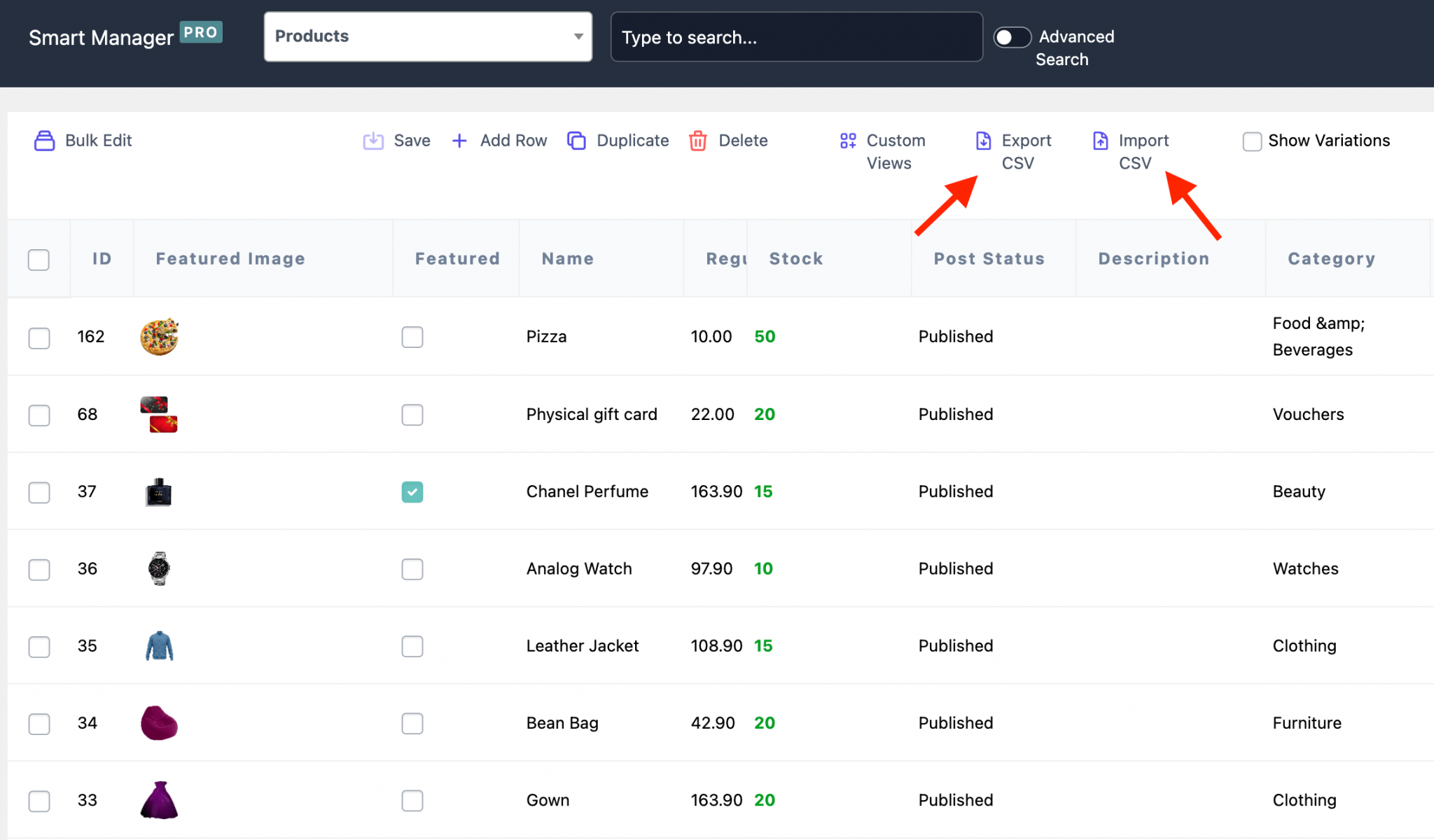
Why WooCommerce’s default export falls short (and how to fix it)
WooCommerce’s built-in CSV exporter handles basic tasks, but struggles with real-world complexity. No advanced filtering, weak variation support, limited custom field handling, and zero column control make it painfully slow. You can’t search specific products efficiently or save export templates for reuse.
Thousands of WooCommerce store owners use our products export plugin for professional-grade CSV exports and imports. Get advanced search and filtering, bulk editing, instant updates, all through an intuitive spreadsheet-style interface designed for speed.
-
Export all WooCommerce product types
Whether you sell simple products, complex variable items, subscriptions, bundles, or bookings, get complete visibility across your entire catalog instantly. Spot low-stock variations before they cost you sales, identify your best-performing bundles for promotion and generate restock reports in seconds.
-
Export stock data
Get a clear view of your inventory in seconds. Pull SKU, stock status, quantity, product type and backorder details to understand what’s selling, what’s running low and what needs attention. For instance, generate a list of products with fewer than 15 units left or identify out-of-stock variations before they impact sales.
-
Export products by price and stock
Understand how your products perform across different price ranges and stock levels. Instead of scanning your entire catalog, export only the products that match your criteria. For example, analyze in-stock products priced between $75–$200 to evaluate mid-range performance or plan targeted promotions.
-
Export products by attributes
Filter by size, color, material, or any custom attribute, then export only the matching products. Gain the insights you need for targeted promotions, supplier sourcing, manufacturing specs or catalog segmentation that drives more sales.
-
Export by category
Instantly analyze complete category performance to decide what to reorder, markdown, or discontinue. Identify missing product tags that hide items from search results and cost you organic traffic.
-
Export custom fields and metadata
Your store runs on more than basic product fields, and your exports should reflect that. Pull custom fields, ACF data and plugin-specific information like brand details, size charts, warranty terms or subscription settings, so your data stays complete and useful outside WooCommerce.
-
Your own custom exports
Export exactly the columns you need, nothing more. Select specific fields, build custom column views, apply filters and save layouts. Create a custom view showing only product name, SKU, price and stock, and then reuse it weekly without reconfiguring.
-
Unlimited exports
Unlimited exports mean you’re never choosing between checking stock and hitting monthly limits. Export full catalogs for quarterly backups. Export filtered lists for daily operations. Export whenever business demands without artificial caps or processing delays slowing you down.
Here’s what real store owners are saying about our products exporter plugin
“The smart Manager plugin is indispensable! It is possible to operate in bulk on anything: categories, attributes, tags, moving products from one category to another.” – Lolopo
“Smart Manager plugin lets me manage over 200 products with ease. Probably 20 or 30 times quicker. It’s an absolutely invaluable tool.” – Brian Batcher
“This plugin keeps you calm while updating numerous products. I recommend it to everyone who doesn’t want to constantly enter product pages to make changes on price etc.” – Vanesa
“Smart Manager makes our day way more productive. We now can change our stock in just 2 clicks instead of hours of work. Also, the support is really quick and helpful!” – Jasper
“It requires 10 different plugins to do what Smart Manager does with only 1 plugin. It is light, sleek, fast and I can manage coupons, users, products, orders, etc.” – Nuno Palha
“Smart Manager Pro is an absolutely efficient tool for handling large datasets, especially when you need to delete them from the SQL database.” – Felix
Say goodbye to export frustration, hello to professional data export control
Product exports shouldn’t slow you down or require extra cleanup. When exports are part of your daily workflow, you need control, not complexity. Smart Manager, the ultimate export products for WooCommerce tool, helps you get exactly the data you need whether it’s a few selected records or your entire catalog. You can review, refine and export in one flow, while also updating inventory or making bulk changes along the way.
-
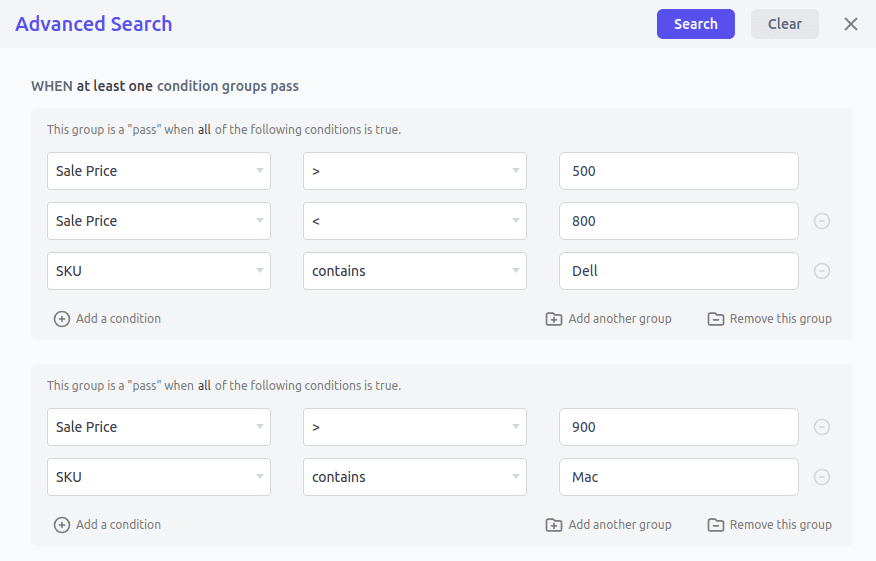
Smart Manager’s advanced search lets you export products based on actual business scenarios. Use AI search to build complex filters instantly. Just describe what you need in plain language and let Smart Manager configure the conditions automatically.
- Export products in Category: Shoes with Stock < 5
- Export in-stock products priced between $20 and $99
- Export products where the SKU is missing or empty
- Export products updated after January 1, 2026
- Export products with Sale Price > $199
- Export products with specific attributes (e.g., Color = Red, Size = XL)
Filter, search and export smartly
-
Export memberships, subscriptions, bookings, product add-ons and 100s of other plugins’ records with Smart Manager.
- Subscriptions: Export ID, date, status, billing email, order total, billing interval.
- Bookings and memberships: Export booking and membership data (booking types, durations, start dates, membership IDs, membership status).
- Bundled and composite products: Export structured data for complex products, including bundled items, IDs, SKUs, quantities and pricing.
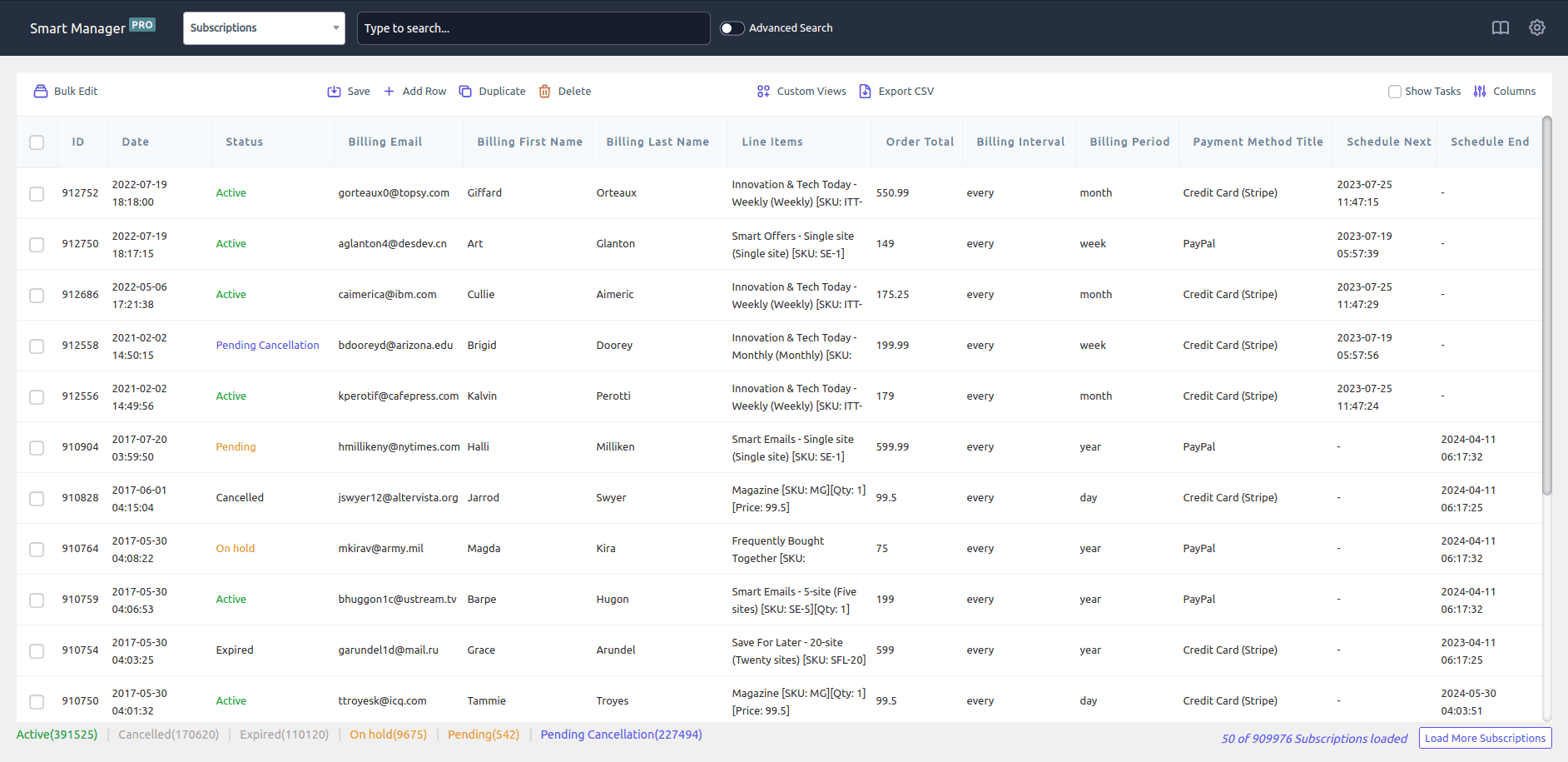
Export third-party product fields
-
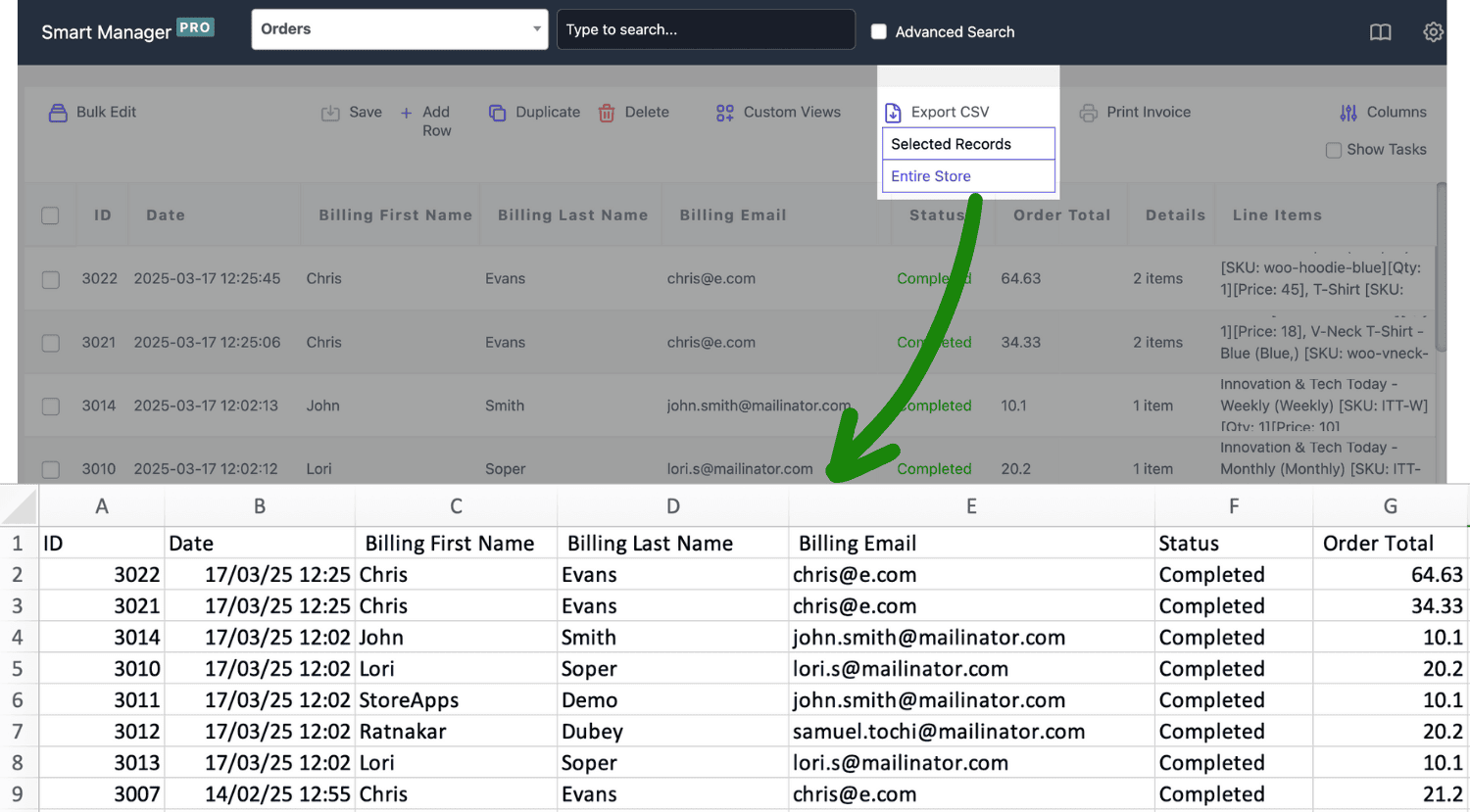
- Export orders – IDs, statuses, payment methods, billing details. Example – pull all Completed orders from last month to follow up on payments.
- Export users – names, emails, order counts and total spend. Example, identify customers who’ve spent over $1,000 for loyalty campaigns.
- Export coupons – discount types, amount, usage limits, expiry dates. Example, list expired coupons to review campaign performance.
- Export posts – titles, content, authors, publish dates. Example, export draft posts for quick content review.
Beyond product exports: Export any WordPress post type
-
Here are more product management tools for you!
- Duplicate products, orders or coupons — including pricing and variations.
- Bulk edit prices, stock, categories, attributes, taxonomies. Example, increase prices by 10% for all products in a category and export the updated list.
- Edit values directly using inline edit and undo any change instantly.
- Bulk delete products using advanced filters — by category, brand, price, stock status, attributes, variations or date range.
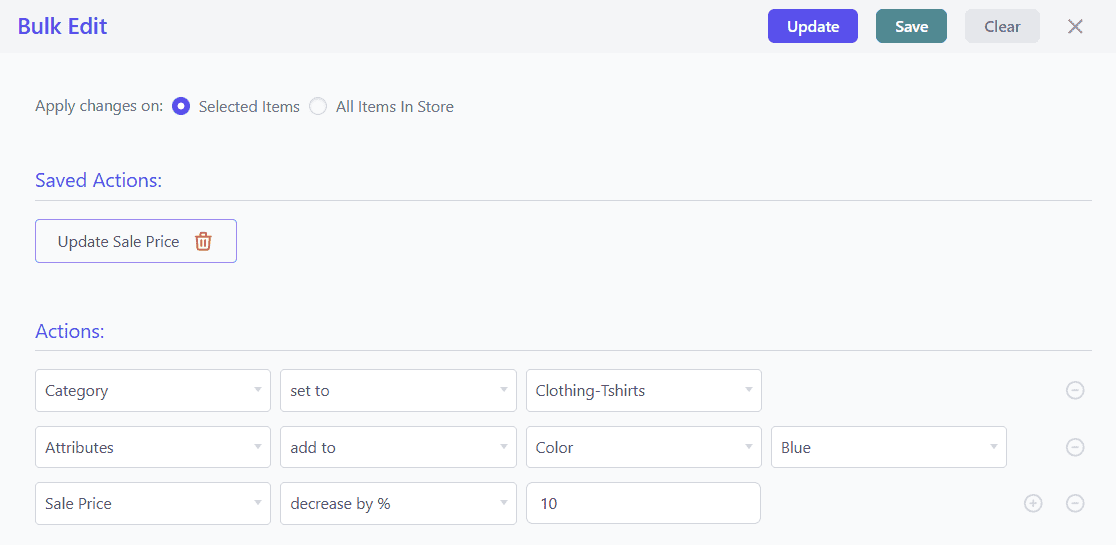
Edit, delete, duplicate and manage in one tool
Unparalleled compatibility for 10x efficiency
You get a whole new level of transformation when you integrate Smart Manager with others. Make use of other plugins and expand your store horizons easily. Automate things or manage store, the choice is completely yours.
- Smart Coupons – Bulk manage and edit store-wide discounts.
- Smart Offers – Optimize upsells, cross-sells and special deals.
- Chained Products – Modify bundled product rules in bulk. products.
- Affiliate for WooCommerce – Manage affiliate commissions and payouts effortlessly.
- Subscriptions for WooCommerce – Search, edit and delete expired subscriptions in one go.
- Bookings for WooCommerce – Modify multiple bookings within a specific date range.
- Memberships for WooCommerce – Inline edit membership details based on search filters.
- Product Add-Ons for WooCommerce – Inline edit membership details based on search filters.
Saved 10+ hours a month 🚀
Managing global stock, regional pricing and affiliate coupons across WooCommerce stores was slow and manual for Shot Scope.
With Smart Manager’s bulk edit and CSV export, they updated stock, pricing and coupons from one dashboard—saving 10+ hours every month and reducing errors.
Smart Manager vs other WooCommerce export tools: Compared
Smart Manager clearly outperforms competing export solutions. Unlike tools built primarily for custom imports, our plugin leverages WooCommerce’s native import system while doing advanced exports at scale. Export all product types, apply multi-condition filters, customize column layouts and sort data before exporting.
| Features | Smart Manager | Product CSV Import Suite | Import Export Suite | WP All Import |
|---|---|---|---|---|
| Export all product types | Available | Limited | Available | Import focused only |
| Export product variations | Yes | Yes | Yes | Yes |
| Export attributes, categories, tags | Yes | Yes | Yes | Yes |
| Export stock | Yes | Yes | Yes | Yes |
| Export prices | Yes | Yes | Yes | Yes |
| Export orders | Yes | Not available | Yes | Yes |
| Export customers | Yes | Not available | Yes | Yes |
| Export users | Yes | Not available | Yes | Yes |
| Export coupons | Yes | Not available | Yes | Yes |
| Export reviews | Not available | Not available | Yes | Yes |
| Advanced filtering | Robust filtering, multi-condition, AI search | Limited | Limited filters available like order ID, skip rows, date, etc. | Rule-based filter |
| Custom column views | Yes, save, switch, share, user role access | Not available | Not available, field mapping only | Not available, custom export templates only |
| Sort columns before export | Sortable, drag-and-drop, customizable columns | Limited sorting, predefined templates | Drag-and-drop, field mapping, reorder columns | Drag-and-drop, add/remove columns, rename, reorder |
| Undo changes | Yes | No | No | No |
| Inline editing | Yes | No | No | No |
| Bulk edit stocks | Yes | Not available | Not available | Not available |
| Export other plugin data | Subscriptions for WooCommerce, Affiliate for WooCommerce, Smart Coupons, WooCommerce Memberships for WooCommerce, Bookings for WooCommerce (100+) | Not available | WebToffee suite plugins, ACF, Bookings for WooCommerce, Subscriptions for WooCommerce | ACF, Yoast SEO, WPML, Toolset Types, BuddyPress |
| Export for large stores | Fast | Slow | Slow | Slow |
| Ease of use | Super easy | Average | Average | Slightly complex |
One export plugin for WooCommerce that does it all
Smart Manager handles advanced inventory and stock control, order exports, bulk editing, duplication and complete store data administration. Stop juggling multiple import and export plugins and manage everything with one professional CSV exporter.
Pricing
Save more time, effort and money
Unlock lightning-fast exports, powerful bulk editing and data management. If you export WooCommerce products more than once a month, the Smart Manager plugin pays for itself immediately. Maximize savings with a 5-site license for under $249!
FAQ
- How will I get the plugin? How do I install it?
-
When you checkout and complete the order, you will be able to download the plugin. You can then install it in your own WordPress site. It works like all other WordPress plugins – but read this documentation if you need help. BTW, you can always download your purchases again by logging into our site.
- What if I want a refund?
-
We offers refunds within 30 days of purchase, if the plugin is broken, and if we do not solve it in reasonable time, after mutual communication. Renewals, problems due to third-party plugins / themes / code / hosting etc do not qualify for a refund. Please read all our terms here.
- What if I buy one year license and then cancel?
-
You can certainly do that if you wish. Cancellation is easy. You can manage all your subscriptions easily from your account. But keep in mind that you are eligible for support and updates only if your license is active. So you will need to buy again at then prevailing prices if you cancel now and need updates later.
- How do you count number of sites for a license?
-
Each website – whether it is a subdomain, cross-domain, subdirectories… is considered a separate website. Learn more about it from here.
Buy with confidence – you’re in good hands
- You’re buying from the best!
-
Rest assured that you will be well taken care of when you buy from StoreApps.
- Top selling plugins for marketing and store management
- Official WooCommerce and GoDaddy partner
- Founded in 2011, one of the early Woo third party developers
- 40k+ customers, 300k+ users, millions of downloads
- Consistent 5 star review ratings
- WordPress community contributor, sponsor, speaker.

- Friendly support from top quality developers
-
Our plugins are easy to use. We also have ample documentation. But whenever you need further assistance, you will get support from the same people who develop these plugins! We make sure you succeed!