

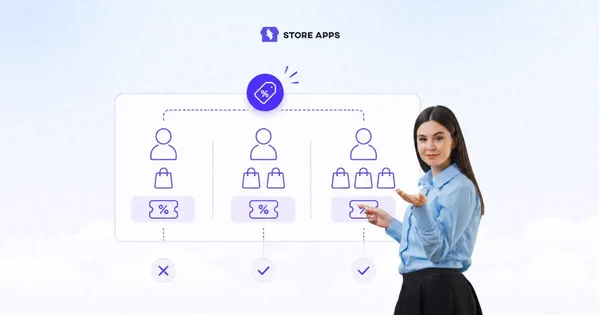
Not every customer should get the same coupon.
Think about it: a first-time shopper, a loyal repeat buyer, and someone returning after months all need very different incentives to place an order.
But if your checkout system treats them all the exact same way, you’re not really running a targeted promotion anymore — you’re just discounting for everyone.
When coupons keep getting reused by the wrong customers, acquisition offers become permanent discounts and loyalty campaigns lose their value.
That’s where purchase-frequency restrictions help.
In this guide, you’ll learn how to restrict WooCommerce coupons based on order counts, repeat purchases, and customer buying behavior using Smart Coupons, so your promotions stay targeted, controlled, and profitable.
How to restrict coupons by customer purchase frequency using Smart Coupons
Smart Coupons lets you create coupon rules based on how often customers purchase from your store.
So instead of giving the same discount to everyone, you can create offers specifically for:
- first-time buyers
- repeat customers
- VIP shoppers
- inactive customers
- high-value loyal buyers
The setup is simple and works directly from your WooCommerce coupon settings.
Restrict coupons only for first-time customers
Let’s say you want to offer: “Get 15% off your first order.”
This works especially well when you want to encourage hesitant shoppers to finally place their first order without giving the same discount repeatedly to existing customers.
Here’s how to set it up:
- Go to
WordPress Admin → Marketing → Coupons. - Click
Add coupon. - Enter your coupon code (example: WELCOME15) or click
Generate coupon code. - Under the
Generaltab:Discount type → Percentage discountCoupon amount → 15- (Optional) Set expiry date/time
Enable For new customers- (Optional) Enable
Auto-apply
- Then open the
Usage limitstab. - Set:
Usage limit per user → 1 - Click
Publish.
That’s it. You now have a WooCommerce first-order coupon that only works for new customers.
Create coupons only for repeat customers
Let’s say you run a pet food store and want to reward customers who regularly reorder from your store.
For example, you might want to offer: “Get $15 store credit on orders above $100.”
But only for customers who’ve already placed at least 5 orders.
This works especially well for repeat-purchase businesses because loyal customers are more likely to come back and use the store credit on future orders too.
Here’s how to set it up:
- Go to
WordPress Admin → Marketing → Coupons. - Click
Add coupon. - Enter your coupon code (example: PETCREDIT15) or click
Generate coupon code. - Under the
Generaltab:Discount type → Store Credit / Gift Certificate→ Coupon amount → 15- (Optional) Set expiry date/time
- Next, open the
Usage restrictiontab.- Configure:
Minimum spend → 100 - Then scroll down to:
Smart Coupons: Restrictions - From the dropdown, select:
Number of orders made - Click
Add. - Now configure:
Condition → Greater than → 4
- Configure:
- Click
Publish.
That’s it. The coupon will now work only for customers who’ve already completed at least 5 orders in your store.
This kind of setup works especially well for stores selling refill-based or consumable products where repeat purchases happen naturally over time.
Combine purchase-frequency rules with other coupon restrictions
This is where things get really useful.
Instead of only checking how many orders a customer has placed, you can combine purchase-frequency rules with other coupon restrictions to create much more controlled promotions.
For example, you can combine them with:
- product restrictions
- expiry dates
- allowed emails
- payment methods
- shipping methods
- user roles
- excluded sale items
Advanced use cases store owners often overlook
Purchase-frequency restrictions can do much more than simple first-order discounts.
- Reward repeat buyers with free shipping
If you sell refill-based products like pet food, coffee, or supplements, free shipping can be enough to bring customers back for another order.
Just configure:
Number of orders made ≥ 3 - Run VIP-only sale campaigns
Instead of giving early Black Friday access to everyone, you can reserve special coupons for customers who already purchase regularly from your store.
Configure:
Number of orders made ≥ 5 - Offer category-specific loyalty discounts Suppose a customer keeps buying skincare products from your store. You can create a coupon that works only for repeat skincare buyers and only on skincare categories.
- Encourage larger reorder purchases You can create offers like “Save $25 on orders above $200” only for returning customers instead of every shopper visiting your store.
- Offer store credit to loyal customers Rather than running another sitewide sale, reward repeat buyers with store credit they can use on future purchases.
- Give repeat customers early access to launches If you launch limited-edition products or seasonal collections, you can create exclusive coupons only for customers who’ve already ordered multiple times from your store.
- Create better post-purchase campaigns Purchase-frequency restrictions work especially well with email marketing and reorder reminders because offers feel more personalized instead of generic mass discounts.
Best practices for purchase-frequency coupon restrictions
A few simple rules can make these campaigns much more effective:
- Don’t over-discount repeat buyers. Small perks like free shipping or store credit usually work better long-term.
- Combine order-count restrictions with minimum spend rules to protect margins.
- Add expiry dates so offers still feel time-sensitive.
- Avoid running the same coupon for every customer segment.
- Use purchase-frequency rules alongside email marketing and reorder reminders for better retention campaigns.
Stop treating every customer the same
As your WooCommerce store grows, generic coupon campaigns start becoming harder to control.
Discounts meant for new buyers get reused, loyalty offers lose value, and promotions become less profitable over time.
Purchase-frequency restrictions help you create smarter offers based on how customers actually shop from your store, whether that’s first-time buyers, repeat customers, or loyal long-term shoppers.
With Smart Coupons, you can run more targeted WooCommerce promotions without relying on custom development or complicated workflows.
FAQs
How many previous orders should qualify someone as a repeat customer?
There’s no fixed number. Many WooCommerce stores start treating customers as repeat buyers after 2–5 completed orders, depending on average order value and purchase frequency.
What types of WooCommerce stores benefit most from purchase-frequency coupons?
These restrictions work especially well for stores selling products customers naturally reorder, like pet food, skincare, supplements, coffee, and personal care products.
Can purchase-frequency restrictions improve customer retention?
Yes. Targeted repeat-customer offers often perform better than blanket storewide discounts because they feel more personalized and relevant.
Do smaller loyalty perks work better than large discounts?
In many cases, yes. Small incentives like free shipping, store credit, or early-access offers often feel more sustainable than constantly offering 20–30% discounts.