

If you’re running a WooCommerce store, you surely come across the WooCommerce Memberships and WooCommerce Subscriptions plugins. To many, they sound similar.
They are often used together but they are not the same. And this is where most WooCommerce store owners get confused.
You might think “I want recurring revenue. Should I use memberships?” or “I want to sell access. Do I need subscriptions?”
Here’s the reality: subscriptions and memberships are two different plugins. They solve different problems.
The subscriptions plugin handles recurring payments while the memberships plugin manages access control and perks.
So, one manages money for your store and the other manages access to your content or products. Sometimes you need one and sometimes you may need both.
In this blog, you’ll understand:
- What WooCommerce Subscriptions is and what it actually does
- What WooCommerce Memberships is and what it does
- WooCommerce Subscriptions vs Memberships
- When to use each (and when to combine both)
- How to manage everything efficiently
What is WooCommerce Subscriptions?
WooCommerce Subscriptions is a billing automation plugin from WooCommerce itself. It transforms your product catalog into a recurring revenue machine.
Customers sign up once and you charge them repeatedly. Their orders are generated automatically in the system while your cash flow stabilizes.
The payment and fulfillment happen without daily intervention from you or your team.
Instead of one-time payments, you are billing your customers automatically. It can be daily, weekly, monthly, yearly or custom intervals.
Here are the key features of the WooCommerce Subscriptions plugin:
- Use every billing interval possible: daily, weekly, monthly, annual and custom
- Access to a full free trial and sign-up fee
- Subscriber self-management including pause, cancel, upgrade and downgrade
- Manual renewals as a fallback for failed automatic payments
- Prorated upgrades and downgrades between subscription tiers
- Synchronized renewals i.e., bill all subscribers on the same day of the month
- Get extensive support for third-party WooCommerce extensions
- Offer multiple subscription products in a single checkout
The price of this subscription plugin is $279 for a single-year license.
Use cases of WooCommerce Subscriptions
Subscriptions are ideal when you’re selling ongoing value or products and services that require repeat payments from customers.
- Physical product replenishment: Coffee, supplements, pet food shipped on a recurring schedule
- Digital content access: Charging monthly for access to a course, template library or tool (keep in mind that subscriptions handles the billing side only: access control requires a separate membership plugin)
- Service retainers: Monthly billing for ongoing services like SEO, website maintenance or consulting
- Software as a Service (SaaS): Recurring billing for a WordPress-based SaaS product
- Subscription boxes: Monthly curated physical product boxes with automated billing
What is WooCommerce Memberships?
WooCommerce Memberships is an access control plugin from the brand SkyVerge. Its job is to restrict and grant access to exclusive content and products, while pricing is based on whether a user holds an active membership plan.
The plugin doesn’t handle recurring payments. It doesn’t bill customers on a schedule.
It simply manages the membership state, who has access to what, when that access starts and when it expires.
Payment for the membership can come from a one-time purchase, a subscription or even a free service.
Key features of the plugin:
- Create multiple membership tiers and link them to different products
- Build exclusive members‑only areas or products and manually grant access to selected users
- Control access to posts, pages and custom content types. Easily set rules so only members can view specific content
- Release content gradually over time. For example, unlock premium content after a week of membership to keep users engaged
- Offer products exclusively to members or restrict purchasing for non‑members. Non‑members can see the products but can’t buy, creating intrigue and driving sign‑ups
- Provide benefits like free shipping, special discounts or faster delivery options to incentivize membership
- Give members a personalized dashboard to view their benefits, account details and exclusive content
- Export member data in CSV format for integration with external tools
The price of this membership plugin is $199 for a single-year license.
Use cases of WooCommerce Memberships
Memberships are ideal when you’re offering exclusive access or experiences for your customers.
- Online course platforms: Restricting lesson content to enrolled members
- Private community sites: Gating forums, resources or community features behind membership
- Wholesale stores: Restricting product visibility and applying trade pricing to verified wholesale members
- Members-only product launches: Giving existing members early or exclusive access to new products
- Content libraries: Restricting a library of downloadable resources, templates or guides to paying members
WooCommerce Memberships vs Subscriptions: Compared head-on
Want a direct comparison between the two plugins to clear the confusion?
| Features | WooCommerce Subscriptions | WooCommerce Memberships |
|---|---|---|
| Primary role | Recurring billing automation | Access control and content restriction |
| What it does | Payment schedules, renewal orders, failed payment retries | User permissions, content visibility, member benefits |
| Content/product restriction | ||
| Payment system | Requires recurring payments | Can be free, one-time or tied to subscriptions |
| Billing | Daily, weekly, monthly, yearly | No built-in billing. Uses Subscriptions if recurring fees needed |
| Access control | ||
| Trial support | ||
| Subscriber self-management | ||
| Email notifications |
Subscriptions and Memberships: Which one to use and when
Now that you understand WooCommerce Subscriptions and Memberships, find out which one to use and when.
Use WooCommerce Subscriptions only
Use subscriptions alone when you’re selling a recurring product and access control isn’t part of the business.
Physical subscription boxes, supplement replenishment, recurring service retainers: these are pure billing use cases.
The customer pays on a schedule, receives the product or service, and there’s no content or product visibility to the gate. Subscriptions handle this end-to-end without any membership layer required.
Also applicable for digital products where the delivery mechanism is a file download or a third-party platform link. You’re billing recurrently but not restricting content based on membership state.
Use WooCommerce Memberships only
Use memberships alone when access control is the requirement but recurring billing isn’t.
A one-time purchase that unlocks lifetime access to a course library. A manually assigned wholesale account that grants trade pricing. A complimentary membership is granted to beta testers or partners.
None of these involves recurring billing. They involve granting and managing access based on membership status. The membership plugin handles this cleanly without a subscription plugin in the stack.
Memberships with Subscriptions: Using both plugins in your business
WooCommerce Memberships works perfectly as a standalone solution. But if you pair WooCommerce Memberships and Subscriptions, you can unlock advanced billing and flexibility.
Together, they give you a flexible system for recurring payments, trials, upgrades and content control.
Here’s how both the plugins work together:
- Recurring billing for memberships: Instead of fixed‑term memberships (like one year), you can bill members monthly, quarterly or on any cycle supported by Subscriptions.
- Installment payments: Use subscriptions as a payment plan while letting your memberships plugin control access length. This is perfect for offering memberships paid in installments.
- Free trials: Offer trial periods for memberships through subscriptions. You decide what content is available during the trial.
- Content control during trials: Restrict or drip content specifically for trial users, ensuring premium content is gated until full membership begins.
- Pause and resume: Members can suspend their subscription, which automatically pauses their membership access.
- Upgrades and downgrades: Members can switch plans and subscriptions handle proration so billing stays accurate.
- One‑cycle subscriptions: Even if you don’t want recurring billing, you can still leverage subscriptions features (like trials or upgrades) by setting the subscription length to a single cycle.
Is the WooCommerce Subscriptions plugin too advanced and complex for you? What if you could get the right alternative?
Smart Subscriptions for WooCommerce is a leaner, faster alternative that covers the same core billing mechanics, at a lower price point and with significantly less setup overhead.
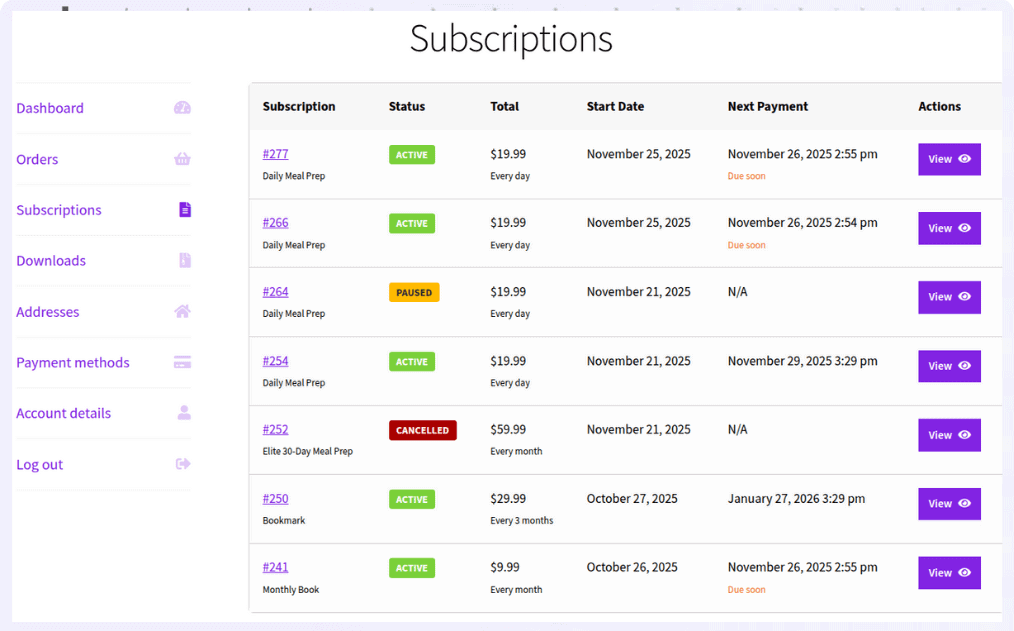
With the Smart Subscriptions plugin, you don’t need any heavy configuration. You don’t need hours of time in setup. You only need the Stripe payment gateway configured for your store.
You just create a simple subscription product, define pricing and billing cycle and go live. Stripe handles the recurring payments for you.
Here are the key features of the Smart Subscriptions for WooCommerce plugin:
- Recurring billing on daily, weekly, monthly and annual intervals
- Supports simple subscription products along with free trial support
- Subscriber self-management — pause, cancel, resume
- Admin management also included
- Automated emails: trial end reminders, renewal notifications, failed payment alerts
- Automated failed payments retry solution
Who is using the Smart Subscriptions plugin?
- Store owners launching subscriptions for the first time
- Small to mid-sized WooCommerce businesses
- Creators selling digital subscriptions
- Stores already using Stripe for payments
How to manage memberships and subscriptions efficiently
Managing subscriptions and memberships at scale quickly becomes an admin headache.
WooCommerce’s default backend isn’t built for bulk operations. Records load one at a time, bulk actions are limited and inline editing is missing. When you’re handling hundreds of subscribers or members, this slows everything down.
Smart Manager is the perfect plugin that manages both memberships and subscriptions. It’s an advanced bulk editor plugin that replaces the standard interface with a spreadsheet‑style dashboard.
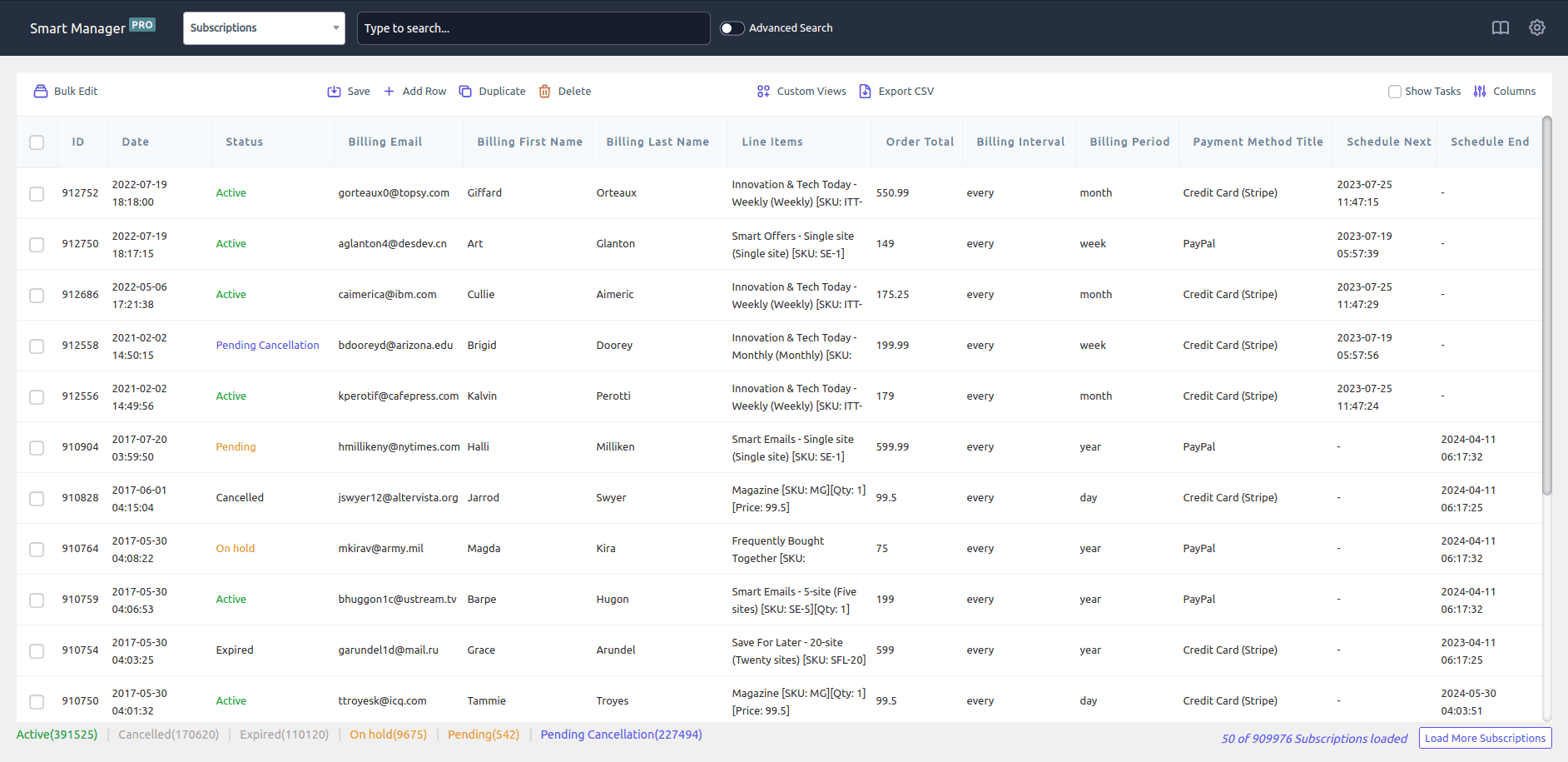
You can view, edit and update subscription and membership data in bulk, all from a single screen.
With Smart Manager, you can bulk update memberships in seconds. Activate, pause, cancel or upgrade hundreds of memberships at once. No manual updates required.
Or, you can edit membership details directly from one screen. Modify expiry dates, plans, perks or statuses inline using a spreadsheet-like interface.
Learn more: How to manage memberships
It can also help you bulk update subscription statuses instantly. You can upgrade, downgrade, pause, reactivate or cancel hundreds (or thousands) of subscriptions in one go.
Learn more: How to manage subscriptions
Conclusion
WooCommerce Subscriptions and Memberships are often confused but now you know that they solve different problems.
Subscriptions bring recurring revenue while Memberships control access and experience.
Many WooCommerce stores use both plugins, creating subscription memberships that combine predictable revenue with exclusive community.
FAQs
Can I run Memberships without Subscriptions?
Yes you can do that. Memberships works as a standalone plugin. You can create fixed‑term memberships (e.g., one year) or manually assign access without recurring billing.
Do I need both plugins for my store?
Not always. If you only need recurring billing, the subscriptions plugin is enough. If you only need gated content or member perks, the memberships plugin is sufficient. Use both together if you want recurring billing and controlled access.
How do WooCommerce Memberships and Subscriptions work together?
When combined, Memberships can leverage Subscriptions for recurring billing, free trials, upgrades/downgrades, proration and pause/resume functionality. The Memberships plugin manages access, while the Subscriptions plugin manages payments.