
Creating courses with Sensei LMS, LifterLMS and LearnDash is a seamless experience. And integrating them with WooCommerce takes it to another level.
Selling courses as subscriptions, including them in a membership package, learners booking appointments, offering discounts…you have a lot of advantages with WooCommerce.
However, one territory you may haven’t explored for earning revenue for your online courses is setting up your affiliate program.
This is the area where you can get experts for each course category. They can promote your courses to their audience in exchange for a commission.
For example, Woo experts can suggest your ‘Beginners guide and plugins for new users’ course to their audience. This boosts your visibility and sales because people trust these experts.
With the Affiliate for WooCommerce plugin, it’s very simple to set up and run your own successful affiliate program to sell more courses (products) online.
Let’s dive into it.
How to set up an affiliate marketing program for online courses?
The affiliate program approach for marketing your courses offers the most significant benefit: it’s low-risk, and you get real enrollments. Remember, you only pay affiliates for actual sales, not just clicks.
Think of it: influencers, bloggers, YouTubers, podcasters, entrepreneurs, and coaches recommending your courses to their followers. Doesn’t that guarantee more sales?
All you have to do is make these people your affiliate partners, set up special commission rates for them, provide marketing materials for promotions, and ensure timely payouts.
The Affiliate for WooCommerce plugin makes all of this easy and quick. It’s not complicated at all. Take a look at the steps below, and you’ll agree with me.
Step 1: Installation and activation
Since the plugin is exclusively designed for WooCommerce, there are no integration steps. Just install and activate the plugin as you would for any other WordPress plugin, and proceed further.
Step 2: Choose affiliates for your program
The plugin provides a form for the visitors to fill out some essential details before they become your affiliates. This is required so that you know beforehand who can be the potential affiliate.
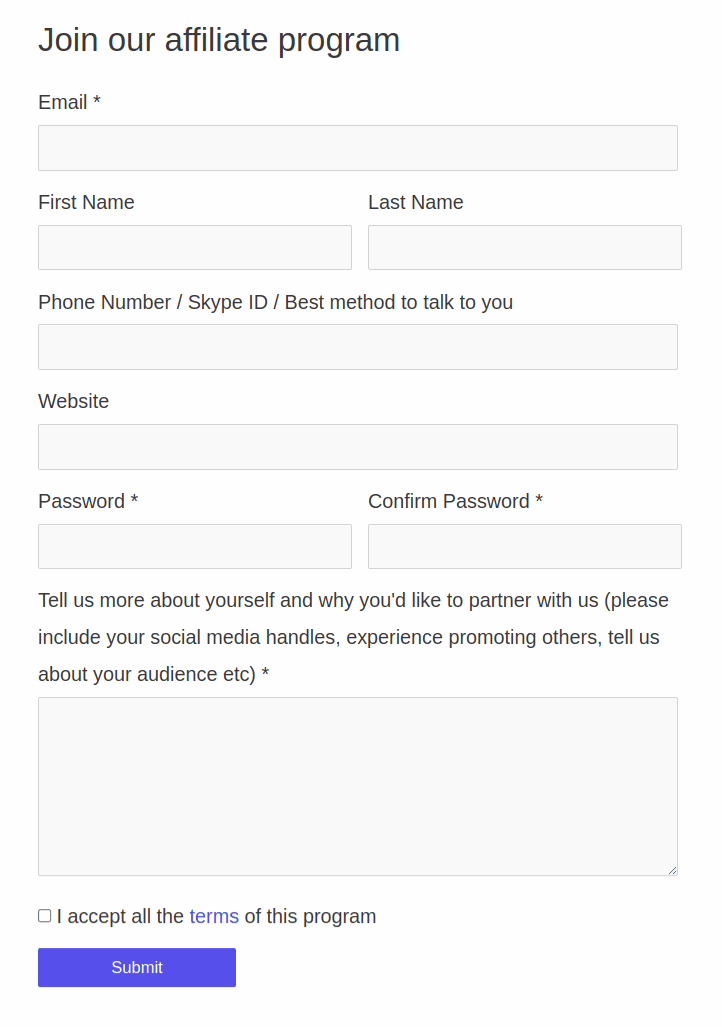
You can also customize this form using Elementor and Contact Form 7.
There is an option to automatically approve affiliates. But since you want influential people to recommend your courses, go for the manual approval option.
Step 3: Set commissions for course categories and affiliates
If you sell courses as subscriptions, you can also set up recurring commissions for renewals using commission plans. This way, affiliates keep earning as long as the student stays subscribed.
This works best when your courses are sold using the official WooCommerce Subscriptions plugin.
You can create Plans to set up different commission rates for your courses or course categories, and also for affiliates or affiliate tags (groups).
For example, set commission rules like these:
- 25% commission for all SEO courses.
- $10 commission for all email marketing courses.
- 30% commission only to John and Claire and only for the Facebook-related courses.
- 35% commission only to the YouTubers group and only for the ‘Woo advanced’ course.
- $15 commission to the Podcasters group for all the courses.
You also have the option to reject a commission for an affiliate in case there is another course in the sales order that belongs to another category. Or you can provide the default 20% commission rate for that other course.
It’s quite flexible you see. Here’s how to create commission plans.
Create marketing campaigns or creatives and provide them to affiliates for promotion.
However the plugin goes a step further to provide specific resources to specific affiliates or groups only.
For instance:
- Provide featured images of the courses only to YouTubers.
- Provide quizzes and assignments to coaches.
- Provide logos to John and affiliates sharing Silver Tag (affiliates who brought 50 referrals).
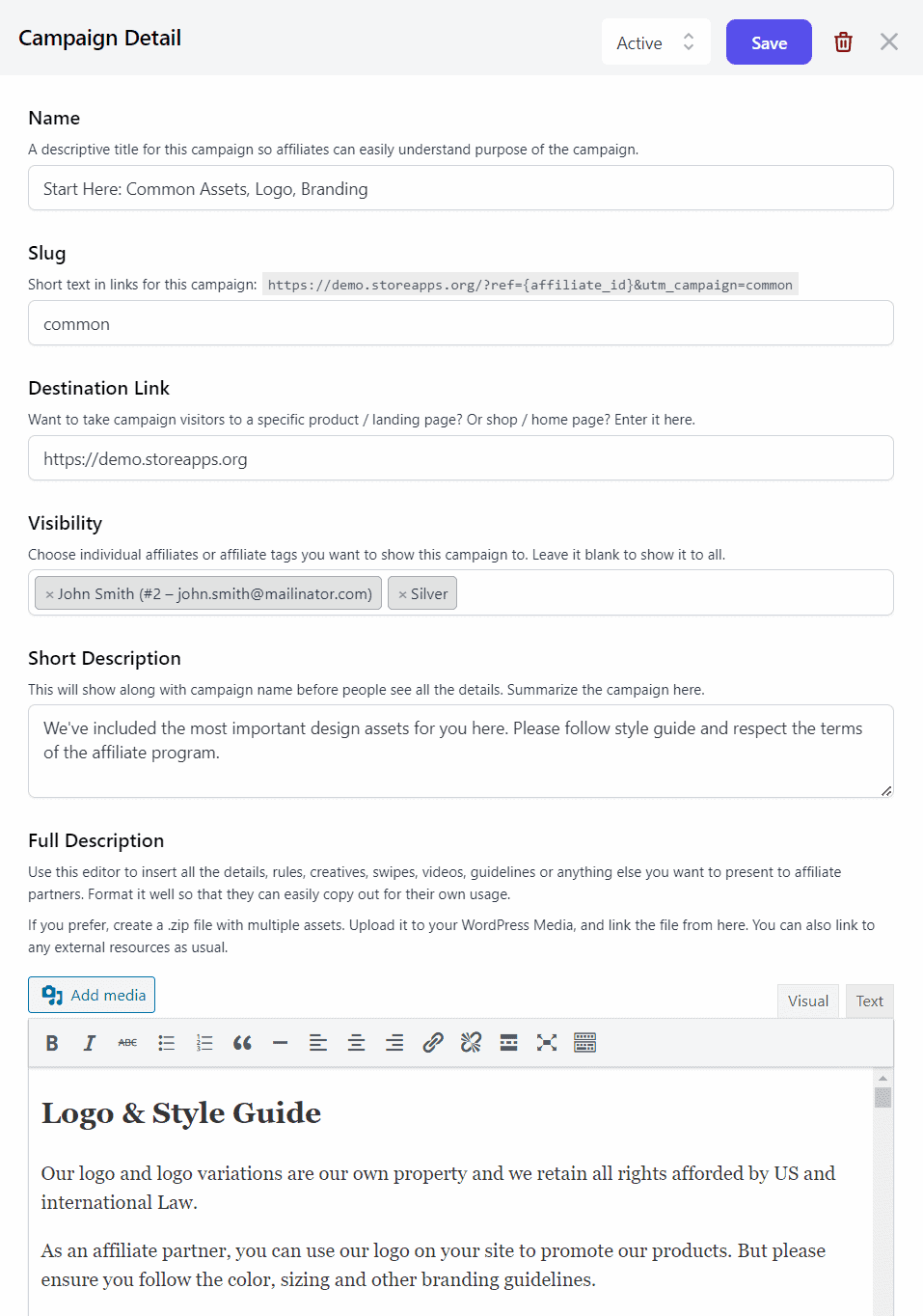
The affiliates can pick up the campaign resources provided to them and start promoting your courses with their unique campaign referral link.
Affiliates can find their campaigns under their My Account > Affiliate > Campaign.
This will help affiliates get the right materials on hand for your courses’ promotion.
Step 5: Promotion via links and coupons
Each affiliate gets a unique referral ID that can be customized.
For example: https://demo.storeapps.org/?product=photography-course&ref=3
Affiliate can also use a coupon to use for promotion instead of the link on request.
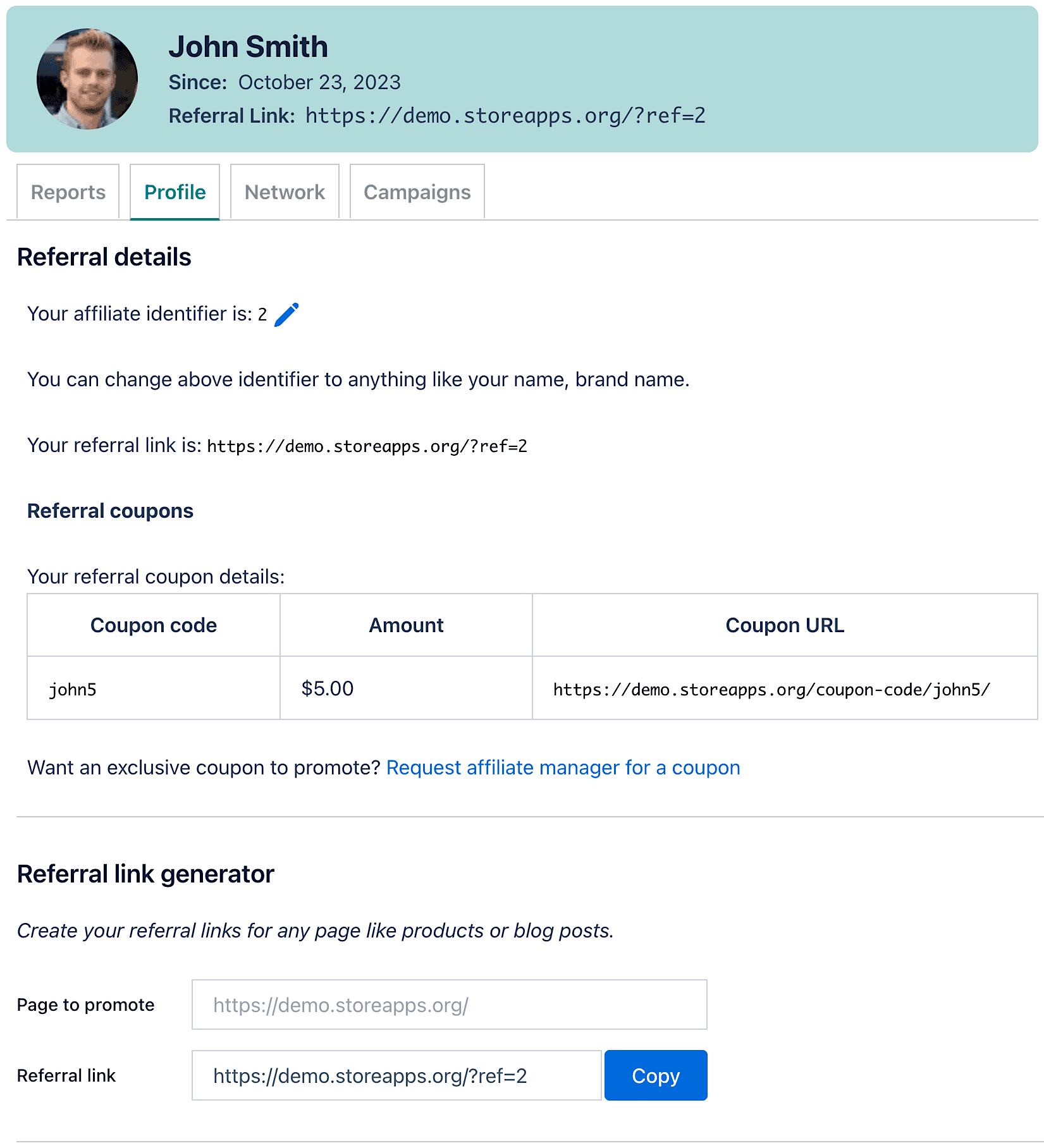
If you are using Smart Coupons, each coupon code will automatically be converted into a unique coupon referral URL. This way, your affiliates don’t have to manually share coupon codes.
Based on the social platform, affiliates can either share the coupon code (on Instagram) or the coupon referral link (on Facebook, X, etc.).
On a successful purchase, they will earn the commission based on the commission Plan they fit into.
Step 6: Making payouts
Pay your affiliates on time, and they’ll be more likely to stick with your brand for an extended period.
You can make commission payments through PayPal or manually mark commissions as paid and process payouts outside of the plugin.
To explore more payout methods and strategies, check this guide: Affiliate payout options in WooCommerce.
Congratulations! You have set up an affiliate marketing program for your online courses. Remember, I said earlier you will agree with me that it is simple and even a non-techie can set it up!
Monitoring performances
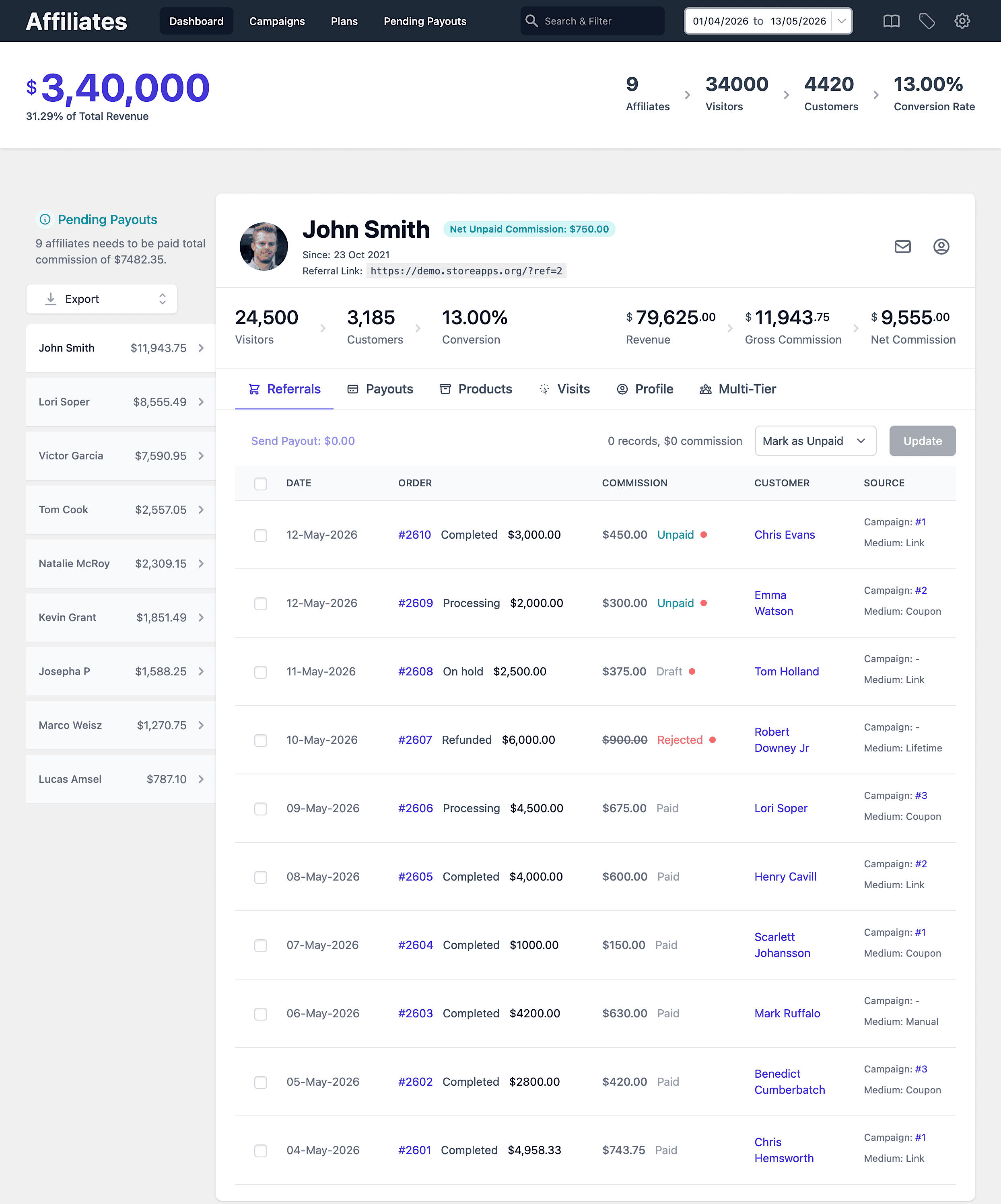
Being a store owner, you can track each affiliate’s performance and gauge their influence. Net affiliate sales, unpaid commissions, refunds, payment methods, order dates, commissions, payouts, and more…track all these metrics from a single place.
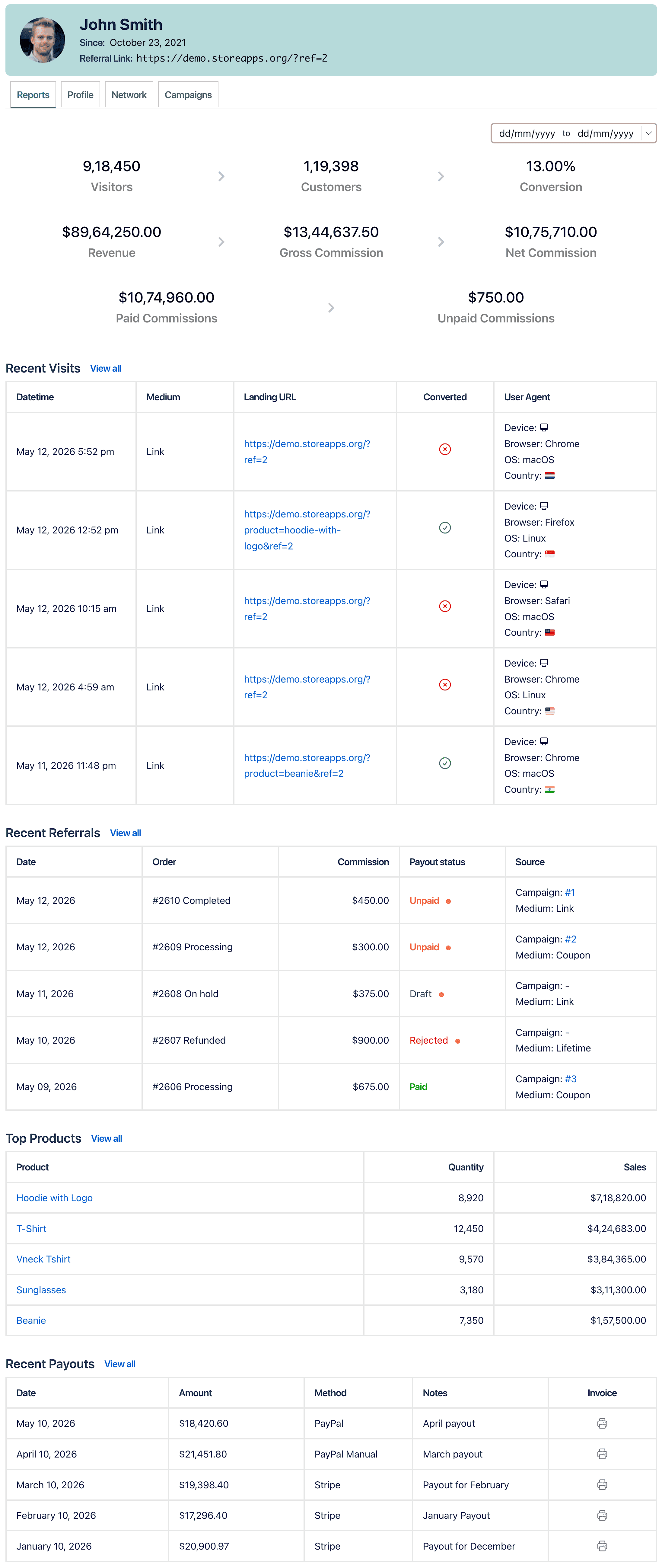
Your affiliates also get a dedicated dashboard to track their performance – commissions, courses sold the most, course purchasers, conversion rate…
Conclusion
The Affiliate for WooCommerce plugin will help you maximize your online courses’ sales in the long run.
Not just because of its powerful features, but also for its ease of use, self-management, flexibility, and human-backed support.
Whether you are a beginner or an established business, the plugin will take your business to new heights.
6500+ users have successfully amplified their affiliate program using the plugin. You are next!