
Managing an affiliate program is no less than juggling too many balls and that too on one unicycle. You have to approve new affiliates, calculate commissions, complete the payment for the old ones, and make timely payouts. It’s a lot!
But what if you could automate WooCommerce affiliate program and simplify the above? And focus on your business instead of getting your head under all these tasks?
Let me introduce you to Affiliate for WooCommerce, your go-to plugin to automate affiliate marketing. Whether you’re just starting or scaling up, this tool takes care of the nitty-gritty. This way, you can concentrate on the bigger picture.
Curious? Let’s dive into this article and see how to automate affiliate marketing efforts in WooCommerce.
Affiliate for WooCommerce: Simplify affiliate management, amplify growth
Affiliate for WooCommerce is a trusted WooCommerce plugin. With 5.5K+ users and 100+ five-star reviews, it’s a top choice for managing affiliate programs easily and effectively.
What makes Affiliate for WooCommerce unique:
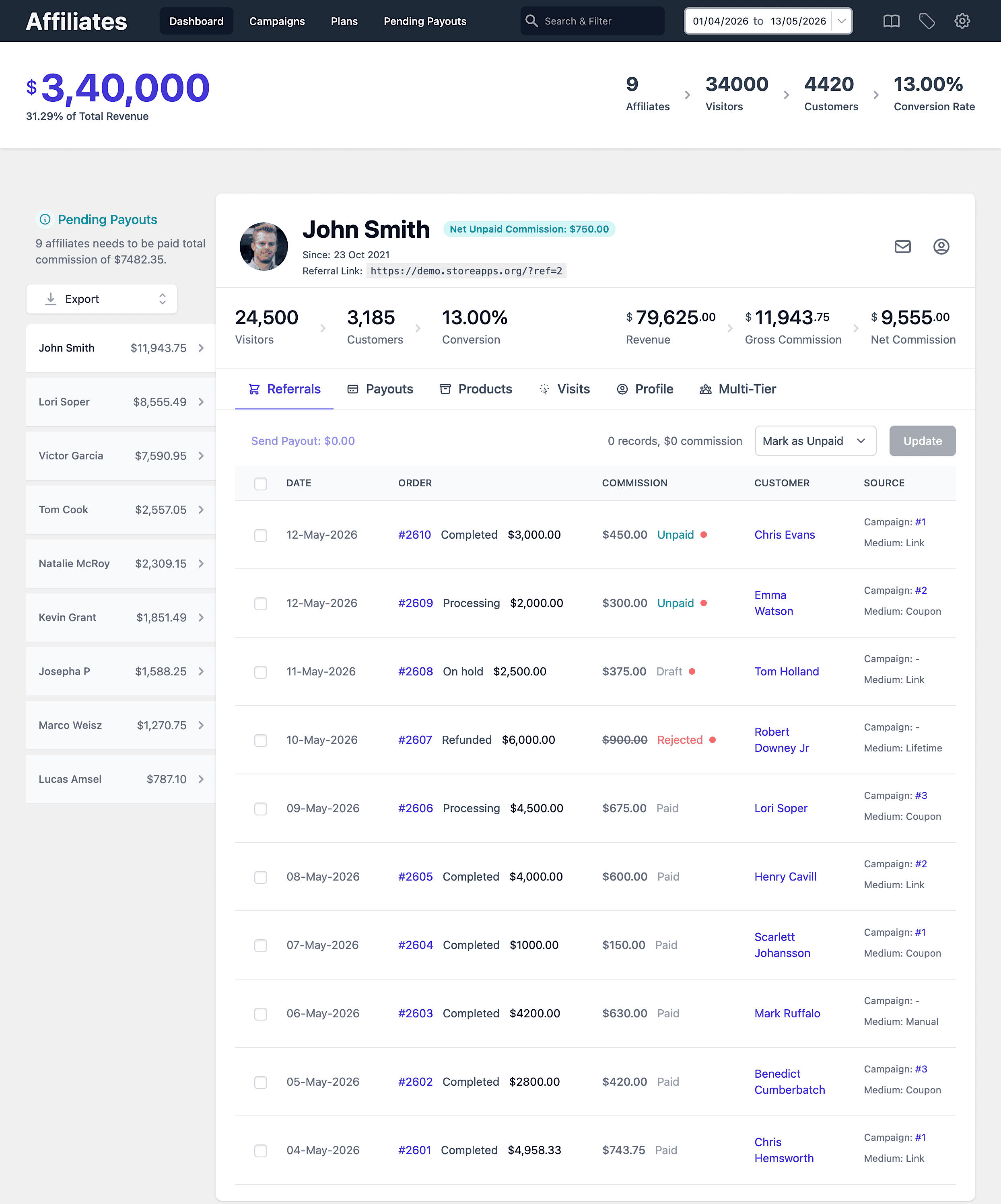
- Easy affiliate onboarding with customizable registration forms.
- Tracks referrals, sales, and commissions in real-time.
- Supports referral links and coupon-based tracking.
- Boost affiliate conversions with Smart Coupons by creating affiliate-friendly coupon deals, gift cards, and auto-apply discounts.
- Customizable commission plans (flat, tiered, lifetime or product-specific).
- Automated affiliate payouts via PayPal or Stripe.
- Create marketing campaigns to provide banners, swipe files and other assets.
- Self-service affiliate dashboard for performance insights.
- Bulk management of affiliates using Smart Manager.
- Provides detailed affiliate reports and leaderboards.
What can be automated for your affiliate program?
Affiliate for WooCommerce automates the most repetitive parts of affiliate management, so you can spend less time managing affiliates and more time growing your store.
Note: Not every part of affiliate marketing can be fully automated (like manually reviewing applicants). But the plugin handles the most time-consuming tasks like tracking referrals, calculating commissions, and processing payouts.
Seamless affiliate onboarding
Onboarding affiliates can be tricky, especially when the setup is too complex and involves unnecessary long steps. Also, delays in approval make things worse for both store owners and affiliates.
That’s where Affiliate for WooCommerce steps in to save the day! While the onboarding isn’t fully automated, the plugin simplifies things a lot.
Registration made simple
Once you install the plugin, you will get the default registration form. You can use the shortcode to add the form anywhere on your website.
Now here’s the best part – Affiliate for WooCommerce can help you automate affiliate approval:
- Automatically approve all affiliate registration form submissions.
- Automatically assign affiliate roles to users like Customers, Subscribers, etc.
Note: If you want to manually review the affiliates before approving them, keep the auto-approval option unchecked. More about this setting.
Automated emails
The plugin has your back when it comes to notifications.
- You get an email whenever someone signs up.
- Affiliates get a warm, automated welcome email with the details they need.
No manual follow-ups, no confusion—everyone stays informed.
So, while the onboarding process isn’t 100% automated, Affiliate for WooCommerce takes care of the heavy lifting. From auto-approvals to role assignments, it makes managing your affiliate program a breeze.
Commission management
Managing affiliate commissions manually can be a real headache. With Affiliate for WooCommerce, commission statuses are automatically updated based on the WooCommerce order status.
How is commission status set for a referral order?
Commission status for referral orders gets automatically set based on the order status of the referral order.
Here’s how it works for default WooCommerce order statuses:
- Paid order statuses (
Processing,Completed)
Commission status:Unpaid - Rejected order statuses (
Refunded,Cancelled,Failed)
Commission status:Rejected - Pending payment order statuses (
Pending,On Hold)
Commission status:Draft(Draft commissions are ignored in KPIs until the order is paid.)
Note: WooCommerce defines only paid order statuses. We grouped other statuses into Rejected and Pending payment for clarity, so it’s easier to understand how commissions are handled.
Learn more about commission statuses in the official documentation.
With these automations, the plugin ensures commissions are calculated fairly and accurately without manual tracking.
But wait, there’s more!
Affiliate for WooCommerce offers flexible commission rules that adapt to your business needs:
- Storewide commission plans
- Affiliate-based commissions
- Affiliate tag / group-based commissions
- Product-based commissions
- Product category-based commissions
- Product taxonomy-based commissions
- Commission based on referral medium (link vs coupon)
- First order-based commissions
- Commission based on user roles
- Commission based on subscription parent orders
- Commission on renewal orders (recurring commissions)
- Lifetime commissions
- Multi-tier commissions
- Tiered commissions
- Affiliate – Customers
- Affiliate – Last Referral (days)
- Affiliate – Revenue
- Affiliate – Valid Referral Orders
- User – Logged In
- Order – Coupons
- Order – Payment Methods
- Order – Subtotal
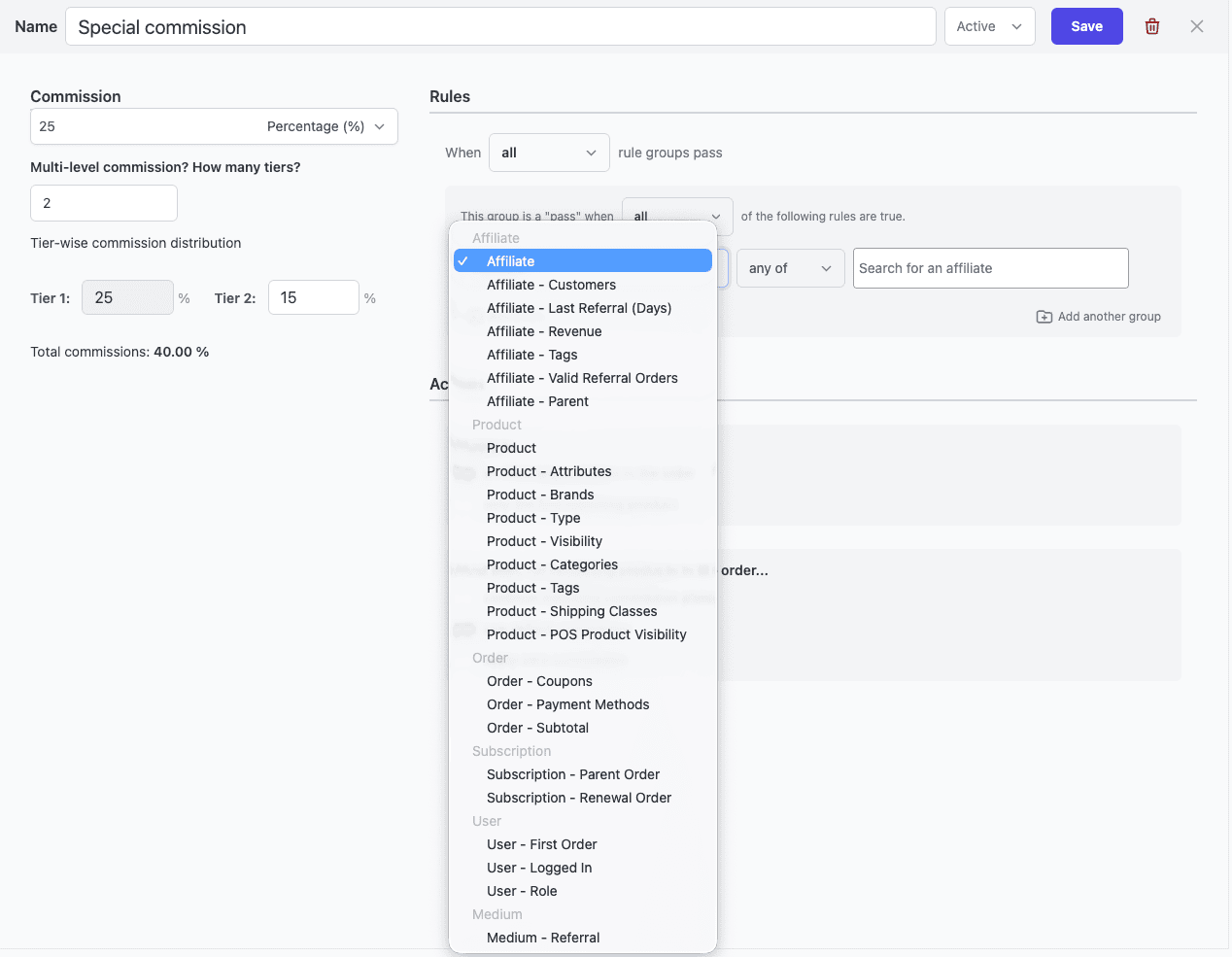
Be it any complex use case set based on the above rules combination, the plugin calculates exact commissions. So no more guesswork, no manual tracking—just hassle-free commission management.
Automate WooCommerce affiliate program payouts
Another challenge for store owners managing affiliates is payouts. Tracking payment statuses, processing payments, and updating affiliates can be time-consuming and prone to errors.
With Affiliate for WooCommerce, this process becomes easy. The plugin allows you to set up automated payouts, which means your affiliates can get their hard-earned money on time and you can enjoy peace of mind.
Whether you’re using PayPal or Stripe, Affiliate for WooCommerce has you covered with easy integration and setup for automated payouts. Just set it up once, and the plugin handles the rest.
Refer to these blogs to get started with automated payouts:
Boost engagement with auto-apply coupons
Getting customers to remember coupon codes is a hassle.
That’s where auto-apply coupon affiliate links come in. Affiliates can request coupons, and you, as the store owner, can provide them.
For auto-applying coupon via affiliate link, you will need StoreApps Smart Coupons alongside Affiliate for WooCommerce to make this happen.
For example, your coupon link is: https://demo.storeapps.org/coupon-code/20discount/.
And your affiliate link is: https://demo.storeapps.org/?ref=2.
So the affiliate link with coupon will be: https://demo.storeapps.org/coupon-code/20discount/?ref=2.
When the visitor clicks the above URL, the coupon will be applied automatically, and the affiliate will get the commission on a successful purchase.
Lifetime commissions
Imagine rewarding affiliates, not just one time but for every purchase automatically. Yes, that is also possible with Affiliate for WooCommerce.
When customers use an affiliate’s referral link or coupon and complete a purchase, they’re automatically linked to that affiliate for life. All you need to do is enable the Lifetime Commissions setting in your store.
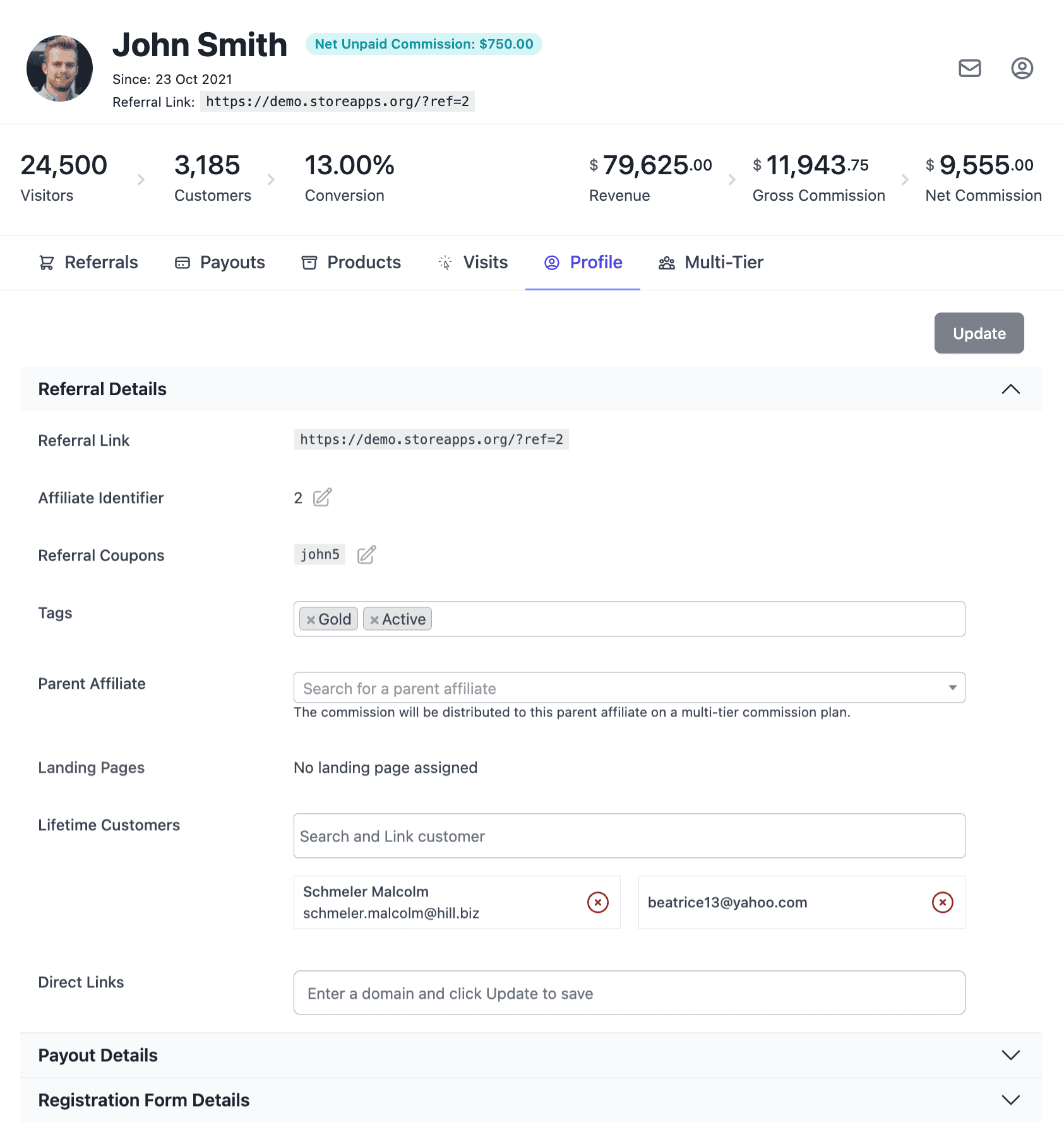
Note: For an affiliate to earn lifetime commissions, the customers must be linked to that affiliate. Here’s how.
Why automate WooCommerce affiliate program?
Automation is not just for convenience. It’s a real game-changer. By automating repetitive tasks like onboarding, commission tracking, and payouts, you can:
- Save your time for strategic growth.
- Reduce human errors.
- And provide a better experience for your affiliates.
With Affiliate for WooCommerce, you’re not just managing an affiliate program but building a system that would bring you real business. Use this plugin now and enjoy the benefits of using an automated WooCommerce affiliate program.
Ready to simplify your affiliate program?
Don’t let manual processes hold you back. Take your affiliate marketing to the next level with Affiliate for WooCommerce.
This plugin simplifies your job and makes affiliate management easier and more efficient.