

Product catalogs rarely stay static.
Prices change. File paths change. Descriptions get updated. Variations expand. And as a store grows, even small product improvements can start taking hours longer than they should.
That’s exactly what The Paper Texture Company wanted to avoid.
Instead of exporting spreadsheets or editing products one by one in WooCommerce, they built a faster bulk-editing workflow using Smart Manager.
Meet Nicolai and The Paper Texture Company
The Paper Texture Company is an online store that sells “smart” paper texture templates for digital artists.
It is also a sister shop to Nicolai’s other business, GrutBrushes, which has been using StoreApps plugins like Smart Offers for over 10 years.
From the beginning, Nicolai planned to scale the product catalog quickly. To do that, he needed a way to manage WooCommerce product updates efficiently without spending hours inside the default editor.
What struggles The Paper Texture Company faced before Smart Manager
Nicolai expected the store to grow to over 500 products in the next 2 years, with each product containing up to 6 variations.
That growth meant constant store updates. Pricing changed, file paths were updated, descriptions needed improvements, and variation pricing had to be adjusted regularly.
On top of that, the store relied heavily on custom fields, which added another layer of complexity.
Before Smart Manager, Nicolai managed these changes using spreadsheets. He exported WooCommerce product data into CSV files, edited the information manually, and imported it back into the store.
But the workflow became unreliable as the catalog expanded.
In Nicolai’s words, “not all the data makes it through and something always goes wrong.”
Important fields sometimes failed to import correctly, and fixing those issues often took more time than the updates themselves.
Editing products manually inside WooCommerce was not realistic either, because it required opening products one by one.
As the product line grew, bulk editing became a necessity, not a convenience.
How did Nicolai discover Smart Manager?
As the catalog grew, Nicolai needed a more reliable way to manage bulk updates directly inside WooCommerce without depending on spreadsheet exports and re-imports.
Since his other business had already been using StoreApps plugins for over 10 years, Smart Manager was a natural choice to test. The workflow matched exactly what he needed, and the StoreApps support experience was already trusted.
Why did Nicolai choose Smart Manager?
Nicolai chose Smart Manager because he needed a bulk editing tool that could handle complex WooCommerce data without breaking the workflow.
Most alternatives did not support the level of bulk editing he required, especially for stores that relied on custom fields and custom post types.
Smart Manager also stood out because it offered advanced filtering, allowing Nicolai to isolate specific product groups and make targeted updates instead of working through the entire catalog manually.
How Smart Manager changed product management workflow
After switching to Smart Manager, Nicolai stopped relying on CSV exports and imports.
Instead, he edited product data directly inside WooCommerce using Smart Manager’s spreadsheet-style interface. This made it possible to update multiple products at once and apply changes across large product groups without opening individual product pages.
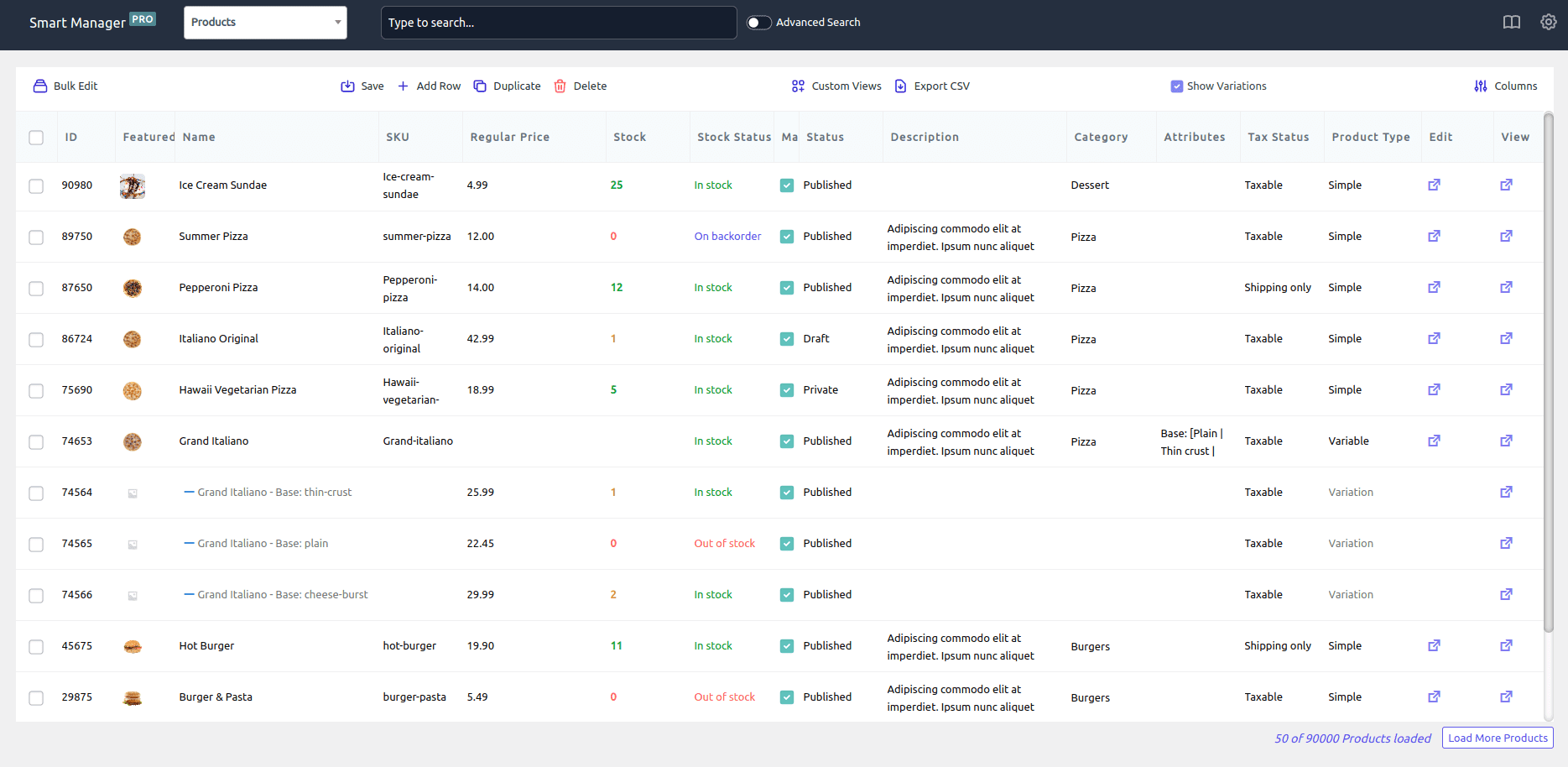
Smart Manager also reduced the risk involved in bulk updates. Nicolai explained that there were “no mysteries” because all data remained visible during editing, and any changes could be undone if needed.
This allowed him to make improvements more frequently and manage a rapidly growing product catalog with far less effort.
Why The Paper Texture Company recommends Smart Manager
Smart Manager gave Nicolai the ability to manage an expanding WooCommerce product catalog without being limited by the traditional product editor.
As Nicolai shared:
“Smart Manager allows me to add and modify whole product lines in a few minutes. Knowing that is possible opens up so much room for growth and flexibility.”
He also added:
“Being able to manage so many products so easily is why I am willing to tackle and take on such a rapidly growing product line. It would be impossible to manage if I had to do it in the traditional post or product editor.”
For The Paper Texture Company, Smart Manager made large-scale product management practical and opened up new possibilities for growth.
Start with Smart Manager for WordPress
If you manage a growing WooCommerce store and frequently update product data, Smart Manager can help you edit products in bulk, handle custom fields, and keep large catalogs under control.
You can start with the free Smart Manager plugin for WordPress and upgrade later as your store grows.