
Let’s be honest, Black Friday isn’t what it used to be. It’s no longer about who throws the biggest discount. It’s about who plans smarter, who knows their customers, uses the right tools, and creates offers that actually convert.
Because today’s shoppers? They’re different. They scroll through ten tabs, read reviews, compare brands, and even ask AI tools before hitting “Buy Now.”
So if your WooCommerce store still runs on “Flat 50% Off” and hope… you’re missing the real opportunity.
This year, winning Black Friday isn’t about lowering prices, it’s about raising your strategy. You’ll learn how to:
- Plan your Black Friday campaign weeks in advance
- Automate offers and create urgency
- Optimize checkout to reduce drop-offs
- Track results in real-time
- Turn one-time buyers into repeat customers
Let’s make this Black Friday not just bigger, but smarter.
Planning SMART (2–3 weeks before sale)
Two to three weeks before Black Friday is your “strategy zone.” This is where the real prep begins, not just with discounts, but with clarity.
How should I set Black Friday goals?
Most stores rush into offers without a clear purpose. But goals decide everything, from which products to promote to how much you can afford to discount.
Here are three core goals most WooCommerce stores should set:
- Revenue target: How much do you want to earn during BFCM?
- Customer goal: How many new customers do you want to acquire?
- Engagement goal: How will you keep buyers engaged after the sale?
Once your goals are set, align your prep around them like this:
- Run a profitability check using last year’s WooCommerce data, focus on products with the best margin-to-discount ratio, not just top sellers.
- Segment customers by behavior, tag them as new, loyal, or high-value to design personalized offers.
- Define discount limits. Set a ceiling (e.g., not more than 25% off on low-margin products) to protect profits.
- Assign a campaign owner, one person who oversees offers, emails, and support to keep execution smooth.
- Create a “No-Go” list, products you won’t discount due to stock, supplier limits, or future launches.
- Set one success metric per goal, track key numbers like total sales, new signups, or repeat visits.
Once your goals and offers are mapped out, it’s time to shift gears, from planning to building anticipation.
How to create VIP early access and build hype before Black Friday
The best Black Friday campaigns don’t announce sales, they build anticipation. .
Here’s how you can warm up your audience:
- Send short teaser emails: “Something big is coming” or “Your favorite sale starts soon.”
- Add countdown banners or popups using Icegram Engage.
- Inform affiliates early and let them drop hints about upcoming offers through Affiliate for WooCommerce.
- Give loyal customers VIP early access using Smart Coupons, send a private email inviting them to shop 24 hours before everyone else.
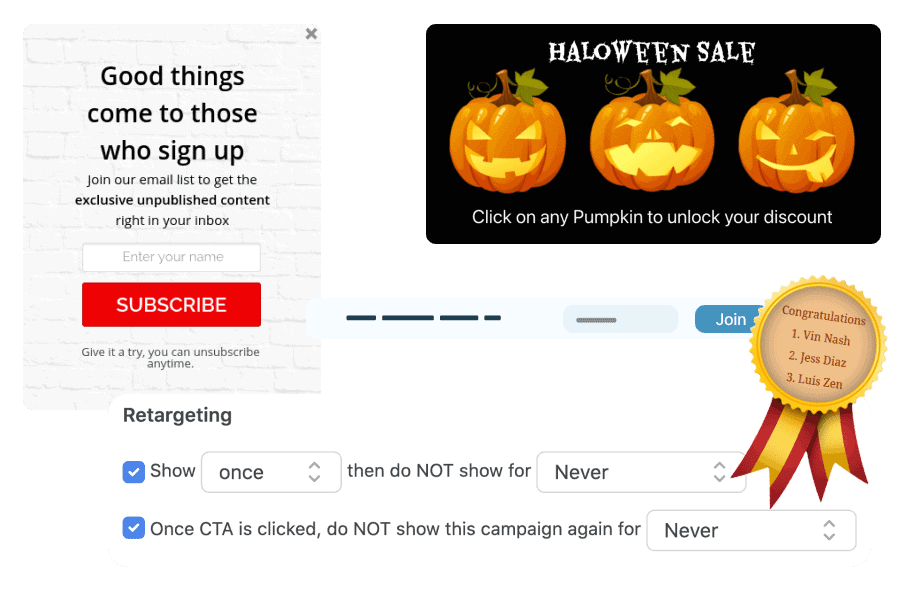
This early excitement makes customers feel involved and ready, ensuring your first hours of the sale bring real conversions.
Once your audience is warmed up and ready, it’s time to decide what kind of offers they’ll actually see.
Which WooCommerce discount strategy works best for higher cart value?
Discounts are everywhere during Black Friday. The difference lies in how you design them. Instead of cutting prices across the board, build value into every offer.
Your goal is to make shoppers feel rewarded when they spend more, not that you’re selling out inventory.
That’s where Smart Coupons and Smart Offers help. Used together, they turn regular discounts into predictable profit drivers.
Smart Coupons lets you set clear, rule-based offers that encourage larger orders.
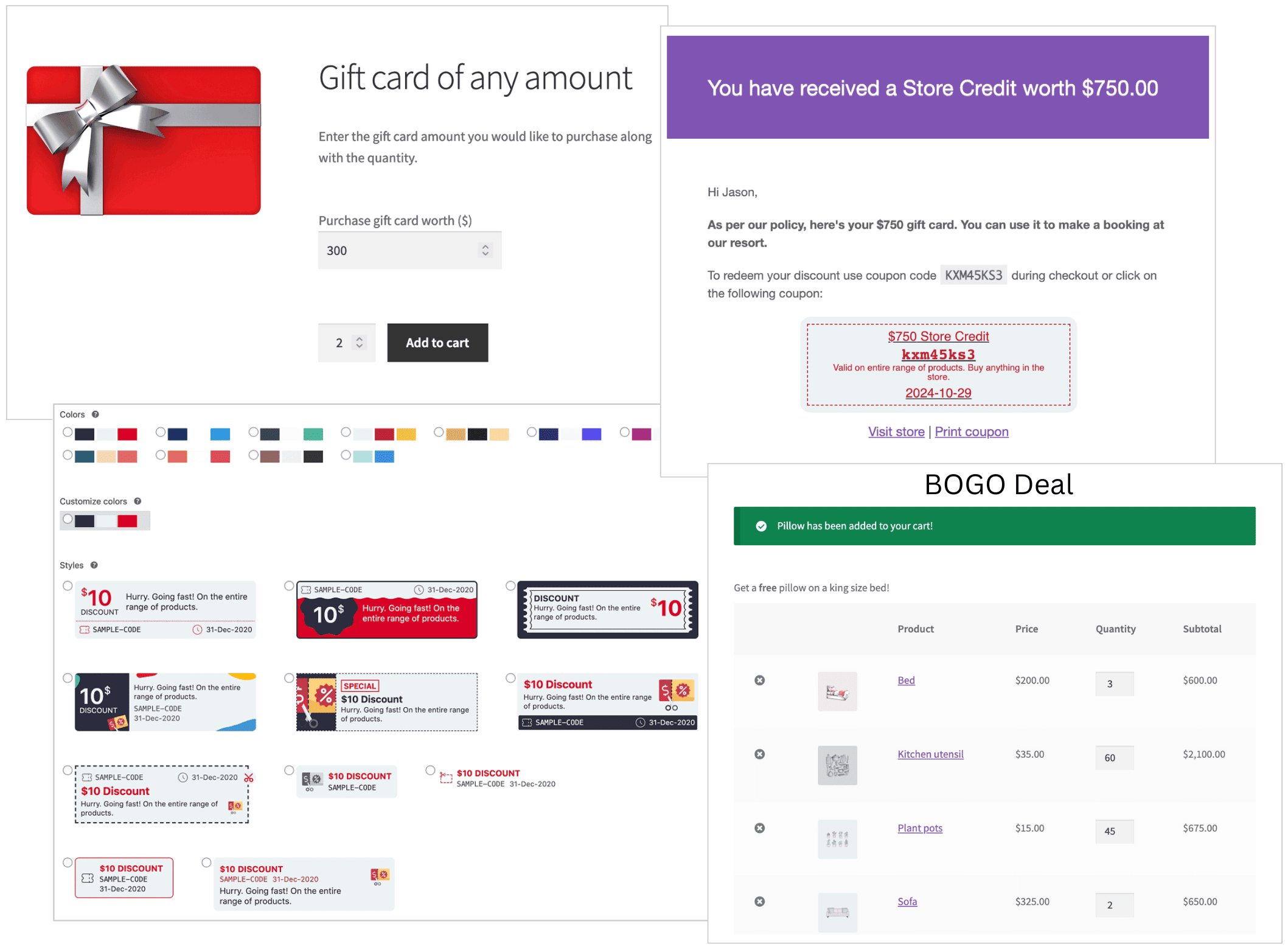
Use it to:
- Create BOGO offers to clear stock faster.
- Offer gift cards or store credits that bring buyers back later.
- Set tiered discounts to reward higher spending.
- Add free gifts automatically when a condition is met.
Not only these, but Smart Coupons also allow you to create all types of coupons that work like a charm.
Check out other types of coupons here for your upcoming Black Friday campaign.
Smart Offers takes it further, inside the buying journey.
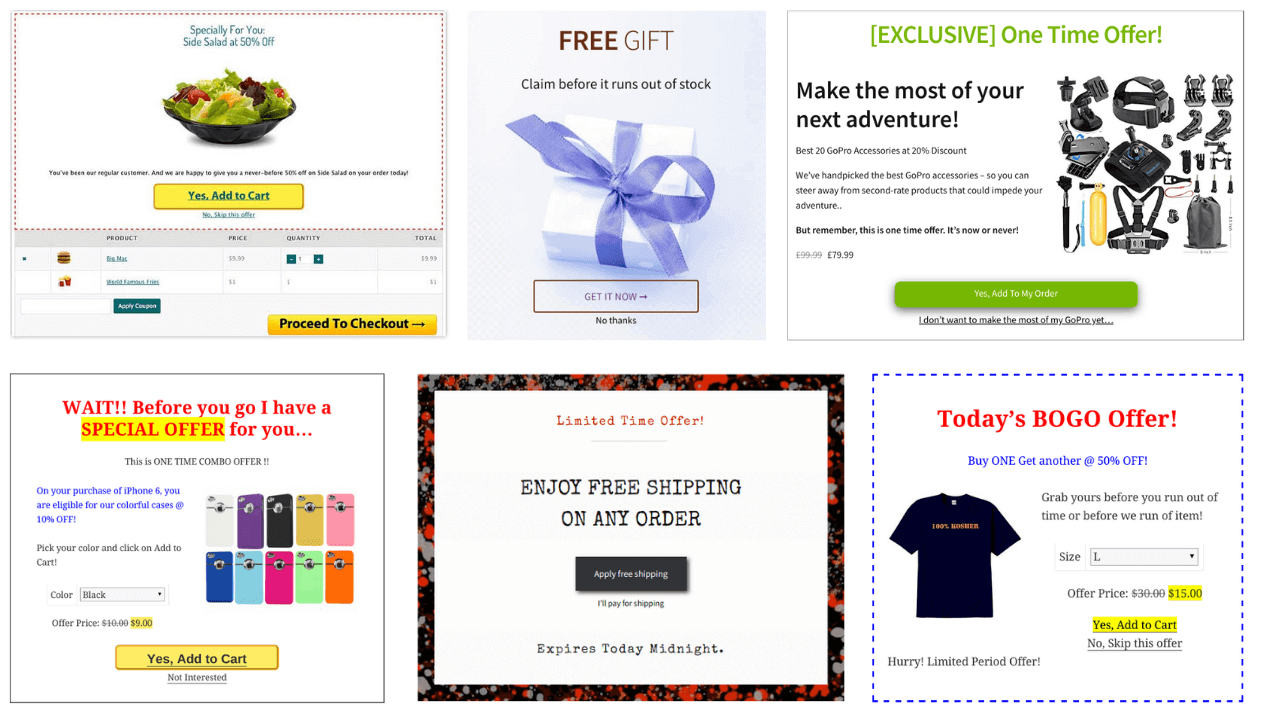
You can:
- Show related products when a shopper adds an item to the cart.
- Add a small order bump at checkout such as “Add a pouch for $19.”
- Upsell after purchase with a single click.
Together, these tools make every offer feel intentional and seamless.
Now that your offers are ready, your next job is simple, make sure your store can actually handle the traffic and orders that follow.
How to prep inventory?
Great offers mean nothing if your inventory isn’t ready. Your goal now is to keep everything accurate, updated, and fast before the sale goes live.
Here’s how to prepare:
- Review all products in your WooCommerce dashboard for low stock, missing details, or wrong prices.
- Use Advanced Bulk Edit to update prices, stock levels, and categories in one go.
- Manage inventory faster with Smart Manager, it shows all products in a spreadsheet-style view so you can sort, search, and edit instantly.
- Track live stock movement with Smart Stock & Inventory Management, especially if you manage multiple warehouses or suppliers.
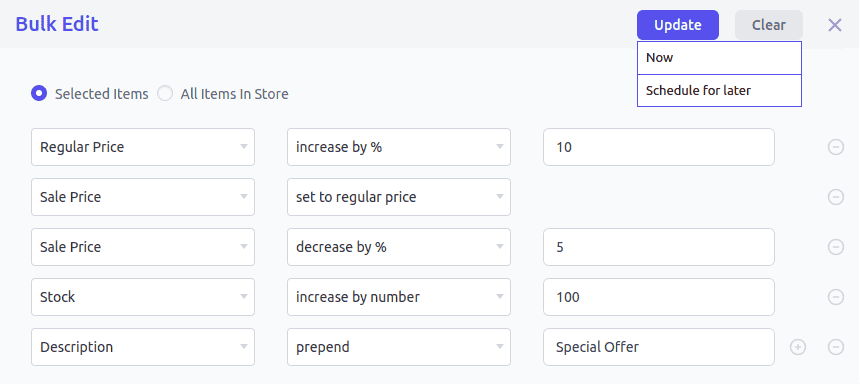
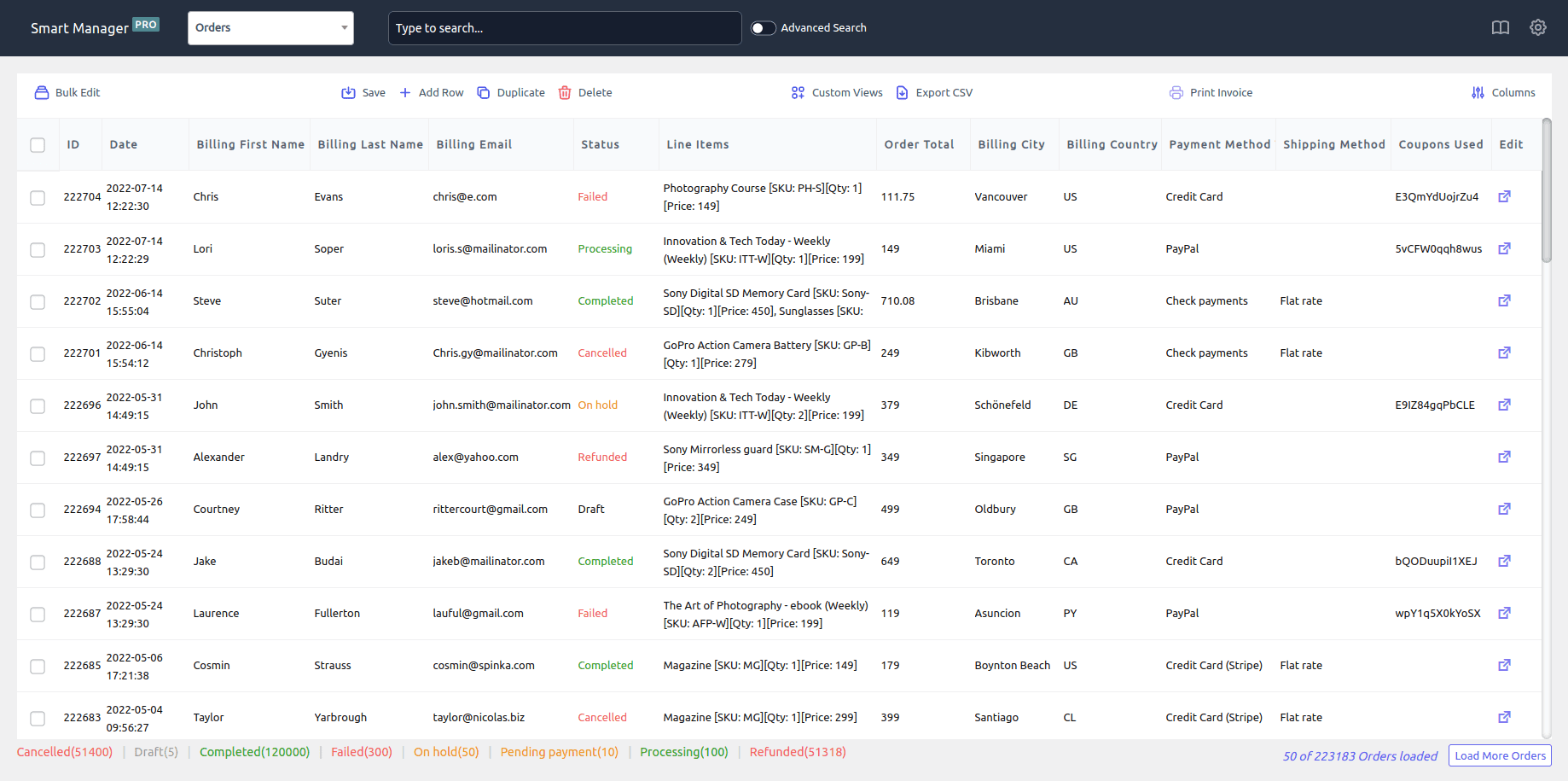
When the sale starts, you shouldn’t be fixing product data, you should be focusing on customers.
During black friday (48–72 hours sale window)
Once the sale goes live, things move fast. Your focus isn’t on adding new offers, it’s on keeping your store fast, stable, and responsive.
How to make WooCommerce checkout faster & reduce cart abandonment?
When carts are full and pages are slow, every second matters. A clean checkout builds trust and saves sales. Keep it simple:
- Remove unnecessary clicks and distractions.
- Show shipping fees and taxes upfront.
- Avoid popups or upsells that interrupt checkout.
- Use Cashier for WooCommerce to create a one-page checkout so buyers can review, confirm, and pay on a single screen.
- Enable one-click checkout for returning customers. It helps them complete purchases instantly, a big win when they’re hopping between multiple stores.
Pro tip: Test checkout speed across devices during the sale. According to Portent, a WooCommerce site that loads in under one second can convert up to 2.5× more visitors than a site that takes five seconds to load.
How to track sales live and quickly fix dips?
Black Friday isn’t a “set and forget” campaign, it’s a live performance. You need to monitor metrics in real time and act before small dips turn into big losses. Keep a close eye on:
- Conversion rate: If it drops, test your checkout; a coupon or payment gateway might be failing.
- Average order value: If it dips, your cross-sells or order bumps may not be showing.
- Cart abandonment rate: if it spikes, check page load speed or broken coupon links.
Use reliable analytics to stay on top of your data, tools like Putler’s Sales Dashboard can show you real-time orders, refunds, and revenue trends across all your payment gateways, helping you spot dips early.
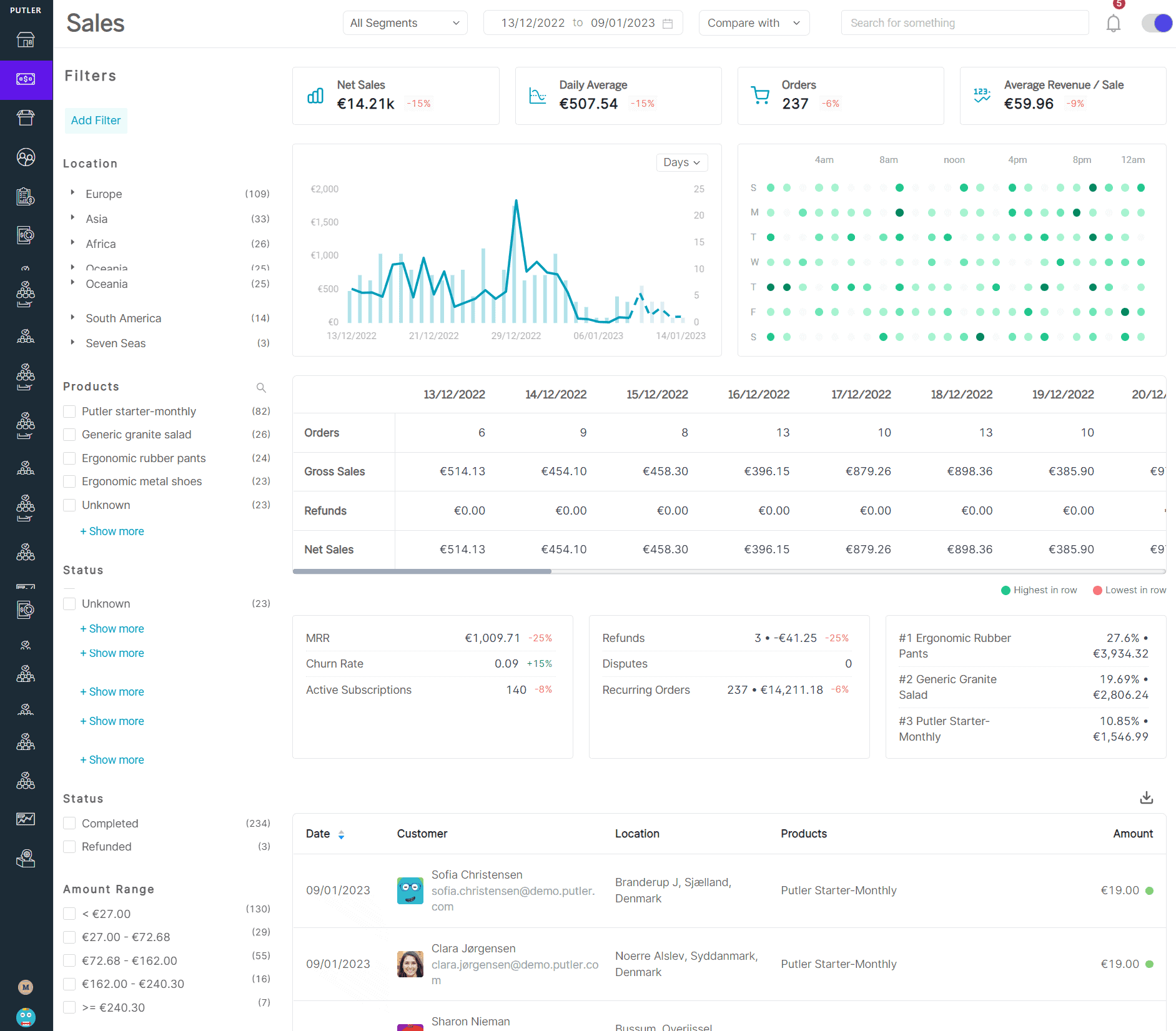
Also stay agile:
- Refresh limited-time banners or coupon messages.
- Fix pricing errors quickly.
- Recheck coupon expiry times.
During these 72 hours, quick action matters more than perfection.
Don’t ignore customer support
During the rush, your support team can be the difference between a refund and a repeat customer.
Black Friday brings excitement and confusion, so responsiveness becomes part of your brand. Stay available and:
- Monitor all support channels: email, live chat, and social media.
- Keep short templates ready for common queries like:
“My coupon isn’t working”, “I didn’t get my confirmation email”, “Can I change my shipping address?” - Tools like Help Scout or Zendesk help you manage replies without losing context.
- Always sound human and calm, even short, polite messages make a difference.
Customers will forget your discount but remember your support. Great service during Black Friday often leads to repeat orders and higher lifetime value long after the sale ends.
After Black Friday (Post-Sale Strategy)
Once the rush ends, it’s tempting to switch off. But the few days after Black Friday decide how much of your success actually lasts.
Customers from Black Friday or Cyber Monday have just an 8–15% repeat purchase rate within 90 days.
And therefore your post-sale engagement decides whether they stay or disappear.
How to turn Black Friday buyers into repeat customers?
Black Friday brings a flood of first-time shoppers. Your job now is to make sure they come back, not just remember the discount. Simple actions that work:
- Send a short follow-up email a few days later, not to sell, but to ask about their experience. It shows you care and builds trust.
- Offer store credit or a small loyalty discount using Smart Coupons. A small reason to return often leads to another purchase.
- Ask happy customers for reviews or product photos. These become authentic stories for your next campaign.
Retention isn’t complicated, it just needs a small, genuine nudge after the sale. Want to keep those holiday shoppers coming back?
Check out our top strategies to boost thanksgiving and black friday customer loyalty.
Turn buyers into brand advocates
Your Black Friday buyers can become your best promoters if you keep them engaged. Here’s how to build advocacy:
- Launch a referral or affiliate program using Affiliate for WooCommerce and reward customers for every new buyer they bring.
- Share customer stories or photos on social channels and newsletters.
- Highlight loyal buyers in your emails, recognition creates community.
People trust other people more than ads. Consistent engagement builds a base that lasts beyond one sale weekend. Looking to get more eyes on your deals this season?
Check out how to use affiliate marketing to boost your Black Friday sales.
Audit, learn, and systemize for next year
When the sale closes, the real learning starts. The insights you collect now will make next year’s campaign smoother and more profitable. Start by reviewing what actually happened:
- Review which products sold fastest and which stalled.
- Check when traffic peaked and how checkout performed under load.
- Use Putler’s Insights Dashboard to compare this year’s results with the last.
- Document everything, from coupon setups to campaign timelines to FAQs, in a short internal playbook.
Next year, you won’t be starting from scratch. You’ll be improving on what worked.
A successful Black Friday isn’t about record numbers. It’s about building systems that make every one after it smoother, faster, and smarter.
The story doesn’t end here
Black Friday doesn’t end when the sale closes. It marks the beginning of what comes next, new customers, cleaner systems, and lessons that make the next campaign easier.
Take a short pause to review what worked and what didn’t. Fix small gaps while the experience is still fresh.
Update product details, tidy your email lists, and thank your customers, they’re the reason your numbers moved. Then, take a breath. You’ve just managed one of the busiest weekends in eCommerce.
The real win isn’t the total sales you made, but the systems and insights you built along the way. Every Black Friday prepares you for the next one and every next one gets a little smarter.
FAQs
- When should I start planning for my Black Friday WooCommerce campaign?
Start at least 3–4 weeks before the sale. It gives you time to test offers, check inventory, and build excitement before launch day. - How can I create urgency in my Black Friday offers?
Don’t fake urgency, design it. Show real-time stock updates, limit coupon uses, and offer early access to loyal buyers. It builds trust and triggers quick decisions at the same time. - Should I extend my Black Friday deals beyond the day itself?
Yes, but smartly. You can keep the sale running through Cyber Monday or turn it into a weekend event, just make sure to refresh your messaging so it still feels exciting.