

Running SaaS ads is easy. Running them profitably for months is where most SaaS businesses struggle.
Affiliate marketing solves that problem because you only pay when a sale happens. And for subscription-based SaaS products, it gets even better: you can reward affiliates not just for the first sale, but also for renewals.
So if you’re selling subscription products using the official WooCommerce Subscriptions plugin (or any similar WooCommerce subscription setup), building an affiliate program for SaaS can be one of the most cost-effective ways to grow.
In this guide, you’ll learn how to set up SaaS affiliate marketing in WooCommerce, configure recurring commissions, and manage everything using Affiliate for WooCommerce.
What makes SaaS affiliate programs different?
SaaS affiliate programs work differently from normal ecommerce affiliate programs because SaaS businesses earn revenue repeatedly through renewals.
That means your affiliates shouldn’t just be rewarded for the first subscription purchase. The best SaaS affiliate programs reward affiliates for renewals too.
- Parent order commission: commission on the first subscription purchase
- Renewal commission: recurring commission every time the subscription renews
This makes SaaS affiliate marketing more sustainable because affiliates stay motivated long-term and keep promoting your product consistently.
Benefits of SaaS affiliate marketing (why it works)
Affiliate marketing is one of the most cost-effective growth channels for SaaS businesses because you only pay when a subscription sale happens.
Here’s why SaaS affiliate programs work so well:
- Wider reach: Affiliates already have audiences that trust them, helping your SaaS product reach new customers faster.
- Lower customer acquisition cost (CAC): Unlike PPC or Google Ads, you only pay commissions after a successful subscription purchase.
- Recurring affiliate motivation: Renewal commissions keep affiliates promoting your SaaS product long after the first sale.
- Reduced marketing risk: You don’t waste budget on clicks or impressions that don’t convert.
- Better long-term retention: Affiliates often create tutorials, reviews, and onboarding content that reduces churn.
- Predictable growth channel: A strong affiliate network keeps sending leads even when ad costs rise.
How to set up a WooCommerce SaaS affiliate program?
Choosing the right affiliate plugin matters a lot for SaaS. You need something that supports:
- recurring commissions
- subscription renewals
- flexible commission rules
- easy affiliate tracking
The Affiliate for WooCommerce plugin is built specifically for WooCommerce stores, making it a strong fit for subscription-based SaaS businesses.
It helps you manage registration, tracking, commission plans, and payouts without relying on shortcodes or complicated setups.
You can customize affiliate registration forms, approve affiliates, create campaigns, set commission rules, and track referrals and payouts from one dashboard.
With over 6.5k+ WooCommerce businesses using it, it’s a proven solution for running affiliate programs in WooCommerce.
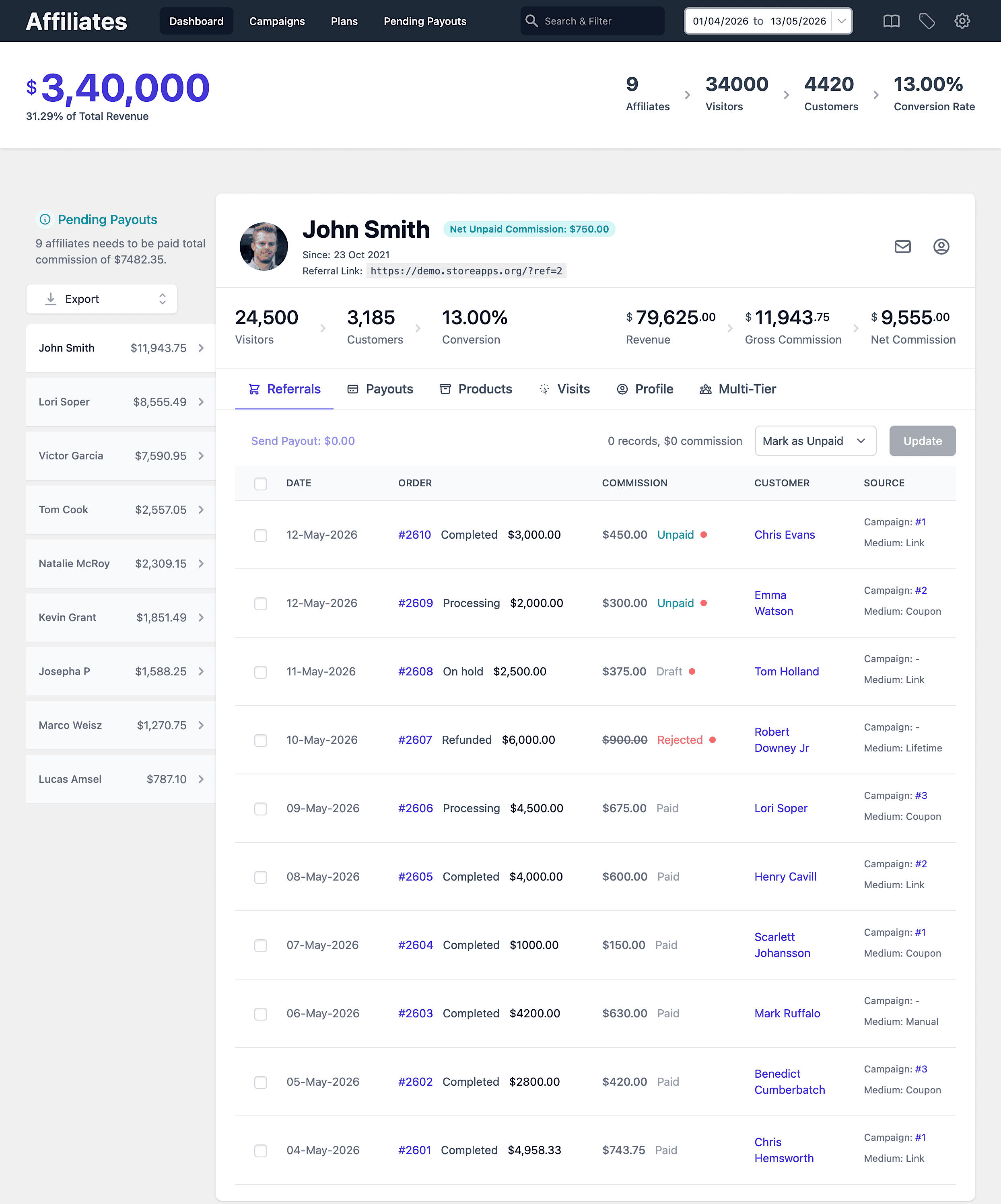
Let’s see how the plugin helps you set up one!
Installation and activation
Since this plugin is built for WooCommerce, there are no additional integration steps.
To activate the plugin:
- Download the
.zipfile from your account > Downloads. - Go to
WordPress Admin > Plugins > Add Newto upload the file you downloaded. - Activate the extension.
Registration form
Affiliates need a signup form to join your SaaS affiliate program. You can use the default registration form or customize it to match your brand.
You can also customize form fields using:
This helps you collect important information like website URL, social profiles, or marketing channels before approving affiliates.
Approve affiliate requests
You can either approve affiliates manually or allow auto-approval.
Enable the Approval method setting to approve requests automatically. For example, any users who requested to join your affiliate program can become affiliates automatically. Or disable it to review each affiliate request personally and approve.
You can also notify users by email when their request is pending, and send welcome emails after approval.
Promotion via links and coupons
Once affiliates are approved, they need a way to promote your SaaS product.
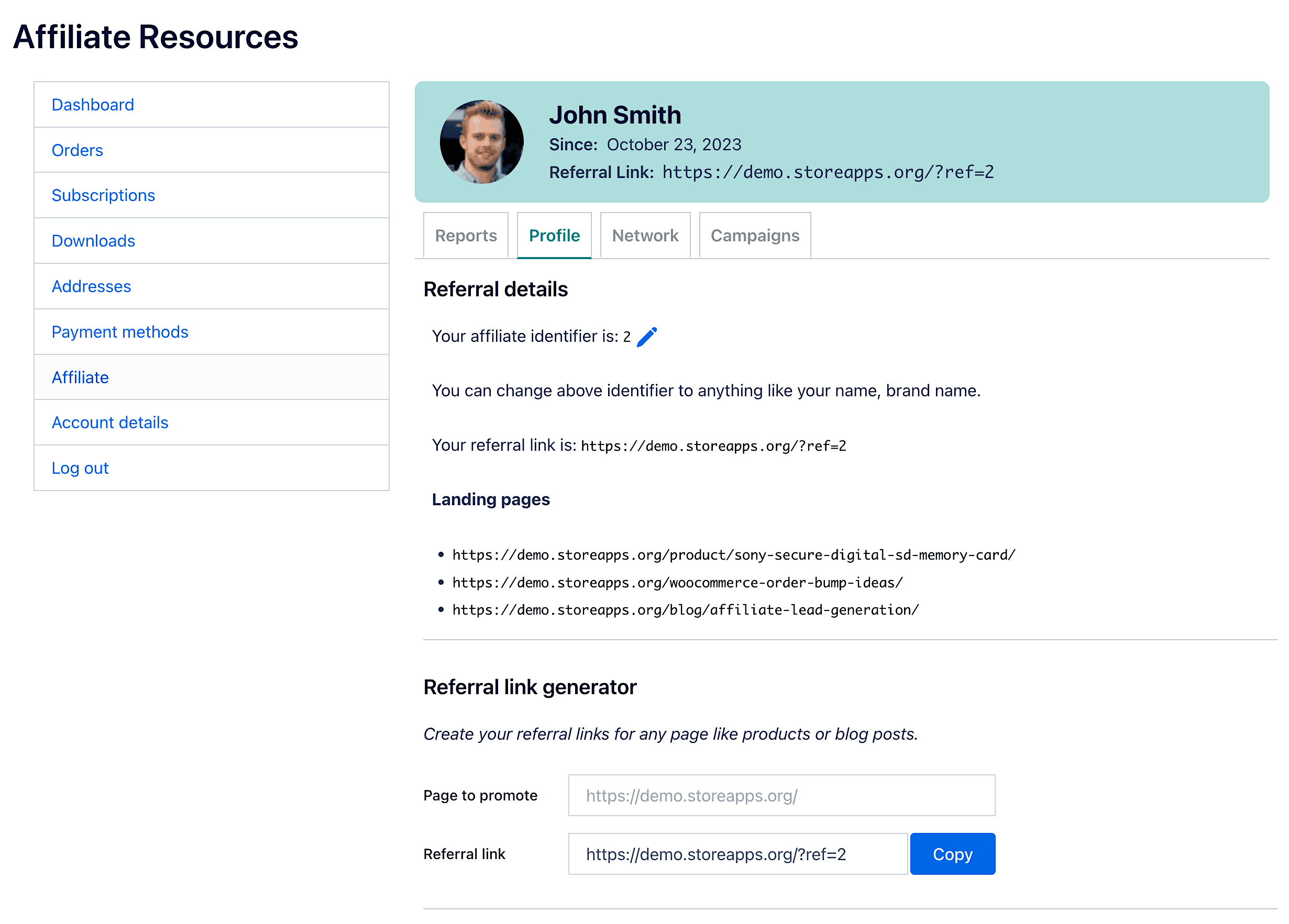
Affiliate for WooCommerce provides a unique referral ID for each affiliate, allowing them to generate referral URLs.
For example: https://demo.storeapps.org/product/jacket?ref=2
Affiliates can also turn default referral links into
pretty affiliate links
using their name or brand.
For example:
- Default referral link:
https://demo.storeapps.org/?ref=2 - Pretty affiliate link:
https://demo.storeapps.org/ref/john
Whenever a visitor buys your SaaS subscription through a referral link or coupon, the affiliate earns commission.
Alternatively, you can assign custom landing pages to affiliates. This works well for SaaS businesses because affiliates can promote a conversion-focused landing page instead of sending traffic to your main product page.
Setting commission rules (parent orders vs renewals)
This is the most important part of setting up affiliate marketing for SaaS.
SaaS affiliate programs become powerful when you reward affiliates not only for the first subscription purchase, but also for renewals.
Affiliate for WooCommerce lets you create separate commission rules for:
- Subscription parent orders (first-time subscription payment)
- Subscription renewals (recurring renewal payments)
For example:
- 15% commission on the parent order and 10% on renewals for six months
- 0% on the parent order (free trial) and 10% on renewals
- 20% on every payment until the subscription is cancelled
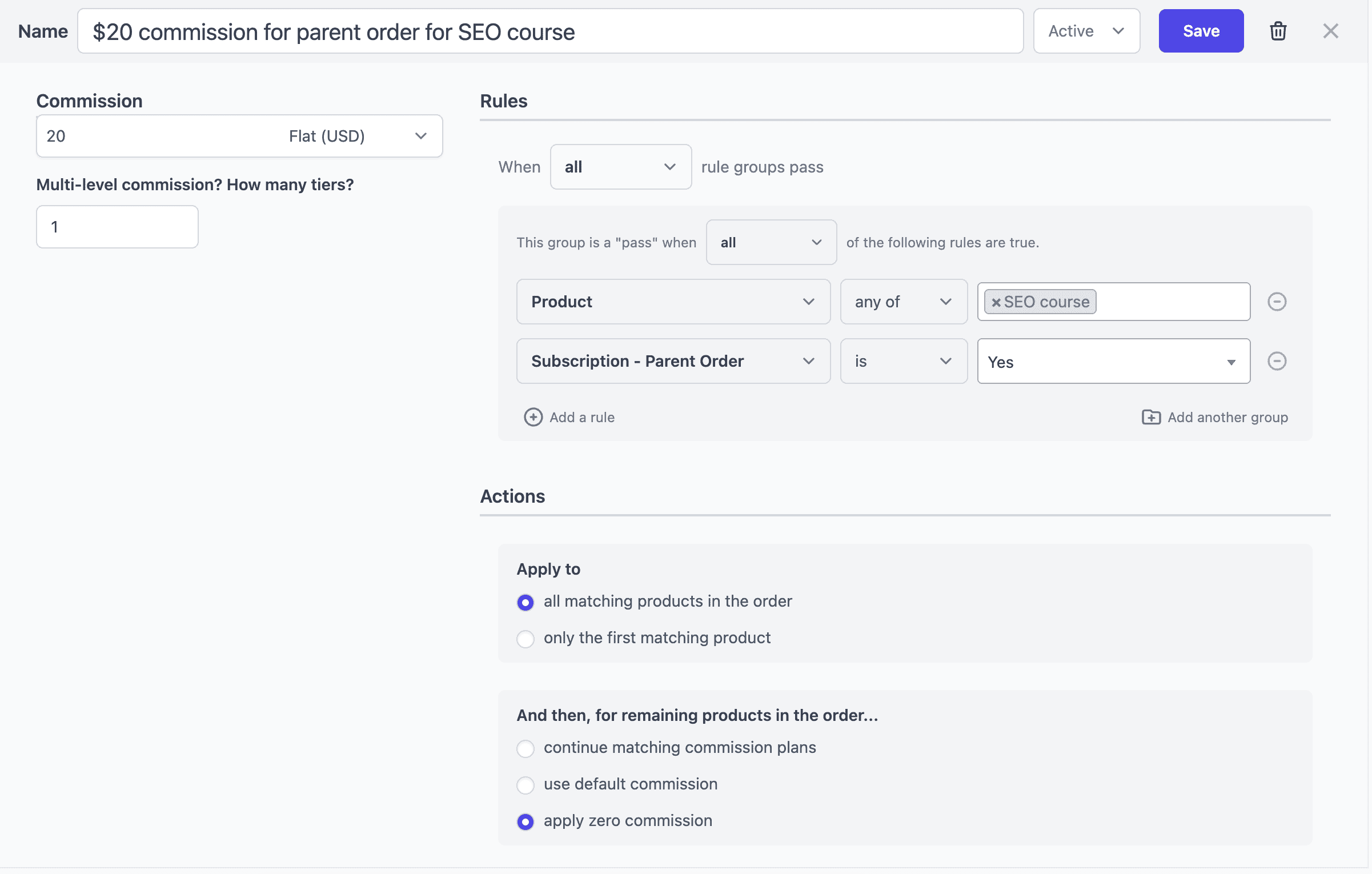
Let’s take an example. You want to offer $20 on the parent order and $10 on renewals for a specific SEO course subscription.
For parent subscription (first-time payment):
- Go to
WooCommerce > Affiliates > Plans. - Click on ‘Add a Plan’ to create a new commission plan.
- Name this commission plan, say ‘ $20 commission for parent order for SEO course’.
- Under Commission, specify the commission amount, $20 here.
- Under Rules, set the following:
- Select
Product > any of > SEO course. (Select Product category to choose all products from a specific category in case you want to set commission for a category) - Click on
Add a rule. Use the dropdown, click onSubscription > Parent Order. Set the rule asSubscription Parent > is > Yes. - Make sure
allcondition is selected underThis group is a 'pass' when.
- Select
- Under the Actions tab, set these:
- Apply to > all matching products in the order.
- And then for remaining products in the order…> apply zero commission. This is to ensure if any other products or upsells are in the order, affiliates won’t get a commission on those products.
- Select Active status from the dropdown at the top and click on ‘Save’.
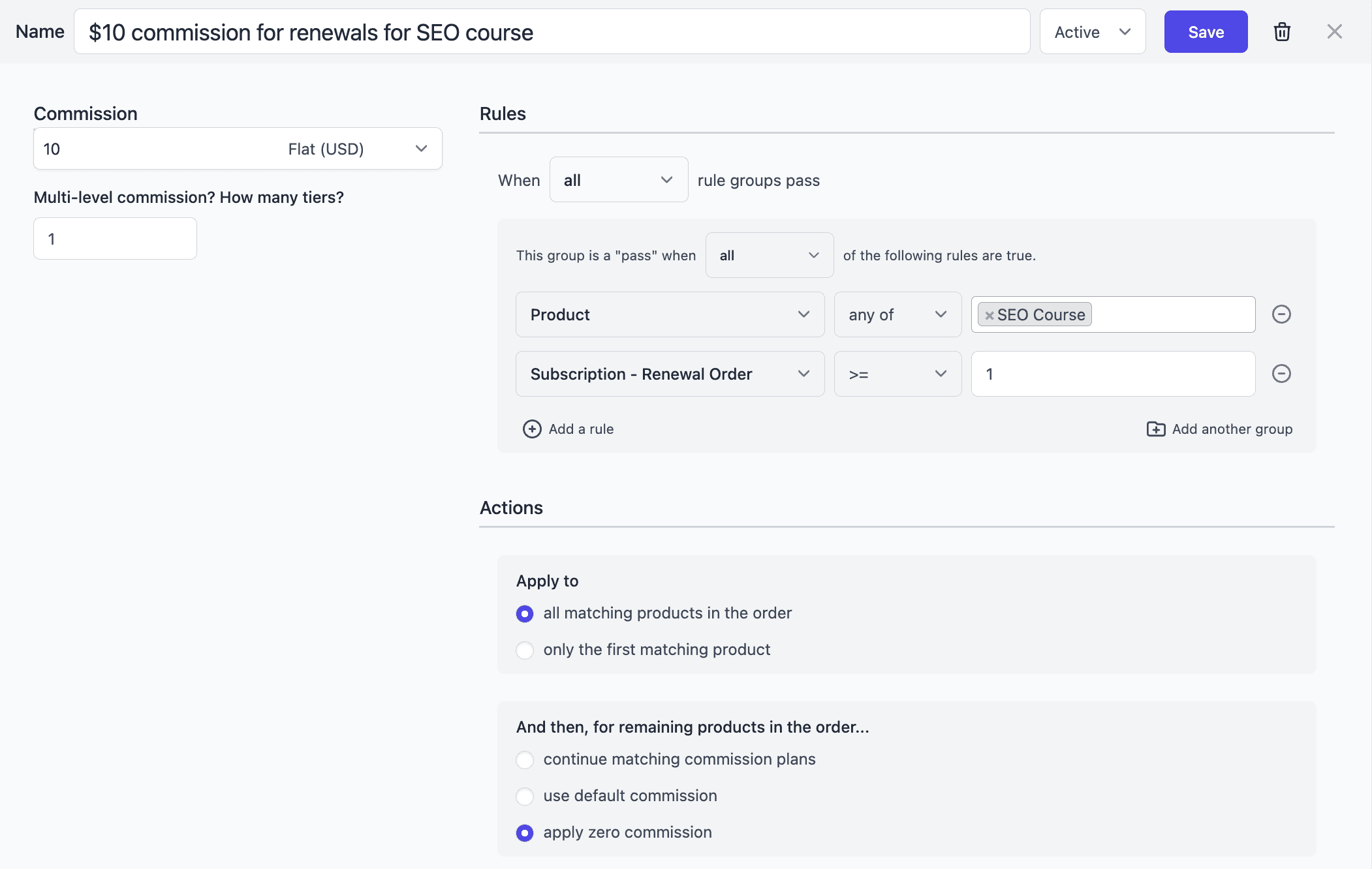
Now, for renewals:
- Create a new plan and name it
$10 commission for renewals for SEO course. - Under Commission, specify the amount as
$10. - Under Rules, set the following:
Product > any of > SEO course.Subscription Renewal >= 1.
- Save the plan.
Besides this, you can also set up commission plans for products, user roles, referral medium, affiliate tags, multi-tier commission, and lifetime commission.
For example:
- Set a higher commission for the Influencer tag or affiliate group.
- Create a three-tier commission structure for your SaaS referral network.
- Offer lifetime recurring commissions for affiliates who bring high-retention customers.
SaaS affiliate commission models (examples)
If you’re unsure what commission structure to offer, here are common models used by high-performing SaaS affiliate programs:
- Parent + renewal commission: Higher payout on the first order + smaller renewal commission for 3–6 months.
- Renewal-only commission: Useful for free trials where the first payment comes later.
- Lifetime recurring commission: Affiliates earn commission until the subscription is cancelled.
- Tier-based commissions: Higher recurring commission after affiliates cross referral milestones.
This flexibility is one reason why Affiliate for WooCommerce works well for SaaS businesses running long-term subscription models.
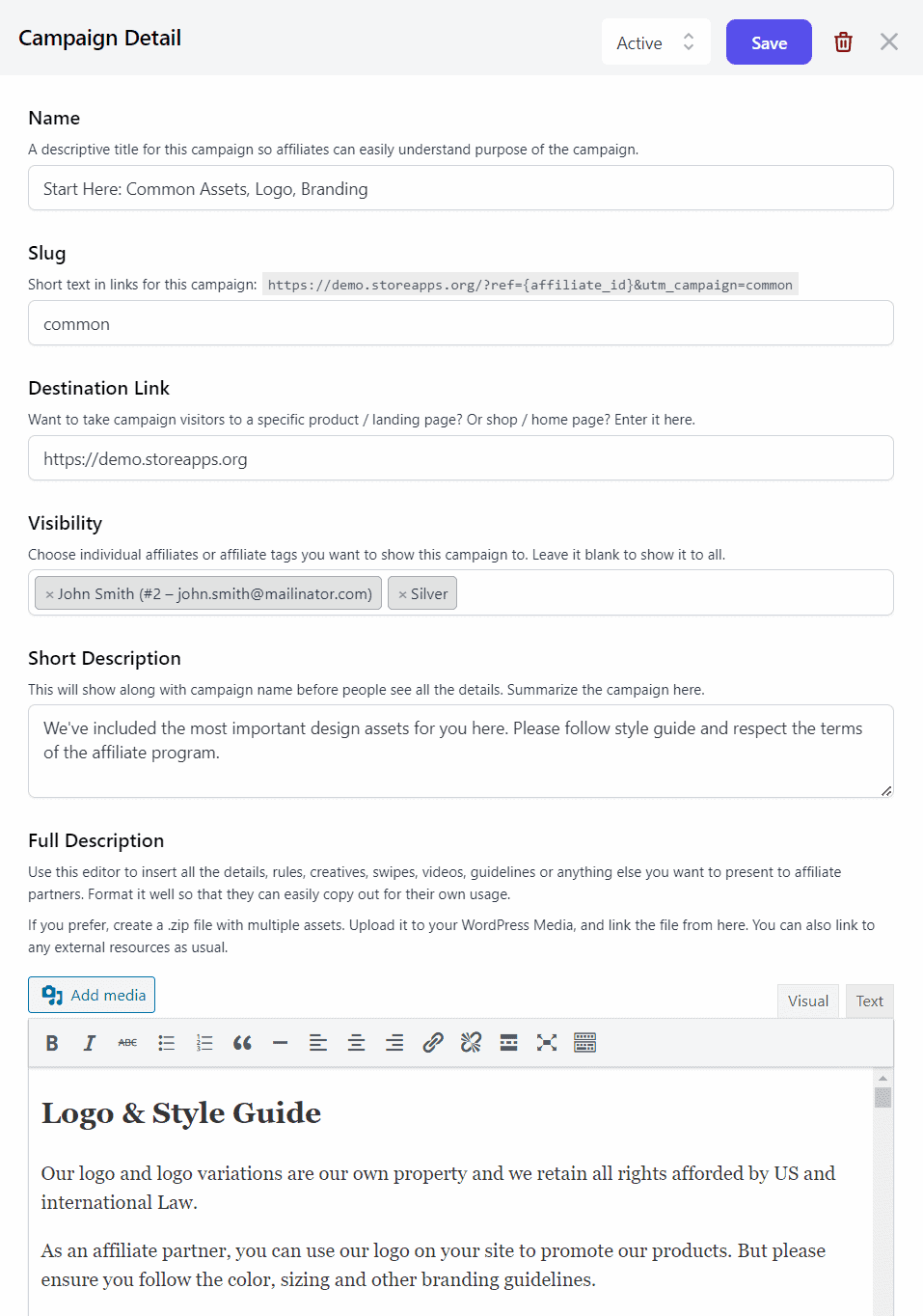
To help affiliates promote your SaaS product effectively, you can share marketing resources through campaigns.
Using Campaigns, you can upload:
- logos and banners
- email templates and swipe files
- videos, PDFs, and onboarding guides
- product images and promo creatives
You can also restrict campaigns to selected affiliates only.
Paying your affiliates
Affiliate payouts are simple once your program is active.
You can set automatic PayPal payouts on a schedule and also configure:
- Maximum payout amount
- Minimum threshold commission
- Refund period to avoid unfair payouts
You can also pay commissions manually or process payouts outside WooCommerce.
The plugin also supports store credit and reward points payouts using:
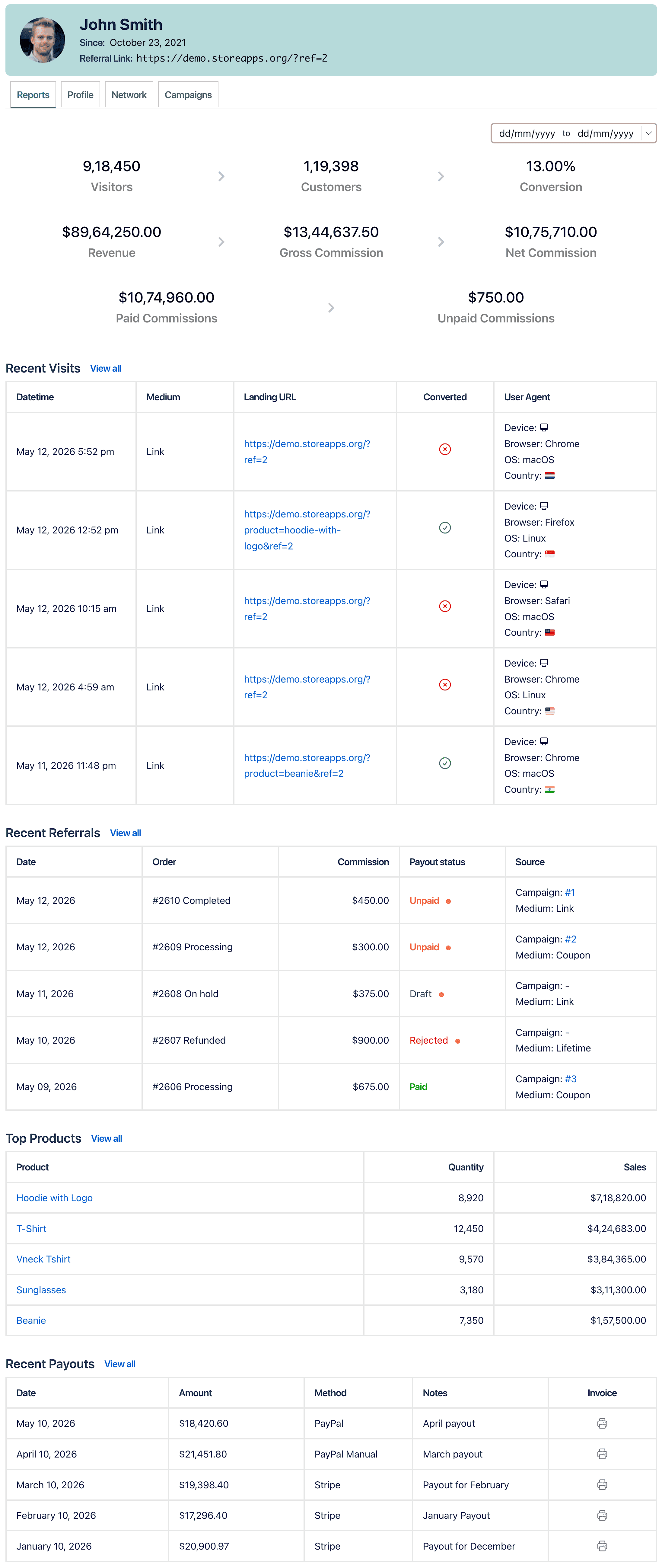
Track everything from a single place
Affiliate for WooCommerce keeps affiliate tracking clean and simple.
Store owners can track:
- net affiliate sales
- unpaid commissions
- refunds
- payment methods
- payout history
- order dates and commissions
Affiliates also get their own dashboard to track commissions, sales, products sold, and referral URLs.
That’s it. Your SaaS affiliate program in WooCommerce is ready.
Conclusion
Affiliate marketing is one of the smartest growth channels for SaaS businesses because it scales without heavy upfront costs.
With Affiliate for WooCommerce, you can create a complete affiliate program in WooCommerce, onboard affiliates, track referrals, and pay commissions from one dashboard.
Most importantly, you can create different commission rules for subscription parent orders and renewals, making it ideal for businesses focused on recurring revenue.
FAQ
What is a SaaS affiliate program?
A SaaS affiliate program allows partners, influencers, and customers to promote your subscription product and earn commissions when they generate sales.
How does affiliate marketing work for SaaS subscriptions?
Affiliates share referral links or coupons. When someone buys your SaaS subscription, the affiliate earns commission. Many SaaS affiliate programs also offer commissions on renewals.
Can I track renewals separately from first-time subscription purchases?
Yes. Affiliate for WooCommerce supports commission plans specifically for Parent Order and Subscription Renewal rules.
What is the best affiliate program for SaaS businesses?
The best SaaS affiliate programs offer recurring commissions, flexible commission rules, and easy tracking. Affiliate for WooCommerce is built for WooCommerce subscription-based stores and supports renewal-based commissions.