

There are endless plugins that are compatible with WooCommerce. Many of those plugins are very flexible and simple to use, allowing you to make a powerful and conversion-focused e-commerce store.
One such plugin is the official WooCommerce product add-on that lets you add as many custom options to your product pages as needed.
An example would be to display a text box to allow the user to enter something on a product.
Another example would be a radio button that allows the user to select from different product upgrades. Moreover, another option includes a checkbox that allows the user to add gift wrapping.
This plugin will improve customer experience, reduce customer inquiries and boost sales.
Moreover, if you could easily manage so many product addons in bulk from a single place, wouldn’t it be the icing on the cake?
This article will explain how to manage WooCommerce Product Add-Ons from one place with the Smart Manager plugin.
We’ll also cover some other popular WooCommerce extra product options plugins.
Read on.
What are WooCommerce add-ons?
WooCommerce add-ons are extensions or plugins that can be added to the WooCommerce e-commerce platform. They are designed to provide additional functionality and customization options for technical users who want to enhance their online stores.
These add-ons offer advanced features such as:
- Integrating with specific payment gateways.
- Enabling complex shipping options.
- Implementing advanced product variations.
- Integrating with external systems or APIs.
- Providing in-depth analytics and reporting capabilities.
They allow users to tailor their WooCommerce stores to meet their specific requirements and make their online selling process more efficient and flexible.
Why should you use product add-ons?
Some people call them “product add-ons,” others refer to them as “extra product options”.
Allow us to explain this in more detail.
Let’s assume that you are a jewelry shop owner and you are trying to sell some gold and platinum rings online. How about an option to engrave the rings or add diamonds in a bespoke manner?
Consider these cases:
- The preference for a customized ring for a wedding.
- Some would request the jewelry to be presented as a gift.
- Some would want the ring for occasions such as birthdays, or anniversaries.
All these occasions require a different approach.
In such cases, all you need is the product add-ons plugin. Because the core WooCommerce only allows you to create variations, not extra product options.
Not only can you add custom options, but you can also increase the product’s price based on the user’s selection and conditionally show fields based on their choices. A smart way to boost your sales!
With that said, let’s look at how to add product add-ons with the help of plugins.
The official WooCommerce product add-ons plugin
With 100,000+ active installs, the WooCommerce Product Add-Ons is developed by the WooCommerce team itself. It’s the most widely used option in this category. That said, it averages 3.4 stars on WooCommerce.com. Reviewers most often point to the lack of conditional logic and no minimum or maximum quantity settings, worth knowing before you buy if either matters for your store.
This plugin is a good place to start if you’re trying to make your product pages more powerful. Moreover, if you are looking for neat ways to present your products, this is the way to go.
Adding custom options to a single product page is no longer a hectic task. Concerning the plugin usage, online retailers dealing with jewelry, books, gifts, clothing & apparel, electronics and many more will greatly benefit from this plugin.
Quick overview of main features
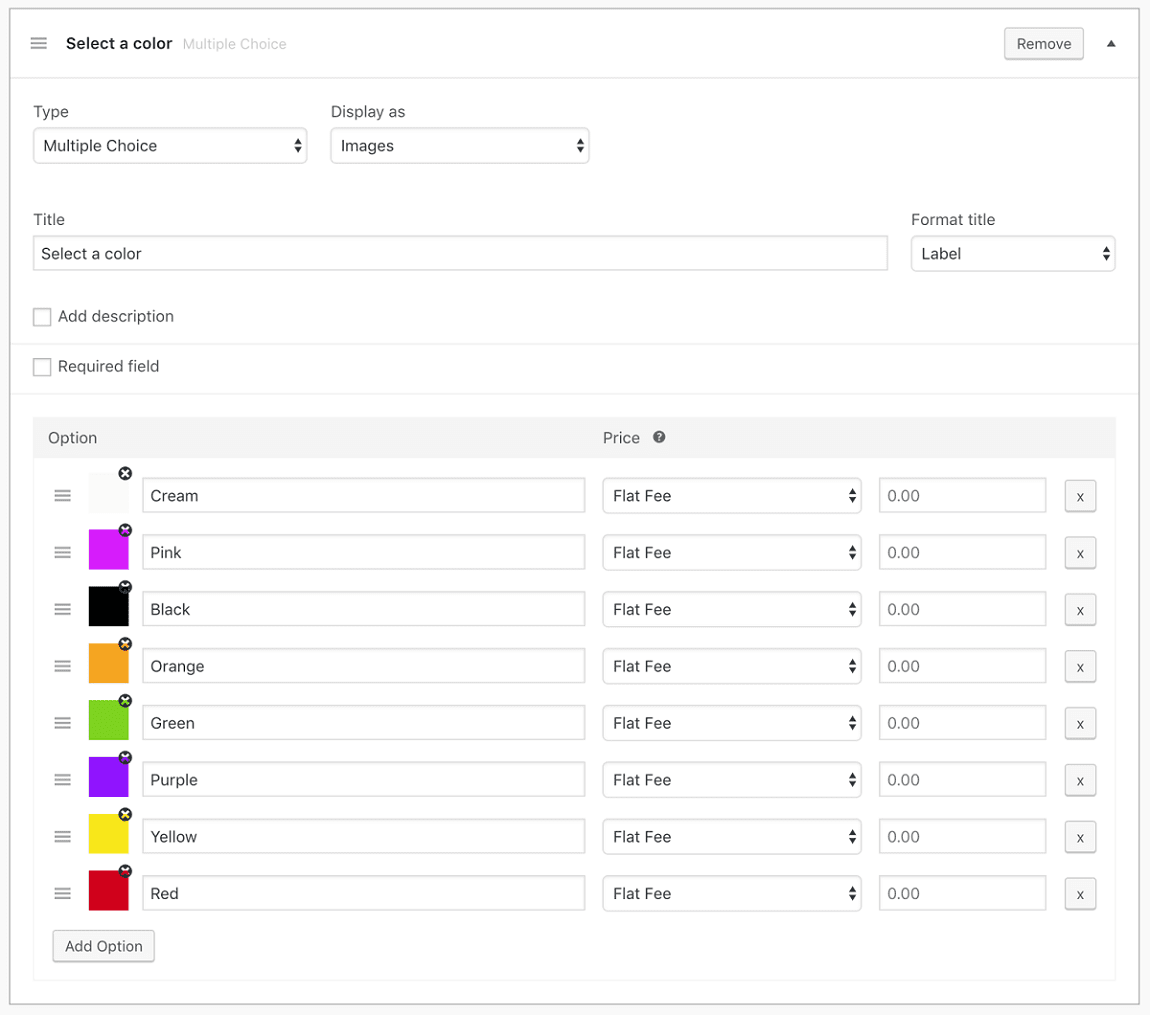
- Apply plugin settings to all products, or a few selective categories.
- Give buyers the chance to select from images, drop-downs and radio buttons.
- Add custom price fields to your products.
- Enable a spinner input field to let buyers select the product quantity.
- Add optional top-up items or services as checkboxes.
- Give short or long input text field options to customers so that they can add notes.
- Enable adding headings between two add-ons to keep your product page clean.
- Upload file attachments to deliver more information without filling up the product page.
- Add different pricing for all your product variants (color or size variants).
- Create a product-specific add-on and exclude all global add-ons for that product.
- Insert proper information about each of the extra input or display fields.
- Display all additional fields in the layout that match your theme.
Benefits of using WooCommerce product add-on plugin
Regardless of how many features the plugin has, it’s the convenience of the plugin that proves it is valuable for you.
So, let’s take a look at the perks offered by WooCommerce Product Add-ons integration:
Custom fields
Adding extra product options and custom fields is a fast and simple feature. For instance, you can add fixed discount details or an extra field related to the product specification that you want to highlight.
Add variants
Be it color or size variants, variable products are supported by the plugin. So, if your online store sells a product with multiple variants, it will be quite useful for your business.
Promotions
For instance, you can add a short text, a long text, or a heading to promote the same product or a product you want to upsell.
Enable services

The plugin allows business owners to add additional services such as gift wrapping, warranty, insurance, special transfer and many more on the product page without any hassle.
Doing so enhances the customer experience.
Educate buyers
The plugin allows file uploads and adding extra text fields. So, you can provide more information about the product to your buyers. You can attach informative files such as documentation, images and specifications to boost sales.
Customer notes and other such inputs
Extra text input fields (short and long) on the product page make a huge difference as they support amplified sales and customer information. It will let customers add notes in the relevant order without much hassle.
Order customization
For e-commerce businesses like watches, stationery and jewelry, the facility of adding notes plays a significant role. Customers can add the required text for product engraving and get 100% customized orders. This makes offering personalized service effortless.
Pros, cons and pricing
Just like any other plugin, the WooCommerce Product Add-Ons come with its fair share of pros and cons.
Before jumping to conclusions, focusing on both these elements is vital to finding the right match for you.
Pros:
- Easy to use and has a super-intuitive interface.
- Lets you add unlimited images to make the product presentation impressive.
- The drag-and-drop form builder makes arranging fields an effortless task.
- The interface design is UX-oriented and simplifies the product page-building process.
- Works well with WooCommerce Subscriptions.
Cons:
- Compatibility with third-party multi-currency extensions is not that impressive.
- No default selections for checkboxes and radio buttons.
- Inflexible for some high-level customizations. For example, if a color variant isn’t sold in a particular size, there’s no way to mark it “unavailable.”
Pricing: $79
Should you buy the WooCommerce Product Add-Ons plugin?
Clients will purchase from a store that offers a smooth and superior user experience that understands their shopping needs well.
With this Product Add-Ons plugin, building such an impressive online store is possible as it supports endless customization.
So, if you’re looking for a viable way to empower your WooCommerce store, then this plug-in is the right choice to make.
Why use Smart Manager to manage the WooCommerce Product Add-Ons plugin?
Using add-ons is a great thing. But what will you do if you want to manage these add-ons repeatedly in a few minutes rather than investing endless hours?
What if there are hundreds of similar projects? We are sure losing out on your precious time isn’t an option!
Managing product add-ons can become a tedious errand assuming you go inside every one of them to make changes as and when required.
But with Smart Manager, you can make those changes directly from a single Excel-like spreadsheet, without moving back and forth from each add-on.
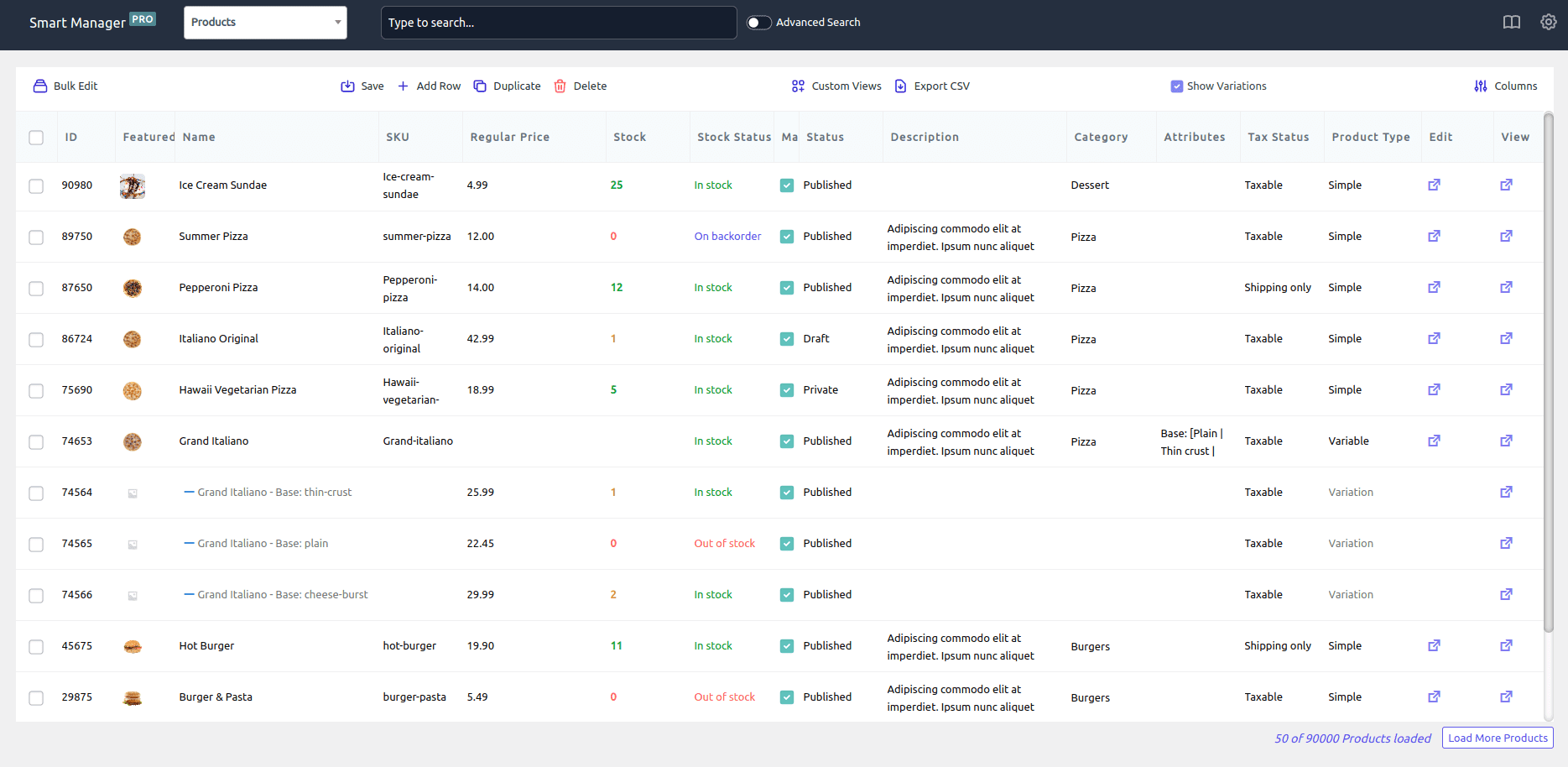
One-page management with Excel-like spreadsheet
Simply update all your add-on data in one go. Be it changing prices or adding a personal message, adding fees or shipping options, you have full flexibility to edit the add-ons directly using Smart Manager.
Don’t bother digging inside every item to roll out an improvement. This is yet another efficient and time-saving component we were talking about.
Make instant searches
Another Smart Manager highlight that saves you time through the ‘Search’ feature. Rather than digging through thousands of items, simply search using keywords. Smart Manager will fetch the desired results in the blink of an eye.
Simply make a change and that’s it.
Export add-ons data as CSV
Export all your add-on data for future reference. You can also Export data based on date and search filters.
Use cases of Smart Manager to manage product add-ons
There is a lot to cover but for now, we have only covered four of the most prominent use cases, based on requests from our customers who use both the plugins.
Add shipping options directly
Consider a scenario wherein, you want to provide three courier options for shipping on only twelve out of the fifty shoe varieties in your store.
So, instead of going through each shoe, you can search for the desired shoes using Smart Manager and add a shipping option.
Upsell higher plans, support, or warranty
This is incredible for subscription products as well as physical products.
You want to upsell a higher plan at 20%; ask customers to pay an additional $10 for email support or $15 for both email and phone support. For physical products, you pitch an extended warranty for two years at a nominal price.
To do this for every item individually is certainly not a great choice. Use Smart Manager’s Excel-like spreadsheet to add these upsell options directly.
Add gift wrapping option at an extra buck
To delight customers, you plan to add a gift-wrapping option for just an additional $1 for all the watches (say 120) available in your store.
Again, if you want to save time and not repeat that process for every watch; search for ‘watches’ in Smart Manager, select all watches and add gift wrapping.
All your watches will now display ‘Add gift wrapping for $1’ on their product pages.
Show customization options
Remember the rings’ example at the start? With Smart Manager, you can also add customization options to any or all of your products in minutes.
Quick comparison: WooCommerce product add-ons plugins
| Plugin | Starting price | Free version | Standout feature |
|---|---|---|---|
| WooCommerce Product Add-Ons (official) | $79 | No | Built by the WooCommerce team, deepest theme/ecosystem compatibility |
| Acowebs WooCommerce Custom Product Addons | $49/year | Yes | Lookup-table and custom-formula pricing for measurement-based products |
| WowAddons by WPXPO | Free | Yes | 22+ field types included free, no paywall on the basics |
| Advanced Product Fields (Studio Wombat) | $79/year | Yes | Lightweight, conditional logic, translation-ready |
| Barn2 WooCommerce Product Options | $149/year | No | Most advanced price formulas, live preview add-on |
| PPOM (Personalized Product Option Manager) | Free | Yes | Built specifically for personalized/made-to-order products |
| WooCommerce Product Add-Ons Ultimate | $79 | No | Per-character pricing, made-to-order calculation fields |
| YITH WooCommerce Product Add-Ons & Extra Options | Free version available, premium from ~$100/year | Yes | Deep integration across the wider YITH plugin ecosystem |
Other popular WooCommerce product addons plugin
There are other good WooCommerce extra-option plugins you can consider, including two solid free options if budget is the deciding factor.
Check them out below:
Advanced Product Fields (Product Addons) for WooCommerce
There are over 50,000+ active installs of this plugin on WordPress.org, it offers conditional logic and dynamic product pricing based on custom field choices.
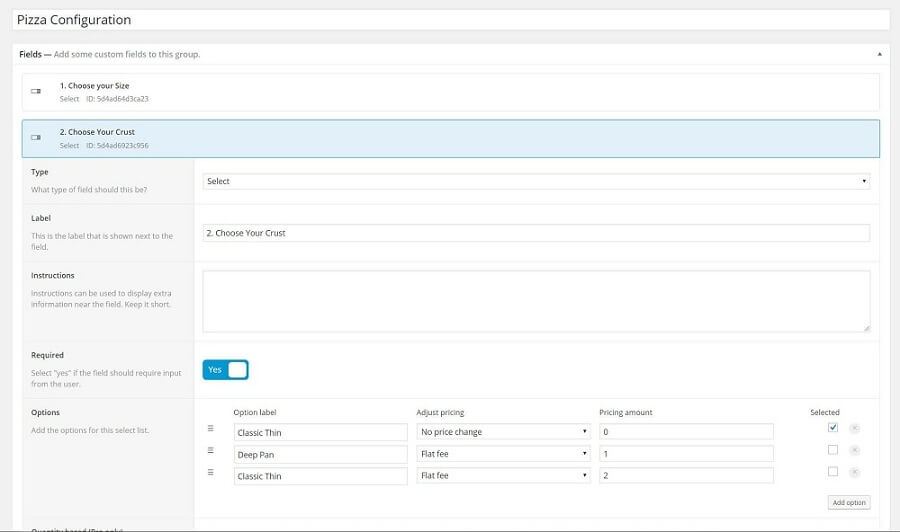
Top features:
- The backend manufacturer is intuitive, just like Advanced Custom Fields.
- You can browse nine different structure components.
- You can change the WooCommerce item cost in the truck in light of the field value(s).
- Works with both basic and variable items. It also upholds variable items over Ajax.
- The plugin is also translation-ready.
Pros:
- Genuinely useful free version, not just a crippled trial.
- Lightweight, built for performance, minimal impact on page speed.
- Backend modeled on Advanced Custom Fields, familiar to most WordPress developers.
Cons:
- Fewer advanced pricing options (formulas, lookup tables) than Acowebs or Barn2 without the premium tier.
Pricing: Free version on WordPress.org, premium plans from $79/year
Acowebs WooCommerce Custom Product Addons
A pragmatic, budget-friendly pick that’s repeatedly named the best all-round product addons plugin in 2026 comparison guides. It stands out for lookup-table and custom-formula pricing, useful for measurement-based products like framed prints or fabric by the yard.
Top features:
- 22+ field types including file upload, image swatches and color pickers.
- Drag-and-drop, multi-column form builder.
- Lookup-table pricing for measurement-based products (e.g. price by height and width).
- Custom price formulas without writing code.
- Lightweight front end, built to avoid slowing down product pages.
Pros:
- Best-in-class lookup-table and formula pricing for measurement-based products.
- Budget-friendly premium tier at $49/year, one of the lowest in this list.
- Free version is a real, usable starting point.
Cons:
- Custom pricing and deeper customization are locked behind the Pro version.
Pricing: Free version on WordPress.org, premium plans from $49/year
WowAddons by WPXPO
A free-first option worth including for stores that want a full feature set without committing to a paid plugin first. Trusted by 60K+ businesses, with a strong support reputation.
Top features:
- 22+ field types available, including in the free version.
- Modern drag-and-drop builder.
- Conditional logic included free.
- Products field lets you upsell real store products as add-on choices.
- Dynamic pricing with regular and sale prices per add-on.
Pros:
- Most generous free tier in this list, 22+ field types and conditional logic with no paywall.
- Large, active user base for a relatively newer plugin.
- Modern, beginner-friendly builder.
Cons:
- Newer to market than several other plugins in this list, shorter track record.
Pricing: Free on WordPress.org, Pro version available for advanced needs
WooCommerce Product Add-Ons Ultimate
This is another easy-to-use WooCommerce extra product options plugin. It provides 16 extra field types such as checkboxes, dropdowns and transfer choices.
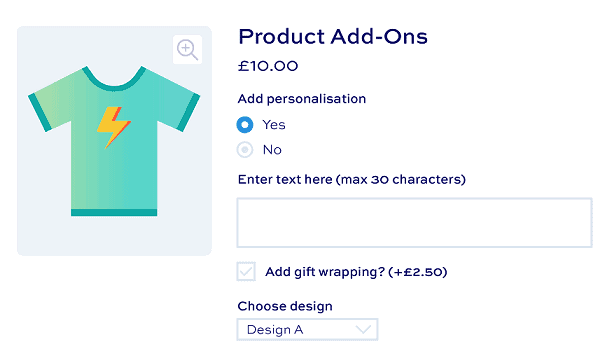
Top features:
- Assign prices to your product add-on fields or offer for free.
- Add price per character costs to text fields.
- Create global fields and assign them to multiple products or categories.
- Accept custom prices (name your price fields).
- Display product images as image swatches.
- Checkbox groups, percentage-based pricing, group toggles and tabs.
Pros:
- Per-character pricing, well suited to engraving and made-to-order products.
- Can display other store products as add-on choices for upselling.
- Fully compatible with WooCommerce Subscriptions.
Cons:
- No free version.
- Pricing scales steeply for the full plugin bundle, up to $899.
Pricing: From $79 (tiered pricing up to $899 for plugin bundles)
Barn2 WooCommerce Product Options
The most fully-featured plugin in this list, worth recommending to stores that need advanced pricing logic rather than simple checkboxes. Includes a live preview add-on so shoppers can see uploaded designs on the product before buying.
Top features:
- 16+ field types: text, dropdowns, file uploads, checkboxes, radio buttons, color/image swatches, date pickers and more.
- Advanced custom price formulas, not just flat or percentage fees.
- Conditional logic to show or hide options based on other selections.
- Optional live preview add-on for uploaded images.
- Can display other store products as upsell options.
Pros:
- Most advanced price formula engine of any plugin in this list.
- Optional live preview add-on, useful for print-on-demand and personalized products.
- Highest-rated plugin reviewed here.
Cons:
- No free version, and the highest starting price in this list.
- Price formulas have a learning curve, each option needs a numeric value before it can drive a calculation.
Pricing: From $149/year for a single site, no free version
YITH WooCommerce Product Add-Ons & Extra Options
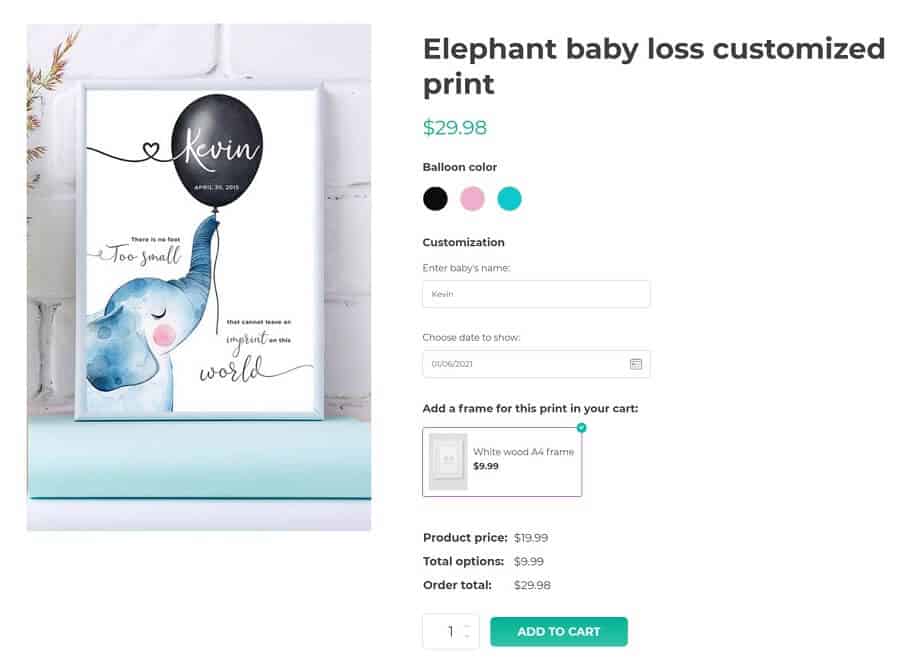
With 20,000+ active installs on WordPress.org, the plugin allows you to make numerous choices for items, including radio buttons, checkboxes, drop-down menus and custom text inputs.
These choices can be free or chargeable.
Top features:
- Create unlimited blocks of options to show specific products or product categories.
- Promote products in your store as additional options.
- Conditional logic to show or hide the options based on the user’s selection.
- Customize every option the way you want it to appear on the product page.
- Compatible with WPML.
Pros:
- Free version available, backed by an established vendor with a large plugin catalog.
- Integrates tightly with other YITH plugins if you already use them.
Cons:
- Settings page is more cramped and has a steeper learning curve than tidier rivals.
- Premium version is pricier than several stronger options in this list.
Pricing: Free version available on WordPress.org, premium plans from around $100/year
PPOM (Personalized Product Option Manager)
A strong second free option alongside WowAddons. It’s built specifically for personalized and made-to-order products, think engraving, custom apparel, or print-on-demand.
Top features:
- Text, textarea, select, radio, checkbox, date and file upload fields, even in the free version.
- Per-option pricing on select, radio and checkbox fields.
- Conditional logic and dynamic pricing.
- Pro version adds image previews (customers see their text/upload rendered on the product) and price matrix discounts.
Pros:
- Generous free tier, most common field types are free, not just a limited trial set.
- Purpose-built for personalized and made-to-order products, matches this article’s own engraving example directly.
Cons:
- Image preview and price matrix discounts require the Pro upgrade.
Pricing: Free on WordPress.org, Pro version available for image preview and advanced pricing
Conclusion
WooCommerce Product Add-Ons is a great add-on for adding product customization and encouraging your customers to buy more.
But using Smart Manager to manage those add-ons is a smarter move. Wouldn’t it be so much better to save time, resources and effort with a plugin as efficient as Smart Manager?
Not only add-ons, but you can also manage and bulk edit WooCommerce products, orders, coupons, users, subscriptions, any WordPress post type and their custom fields.
So, if you are using both Smart Manager and WooCommerce Product Add-Ons plugins, update to the latest version and have access to this compatibility.
And if you are new to Smart Manager, get Smart Manager now.
FAQ
Can extra product options be used to create personalized or customized products for customers?
Yes, extra product options can be used to create personalized or customized products for customers.
How do I manage and track orders that include WooCommerce product add-ons?
Use the order management features built into WooCommerce, or the ones bundled with your add-ons plugin. These typically cover order tracking, reporting, and integration with your inventory system, enough to keep add-on orders organized without extra tools.
Is there a free WooCommerce product add-ons plugin?
Yes. WowAddons and PPOM are both free with optional premium upgrades. Acowebs and YITH also offer free versions, with paid tiers for advanced features like custom pricing formulas or image previews.
What’s the difference between product variations and product add-ons?
Product variations are built into WooCommerce. Customers pick from preset options, like size or color, that you set up in advance. Product add-ons go further: customers can enter custom text, upload files, or choose optional paid extras like gift wrapping. That’s information WooCommerce doesn’t collect natively.
Can I use more than one product add-ons plugin on the same store?
It’s not recommended. Running two add-ons plugins at once can cause field conflicts, duplicate pricing calculations, or checkout errors. Choose one plugin that covers your store’s specific needs instead.
Will a product add-ons plugin slow down my product pages?
It depends on the plugin. Lightweight options like Acowebs and Advanced Product Fields are built specifically to minimize front-end load, while feature-heavy plugins with many field types can add more scripts to your product pages.