


The best WooCommerce plugins for holiday sales prepare your store across 4 areas: bulk catalog updates, checkout speed, promotional gift cards, and abandoned cart recovery. Selecting reliable tools before peak season protects your revenue and keeps your server fast during heavy traffic spikes.
Most holiday marketing guides focus purely on gross page views. That traffic number is vanity. If 5,000 visitors arrive during Black Friday and your checkout freezes, high traffic only produces server errors.
Research from Baymard Institute shows the average e-commerce cart abandonment rate sits at 70.22%. Resolving checkout friction can recover up to 35.26% of those lost transactions. Preparing your stack beforehand is what converts festive traffic into settled orders.
How to choose the best WooCommerce plugins for holiday sales
Unvetted plugins cause database bloat right when your store needs speed.
The best WooCommerce plugins for holiday traffic must handle concurrency without introducing database locks or slow scripts. Every tool you activate should deliver clear revenue lift or operational time savings while staying fully compatible with modern WooCommerce standards.
Unvetted plugins cause database bloat right when your store needs speed. In legacy WooCommerce setups, orders were stored across wp_posts and wp_postmeta. This scattered a single order across dozens of rows.
Under high concurrency, simultaneous write operations lock database threads. High-Performance Order Storage (HPOS) moves order data into dedicated, indexed tables. WooCommerce core benchmarks confirm HPOS inserts orders roughly 5x faster and speeds up order search queries by up to 40x.
Before installing any holiday extension, verify three criteria:
- HPOS compatibility: Your extensions must support HPOS so your checkout queries run through normalized tables.
- Database footprint: Avoid tools that make unindexed queries or poll your server with frequent AJAX requests on the cart page.
- Operational reliability: Test your discount rules and bulk pricing updates on a staging site before touching live products.
Audit your stack at least two weeks before Black Friday so your team can test every coupon and checkout flow safely outside your live freeze period.
For some highly recommended plugins for Black Friday sales, check out the video.
Manage stock, products and variations in bulk
Manage stock, products and variations, update prices in bulk within minutes. Peak holiday sales require quick inventory adjustments, flash price changes, and margin corrections across your entire catalog.
Smart Manager
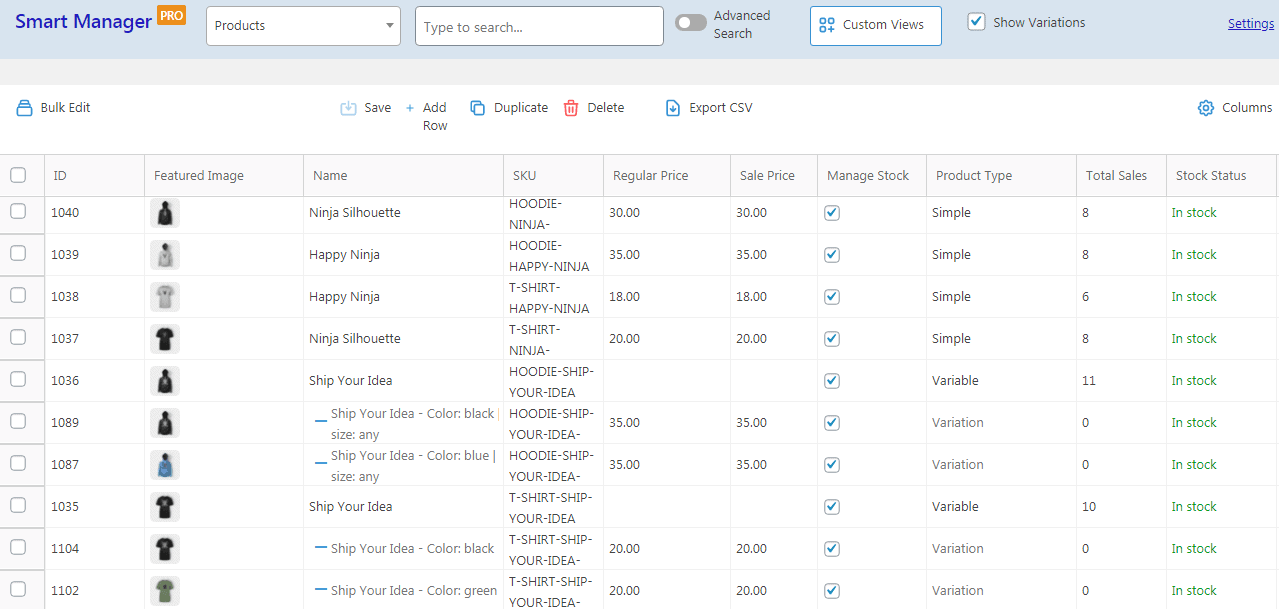
Smart Manager provides an Excel-like spreadsheet to view, filter, and edit thousands of WooCommerce products, orders, coupons, and customer records from a single screen.
Why use this plugin?
- Edit prices, sale schedules, and stock levels inline like a spreadsheet.
- Update thousands of products or variations in batches without server crashes.
- Filter products by category, attribute, or stock status to run bulk discounts in seconds.
- Export filtered order and product data quickly for fulfillment teams.
Recently, an online pet supplies retailer needed an urgent 8% distributor surcharge price increase right before peak season. Their catalog had 10,000 product records (2,500 parent products and 7,500 variations). Native WooCommerce bulk edit timed out at 200 items with 504 Gateway errors. Using Smart Manager, the merchant processed the entire catalog in 4 minutes 18 seconds across 100 background chunks without server interruptions.
Bulk Variations Manager
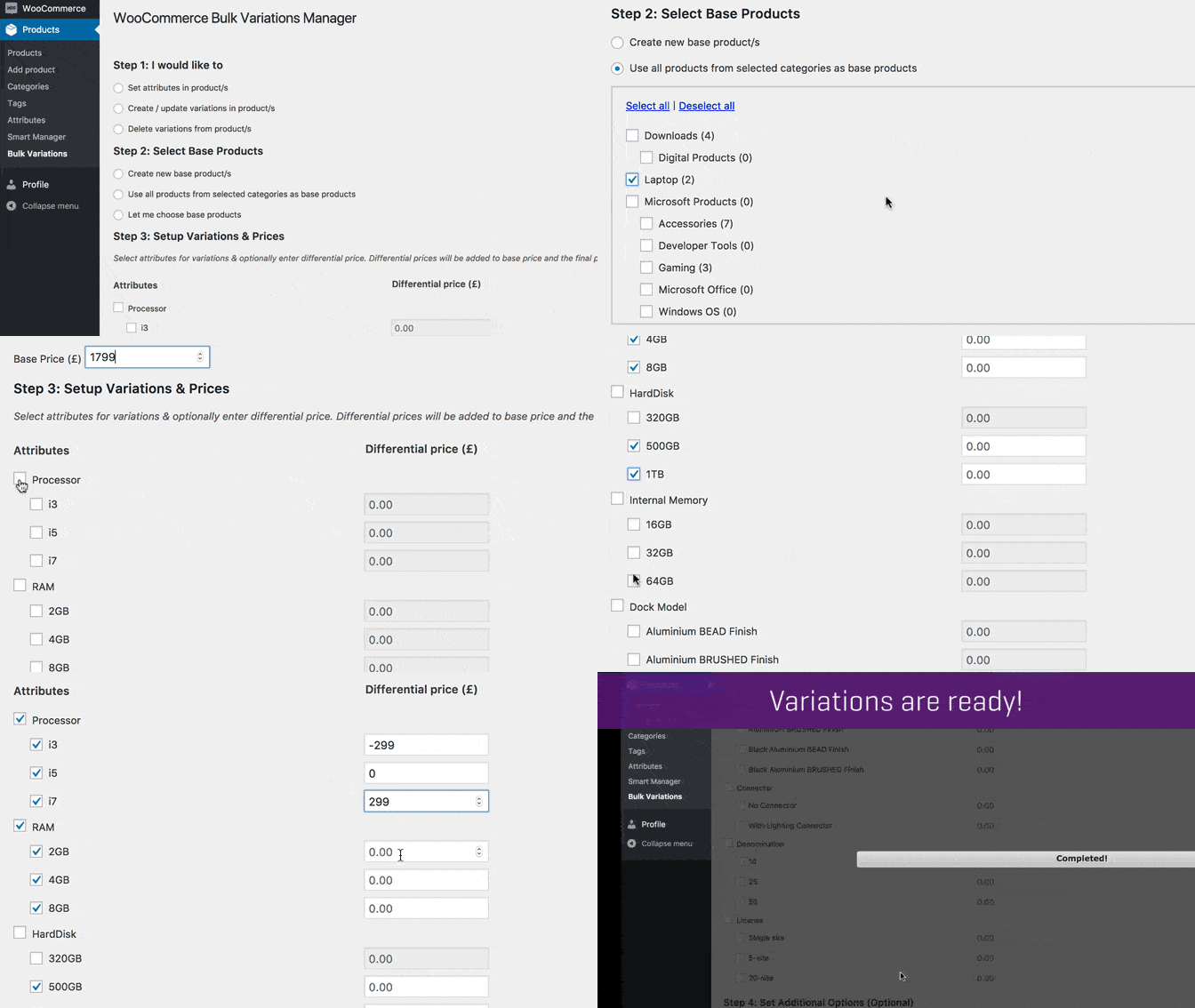
Bulk Variations Manager allows you to create and update product variations in bulk using a structured matrix grid.
Why use this plugin?
- Add new sizes, colors, and holiday gift packaging across multiple parent products at once.
- Set distinct regular and sale prices for specific variation combinations in seconds.
- Modify stock levels and backorder rules for seasonal product bundles.
Managing variable items manually during holiday preparations wastes dozens of administrative hours. This tool eliminates repetitive manual clicks so you can launch seasonal inventory on time.
WooCommerce Stock Manager
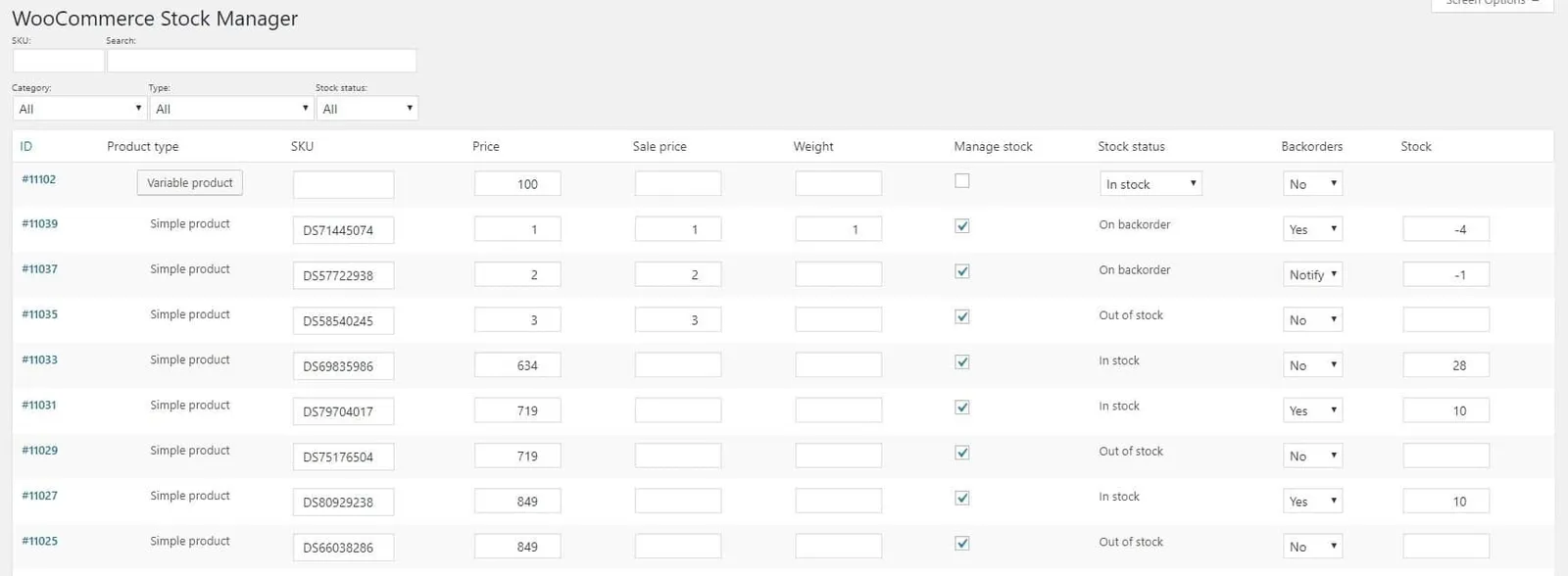
WooCommerce Stock Manager is a free, widely-used inventory management plugin for WordPress that lets you manage stock for products and variations from a centralized interface.
Why use this plugin?
- Clean tabular screen to adjust inventory quantities, backorders, and stock status.
- Color-coded cells that highlight low-stock and out-of-stock items immediately.
- Built-in CSV import and export functions for simple inventory audits.
For small stores wanting a straightforward free tool to monitor inventory counts before BFCM, this plugin handles stock level maintenance reliably.
Run targeted offers in the sales funnel and sell more
Targeted sales funnel offers allow merchants to present relevant product upgrades and order bumps right when customer buying intent is highest.
Smart Offers
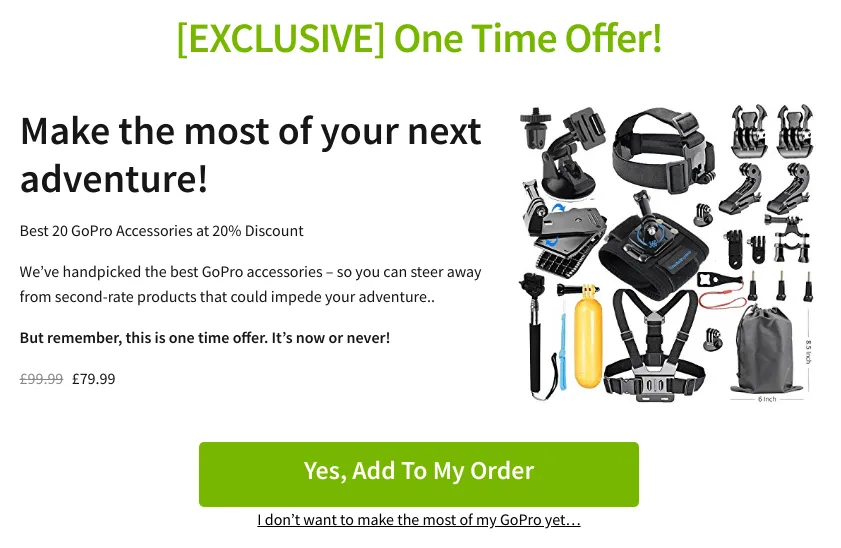
Smart Offers helps you design and automate personalized upsells, cross-sells, BOGO deals, and order bumps throughout your store’s buying journey.
Why use this plugin?
- Display targeted upsell offers on the cart page, checkout page, or thank-you page.
- Set dynamic rules based on cart totals, specific products, customer purchase history, or user roles.
- Allow shoppers to accept add-on products with a single click without re-entering payment details.
- Prevent checkout abandonment by showing tailored exit-intent offers.
A generic store-wide 20% discount eats into your margin. Presenting a relevant accessory or holiday gift box at checkout lifts average order value while protecting baseline profits.
Create coupons in bulk and schedule them
Automating promotional discounts and gift cards lets you run multi-day holiday campaigns without staying glued to your WordPress dashboard at midnight.
Smart Coupons
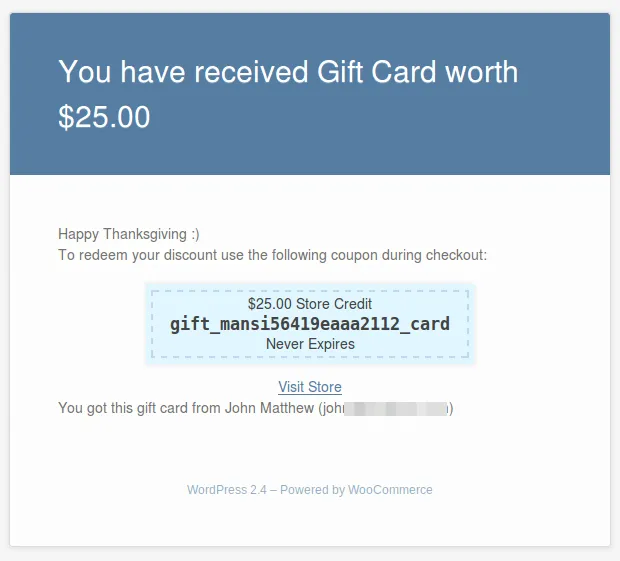
Smart Coupons is the leading coupon, store credit, and gift card plugin for WooCommerce, powering promotional campaigns on more than 27,000 stores.
Why use this plugin?
- Sell digital gift cards that recipients can redeem across festive shopping campaigns.
- Generate unique coupon codes in bulk to prevent discount abuse on deal sites.
- Issue store credit for customer refunds or festive loyalty rewards.
- Set up advanced discount rules like WooCommerce coupon strategies for holiday sales, tiered volume discounts, and BOGO deals.
- Share direct discount links for holiday email campaigns using auto-applying holiday discount codes.
Selling digital gift cards for holiday shoppers provides immediate upfront cash flow. Gift cards solve shopping dilemmas for last-minute buyers while bringing new shoppers to your catalog after the holiday peak passes.
Optimize checkout based on what you sell
Checkout optimization removes unnecessary form fields and steps so buyers can complete purchases before distractions pull them away.
Cashier for WooCommerce
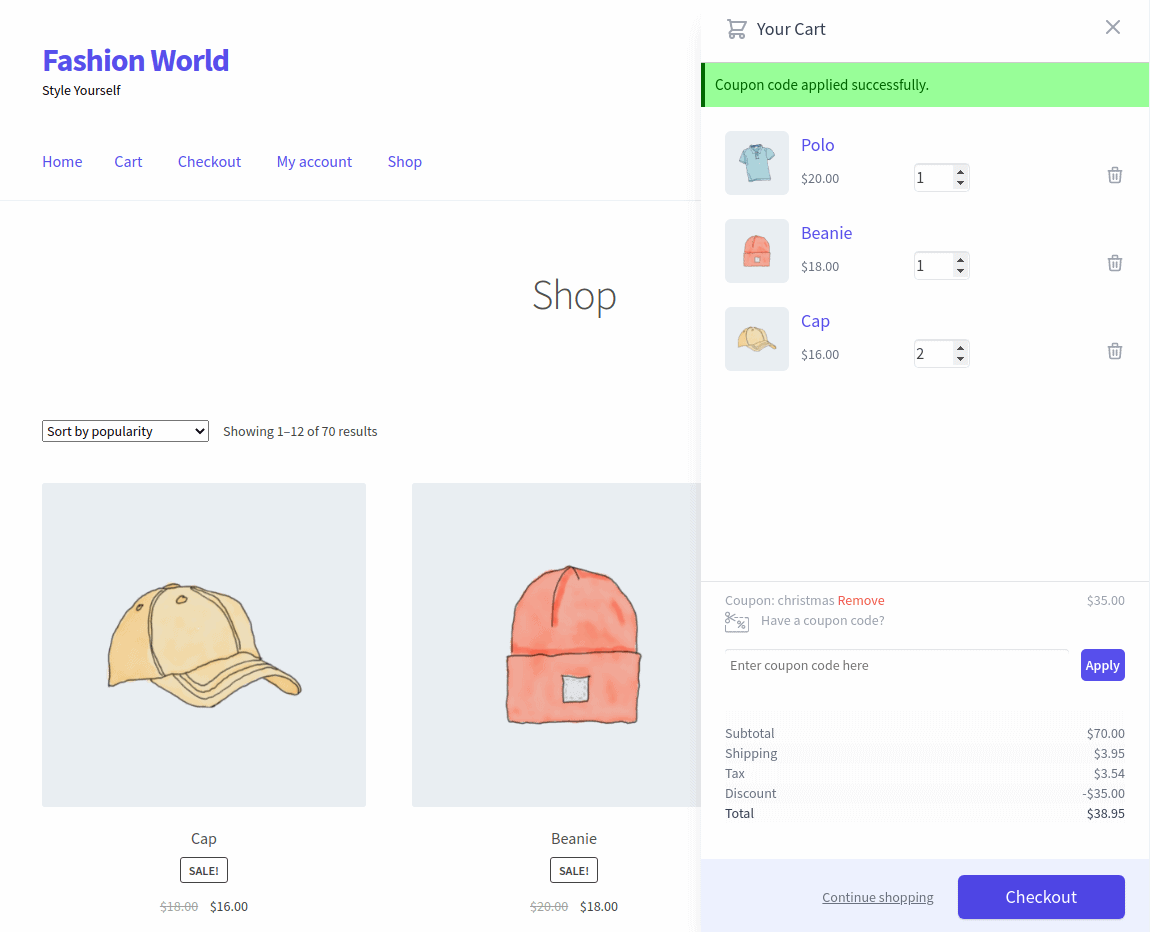
Cashier for WooCommerce speeds up purchasing. It bundles Buy Now buttons, direct checkout redirects, an interactive side cart, and custom checkout field management.
Why use this plugin?
- Add instant Buy Now buttons on product and shop pages that send buyers straight to checkout.
- Display a sliding side cart that lets customers review items and checkout without leaving the page.
- Skip unnecessary cart steps for single-item digital downloads or flash sale items.
- Remove redundant checkout fields to shorten form completion time on mobile devices.
Lengthy checkout forms destroy mobile sales. A direct one-page flow eliminates multi-step redirects. This keeps buyers focused on finishing payment.
WooCommerce One Page Checkout
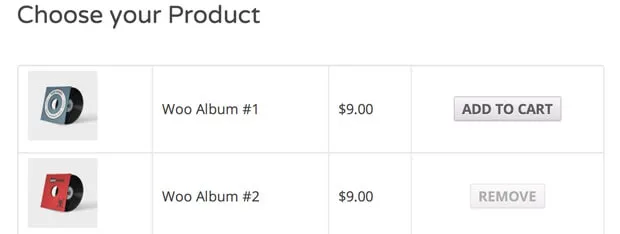
WooCommerce One Page Checkout displays both product selection and payment forms on a single dedicated landing page.
Why use this plugin?
- Built-in templates to display curated holiday gift bundles alongside checkout fields.
- Customers can add or remove items and enter payment details without page reloads.
- Suitable for holiday landing pages, promotional bundles, and single-product promotions.
For dedicated festive campaigns, sending paid ad traffic to a focused one-page sales funnel delivers higher conversion rates than a standard catalog layout.
CheckoutWC
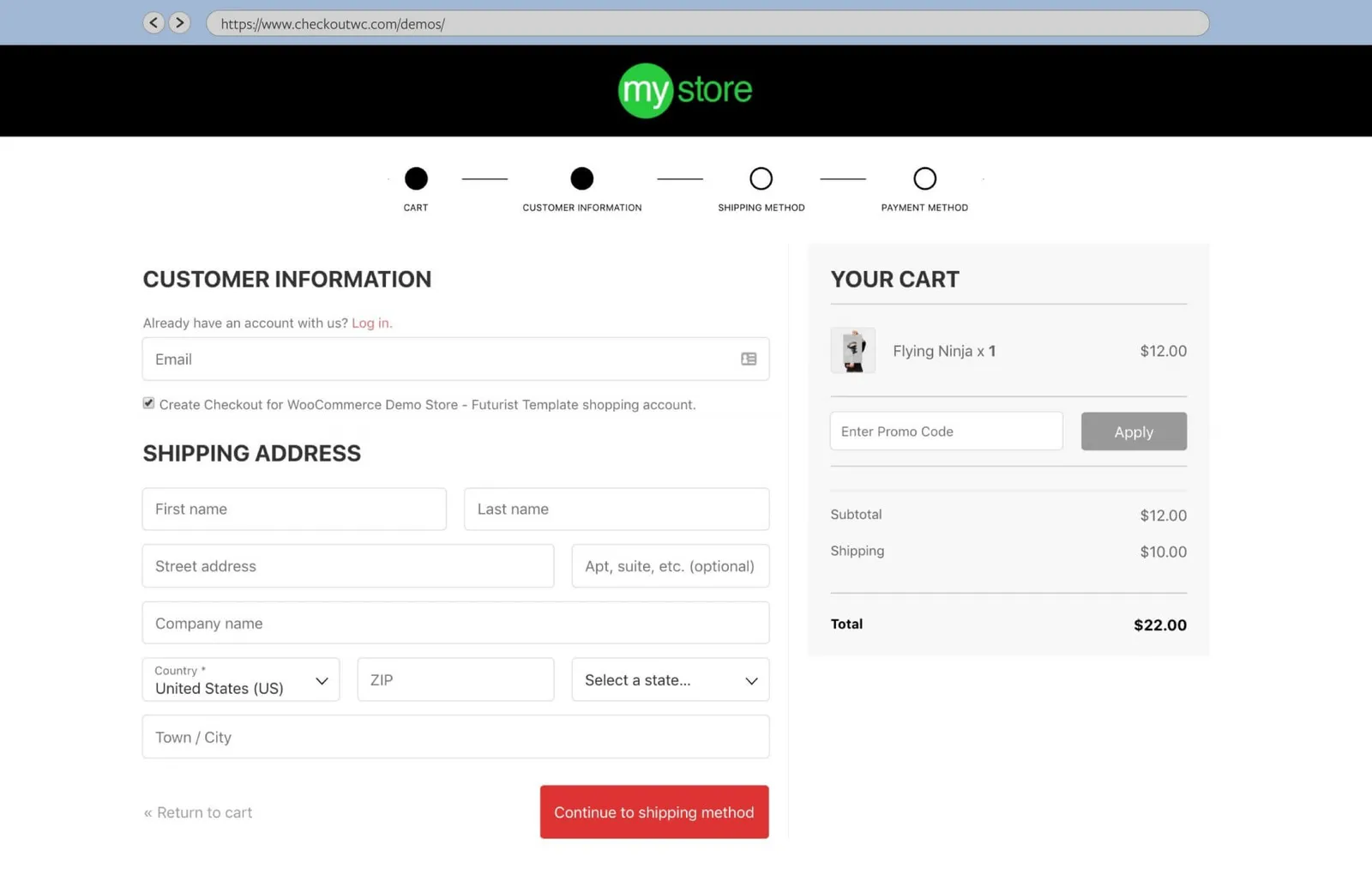
CheckoutWC replaces the default WooCommerce checkout template with a multi-step, conversion-focused design inspired by Shopify.
Why use this plugin?
- Three-step streamlined checkout process that groups shipping, billing, and payment logically.
- Interactive cart editing feature allows customers to change quantities directly inside checkout.
- Mobile-first layout designed to prevent accidental form abandonment.
- Built-in address autocomplete and field validation.
Shoppers accustomed to modern e-commerce apps expect clean, distraction-free checkout interfaces. CheckoutWC upgrades standard theme forms without custom template development.
Add & manage the best shipping rates
Accurate shipping rates and transparent delivery expectations reduce abandoned carts caused by surprise fulfillment costs at the final payment step.
Table Rate Shipping
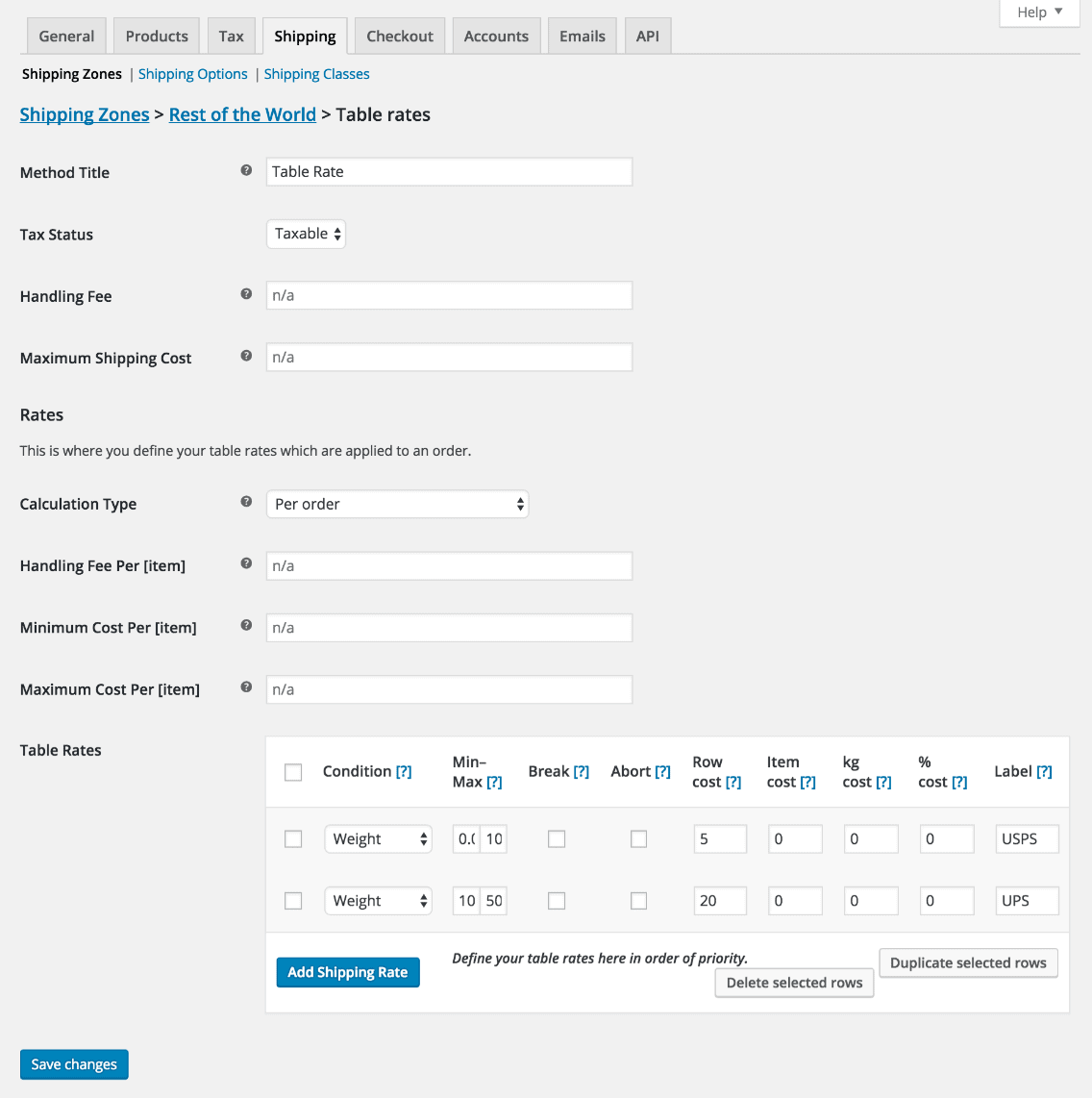
The official Table Rate Shipping extension from WooCommerce gives store owners full control over shipping calculations based on destination, weight, item counts, and order totals.
Why use this plugin?
- Define multiple shipping tiers based on cart total or package weight.
- Create regional zones to charge accurate delivery rates for rural vs metropolitan areas.
- Set complex conditional rates for express holiday shipping options.
Clear delivery pricing removes uncertainty during checkout. When customers understand fulfillment costs upfront, fewer carts are abandoned at the shipping step.
Table Rate Shipping for WooCommerce
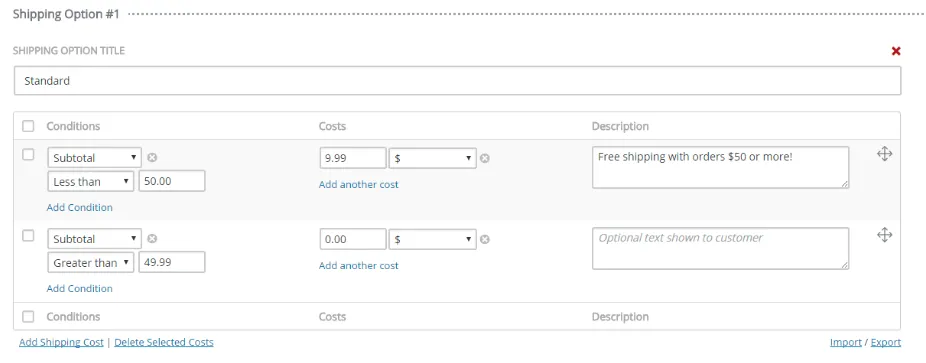
Table Rate Shipping for WooCommerce (by Bolder Elements) is a feature-rich alternative that lets merchants calculate dynamic delivery fees using customizable condition sets.
Why use this plugin?
- Calculate rates by order subtotal, dimensional volume, user roles, or shipping classes.
- Include handling fees and per-item surcharges for fragile holiday items.
- Offer tiered shipping discounts to reward larger festive shopping carts.
Configuring tiered shipping rules protects your margins against unexpected carrier surcharges while still offering competitive rates to high-value shoppers.
Get qualified leads and sales using affiliate marketing
Affiliate marketing enables you to partner with content creators, bloggers, and brand ambassadors to drive targeted holiday traffic with zero upfront advertising risk.
Affiliate for WooCommerce
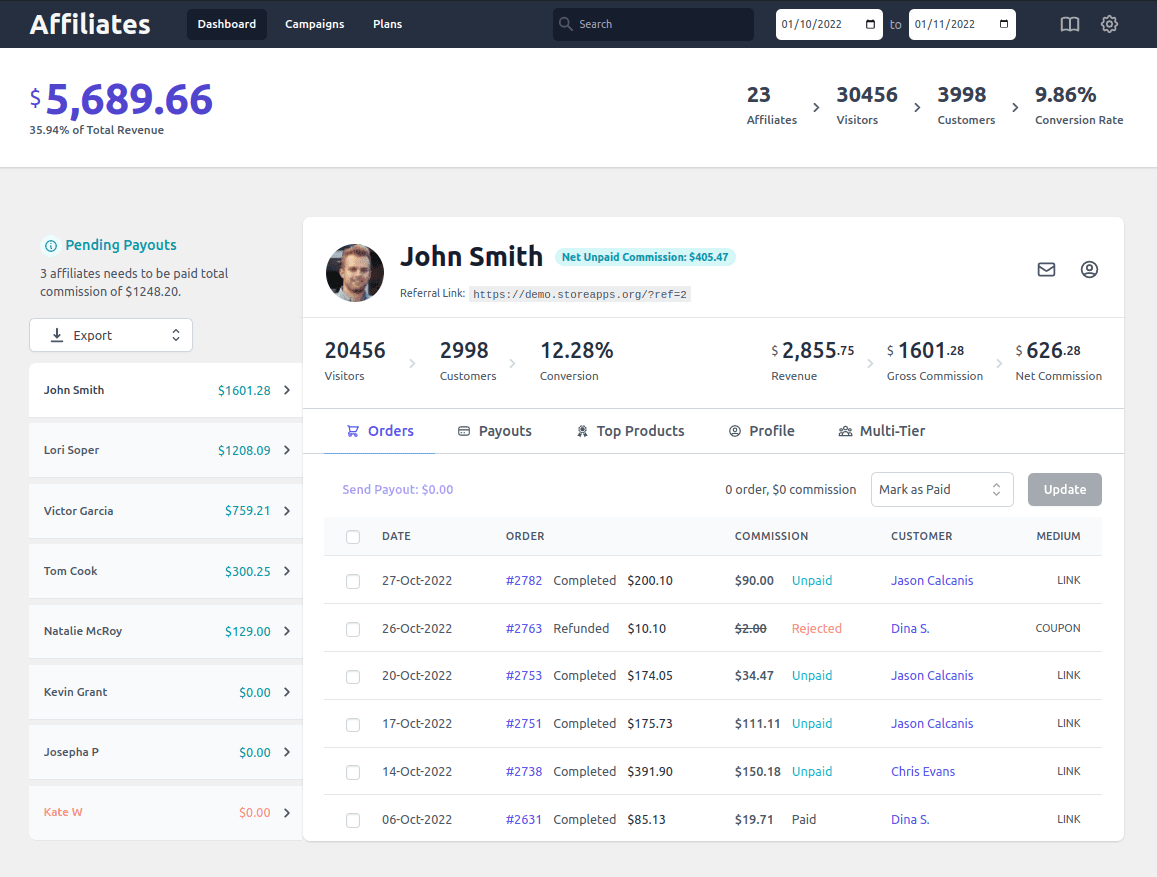
Affiliate for WooCommerce is a self-hosted affiliate program management plugin that lets you track referrals, manage partners, and issue payouts directly from WordPress.
Why use this plugin?
- Real-time tracking of affiliate clicks, conversions, and commission earnings.
- Assign custom commission rates for specific festive products or top-performing creators.
- Issue payouts via PayPal, store credit, or bank transfers with one click.
- Multi-tier affiliate structures to recruit partner networks ahead of Black Friday.
Paid advertising costs jump significantly during November and December as enterprise retailers bid up keywords. Partnering with affiliates lets you acquire customers on a performance basis. You only pay when sales happen.
Build your unique brand identity, warm up your list before sending offers
Reaching customer inboxes consistently and designing professional transactional emails establishes trust before your festive promotions launch.
Email Customizer Pro for WooCommerce
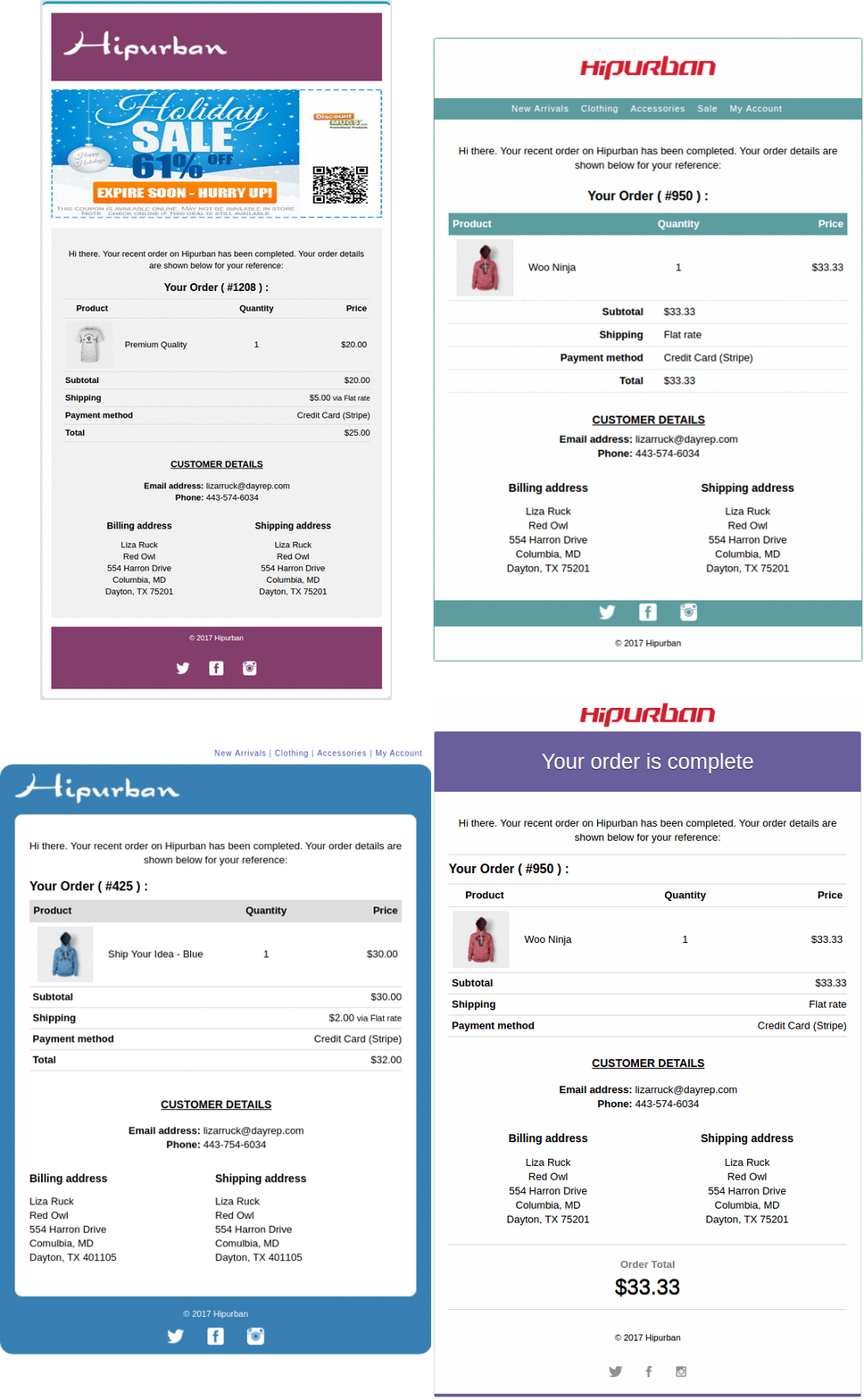
Email Customizer Pro for WooCommerce allows you to customize default transactional emails using an intuitive drag-and-drop visual builder.
Why use this plugin?
- Style order confirmations, invoice emails, and processing notifications with festive branding.
- Add promotional banners, coupon codes, and related product recommendations inside receipts.
- Maintain consistent fonts, logos, and color schemes across all automated store communication.
Standard WooCommerce notification emails look sterile and unbranded. Polishing your transactional templates turns every order receipt into a secondary marketing opportunity.
Email Subscribers & Newsletters
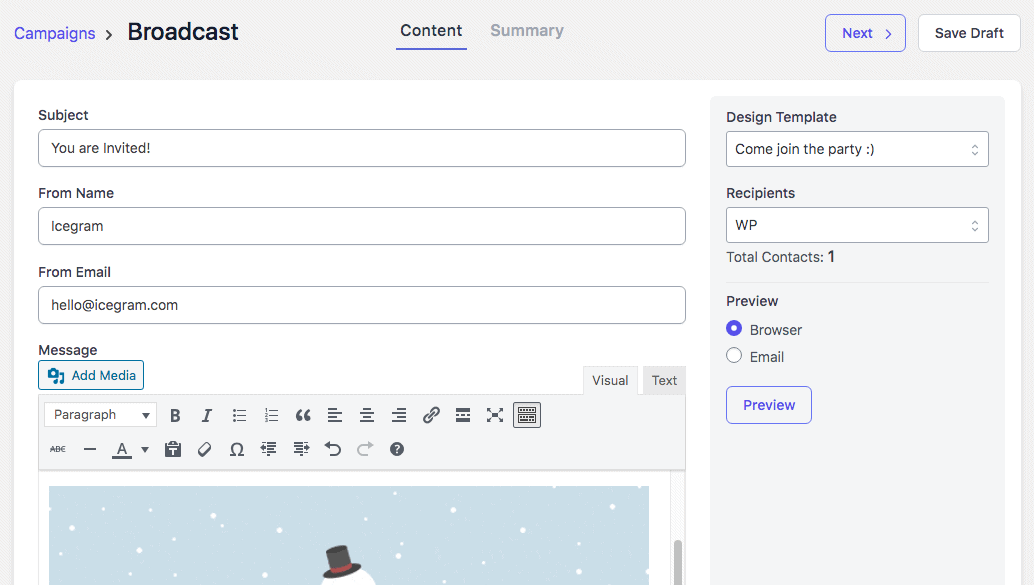
Email Subscribers & Newsletters is a comprehensive email marketing and lead capture plugin built specifically for WordPress and WooCommerce.
Why use this plugin?
- Send automated notification emails when new holiday deals and blog posts are published.
- Schedule newsletter broadcasts to warm up your subscriber list before Black Friday.
- Collect subscriber leads using customizable subscription pop-ups and inline forms.
Warm up your subscriber list weeks before major sales. This builds domain reputation. It ensures your holiday discount announcements land directly in the primary inbox.
Recover lost sale using cart recovery emails
Automated abandoned cart recovery captures high-intent shoppers who added items to their cart but left before completing payment.
AutomateWoo
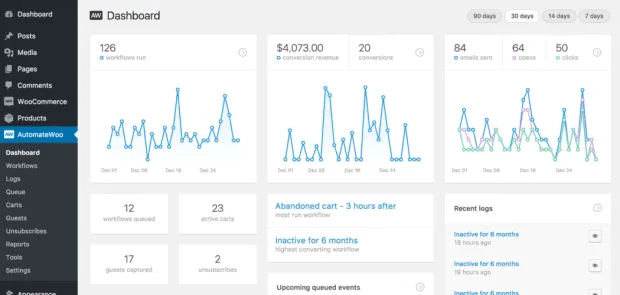
AutomateWoo gives you complete marketing automation inside WooCommerce, enabling triggers and workflows across orders, customers, and subscriptions.
Why use this plugin?
- Trigger multi-step abandoned cart email sequences at custom time intervals.
- Offer personalized, time-sensitive coupon incentives to recover high-value carts.
- Automate post-purchase follow-ups and review requests after holiday fulfillment.
Automated reminder sequences follow up with distracted shoppers. Reaching them within hours recovers orders before they switch to competitors.
Abandoned Cart Pro from Tyche Softwares
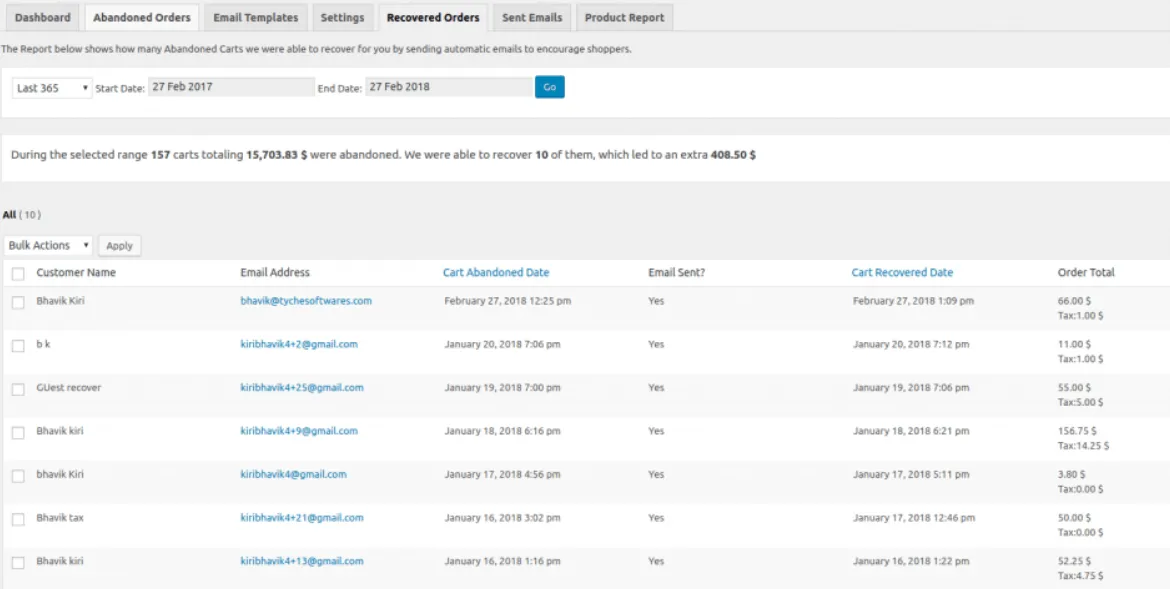
Abandoned Cart Pro by Tyche Softwares is a dedicated cart recovery solution that contacts shoppers via email, SMS, and Facebook Messenger.
Why use this plugin?
- Capture customer emails early in the checkout flow before full submission.
- Send SMS and email reminders with unique checkout links that restore cart contents instantly.
- Detailed recovery analytics showing recovered revenue and campaign conversion rates.
Reaching buyers through multiple channels increases recovery odds during busy holiday weekends when inboxes are overflowing with retail promotions.
Remind customers about their favorite products and lure them to make a purchase
Browsing reminders and wishlists help indecisive shoppers keep track of festive gift options while exploring your catalog.
Recently Viewed Products for WooCommerce
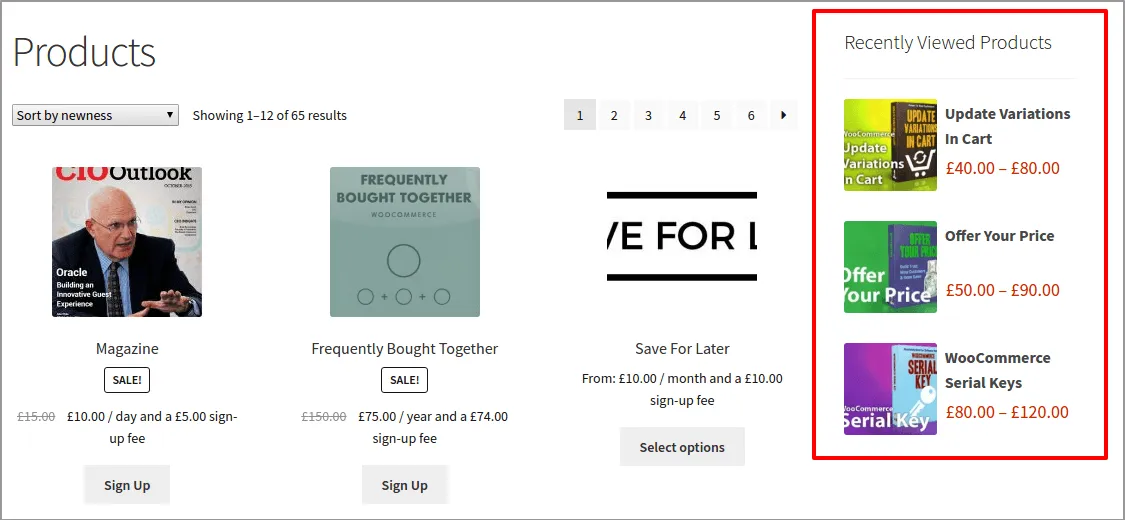
Recently Viewed Products displays a dynamic widget showing products that shoppers previously checked out during their session.
Why use this plugin?
- Add recently viewed sliders to product pages, cart pages, or sidebars.
- Allow customers to jump back to previously considered items without re-searching.
- Shorten discovery friction for stores with large multi-category catalogs.
During festive gift hunting, shoppers compare dozens of items across browser tabs. Keeping recently viewed products visible lets them add items back into the cart in one click.
Save for Later for WooCommerce
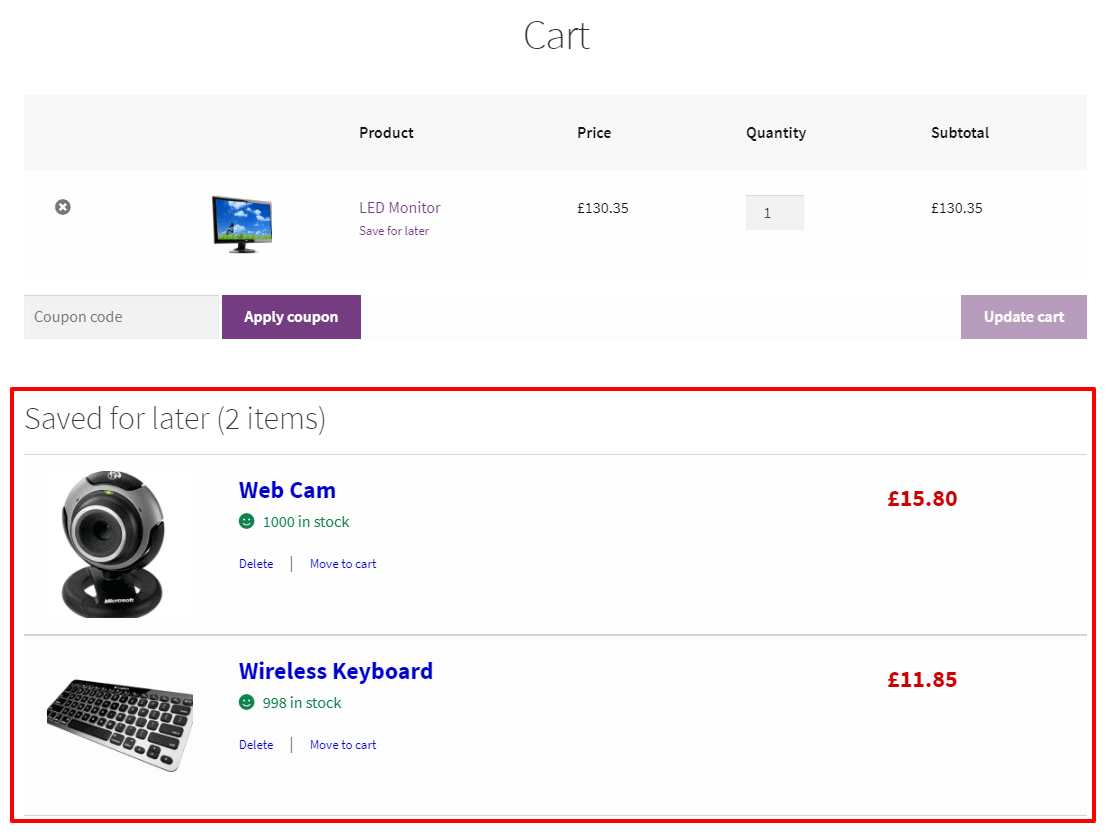
Save for Later for WooCommerce allows shoppers to move cart items into a saved list for future purchase without deleting them completely.
Why use this plugin?
- Adds a simple Save for Later link directly below items in the cart table.
- Reduces cart abandonment caused by shoppers hesitating over total order costs.
- Enables customers to move items back into the active cart with a single click.
Instead of removing an item entirely due to budget limits, shoppers can save it for an upcoming purchase, preserving the intent for future orders.
Make only data-driven decisions to plan your offers
Accurate real-time reporting lets store managers identify trending products, measure coupon profitability, and spot inventory bottlenecks during high-volume sales.
Putler
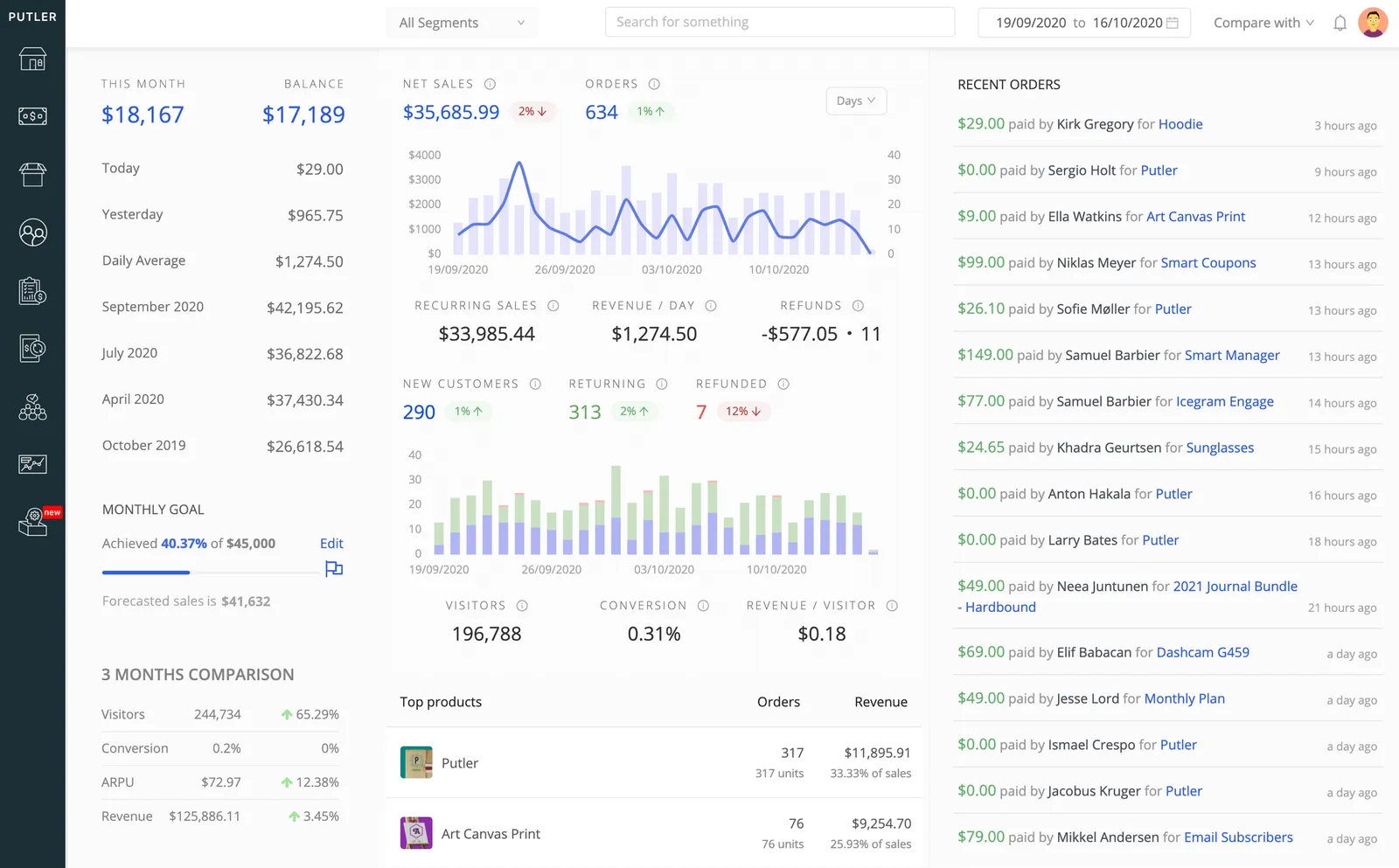
Putler is an advanced analytics and business intelligence tool for WooCommerce that consolidates data across multiple stores, payment gateways, and platforms into one unified dashboard.
Why use this tool?
- Real-time sales tracking, revenue figures, and average order value metrics.
- Track customer segments and identify high-spending VIP customers for exclusive holiday perks.
- Measure product velocity and stock levels to prevent unexpected inventory stockouts.
- Manage refunds and transactions across PayPal, Stripe, and WooCommerce without switching accounts.
Relying on standard WordPress admin reports during high traffic slows down your server database. Putler tracks over 153 e-commerce metrics and has processed analytics for more than 45,000 stores. By crunching data on dedicated external servers, it gives you instant business clarity without generating slow database queries or table locks during peak checkout.
Some other helpful WooCommerce plugins to grow holiday sales
Beyond the primary stack, these extensions solve specific transactional friction points during seasonal campaigns:
- Custom Thank You Page Per Product for WooCommerce: Turn standard order confirmation pages into post-purchase funnels with onboarding videos, holiday coupons, and targeted add-on offers.
- WooCommerce Name Your Price: Accept holiday donations, suggest festive gift pricing, or allow shoppers to name their price above an enforced minimum floor.
- WooCommerce Update Variations In Cart: Let shoppers adjust sizes, colors, and attributes directly from the cart table without returning to the product page.
- WooCommerce Chained Products: Assemble pre-configured holiday gift bundles, promotional packages, and gift combos that automatically attach to the buyer’s order.
What should you do two weeks before the holiday rush?
Prepare your store systematically so you avoid fire drills when seasonal traffic begins. Running through a checklist guarantees your infrastructure remains stable throughout Black Friday and Cyber Monday:
- Lock in your plugin stack: Finish installing and configuring extensions at least 14 days before your campaign starts.
- Benchmark your checkout flow: Test purchasing on mobile devices using test credit cards and Apple Pay or Google Pay.
- Verify HPOS settings: Check that High-Performance Order Storage is active in your WooCommerce advanced settings.
- Schedule automated promotions: Configure coupon start dates, gift cards, and automated recovery emails ahead of time.
- Run a database clean-up: Clear expired transients, optimize order tables, and audit error logs on staging.

FAQ
Which WooCommerce plugins are essential for holiday sales?
Essential holiday plugins cover 4 areas: bulk catalog management (Smart Manager), friction-free checkout (Cashier), promotional gift cards and coupons (Smart Coupons), and abandoned cart recovery (AutomateWoo or Abandoned Cart Pro). These categories protect revenue and streamline order fulfillment during heavy shopping periods.
Will installing multiple plugins slow down my WooCommerce store?
Yes, installing unvetted plugins that make heavy unindexed queries or load bulky scripts will slow down your site. To prevent slowdowns, choose HPOS-compatible plugins, test them on a staging environment, and avoid activating overlapping extensions for the same task.
How does High-Performance Order Storage help during holiday sales?
HPOS moves orders into dedicated, indexed database tables rather than storing them across generic postmeta rows. This eliminates database thread locks during flash sales, allowing your checkout to insert orders approximately 5x faster under peak concurrent customer loads.
When should I prepare my WooCommerce store for holiday sales?
Start auditing your plugins, updating product variations, and configuring discount rules at least 4 to 6 weeks before Black Friday. Finalize all technical updates and enter a strict code freeze 14 days before sales launch to ensure site stability.